Batch Extract ZIP Files: 8 Best Free Tools to Use
For serious downloaders especially those that are frequent users of services such as Usenet or bittorrent, it’s pretty common that you encounter archives that come in multiple parts. One of the many “scene” rules in the world of online file sharing is that files must be archived in a certain way and each file should be a certain size, such as a 4GB movie coming in loads of different files because that’s how they were originally compressed by the creator.
It’s sometimes the case that uploaders often take the original archive files and compress them again perhaps into larger chunks. Also a lot of websites will encrypt the archive with a password so that people would know where the uploaded files came from. Or it can be an identifier to the source when another site leeches the download link. Of course, most archiving tools such as 7-Zip or WinRAR etc can handle this task, but if you have several files to unpack and some don’t have passwords, some have one password and others have different passwords it can become quite tedious.
Here we have 7 free tools that can auto extract multiple archive files, even if they are all protected by different passwords. You supply all the required passwords to the program and it will do the rest.
1. WinZip
WinZip is a powerful utility tool known to archive, compress, combine, or extract multiple files at the same time. To extract files, users can use the 21-day free trial period to access all WinZip features, like unzipping files. Another great feature about this tool is that it can open major compression formats, including GZIP, VHD, XZ, POSIX TAR, Zip, Zipx, RAR, 7z, and TAR. Furthermore, the application can unzip multiple files through a drag-and-drop feature. To do so, select multiple files, right-click, and drag to a folder to unzip in one operation.
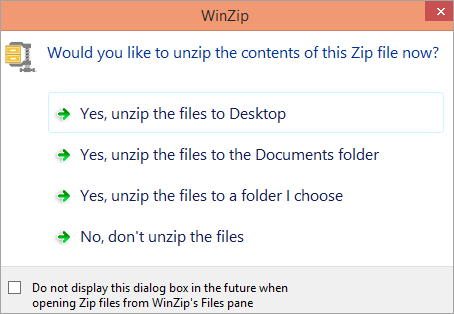
To batch extract zip files, download and install the software. From the left panel, select the file that needs unzipping and click on the Zip option at the bottom of the screen. Choose the preferred storage location for the unzipped files and click continue. Additionally, WinZip can share unzipped files via the cloud, email, instant messaging, or social media. These distribution channels make the tool a great option for individuals and businesses.
2. Unpack Monitor
As the name suggests, Unpack Monitor is a tool that watches specified folders, and auto extracts any archives that appear in them to the chosen location. The program also has some quite advanced features such as uploading unpacked files to FTP, advanced filtering to send different file names to specific locations and launching a separate program after extraction. Unpack Monitor recognizes 7z, Rar, Zip, ISO, Tar and GZip archives and also HJ Split files.
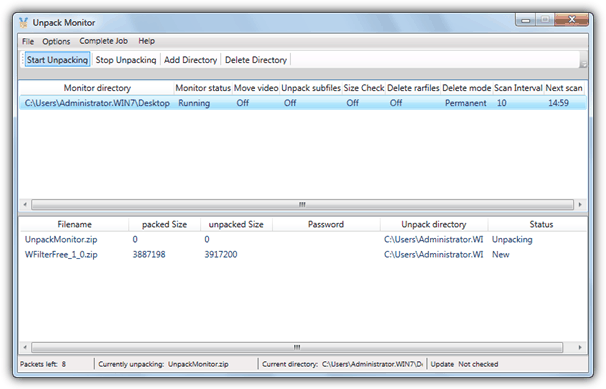
To start monitoring just click the “Add Directory” button and select the options for that folder such as monitor time interval, what to do with the archive files once they’ve been unpacked, copy/move video files and a useful option of checking and extracting files that have been compressed and then compressed again. You can supply a text file password list via Options and the program will also look inside the monitored folder to see if there is a text file with the correct password. Works on windows XP and above.
3. JDownloader
If you’re looking for a program that can download files as well as extract them afterwards, then JDownloader is a good one-click file hosting download tool that is able to handle extracting multiple Rar archive files when they’ve finished downloading. JDownloader runs on Java and is cross platform so there are versions for Linux and Mac. This requires you have the Java Runtime Environment installed though which has had a few security issues of late.
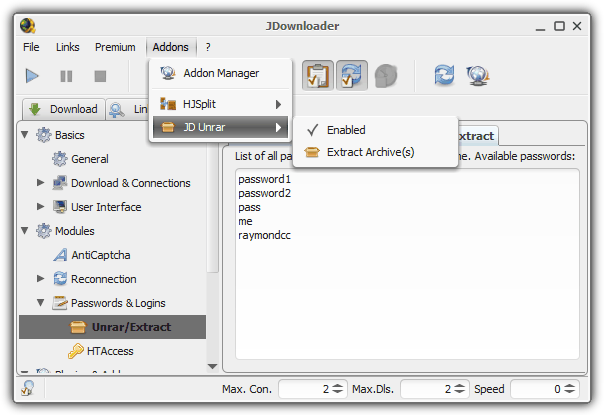
Unfortunately the components that configure how the JD Unrar add-on works are a bit spread around the program. To simply use the unrar tool without changing settings you can go to the Addons menu -> JD Unrar -> Extract Archive(s) and select the first in a multipart archive or single file. Go to Addons -> Addon Manager -> JD Unrar to configure extraction paths, whether to ask if a password isn’t found, and what to do with the Rar files. For setting a list of passwords click on the Settings tab -> Passwords & Logins -> Unrar/Extract and type or paste in the text.
JDownloader only handles Rar files and being a Java built application means memory usage is quite high, well over 100MB while sitting there doing nothing. Also watch for the adware during install, a full offline installer is available in addition to the web installer. There are other similar download tools that can auto extract files once they have downloaded, such as Mipony, Load!, FreeRapid Downloader and ochDownloader.
4. ExtractNow
ExtractNow is a lightweight and easy to use utility that has some useful advantages over some other tools that do a similar job. One of which is it can handle extracting just about any common type of archive file and currently supports over 40 archive types including zip, jar, bzip2, rar, arj, lzh, 7z, cab, nsis, lzma, dmg, wim, iso, chm, split files, rpm, tar, gzip, flv, swf, ntfs, fat, mbr, vhd, pe, elf, apm, ace and sit.
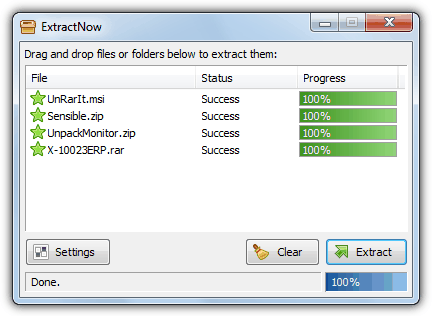
Users need only to drop the target files onto the window, and it will detect the archives, or alternatively right click on the window and add the files or a whole folder. There’s are host of options so you can set things up the way you want such as default or custom extraction paths with macro support, extracting archives within archives, multiple options about what to do with the archives when the files are unpacked, Explorer context menu and file association integration, drag and drop exclusion masks, run external commands, monitor folders for auto extraction and file mask exclusions so you can choose not to unpack any useless files that are inside the archive.
The password option allows you to browse for a text file containing the passwords and prompt if the password isn’t found. It assumes there is only 1 password per archive which speeds up checking, this can be turned off if you know the archive set has more than 1 password. ExtractNow works on Windows 95 and above but watch out for the adware on install.
5. Unrar Extract and Recover
Unrar Extract and Recover can handle password protected, multi-part and encrypted archives without any trouble. Although the user interface is simple and easy to use, it is a bit hard on the eyes with a grey background. You will need to specify the input directory of where the Rar files are located and then the output directory of where you want the files to be extracted. This program only decompresses Rar files.
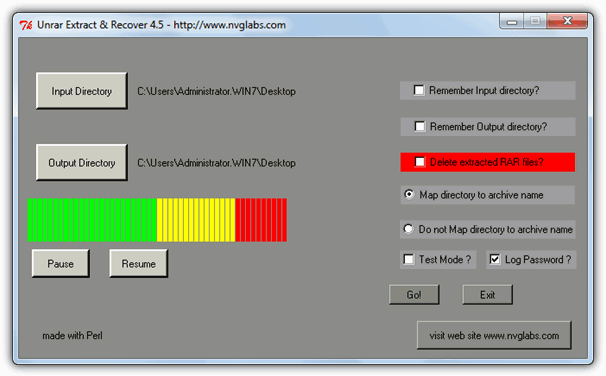
A useful option is “Map directory to archive name” where it will auto create a new folder with the same name as the archive, and a Test Mode is available if you just want to run through the process. The main window provides no real detail about the unpacking and you should check the black console window which shows the failed or successfully extracted statistics. To specify a password, you have to manually edit the password_file.txt file located in the C:\Program Files\Unrar Extract and Recover 4.5\bin folder and enter 1 password per line. Although the program is absolutely clean, there does seem to be a few possible security issues with the main website, the link below is to download from Softpedia.
Download Unrar Extract and Recover
6. UnRarIt.Net
UnRarIt.Net is an easy to use tool that can extract Rar, Zip and 7-Zip archives including single or mutlipart archives. It can also handle those annoying nested files you download where they are compressed and then compressed again so you would normally have to extract them twice. UnRarIt.Net can also take advantage of multicore CPU’s and you can set the number of threads to use in the Preferences.
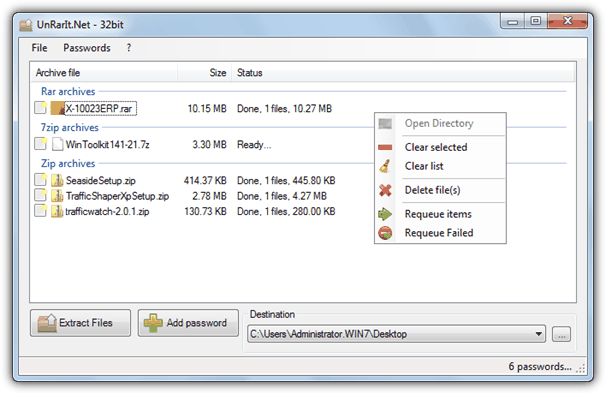
Files are added by dragging and dropping onto the window and if you want to add in a couple of passwords simply press the Add Password button and type them in. If you have a larger text file list available, press the Import button to add them in, the program is smart enough to check the recently used or manually entered passwords first. The file can be exported if required. A slight drawback is the program only extracts to one destination folder at once although it can auto create directories for larger batches of files. Works on Windows XP and above and requires .NET version 4.
7. RarZilla
There aren’t too many functions to configure in RarZilla which makes it quite easy to operate. One drawback is it only handles Rar files but they can be either single or multi-part archives. The installed version also takes over the .Rar file type so RarZilla runs when you double click the file and adds an “Extract!” entry in the right click menu. Not problems in themselves, but some users might like to keep the default Rar file association setup with their archiving program.
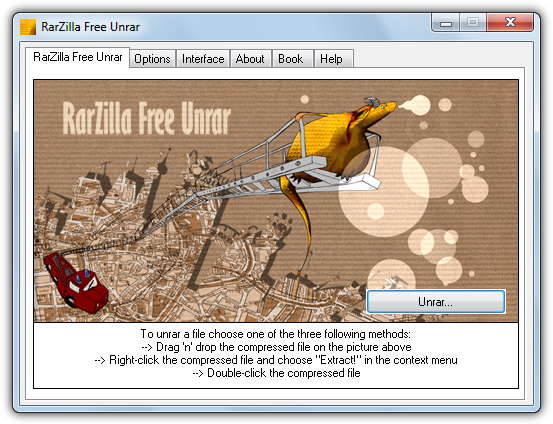
Files can be extracted a few ways; drag and drop onto the RarZilla window, browse for the files, choose Extract! from the context menu or double click, the portable version allows you to drop files onto the RarZilla executable. There are handy options for dealing with password protected archives, you can supply a default single password, use a list from a text file and also try to use the archive file name as the password. For automatic operation turn off the wizard option in the Interface tab.
The portable version is preferable as it doesn’t offer a toolbar on install. It works on Windows XP or above and the author has another tool called Free RAR Extract Frog which essentially the same program but has a skinnable interface.
8. ExtractItAll
ExtractItAll is a rather basic tool with not too many features, but it does have a nice little advantage over some other tools. That is, in addition to any passwords you add into the password manager, the program already has around 1600 passwords in the text file from various websites and common online passwords. This makes ExtractItAll a ready made basic archive password cracker as it might contain the password you can’t remember after downloading files from well known torrent sites or forums etc.
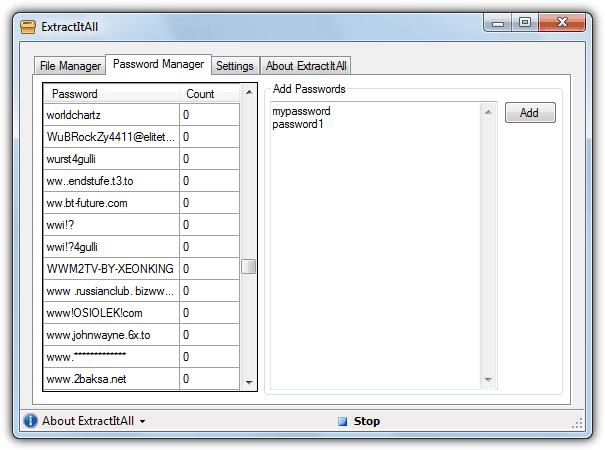
Besides the password function, ExtractItAll can extract 7-Zip, Zip and single or multi part Rar archives and send the extracted files to their own individual folders or a single fixed directory. Files are added via dragging and dropping onto the window. It’s worth having a quick look at the password.txt file to see if there is anything you’re sure you will never need because the program does take a few minutes to make its way through the list for each password protected file. ExtractItAll is portable and requires the .NET Framework 3.5.





Do any of these run silently in the background, or do they all need to have a program window open to run?
UnPacker 1.5.0 build: 1909 by Lars Werner is the best. It can unpack unlimited number of archives neatly down to the core.
‘unrar with password list’ Google query brought me here! Great site and a fantastic idea to include WOT reputation and VirusTotal scan results for the external links. Ever since the introduction of Netflix my downloading days are in essence over but I still have some old archives lying around that apparently were not extracted by JDownloader (the only tool I knew and used from your list) back in the day. From the above selection I have chosen ‘ExtractItAll’ and added my own collection of sixty+ passwords that I used in JDownloader to its native password file. It did manage to find the proper password (apparently one belonging to my own sixty+ passwords maybe it wasn’t a JDownloader batch) and extracted a 300 part 30 Gb archive without problems. For now I can afford to stick to this ‘rather basic tool with not too many features’ because it is the perfect tool for me to round up the few dozen archives that I still want unpacked. Thanks again for this carefully selected array of unrar tools in conjunction with your clear and factual descriptions of these tools which made choosing the right one for me very easy!
i try ExtractItAll. but this apps only use 1 password from my password list .txt
i need to extract multiple archive with different passoword
which of these programs can scan a whole drive and extract all rar files to the source folder, that is, not a single output folder
Also wondering if there is a program that does this. Extract Now used to be able to do it but is broken.
Thank you for providing this list. I had previously used Extract Now until I found a bug that will probably never get fixed since it appears the author has abandoned it. The Date and Time Stamps on files inside RAR archives are decremented by 1 month and some odd amount of hours. You should update your article to note if keeping the original date and time are important to not use this program.
Any tool to extract particular files from multiple archives and delete the same files inside archives and repack in batch mode?
That’s a pretty specific set of commands there, you may have to look at creating a macro for something like that.
This is exactly what i need to do. I would be willing to pay. ;)
we call it bash
read the directory for zip files
{search for filenames in the zips using readline and grep
use readline to read the filenames in the zip
grep for files with the updated name
for each file with updated name
{
extract the file
overwrite the updated file
rezip
}}
there is no need for for/next/if/else – readline and grep have these functions built in their operation
Thank you, “extract now” did just what i needed… multiple tar files in win 7.
Ray, thanks you very much….
Thanks mate!