Track IP Address Exact Location: 8 Best Free Services
It’s probably a good bet that most computer users at some point would like to know where the location of a website is, or to trace a location of an individuals IP address to a region or country. There are many reasons for this, and it could be simply because you are curious as to the origin of a particular company or service before deciding to use it. If you’re a webmaster it’s very useful to know the trends of what people are doing on your website and where they’re coming from, and the IP address of users helps to achieve this.
As an IP address is something each user on the internet is allocated, it’s not that difficult to find out various details as to where the address is currently originating from as long as you know how to get hold of this information. Many services can trace a particular IP address and even pin it down to the town or city it’s currently being used in, as well as telling you the service provider and various other details about where it’s coming from. No personal information such as names, phone numbers or location addresses can be found in this way.
If you have an IP address and would like to trace where it’s location is and get some details about it, whether from an individual, a company or a website, here’s a selection of free online services you can use.
1. Solarwinds IP Address Tracker
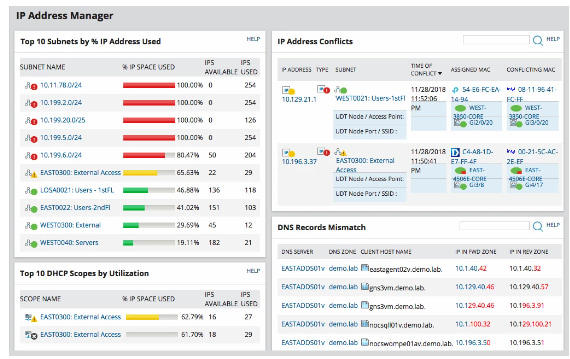
This automatic IP address tracker discovers the IPv4 address of a device and also allows the user to generate IPv6 subnets like ICMP and SNMP. By regularly scanning the IP addresses, Solarwinds create an IPAM record and monitors changes in the MAC addresses, status, and hostname. Additionally, you can use the application to identify conflicts, monitor which device had the IP address first, and change the IP address of the conflicting device.
Furthermore, this application makes it possible for the user to reduce the time it takes to troubleshoot while improving the quality of service at a lower cost. The alert feature on Solarwinds helps the administrator catch IP-related issues as soon as they occur. They can monitor various IP events and resources and have access to a timestamp for effective network troubleshooting. If you’re looking for a tracker that allows you to monitor IP addresses across your network, look no further than the Solarwinds IP tracker.
Download Solarwinds IP Address Tracker
2. InfoSniper
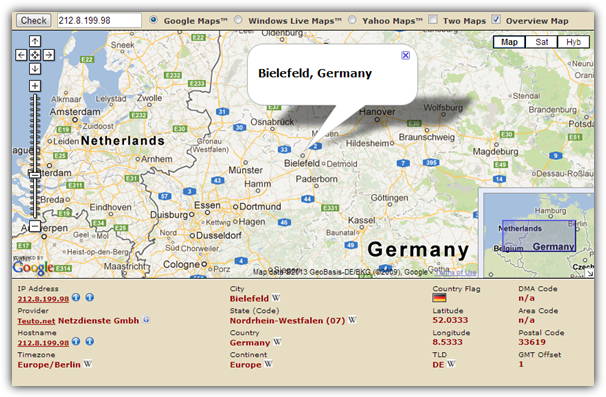
InfoSniper has got quite a few snippets of information in the display of an IP address location. This includes a choice of Google Maps, Microsoft Maps or Yahoo Maps to show the location. You also get country, state/county, latitude/longitude, host name, provider and other things like area or postal codes are also sometimes available. InfoSniper can get down to an accuracy of your town or city not just where your ISP is located and there’s some helpful links to search Wikipedia for more details about the location the address is coming from.
3. IP2Location
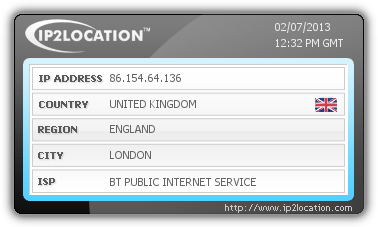
Unregistered users can get a maximum of 20 free queries a days, this goes up to 200 if you sign up for the free account. The information gathered isn’t that comprehensive but will get you the basics such as country, service provider, network speed, possible area and carrier codes. There are also weather station and town/city details but these are for the ISP’s location and not your own. A useful feature is the Share results option which gives you a nice image (screenshot above) of the basic details and there’s also code location html snippets to add into your own website.
4. Geobytes IP Address Locator
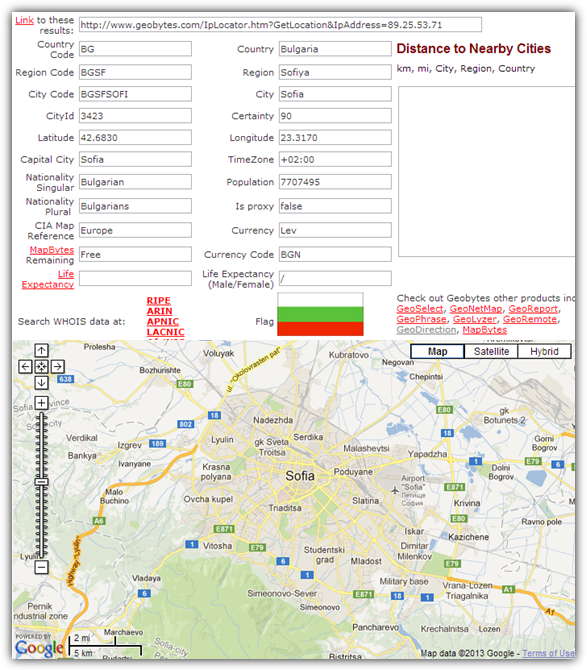
There’s quite a lot of interesting information in Geobytes, although it can’t trace a location’s IP address down to the level of the town it’s in, only as far as the ISP location. You do get a Google map but it will have limited value while pointing to a different part of the country to where the address actually is situated. There’s also a flag, timezone, country population, used currency, nationality singular/plural and a rather curious CIA map reference. It will also tell you whether it thinks the address is a proxy or not.
Visit Geobytes IP Address Locator
5. MaxMind GeoIP
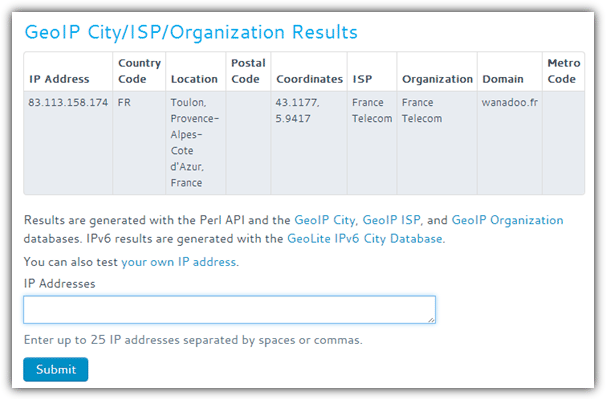
This is a very simple IP location finder and can go down as far as the town or city of where the IP address comes from. There isn’t a huge amount of detail apart from ISP and organization, coordinates, domain and 3 possible location codes. In the free demo version you can enter up to 25 comma separated addresses into the box at once to be checked.
6. IP Tracer
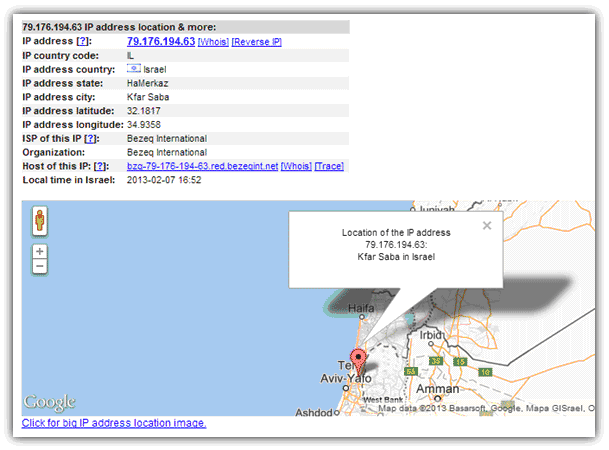
IP Tracer from ip-address.com is able to get down to the town or city where the IP address is coming from, and also gives you longitude and latitude coordinates as well as a Google map of the location. Click the link under the map for a full blown satellite map layout of the area. You also get the ISP, organization and host address with links to perform whois, reverse IP and trace lookups. Tracing your own IP will also give proxy details, o/s, browser and a speed test link.
7. IP Tracker’s Lookup Tool
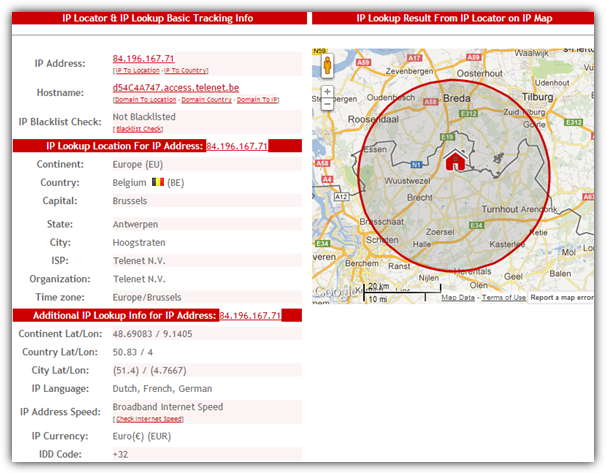
This Lookup Tool will give you plenty of details about the IP address and the country where it’s situated including town/city and county/state of the actual address and not the ISP. You also get 3 different sets of latitude/longitude coordinates for city, country and even continent, the languages spoken, the IP addresses connection speed, local currency and telephone IDD code. There’s also a Google map with the home location on it and a blacklist check will look to see if the IP is known for suspicious or spamming activities.
Visit IP Tracker’s Lookup Tool
8. What Is My IP Address
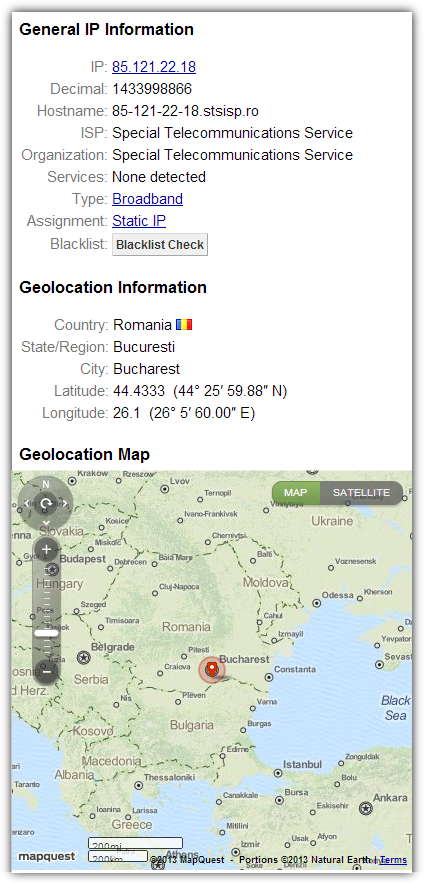
What Is My IP Address certainly looks like a cleanly laid out and easy to read service with details about the town or city where the IP address is (not the ISP location). You also get a Mapquest supplied map along with the location’s coordinates and host, ISP and organization details. The Blacklist check will see if the IP address is listed with 80 DNS based anti-spam databases and users can actually leave comments if they have something to share about the IP address in question.
Editor’s Note: As you’d probably expect, there a tons of these websites around that can trace a location from an IP address in some form or another, some can be as accurate as a city, others will show the ISP’s city. Unfortunately there is no way to get any more accuracy out of these services than this, and showing a specific road or even building just isn’t possible without the full disclosure of those details from the ISP.



I have an IP address that looks like it is all up in my laptop and appears to be from Africa. When I try to close the connection (it’s listed for “system” as well as a number of others), it isn’t letting me close the connection. I think this jerk is all up my stuff :(
Oh! Thanks
Someone from this IP Address 192.169.215.114 try to hack my email account.
Law enforcement should take immediate action to arrest the server owner.
Thanks for this post…
nice, really nice!
Thanks a lot
A couple of nice IP sites there Raymond, thanks. I have always used one or two of the same sites (just geneal WHOIS and DNS LOOKUP sites) and never really thought to look for others but these are good.
:)
Great tip mate, thanks a lot!
Nice..
Thanks
Very useful!
Also, ipgeoinfo seems to be the most accurate :)
thanks super raymond :):) You are a hero person