12 Tools to Verify File Integrity Using MD5 and SHA1 Hashes
When you download a file from the internet, quite often you cannot be 100% guaranteed that the file has not been changed in some way from the original. This could either be by the site you are downloading from, corruption due to errors in the download process, an individual who has uploaded the file for you, or possibly the most dangerous, the file has been infected by malicious software.
One of the ways you can identify whether a file has been changed from its original state is to check its digital signature. Or you can verify a file’s integrity by checking its hash value. Every file has unique data contained within it, and when you apply a certain algorithm called a “cryptographic hash function” to it, a string value is returned which is only valid for that file in its current state.
If even one byte in the file changes, the value given when the check is run again will be different. A couple of popular hash algorithms are MD5 and SHA-1 and you will sometimes see these values listed on website download pages. A prime example is ISO images for operating systems like Linux and Windows. All the official Windows ISO images will have an SHA-1 hash listed somewhere online which you can then compare against to see if the one you downloaded is identical to the original.
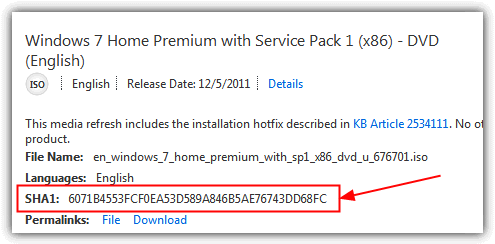
If you have something like an MD5 or an SHA based hash value from a website and want to check the integrity of the downloaded file, a way to calculate its hash value is required. Here we show you 10 different tools that can calculate and compare hash values, they were tested on Windows 10 and 7.
Best File Hash Checkers
1. ManageEngine
ManageEngine is a file integrity monitoring application that lets users keep track of file changes in real-time. With this application, users can track unauthorized changes to critical files, monitor suspicious edit patterns, and evaluate file permission changes. They can also create templates and filters to oversee specific groups of files on as many devices as they need. The software integrates CASB and DLP features and provides a powerful FIM module that helps users meet compliance and security standards.
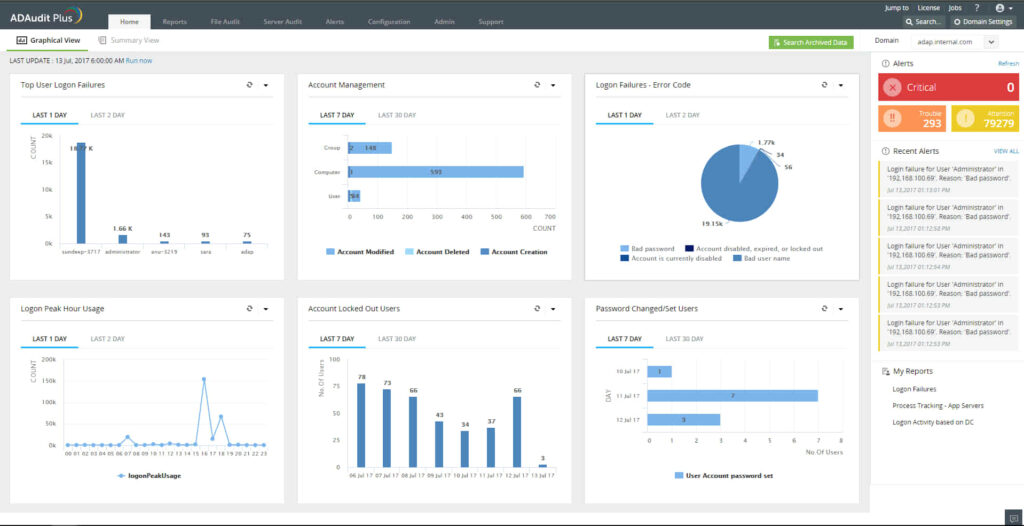
ManageEngine uses both agent and agentless methods, allowing the business’ security team to choose their implementation method based on the company’s requirements. Furthermore, the software thoroughly audits the file and folder activities before delivering a full report on the risks to the document is exposed to. The software also generates in-depth reports to track file access, modification, deletion, permission change, and creation. Users can create warning alerts based on event patterns, time frame, or count. These alerts are delivered via email or SMS when there is unauthorized access.
Additionally, the application has a user-friendly interface that doesn’t require much technical knowledge before set-up. The app also automatically updates audit policies, SACL settings, and agent updates.
2. SolarWinds
This popular file integrity checker allows users to keep track of file modifications. Formerly known as Log & Event Manager, this application provides a central log record of all changes made to the file hashes. The software has an in-built surveillance feature that tracks unauthorized access to executable files, logs, configurations, databases, and more.
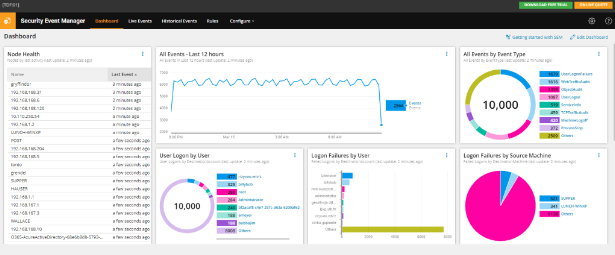
The SolarWinds Server and Application Monitor provides an added layer of security as it comes stock with over 1,000 application monitoring templates. With this tool, users can monitor file changes across public, private, or hybrid conditions. The business is also able to track user activity before and after file modification exercises.
3. IgorWare Hasher
Hasher is a small, portable and easy to use freeware tool that is able to calculate SHA1, MD5 and CRC32 checksums for a single file. You can browse for the file, drag and drop or add a context menu entry to right click and choose “Generate Hash”. There’s also an option to generate a hash from a block of text which you can type or paste into the box. The program opens a window for each file you select so don’t open more than a couple at once.
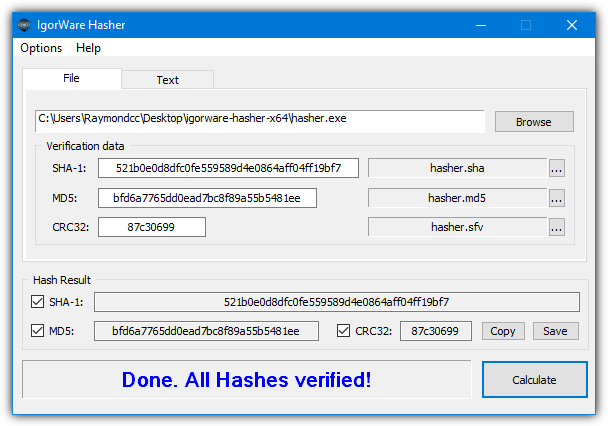
In addition to copying or saving the hash result to a file, you can load the hash file back into the program to check against another or the same file. The Options menu has some useful settings like keeping the program on top, making the hash values upper case, auto calculating after drag and drop, and adding the context menu entry. For some strange reason, Igorware Hasher downloads as a RAR file so make sure you have an archiver like WinRAR or 7-Zip to open it.
4. HashCheck
HashCheck works in a slightly different way to a traditional checking tool because it integrates into the system’s file properties window. You’ll get an extra tab called Checksums alongside the standard tabs of Compatibility, Details, Previous versions and etc. The original Hashcheck is from 2009 but seems to work fine in Windows 10. A more recent version is available on GitHub which we’ll also mention below.
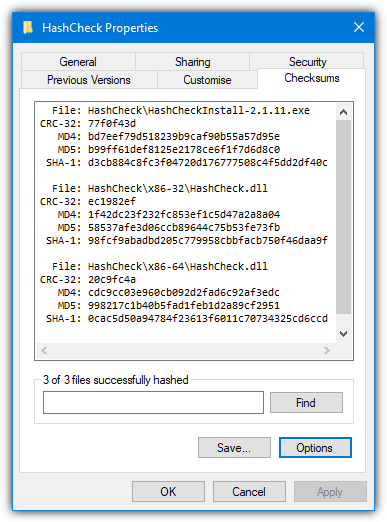
The tiny (85KB) installer simply registers HashCheck.dll on the system so it’s very light on resources. Right click on one or more files or a folder and go to Properties > Checksums. Values for CRC-32, MD4, MD5, and SHA-1 will be shown in the window. The Save button can save the selected file checksums into a separate list for each hashing method which you can load later on to see if any of the files have changed.
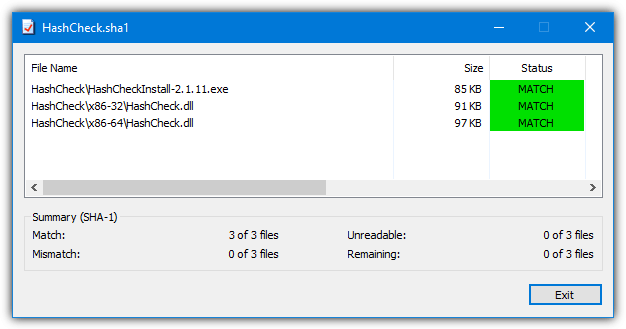
A list can be created quickly from the context menu by right clicking on the file(s) and selecting “Create checksum file”.
As HashCheck is open source software, someone has taken the original code and updated it while adding some new features. Notable improvements include multithreading support, adding SHA-256 and SHA-512 (MD4 has been removed), calculating only selected checksums, adding extra translations, and digitally signing the files/installer.
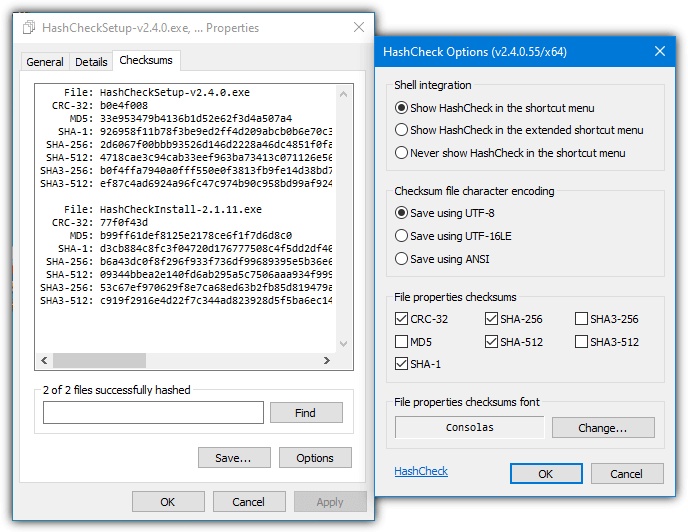
This version of HashCheck is much newer and from 2016. It was created by Christopher Gurnee and is hosted on GitHub. MD5 and SHA-3 are disabled by default in this version but can easily be enabled in the Options window.
Download HashCheck 2.4 From GitHub
5. Nirsoft HashMyFiles
HashMyFiles is another small and portable tool from Nir Sofer that is simple and straightforward to use. The number of ways to open files is impressive because you can add single or multiple files, folders (including sub folders), running processes, and also by wildcard with custom folder depth. There’s also the Explorer context menu which can be manually enabled. The program shows hashes for CRC32, MD5, SHA-1, SHA-256, SHA-384, and SHA-512. General file information is also included in the display.
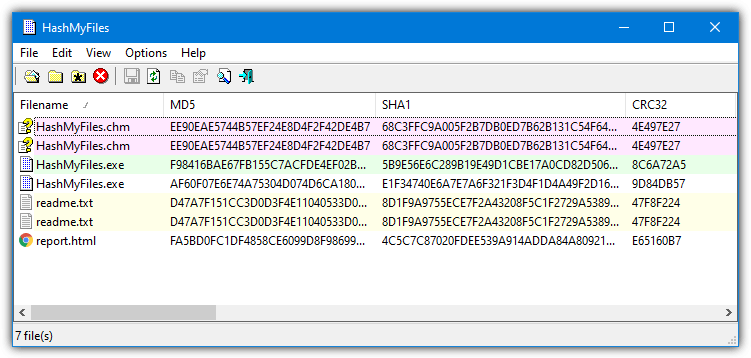
HashMyFiles can export the data to a TXT, HTML, XML or CSV file but you can’t use it to load back into the program to re-check files later on. A number of command line arguments are also available and other functions like always on top, extra file information, uppercase text, and send the hash to VirusTotal are in the Options menu. Also in the Options menu, “Mark Hash in Clipboard” compares a hash in the clipboard with the files and will show a match in green. “Mark Identical Hashes” shows the same files in differing colors.
6. HashTools
HashTools is from software developer BinaryFortress who make well known shareware applications like DisplayFusion and ClipboardFusion. This program is portable and will accept an individual file, multiple files or an entire folder for processing. An option to add a “Hash with HashTools” entry to the context menu is in the Settings window.
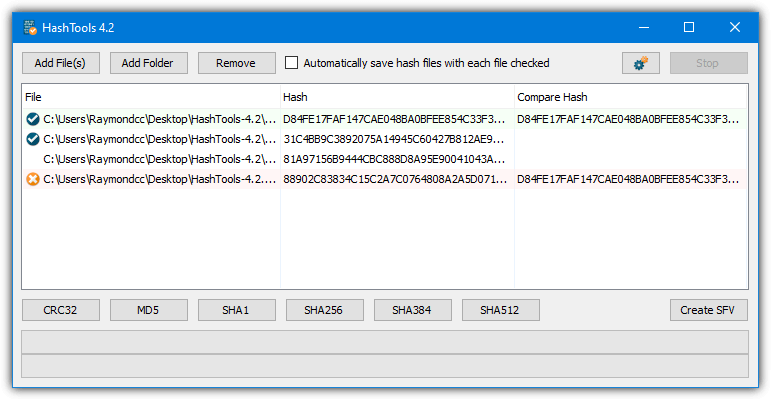
When you add files to HashTools they will not be processed until you press one of the buttons across the bottom to calculate the appropriate checksums. CRC32, MD5, SHA-1, SHA-256, SHA-384, and SHA-512 are supported. The Create SFV button will create CRC32 checksums for the files and save them into an SFV file which you can use to verify later on. Right clicking a file will allow copying of the hash or its path along with supplying a hash manually or from the clipboard to compare with.
7. ComputeHash 2.0
ComputeHash is a small and very simple tool to use with no advanced or confusing features. It works entirely from the Windows context menu and you simply right click on a file and select the “Computer Hash” option. It will display MD5, SHA-1, SHA-256, SHA-384, and SHA-512 hashes all at once. Double click the executable to add the entry to the context menu, use uninstall.bat to remove it again.
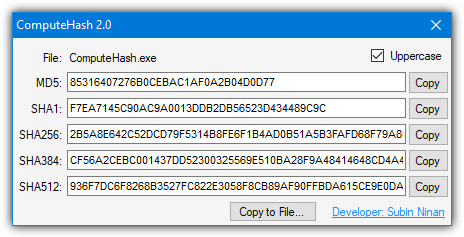
Each checksum can be copied to the clipboard, or all values can be saved to a text file. The uppercase checkbox might make the values a bit easier to read. ComputeHash requires .Net Framework 2 so Windows 10 users will be prompted to install it if it’s not already installed. We are looking at version 2.0 from 2011 here, there is a version 4.4 from 2015 but we found it doesn’t display the checksums properly in Windows 7 or Windows 10.
8. MultiHasher
This utility is by the same developer as the well known HostsMan Windows HOSTS file editor. It has a number of useful options and files can be added to the list in several ways. You can open one or multiple files at once, entire folders (including sub folders), by paths, by running processes and via nine different types of hash list. It can also create a hash value for small text strings. CRC32, MD5, RIPEMD and the SHA family of hash algorithms are supported.
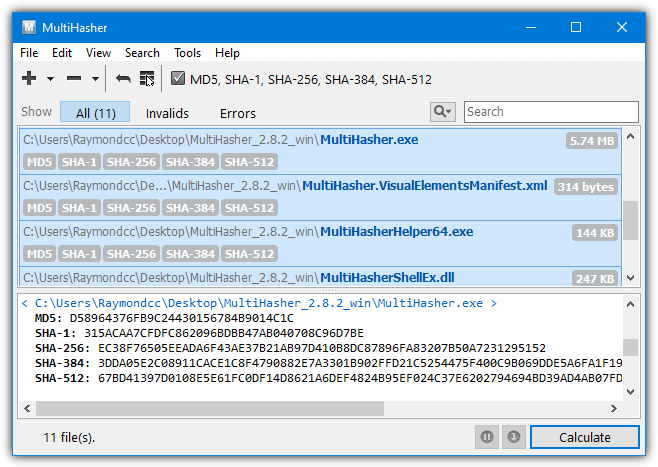
File association, drag and drop and the right click context menu option is also there, along with an option to search for the checksum on Google. A potentially valuable feature for those that need it is the ability to upload and query files on Virustotal. This requires an API key from VirusTotal but anyone can get a key by signing up for a free account. Uploading and checking can then be done from within MultiHasher. Portable and installer versions of MultiHasher are available.
9. 7-Zip
7-Zip is probably the most popular and well known free file archiver around today. Not least because of its 7z archive format that can achieve great compression ratios. The ability to verify file checksums with CRC or SHA has been in 7-Zip since 2011. A few years later a function was added to 7-Zip that introduced a context menu entry where you can quickly check a file’s integrity through the program’s user interface.
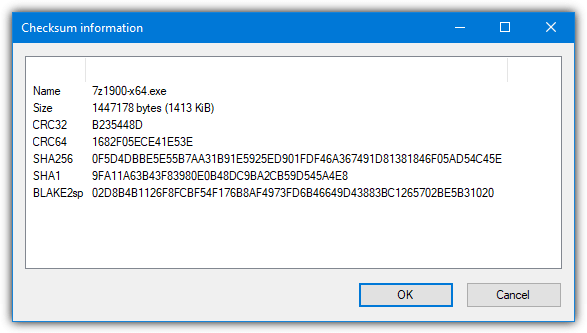
Just right click on a file and go to “CRC SHA” and the options will be available to get a checksum for CRC-32, CRC-64, SHA1, SHA256, or the asterisk will get all at once (including BLAKE2sp). Do note that when you select multiple files 7-Zip will give the overall checksums for all files added together and not each file individually. The 7z.exe command line tool has this function by using the “h” command along with a hash switch “-scrc[CRC32|CRC64|SHA1|SHA256|*].
7z.exe h -scrcSHA256 [filetocheck.ext]
10. HashTab
HashTab is another tool that uses the system file properties window to show file hashes and is quite similar to HashCheck. After right clicking on the file and going to Properties, the tab is called “File Hashes” and you will get CRC32, MD5 and SHA-1 hash values displayed by default. One major limitation HashTab has compared to HashCheck is it only works on one file at a time.
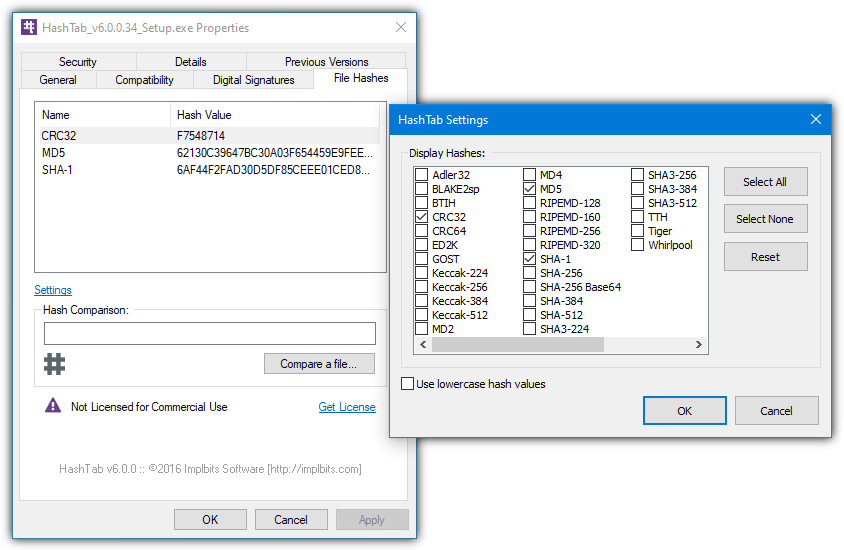
Pressing Settings gives access to an impressive selection of 27 additional hash values that can all be displayed. These include the Keccak, RIPEMD, SHA and MD families along with several others like GOST, ED2K, Adler32, and Tiger. You can compare the current file with a hash value in the clipboard by using the Hash Comparison box or use the “Compare a file” button to compare another file with the selected one.
11. Hasher
Not to be confused with the Igorware tool at the top of our list, this hashing tool is pretty simple to use and lets you drag and drop or browse for a single file to get a checksum. We are looking at version 1.20 from 2009 as all the later versions have a five second nag window on startup, so we really can’t recommend them. They do have more available hashes and folder/multi-file support if you feel like trying one out.
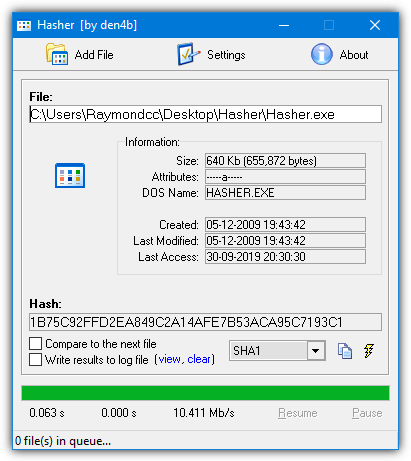
This older version is a small executable and will give you hash values for CRC32, MD5, SHA-1, and ELF. The current hash can be copied to the clipboard and you can manually compare the current hash value with a previous one from the clipboard or the next file that gets checked. Enabling the log file will keep a history of processed hashes and any comparison results.
Download Hasher (version 1.20 is at the bottom)
12. Microsoft CertUtil, FCIV, and PowerShell
We’ve grouped these three options together as they are all by Microsoft and the first two are built into Windows. They can be useful for adding into scripts or creating simple drag and drop shortcuts and etc.
Certutil
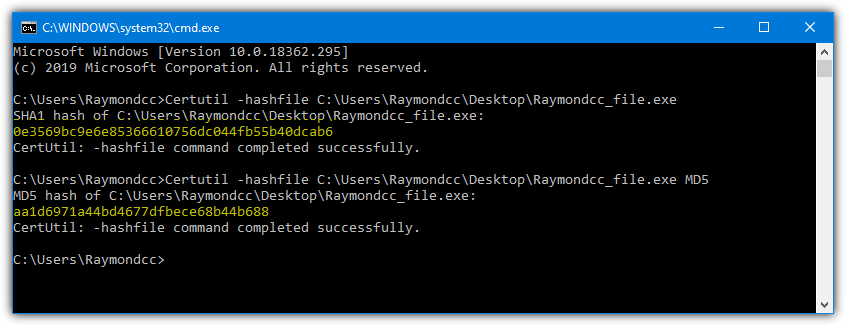
CertUtil is a command line tool that is primarily for showing information for and handling digital certificates on the system. One of its functions is being able to show the hash of a file, which is what we are looking for. The command to use for a file is as follows.
Certutil -hashfile [filetocheck.ext]
This will output the SHA1 checksum of the file. Other algorithms are supported, just append MD2, MD4, MD5, SHA256, SHA384, or SHA512 to the line and it will show that value instead. Only one algorithm is supported at a time, so if you want SHA1 and MD5 you will have to run the tool twice.
Certutil -hashfile [filetocheck.ext] MD5
PowerShell
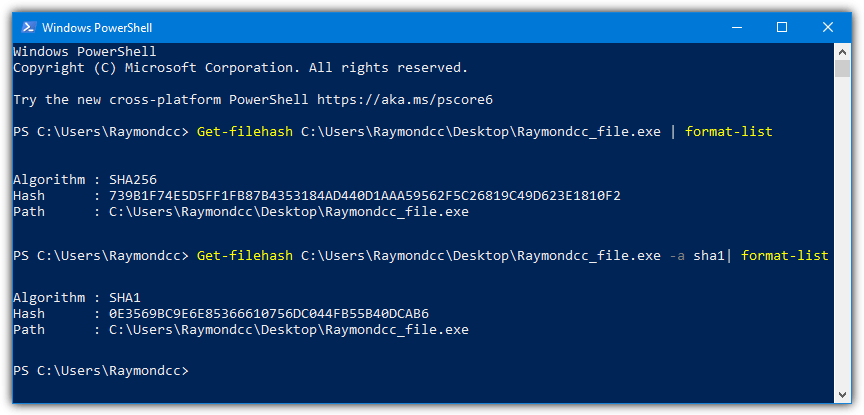
The PowerShell function is also built into Windows so needs no external executable. It works in a similar way to CertUtil. Windows 7 users will need to manually install PowerShell version 4 or above for this command to work.
Get-Filehash [filetocheck.ext]
Just supplying the file to the get-filehash command will output the hash as SHA256 by default. You can change this by adding -a and the new algorithm, MD5, SHA1, SHA384, SHA512, MACTripleDES, and RIPEMD160 are supported.
Get-Filehash [filetocheck.ext] -a SHA1
Note that like the Certutil tool, only one hashing method can be entered into the command at a time.
FCIV
This last tool is not built into Windows but is still made by Microsoft. The File Checksum Integrity Verifier (FCIV) is from way back in 2004 and Microsoft offers no support for it. It has a few more advanced options than the other two commands, including recursing into subdirectories, an exclusions list and the ability to save/list/verify checksums in an XML database.
Fciv [filetocheck.ext]
By default, FCIV outputs MD5 checksums but you can change this to SHA1 by appending -SHA1 or -Both to output MD5 and SHA1 at the same time.
Fciv [filetocheck.ext] -Both
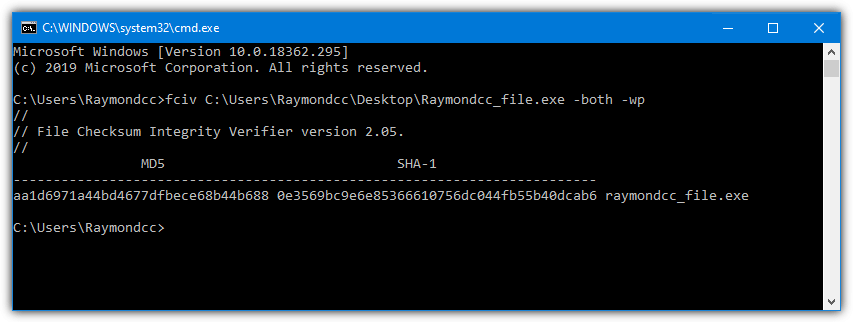
It’s odd this tool has no support because it has a proper knowledge base designation of KB841290 and there is a full page on the Microsoft website detailing FCIV’s usage. A download link is on the same page.
Download Microsoft File Checksum Integrity Verifier
There are dozens of these tools about, and you might already have your favorite. Of course, feel free to tell us about the hash program you like best. If you want to try the reverse and actually have a go at identifying the file from a hash value, you might like to look at this article.
You might also like:
 5 Ways to Check if a File in Website Has Been Updated without Downloading
 2 Tools to List Files Protected by System File Checker (SFC)
 7 Tools to Stop Windows Running the USB Flash Drive Autorun.inf File
 10 Free File Lister Tools for Directory List & Print [2023]
 AVI File Repair Tools: 5 Best to Use in 2023 [Out of 15 Tested]
For those who DON’T want to download stuff, can try online tools md5-checksum.com in browser, support file md5/sha256/sha1 chucksum :-)
I use Directory Report to show a file’s CRC 32bit checksum
What are the best Windows command line tools for the job?
Hi, want to check the integrity of the mails on .pst files. Which tool can show the hash info with other basic details.
Hello,
I’m looking for a program that will generate checksums for entire directories or entire backups/images so I can store them forever, but be able to verify them as needed. I know I cam do this manually. Is there a backup program that will do this automatically that anyone can recommend?
Jim, you might want to take a look at SyncBack Pro by 2brightsparks. I have used it for years, and it includes a Verification Utility. The backup is also stored in the native file format, not proprietary, so individual backup folders and files can be easily accessed. It is not freeware, but it is reasonable, and certainly our data is worth a lot more. In return, you get no ads, multiple licenses, free minor upgrades, a nice GUI, high quality software, and peace of mind. Good luck!
I’m using Microsoft FCIV exactly for this purpose.
An option that is built into current versions of Windows is using the Get-Filehash Cmdlet to generate the hash. It will do SHA1,SHA256,SHA384,SHA512,MACTripleDES,MD5,RIPEMD160
Process in PowerShell
Get-Filehash -path c:\foo\filename.exe -algorithm SHA1
for filename.exe in the C:\foo folder to generate an SHA1 hash.
Full details here for documentation
docs.microsoft.com/en-us/powershell/module/microsoft.powershell.utility/get-filehash?view=powershell-6
What I really want is a tool that will generate a CRC64 for single or multiple files / folder; And then append this checksum to the files “extended attributes” so that it is forever linked to the file. This would allow the file to be tested for corruption easily. (I know it is not perfect but good enough for most of us).
It would also allow another program to quickly find potential duplicate files. This would be very fast as each file already has its own checksum.
This seems a very simple idea – it must have been done – can anyone suggest suitable windows apps?
I know I’m stating the obvious, but one reason this simple idea isn’t realized to the extent you would like is the fact that many, if not most, files change due to legitimate update via patches, and of course data files are frequently edited. And of course any compressed file in a lossy format will change if opened and re-saved.
The problem with adding anything to a files “extended attributes” is like this:
1. A file’s extended attributes are a part of the file. Add or change something there and the file’s hash changes. BTW, that’s one sneaky way malware writers get malware onto a system – they hide it in the extended attributes. And! That changes the file’s hash, alerting you to the fact that it’s not original.
2. Not all file systems support extended attributes, and not all file transfer protocols support them either.
(a) If you copy a file to a FAT formatted flash-drive or SD card, all the extended attributes are lost.
(b) Writing a file to a Windows (SMB) share, (which is what many inexpensive network file storage devices use), may or may not keep the extended attributes – most likely not.
(c) File transfer protocols like wget (HTTP), ftp, sftp, rsync, (etc) are not guaranteed to handle extended attributes correctly.
3. Even if the file system you’re copying to supports extended attributes, if they’re not supported in the same way, no banana. A prime example is a file copied between a Windows and a Mac file system. They both implement file streams (extended attributes), but implement them differently and are therefore incompatible. The same is true for ext-2, 3, and 4 on Linux systems.
Jam Software:
Jam has several interesting tools, including the command line filelist.exe
It will recurse your subdirs and create a file listing with all of the normal into (like name, extension, path, three filedates, etc) and optionally several others including a checksum. Out put is in whatever separated value format you desire. Easy to load into a sqlite db, or Maria for reporting. Duplicate files are easy to locate.
https://www.jam-software.com/filelist
If you are comfortable with the command prompt, you can use my free utility, CrcCheckCopy.
It compares large sets of files and creates a CRCstamps.txt file where you can see the crc of every file. The verification is done against the CRCstamps.txt.
For Windows and MacOS, you can see it here: starmessagesoftware.com/crccheckcopy
all the files listed here get flagged by Norton as a dangerous file, hummmmm
If Norton is really flagging all the files listed here then it is truly messed up. I tested at least half in VirusTotal and they came up completely clean. In my ESET AV and Malwarebytes as well.
I have looked for an answer to this on several tech help sites.
Every one of these sites fail in the same way.
How do you automate the testing of the new hash against the developer’s official hash?
These things can be quite long, making it easy to make mistakes.
Some of the tools here have a verify option where you can paste in the official hash and see if it matches the hash from the file.
Isn’t that exactly what you are looking for??
James And HAL9000
When manually checking only matching a few digits is enough ….
Bcuz as far as i know A checksum is a extremely unique Sequence of characters …
Even if the two files differ by just a few bytes of data they will have entirely different checksums …
P.S. this is from my personal experience.
It’s not so likely but entirely possible to have two vastly different files and the first few characters of the checksum match, so that simply isn’t enough if you want to be totally sure the file is a 100% copy.
HAshGenerator website downloaded file, gets flagged by Norton as a dangeorus file and quarantined. Just FYI
is that possible to know a application name using Hash value (MD5)
How can ı found original hash values of windows 10?
Also note that 7-Zip has hash checking built-in.
7-zip.org
Hashcheck reworked: github.com/gurnec/HashCheck/releases/
There is a new Universal tool called Amazing Hash Utility built for Windows 10, available in the store for free
Very useful info about hash value, thanks!
hello
thanks alot
Still a great post after a few years. Thanks for making and creating it. Cheers~
—
Sam Smith
I found this article very useful, Thanks!
Thanks for mentioning ExactFile. Their console utility does a decent job when you need to process files within a large folders tree. Unfortunately it misses few advanced features such as including/excluding files by wildcards and it stores checksum of the whole tree into one file.
Similar to HashTab by ImplBits is the program by Kai Liu named HashCheck. It, too, installs as a shell extension for Windows Explorer, and works on both x86 as well as x64. See code.kliu.org/hashcheck/
Even though it has not been updated in a very long time (over 6 years!) it works well in XP through 10. Although it shows only CRC-32, MD4/5, and SHA-1, it also has the ability to *save* the MD5 check file for future verification.
Another advantage over HashTab is that you can select multiple files and hash them all at once, and again, save the MD5 of all selected files together in a single file.
+1 for HashCheck. Just grabbed it and it’s comprehensive and super-lightweight. Ability to handle multiple files and shell integration are musts.
hey , i have a question , i want to know if i am givan a md5 signture as this :
e9bf1dd6bfe8ec57f6a41b3cab428b28
can i know if the file is melicios just by looking at the md5 signture ?
if not , what is the best way to figure it out?
You can’t tell just by looking at the signature, the only way to find out is to identify what the file is that matches that MD5, and then check if the file is malicious.
For example, Googling your MD5 tells me that the file is gcBar.dll and it’s classed as “Adware” by some antivirus.
If a search engine can’t tell you, then you can try to decrypt the MD5, here is an article on the subject:
raymond.cc/blog/ask-raymond-how-to-decrypt-md5-hashed-strings/
For SHA256 you certainly can by getting the hash and entering it on the VirusTotal website. The file, if it has already been scanned will show the detection rate for a large amount of different Malware detection softwares. You can have it re-scan the software if it has not been checked recently. This saves you having to upload the software to check it.
For me this tests software with just about all Malware scanners for a very comprehensive analysis. However some Malware can work around AntiVirus software, particularly when it is run in Sandboxes or Virtual Machines which these AV applications use. A Malware free analysis does not always mean that it is Malware free! This has been known for many years by Malware creators.
I totally agree with taco, HashCheck is the best file integrity verifier you can get, despite it hasn’t been updated since 2009. Highly recommended.
Just spent an hour trying to download latest version (5.0) of Download Hash Verifier. There are way, way, too many links labelled “Download” or something similar to determine the actual, magic link that will download the software. After the third return to the same Web page I finally gave up. I have the 4.5 version which seems to work fine. Or I may try one of the other alternatives listed here.
If you are talking about the the SecurityXploded tool, I would agree it has quite a few download buttons to go through, although I managed to get the file downloaded in under 30 seconds.
On the final page it will say “Here is your direct download link”, click on download link and the file will come down.
Great tool HashCheck. Thank you taco!
The best one is not on the list: HashCheck
Check it out here: code.kliu.org/hashcheck/
It’s the easiest to use and very fast and the best is that it seamlessly integrates into the windows explorer.
Thanks for this man. Great resource. cheers
MD5 & SHA-1 Checksum Utility for me. Lite and easy to use!
This is a great post, but you missed the huge one. Microsoft’s File Checksum Identify Verifier. I ran across it while looking for a command line tool to quickly check some hashes and once I installed it to my Windows directory (to put it in the PATH), I can use it from anywhere on the system. It “only” does SHA1 and MD5, but that’s plenty for my uses.
IgorWare Hasher is brilliant! Thanks Ray
Excelent post, Hal 9000.
It’s a tutorial on how to use Hashes to check file integrity.