Best Free Remote Access Software: Out of 25 We Tested
It is possible to control computers in another remote location even if it is located at the opposite side of the world by using a PC that is equipped with the software and an Internet connection. Fortunately the software to access a remote computer has been greatly simplified over the years solving many common problems such setting up dynamic DNS service to automatically point to your changing IP address, port forwarding, firewall configuration and etc.
Remote access software can be installed for long term usage which administrators do to access their servers from home or another location to perform maintenance or troubleshooting. However, if you need to temporarily and quickly access your friend or relative’s computer to help configure a software or fix a minor problem, it doesn’t make sense to go through all the trouble in installing and configuring a full blown remote access software. A much easier way around this is to use the dedicated remote access software applications that are made to quickly and easily provide short term online support. Here are our top 8 picks that are free to use.
8. avast! Remote AssistanceSince avast! version 7, a new feature called “Remote Assistance” has been included in their software which means this feature is only exclusively available to users who have avast! antivirus or Internet Security programs installed. To access this feature from avast! 8, go to the maintenance tab and click on Remote Assistance found on the menu at the left hand side. There are 2 huge buttons either to allow remote control or control remote computer.
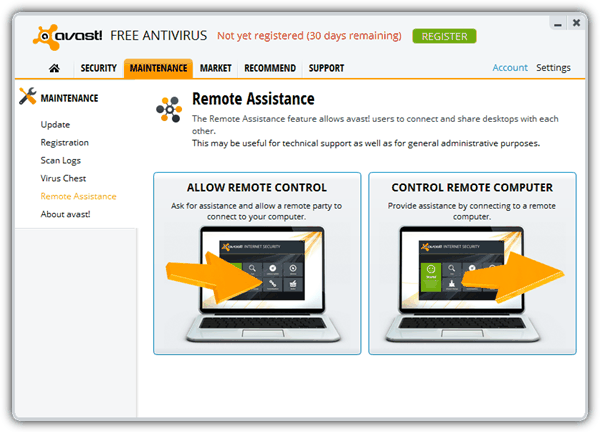
Clicking the Allow Remote Control button will generate an 8 character code which is to be given to the controller. The controller will then click on the Control Remote Computer button, enter the code to the textbox and click Connect.
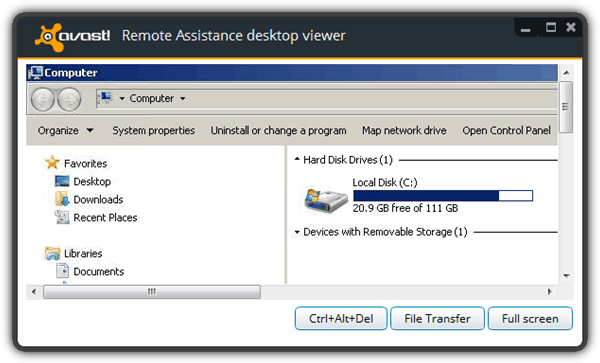
At the bottom of the viewer you will find 3 buttons which is to send the Ctrl+Alt+Del combination key, launch file transfer window and view in full screen. Although not mentioned anywhere, we think that avast! Remote Assistance is using TightVNC because the File Transfer window looks exactly the same. After testing avast! Remote Assistance , we found that the transfer and refresh rate is quite slow.
7. Chrome Remote Desktop
Chrome Remote Desktop by Google is a free app that allows remote control right from the Chrome web browser or Chromebook. Although it is useful, there are some requirements such as both users required to have the Chrome browser installed, signed in to their Google account to download and install the 22.6MB app, and finally grant the Remote Desktop app permission to know who you are on Google which some users who are concerned about their privacy may not be comfortable with.
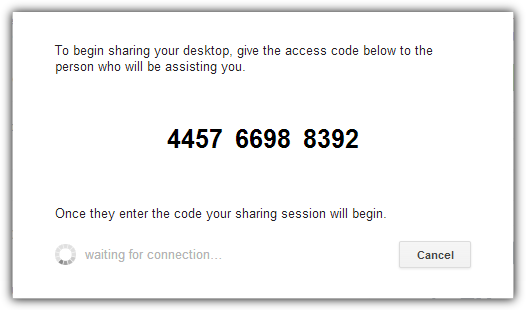
Once Chrome Remote Desktop is installed, the usage is pretty easy. The computer that will be remotely controlled will need to click on the red colored Share button to obtain the 12 digit access code and give it to the person who will be controlling the computer. As for the controller, click on the Access button and enter the code followed by clicking Connect.
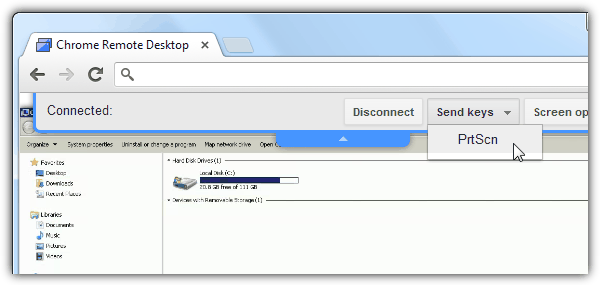
Chrome Remote Desktop is only capable of controlling the computer remotely but without any fancy features such as file transfer, VOIP and etc.
Download Chrome Remote Desktop
6. CrossLoop
CrossLoop’s software works just about the same as the rest on this page but one thing that made it stand out is the marketplace where one can provide and receive computer remote online support for a fee using CrossLoop. To connect, both users who want to access and share will have to download and install CrossLoop. The computer that will be controlled will have to go to the Share tab to get the 12 digit code from the Access Code textbox and give it to the controller.
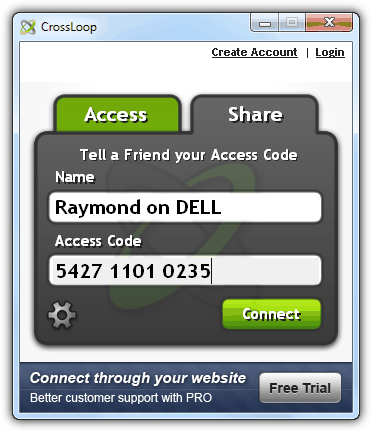
The controller will then enter the given Access Code in the Access tab and click connect. Once the connection has been initiated, the shared computer will also need to manually approve the remote access before the connection is established. CrossLoop uses TightVNC Server 2.0.2.0 to share and UltraVNC Viewer 1.0.8.2 to access.
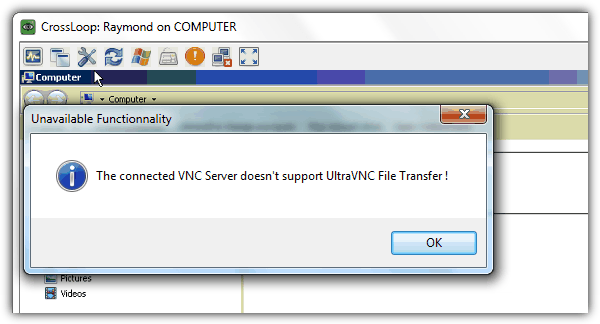
CrossLoop is placed at the 6th spot because it requires installation when most people doesn’t like to install additional software that is only being used temporarily. The 2 minutes share timeout is sometimes not enough to get connected especially for someone who doesn’t know anything about the computer. During testing we also experienced intermittent connectivity problems to their relay servers. File manager is also not available on the free version.
5. Firnass
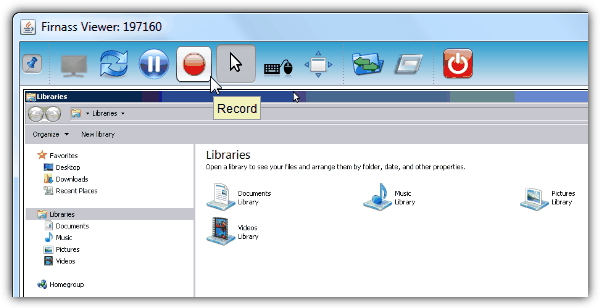
Although Firnass is still in Alpha/Beta status, we will still include it on our top 5 tools to provide remote assistance because it is very small at only 668KB in size, free, runs on Windows, Mac and Linux because of Java, uses their own screen sharing protocols unlike most that uses VNC or RDP, chat and VOIP support, file transfer, run a remote command, session recording and many more to come on future version.
The steps to connect is slightly different from the rest. Firstly a connection will have to be made from either party by providing the 6 digit ID and clicking the Connect button.
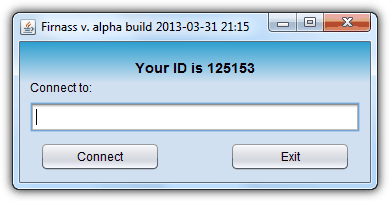
A new window will open on both parties upon successful connection. The computer that wants to be controlled with have to click on the play button which will only appear upon moving the mouse cursor to the small black screen.
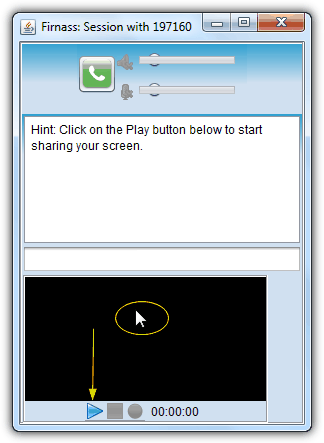
Once the screen is shared, the viewer will have remote access to the computer. The toolbar with options will be revealed when the mouse cursor touches the arrow pointing downwards that is located at the top of the viewer.



This needs to be updated. TeamViewer has changed a lot of their policies and thus I no longer use it. I’m currently a AnyDesk user now.
AnyDesk is the best for me,, he has size of 3MB and portable – did I see it’s free too :)
Try the free version of DesktopAssist
desktopassist.net
aero admin and ammy are very slow options dont seem to better the conecction in the least bit, teamviewer WAS good back when it started but now as of 2017 all they want is money , if the application senses youre using it on a business network , you get disconnected every 2 mins with a lovely referree screen telling you commercial use has been detected, if one of those computers you are giving support has had that restriction, whoops referee screen again it spreads like a freaking virus , and as much as some people had posted on youtube videos and tutorials as to deal with this problem, teamviewer is making a huge effort to black list you very rapidly .
i stopped using it since started that problem and switched to ANYDESK after much testing speed and other details on the ones mentioned on this page ive been more than a year with anydesk and i havent had any restriction problems, its not perfect but it does the job most of the time to transfer files and clipboard you just copy/ paste …hope it helps test it out
I’ve never seen anything better than AEROADMIN. I support above mentioned about it
I’ve been using AEROADMIN, I connect to about 140 computers a month, and now, they have suspended my account on “this” local computer, I can run it on the other4 computers I have here. I contacted them and they said, if you are going to use it “commercially” you need to pay for it.
So.. I tried to pay for it, using PayPal, and AeroAdmin wants me to send them Proof of Who I am, with a picture of a drivers license or credit card… uh.. NO!.. I paid thru PAYPAL… AeroAdmin doesn’t need PROOF of who I am.
So.. I now use AnyDesk… that works..
-sapphire
You may also check out Dayon! on github.com/retgal/dayon/ – it’s free, cross-platform and open-source!
Raymond, you should update this article soon. Please review ConnectWise Control. screenconnect.com/free/
for me great is litemanager software for free remote administration pc’s as alternative to teamviewer
Aeroadmin looked the most reasonable and easy solution for me. So here is my +1 for it as well.
Missed the anydesk
this is best tool then ammay and show my pc as per my opinion
+1 for free AEROADMIN
Ammyy Admin +1! I really love the soft. It seems to be the easieat one as does not require installation or specific settings. The only thing you are to do is to run it on site and you will be able to use it within 1 min. You can quickly connect to remote computers even in case if they don’t have real IP. The soft is transparent for all Firewalls.
One that may of been missed out is Centrastage. Even though it’s aimed at the support market, they do give away a huge quantity of support agents for free. 500 of their on-demand agents and I believe 5 of their full agents.
Fantastic to put it onto all your family machines, then they have to grant you access when they need it (on the on-demand units).
You can also try free remote desktop software AeroAdmin aeroadmin.com
No monthly fees, free for commercial use.
It might be a good alternative though!
I like join.me to help family and friends. I’ve also used LogMeIn free in teh past to help my parents since I already installed on their computers. I think they just changed things and put some limits on their free version as I got an email not to long ago. I’m not sure there are restrictions other than the number of computers you can have. At the office we use ScreenConnect and its great.
Teamviewer sounds great on paper, but I’m finding that it eats up a massive amount of CPU (sometimes 99%) on older machines, especially XP ones. Means ya can’t use the damned software because the computer is bogged down like it has a virus. Have had no issues with Crossloop of that sort. Must be a memory leak with Teamviewer and XP.
ShowMyPc.com has a free version that doesn’t need to be installed and includes file transfer! It isn’t obvious on their website, but if you download from the homepage button that reads “Show My PC View Remote PC,” you’ll get a no-install executable that will act from either computer (controlled or controller). The only downside to this software is that when it closes it opens your default browser to an ad. I’d match it against anything here as superior for both simplicity and usefulness.
ShowMyPC is listed on page 2.
I’m surprised you did not review join.me (owned by LogMeIn). I’m a big fan of TeamViewer and at times CrossLoop, but i think join.me is the easiest to use with people not very computer savvy, or quick one time situations. Tiny, quick and easy install and start-up for sharing and no install needed to view.
Hi. Thanks for the work.
I use UltraVNC, the free version for everyone. I have a DynDNS-like to connect to my client and I have hardcoded my IP (remote.xx.site.com) which works nice :-9
The biggest problem is to get the newbie to click an download and run, and accept that the application is OK to access the Internet :-)
Could be a nice thing if that could be easier for newbies :-)
Regards Nmouse
Thanks Raymond. I am allways eager to read you. LOGMEIN (www.logmein.com) is the one I prefer among all the ones I tried. For PC and Mac. Free for non commercial use. This one at least allows you to make the taskbar appears when the automatic masking of the taskbar is set on the remote computer in Windows. No VNC variants or other program I have tried allows this, althoug it is sometimes absolutely necessary. The controlled computer needs a software to be installed. The computer that takes control needs nothing, just any internet browser, because you access the remote trough a web browser. You can set up automatic login if you wish, without even asking the autorisation of the remote, if he trusts you enough or if you wish to manage a remote computer when nobody is in front of it. You even can start it remotely, when Wake On Lan (WOL) is activated on the remote. You only need to know the fixed password in this case. File transfer only in the paid version, but you can use another soft of you choice for this.
With Teamviewer one does not have to install any thing if it is a one time session. The remote session simply has to click on the Join a Remote Session. Logmein requires one to set up an account and that account is for the person who will be controlling the remote client.
As of this time, Logmein is no longer free, even for non-commercial use. It was myfavorite until they decided to go all paid. I now use Teamviewer.
Hey Ray….
Another GREAT article! :)
Do you know if any of these are free for corporate/enterprise use?
And… if any of these permit to run the command prompt remotely (without controlling the desktop).
Great stuff!!! :D
Thanks for the update!
I have a lot of blind friends and used to be visually impaired myself. I use teamviewer to connect to their computers and help them out when something goes wrong. You can set it up with a password so they don’t even have to be able to read you the numbers, you can just log in when you need to. Of course, you have to trust the person who has the ability to log in to your computer even when you are not around.
Ammyy is choice. I think it’s even faster than Teamviewer (when lowering color depth)…