Windows Boot Time Analyzers [Best BootVis Alternatives]
Windows is a complicated operating system underneath and during startup most of the programs, drivers and services needed for the computer to function are loaded. On a clean and trouble free system, the boot will be as fast as the hardware and Windows allows, if something is not quite right or loading improperly, the boot will slow down and it might even cause the computer to slow down after the boot has completed.
What can be useful in this case is analyzing the Windows startup procedure to identify if something is causing any problems. There are many tools around like Autoruns or CCleaner that allow you to look at the programs starting with Windows, but they don’t go very deep and get to the root cause of the issue.
To go right down into the depths of the Windows boot, you need a dedicated analysis tool that can help show you what’s going on and how long it takes. Back in the days of XP, BootVis could be used to analyze how long a Windows XP machine takes to boot, sadly BootVis was XP only.
The number of solutions around to analyze Windows boot performance are few and far between, but we have found some for you that could help do the job.The Windows Performance Toolkit (WPT)
The Microsoft Windows Performance Toolkit is designed for analyzing a wide range of performance problems including application start times, boot issues, deferred procedure calls and interrupt activity, system responsiveness issues and application resource usage. The big problem with the Performance Toolkit is it’s not for the faint hearted and it can be quite difficult for the average user to interpret and understand the results.
The Performance Toolkit is available in more than one version and is a component of the Windows Development Kit (SDK). The Windows 7 SDK supports Vista, 2008 and even XP, while the SDK for Windows 8.1 supports Windows 2012, 2008, 8 and 7. There is a newer SDK version for Windows 10 which currently includes compatibility for 8.1 and 7. Windows 7 users have access to all three versions of the WPT and can choose which to install.
Windows Software Development Kit (SDK) for Windows 8.1
The first thing to note about The Windows 8.1 SDK is that if you intend to use this on Windows 7, Microsoft .NET framework 4.5 is required. If you don’t already have it the setup file will install .NET 4.5 automatically.
After you download the Windows SDK for Windows 8.1, run the installer and at the options screen select only the “Windows Performance Toolkit” and continue with the install.
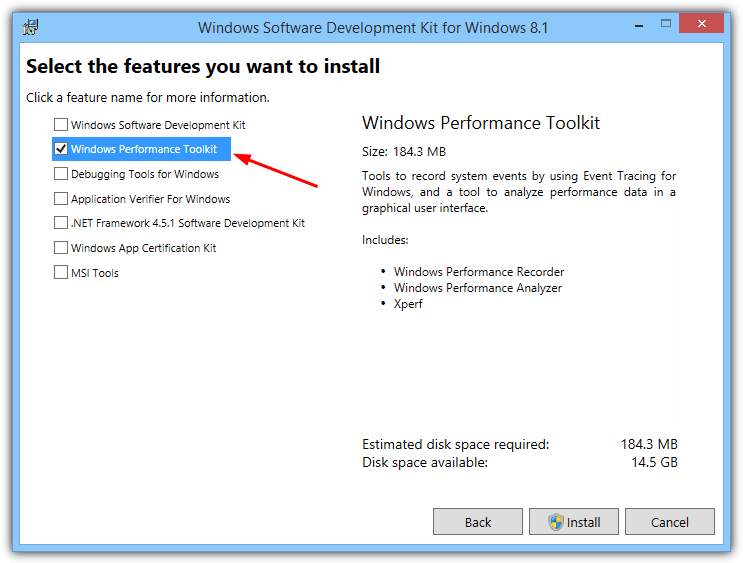
The Windows 10 SDK is also available but currently in release candidate stage until Windows 10 is released in July 2015. At the moment it supports Windows 8, 8.1 and 7.
Windows Software Development Kit (SDK) for Windows 7
To get the Microsoft Performance Toolkit for Windows 7, Vista and XP, you can download the Windows 7 SDK installer and during installation only select the “Win32 Development Tools” from the list of programs, then continue to install the Development Tools.
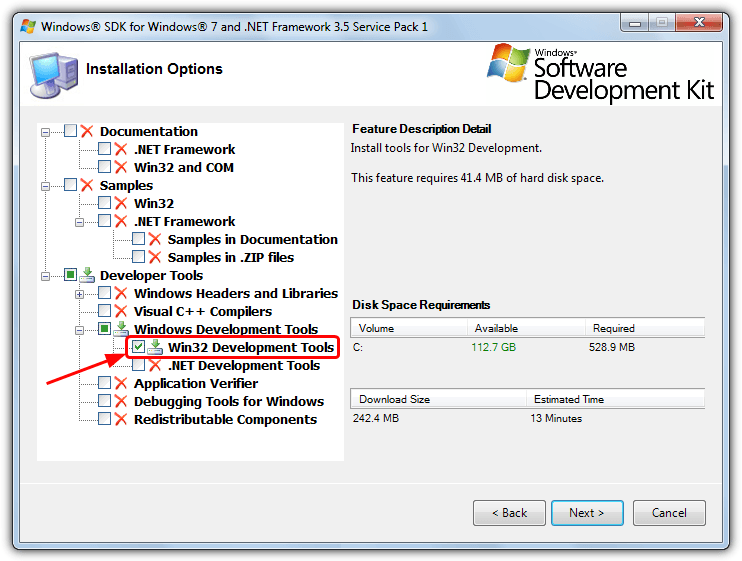
After installation, go to C:\Program Files\Microsoft SDKs\Windows\v7.0\bin and look for the following files:
wpt_x64.msi – To be used on 64-bit Windows Vista/7/Server 2008
wpt_x86.msi – To be used on 32-bit XP/Vista/7/Server 2008
Install the version that matches the architecture of your operating system. For convenience we have uploaded the 32-bit and 64-bit installers for WPT so you can use them without downloading the Win32 Development Tools.
Download wpt_x86.msi for Windows 7 32 bit
Download wpt_x64.msi for Windows 7 64 bit
WPT and Windows XP
The SDK for Windows 7 as a whole is compatible with XP, but the Performance Toolkit is only partly compatible and requires extra steps in order to collect the trace data. XP is able to create the boot trace but it cannot interpret and display the results, for that you will need a computer with Vista or Windows 7 and WPT installed.
You also need Vista or 7 to create a trace because a number of important files do not get installed when you install WPT in XP. Copy the folder “\Program Files\Microsoft Windows Performance Toolkit” from a Vista or 7 computer to Program Files in XP. If you don’t currently have a Vista or 7 computer to hand, download the zipped Microsoft Windows Performance Toolkit folder below and extract to XP’s Program Files.
Download Windows_Performance_Toolkit.zip
Once you have traced the boot, copy the contents of C:\WPT to a Vista or 7 computer and double click the .etl file. An MSDN article on XP compatibility with Xperf is available for further reading.
Running Windows Performance Toolkit Commands
After installing the chosen Windows Performance Toolkit above, you can then run the command to start a trace. Open a command prompt with administrator rights (click Start, type cmd and then press Ctrl+Shift+Enter). Type one of the following commands:
For Windows boot trace:
xbootmgr -trace boot -traceFlags BASE+CSWITCH+DRIVERS+POWER -resultPath C:\WPTFor shutdown tracing:
xbootmgr -trace shutdown -noPrepReboot -traceFlags BASE+CSWITCH+DRIVERS+POWER -resultPath C:\WPTFor Standby+Resume:
xbootmgr -trace standby -traceFlags BASE+CSWITCH+DRIVERS+POWER -resultPath C:\WPTFor Hibernate+Resume:
xbootmgr -trace hibernate -traceFlags BASE+CSWITCH+DRIVERS+POWER -resultPath C:\WPT
You can replace C:\WPT with a folder of your choice as it’s simply where the created trace files (.cab .etl and .log) are stored. When the trace is done, the Performance Analyzer will automatically run and show you the trace results. If it doesn’t, go to C:\WPT and double click the .etl file (Windows Performance Analyzer Trace File).
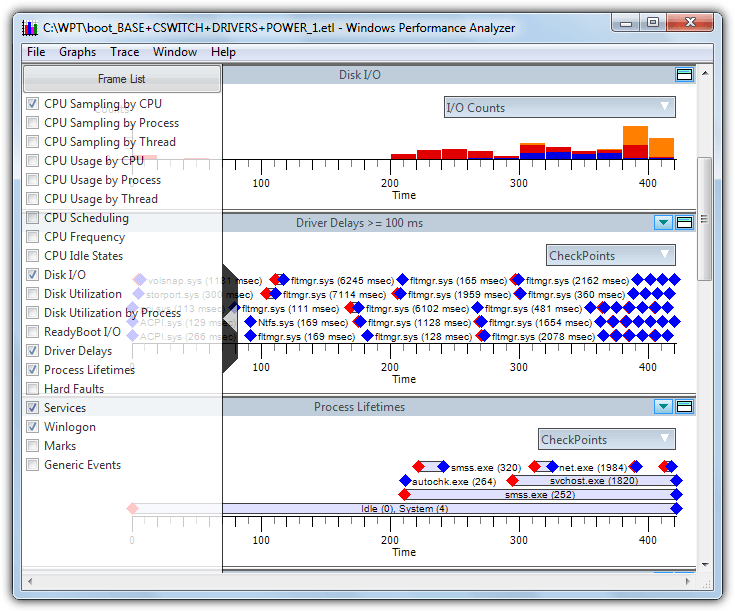
The Windows 7 SDK Performance Analyzer is pretty basic and will show a number of graphs by default, you can click the grey arrow on the left and enable/disable graphs from the pop out list. Some information tooltips are available if you hover the mouse over the item.
One thing to note about the Windows 8.1 SDK Performance Toolkit is the created .etl trace file is considerably larger in size than the one created by the Windows 7 version, 175MB vs 100MB during testing. The Windows 8.1 traces can be over 600MB in size! If you have a Windows 7 computer with 2GB or less of RAM, it is recommended to use Windows 7 version.
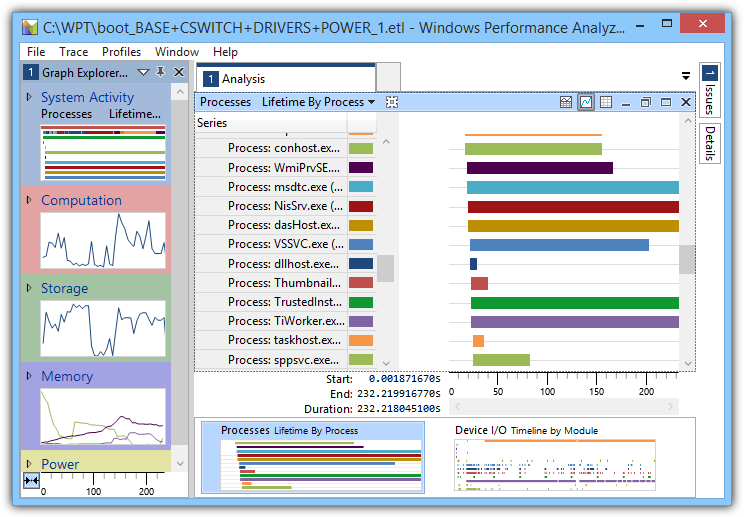
This version is more advanced and shows a large number of graphs on the left hand side in Graph Explorer, any one can be double clicked to open its details into the main display. Almost everything will give you extra detail when you hover over it with the mouse. A system configuration trace is also available from the Trace menu which gives some quite in depth detail about parts of your system and hardware.
If you want to find out more about WPT, the various abilities it has and how it traces the boot, have a read of this MSFN boot tracing article.
Using WPT to Decrease Boot Times
The Windows Performance Toolkit also has a command to analyze the Windows boot process and make changes so the computer boots as fast as possible. It uses a combination of SuperFetch, PreFetch and Defragmentation to optimize the layout and loading of files. The command is:
-trace boot -prepSystem -verboseReadyBoot
The computer will restart six times during the process after which your boot times should be noticeably faster. This process should NOT be performed with an SSD boot drive as it will make no difference due to PreFetch, SuperFetch and defragging having virtually no effect on an SSD.
Other Windows Boot Analysis Tools
The Windows Performance Toolkit is about as detailed and comprehensive as it comes, but if you want something a bit easier to understand, the choices are limited but there’s still one or two options out there.
WinBootInfo
WinBootInfo is an old shareware tool that can analyze the boot process and log the information for viewing. It measures the load time of drivers, services and executables, and records CPU and I/O activity. WinBootInfo is no longer available to purchase because the company (Greenvantagellc) and website disappeared around 2009, so it’s no longer developed or supported.
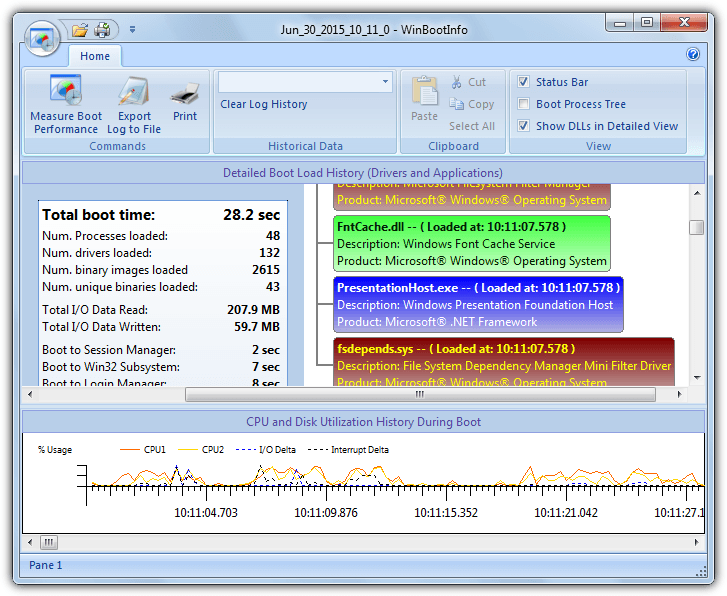
You still have a fully functioning 30 day trial which should be long enough to run it a few times and analyze your boot process. The main interface is split into a CPU and I/O graph, boot time statistics, boot process tree and the order of drivers/applications being loaded. Be aware that clicking on purchase links in the program lead to potential phishing sites. WinBootInfo has been tested on Windows 7 and 8.1 x86/x64 and works, XP and Vista are also compatible.
BootLog XP
While BootLog XP wouldn’t usually be worth mentioning because it only supports Windows XP and is also shareware, it is quite an easy to read program which is useful if you’ve tried Bootvis and have a bit of trouble deciphering what it says. Like WinBootInfo, BootLog XP hasn’t been updated since 2009 but it’s not a problem as XP itself hasn’t had any major updates since 2008.
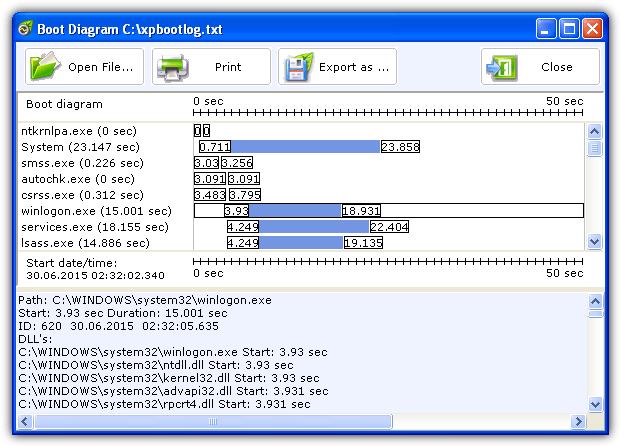
The full 30 day trial will allow you to gather the required boot data to see what’s going on, simply install the program and click “Test at next boot”. After a reboot the program will wait until the system is idle, then popup the results window (shown above). From there you can click on an entry at the top and get more detailed information at the bottom.
Soluto
Soluto started out life as a dedicated startup monitor allowing you to disable programs causing slower boot times. These days however, it’s a premium smartphone management and diagnostics app. The Windows boot time viewer/optimizer is still available but now hidden away from the main pages on the Soluto site. After you have downloaded and installed Soluto, create an account then reboot your computer.
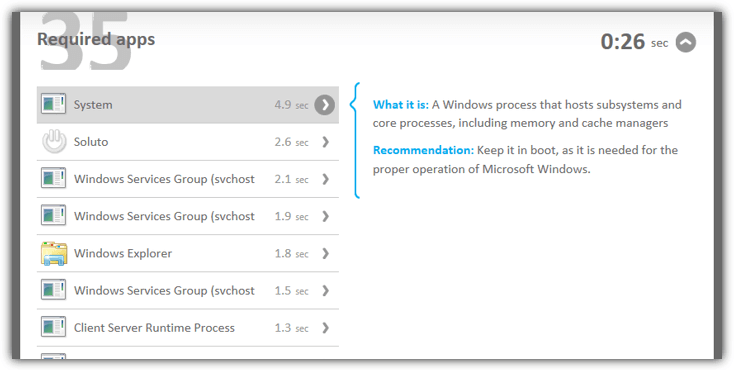
After it’s finished logging you can click the tray icon and then the computer icon online to see all the boot times for all executable files run during boot. The information isn’t as comprehensive as the Windows Performance Toolkit, but it’s easier to digest and will let you know how fast things are loading at startup. We recommend removing Soluto after analyzing because there are many reports around the web that Soluto itself can slow down overall boot times quite a bit while installed.


Can I use something like this: xbootmgr -trace shutdown -prepSystem -verboseReadyBoot
to speed up or fix crashes with shutdown?
I had the same bad experience as Infiniter, maybe even worse!!! Veryyy Dangerous & Scary Undertaking!!!
I’m also running a PC with Windows 7 x64, the WPT x64 version is installed. Running cmd in syswow64 as admin and using the command for the boot trace option “xbootmgr -trace boot -traceFlags BASE+CSWITCH+DRIVERS+POWER -resultPath C:\WPT”,, the 64 bit xbootmgr boot trace action lead to a blue screen, and it got into a permanent loop of crashing with a blue screen, then restarting, and then crashing with a blue screen, ad infinitum. I killed power & tried safe mode to recover my system, but it crashed to Blue Screen even when starting in Safe Boot mode. I was beginning to panic, but luckily when I killed power, powered up & invoked the boot menu & I selected the option to use the last known good config to get to recovery mode to restore from last system restore point, it all came back.
Me too, I had the same sad experience :). I dropped the DRIVERS argument to avoid the BSOD.
I guess I should have read the comments before trying this. :(
Thanks for the info. Can’t wait to get home now to restore my system to working order.
I guess I’m one of the blue screen club now.
For me, running a PC with Windows 7 x64, the WPT (x64 version installed, of course) and xbootmgr boot trace action lead to a blue screen. No chance of getting this to work, not even when starting in Safe Boot mode. Had to boot into recovery mode to restore from last system restore point.
thanks admins
Thank you very uch
thanx!!!!!!!!
thank you, I’m currently using this tool to find a driver that is causing a BIG latency problem of windows 7 x64: