
2 Tools to Automatic Lower Process Priority on High CPU Usage


 7 min. read
  Published on

Sometimes when you run an application or the antivirus decides to run a scan, suddenly the computer might become very slow to react or even get to the point where it seems completely unresponsive. When a program takes up all of your CPU it leaves very little left for the ordinary tasks such as running Windows or allowing your web browser to work smoothly. There may be occasions when you have felt the need to terminate the process through the task manager because it looks like the process has crashed, or maybe you simply want to use the computer for other things and not wait until it’s finished and releases the CPU back to the system.
Windows does actually have a way of dealing with this problem. Each process that starts on your machine is given a priority level by Windows, and these range from Realtime which is the highest, down to Low with some others in between. With the exception of a few core Windows processes, all programs will be given the default priority of Normal. A process with a higher priority gets to use the free CPU time available while a lower priority process only has access to the CPU when the higher priority application doesn’t need it.
This has the effect of making anything with a lower priority than the program taking all the CPU cycles run more slowly because it is having to wait to be given access to the CPU. It also happens to some extent with 2 processes on the same priority level because they are constantly fighting each other for access to the CPU and so a lag or slowdown still occurs. With effective use of priority levels these situations when your computer becomes slow or unresponsive for periods of time while a program is running can be greatly reduced.
There is a simple way to lower the priority of a running program which is through the Windows Task Manager. You can view the current priority for all processes by going to View -> Select Columns… and ticking Base Priority. Then simply right click on the process -> Set Priority and drop it down to BelowNormal or Low. This will then let all Windows and other processes on Normal have access to the CPU before first making the system less sluggish.
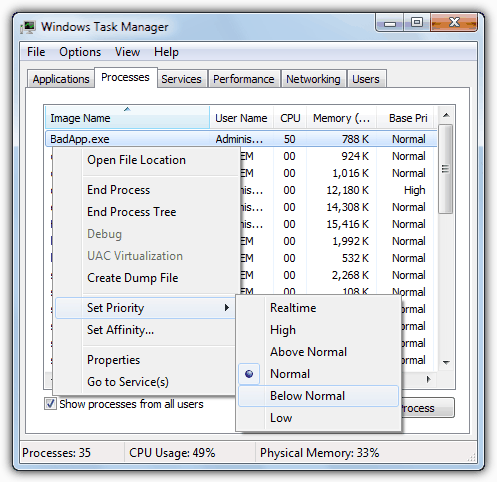
A number of software applications that are likely to use large chunks of processing power will often have an option in their settings to lower the process priority while they are working, which is something worth checking out. If you don’t want to keep changing program priorities every time you run a program that requires a lot of CPU time, then here are 2 applications around to help you out.
1. ProcessTamer is a utility that runs in your system tray and watches the CPU usage of the running processes on the system. When it detects a process has gone over a certain threshold of CPU usage, it automatically lowers the priority while it’s still using the CPU. As soon as the usage level drops again below a certain level, the original priority is restored. This has the effect of dynamically altering priorities to try and keep the operating system running as smooth and lag free as possible.
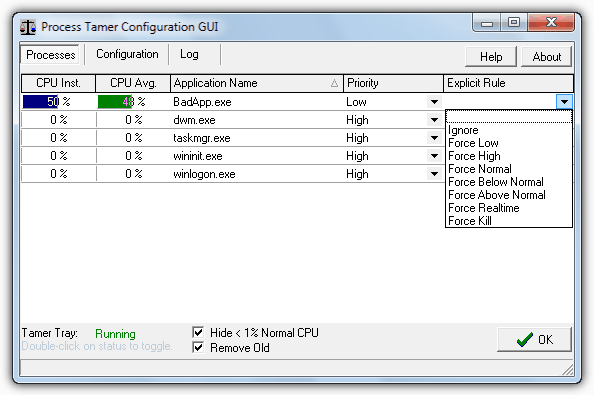
With the built in process usage viewer you can see what is using the processor and what priority it is currently running with. This window is useful because a rule can be created for a specified process, and every time it runs the rule will kick in. The process can be told to force run a set priority every time, to be ignored by Process Tamer, or to be terminated as soon as it’s run. Some programs such as media players or burning applications might set their priority high for a reason so as not to interrupt what they’re doing, which is where the Ignore rule will come in useful.
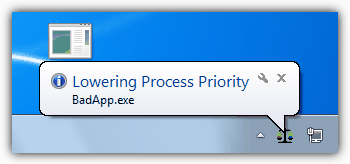
Whenever Process Tamer adjusts or restores the priority of an application there will be a tooltip displayed from its tray icon so you can see what process is being altered.
Process Tamer does have several configuration options such as changing the trigger point for high and low CPU usage, smoothing out the usage average over time so as not to change the priority because of a minor CPU usage spike, and controlling the behavior of foreground processes. You can also delete or add your own rules for user specified executable files from this window.
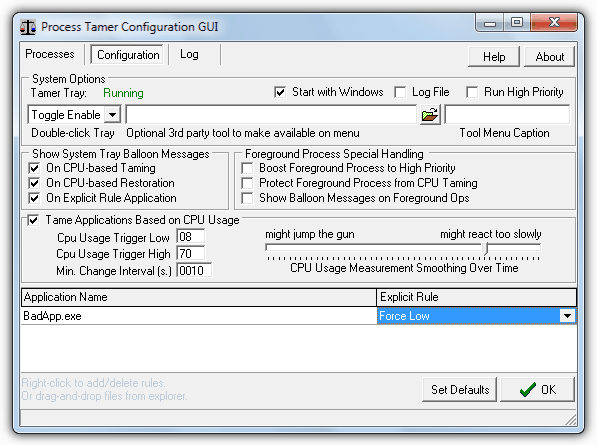
There will be times when you don’t want Process Tamer to change process priorities when you’re doing something you want to use the CPU and at the current priority such gaming etc. Obviously you can create a rule, or right click on the tray icon and disable Process Tamer, or an option can be configured to toggle enabling / disabling by double clicking the tray icon.
Although Process Tamer is free to use, you are encouraged to go to the website and apply for a free license key and will eventually receive a nag until you do. This is totally free and is a small price to pay if you find the program useful. Process Tamer works on Windows 2000, XP, Vista and 7.
2. Process Lasso is a well known tool that can automatically adjust process priorities on the fly, as well as altering which processor cores are used. This is achieved using a technique called Process Balancing that hopefully produces the effect of keeping processes from hogging system resources and reducing system responsiveness. One of Process Lasso’s biggest strengths is the shear amount of features and options available to control processes, unfortunately it’s also one of it’s drawbacks because there are far too many configuration options and context menu entries for the average user.
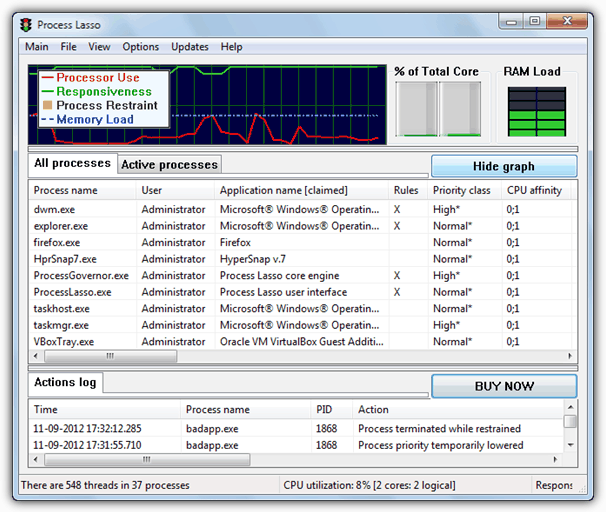
Of course you can still use Process Lasso without having to configure too many of the settings and it does a good job of automatically lowering process priorities if it detects they might be hampering the smooth running of the system. The main window gives you nice graphs and load meters in addition to the log window and the main area which is taken up for the process viewer/manager. As you can see below the context menu if you right click on a process is comprehensive to say the least and is somewhere you could easily make things worse if you’re not 100% sure what each option does.
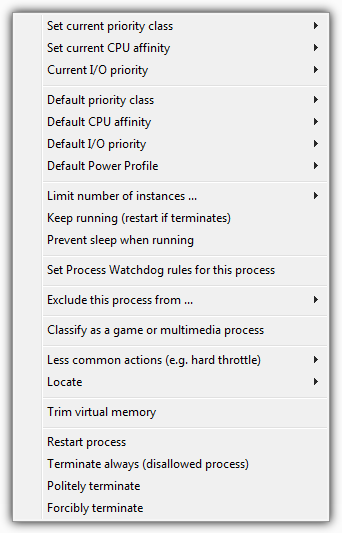
If you’re willing to put in the time effort to finding out what everything does and what the various effects of all the functions might be, Process Lasso could prove to be a powerful and effective utility. The program is shareware but there is a free version which seems to be part trial, part free and you will get a nag screen every time Process Lasso starts up after the trial expires. Some people find this acceptable and others find it intolerable. Process Lasso works on Windows XP, 2003, 2008, Vista, 7 and 8.
Although slightly different to the 2 applications above, another useful tool is called Prio that adds an option to the Windows Task Manager and allows you to save a custom priority for each process. This tool has been discussed in another article dedicated to Prio.



Improve this guide

User forum
0 messages