Automatically Scan for Viruses When Plugging in a USB Flash

Secure your devices with award-winning cybersecurity technology.

Browse the web securely for up to 3 devices across Windows, Mac, iOS or Android systems.

Best security tool for intense browsing activity.

Keep secure with groundbreaking AI detection and prevention technology.

Prevent data breaches and malware infections with user-friendly controls.
In more recent years, one of the most common ways for a virus to spread itself has been through the autorun.inf file that resides on the root of your removable device such as a USB stick or hard drive. When you insert the device into a computer, the autorun file then executes the program it’s told to which in many cases can be malicious file, and then you have a problem on your hands.
Thankfully in Windows XP and above the Autorun.inf virus issue is now pretty much redundant as the inf file no longer gets executed by default in Windows when it’s inserted and so the malicious file cannot get launched. The problem with removable USB devices is they are so portable that the drive could have been plugged into several other computers before it comes back to you. And with that in mind, there’s always a chance that it could have been infected and other types of malicious files might have been transferred onto it along the way.
Several Antivirus packages these days will offer to scan USB devices when inserted, but sometimes this option is buried in the settings and not automatically enabled.
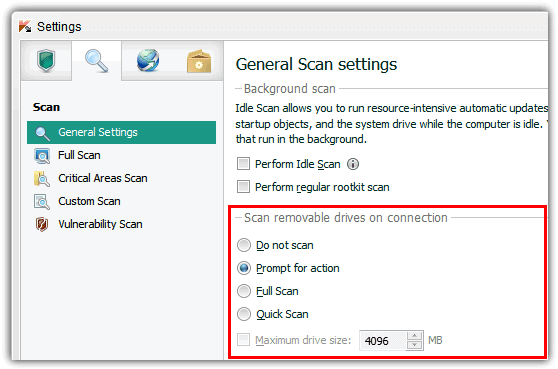
Some others don’t offer this function or only scan the Autorun.inf file to see if it has been infected and you would have to run a manual scan yourself which can easily be forgotten. Here we have a way to automatically scan the USB flash drive whenever it is inserted or plugged in to a Windows computer.
USBVirusScan is a small program that will launch any program you provide as a command line parameter each time a USB drive is inserted. As you might guess, the author uses it to start a full virus scan on the inserted USB drive, and named it as such. But the program can actually be used to launch any program, batch file or script you tell it to and isn’t limited to just running security software.USBVirusScan isn’t really a tool for beginners though because it doesn’t have graphical user interface (GUI). The configuration and launching is done from a batch file called Start.bat and the tool itself only has an About screen that looks like the image below which shows the command line options.
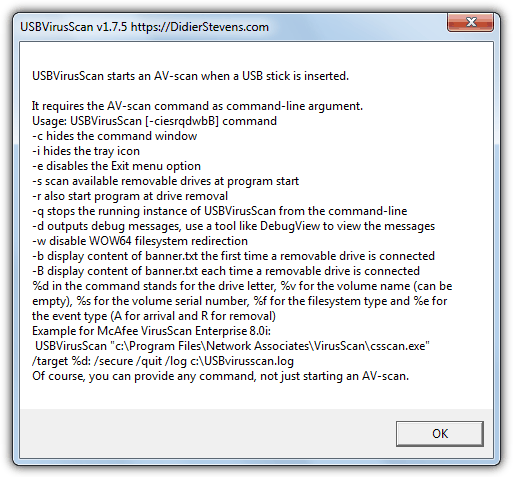
The only thing you need is an Antivirus package installed. If you don’t have one and don’t want to pay for one, have a look at our comprehensive list of free Antivirus software. Then you’ll need to find out the commands that need to be on the line that can perform a scan when you insert a USB drive. Once you have the command line, just edit the Start.bat file in the USBVirusScan folder.
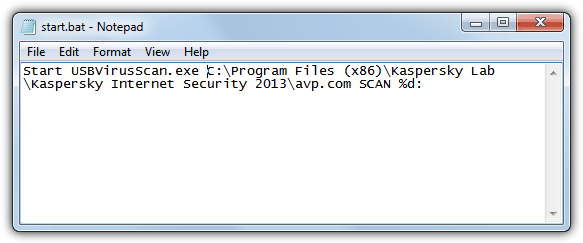
The command line options can be a bit confusing for some users and finding the correct syntax and commands is not always easy because every antivirus software is different. So for your convenience we’ve provided a few command lines for some popular antivirus software. If you’re using a 64-bit Windows, you may need to change the \Program Files\ entries to \Program Files (x86)\ depending on which folder your Antivirus uses. The simplest way to check is to browse and see which folder the Antivirus is in and use the correct one in the batch file.
Place “Start USBVirusScan.exe” without the quotes at the beginning of Start.bat and add one of the commands to the line depending on the Antivirus software package you have. Then simply execute the bat file and the program will sit in the system tray waiting for a USB drive to be inserted. Memory usage is small occupying only 1MB on our Windows 7 64-bit test system, so can easily sit in the background all the time if you come into contact with lots of USB flash drives.
On the next page we’ll show you the command line options required for USBVirusScan in 15 popular antivirus and internet security packages.
You might also like:
 5 Free Multi Engine Antivirus Scanner Tools: Best for 2023
 5 Best Tools to Scan Shared Folder in Network [2023 List]
 12 Free Anti-Malware to Scan and Remove Malwares
 Ketarin Automatically Keep Your Software Setup Installers Up-To-Date
 7 Tools to Stop Windows Running the USB Flash Drive Autorun.inf File
C:\Program Files\Microsoft Security Client\MpCmdRun.exe” -Scan -ScanType 3 -File %%c:
if i insert a usb drive can be letter d e f g h … ?
how you can understand the letter to must use ?
and why you use %% ?
%%c:
Great program idea, but I have to ask, why is it that Antivirus suites don’t do this automatically. It just seems like common senses, you shouldn’t have to use another program and then program it to use your antivirus. This is beyond stupid in my thinking about how antivirus utilities work, they should be protecting flash drives automatically.
Its good to find the virus scan in pc system
Thank u
praveenkumar
will this auto scan utility work with Bitdefender free edition? if so, how should do that? please send me the procedure..
is it possible to revert back after changes made (automatic scan)? can you show how.
How to do this usb auto scan for comodo internet security premium 2013?
Although Comodo do have what is believed to be a command line scanner called Cavscan.exe in the Comodo folder, it seems they haven’t bothered to tell anyone how to use it.
The output from Cavscan is always blank whatever arguments you put into it. Comodo’s forums have loads of people asking how to utilize this tool, no-one ever seems to come back with useful answers.
Very useful program, indeed.
As I use Norton AV, one problem is that the path of NAVW32.exe changes when updated automatically.
So I wrote following bat file which finds the path and kick USBVirusScan.
Content of USBChkStart.bat :
—————– snip ——————
setlocal
reg query “HKLM\software\microsoft\windows\currentversion\app paths\navw32.exe” | find “:\” >–AA–.txt
for /f “tokens=3,4,5,6” %%p in (–AA–.txt) do set nortonpath=%%p %%q %%r %%s
start /b USBVirusScan.exe %nortonpath% %%c: /S+ /B+
endlocal
——————snip ——————
Another bat file (USBChkStop.bat) to stop is:
usbvirusscan -q
Place them anywhere you want (desktop for example). Works great.
Tak
Thanks mate appreciate a lot
Thanks raymond
Neat program.. Thanks for the info raymond, I’m gonna introduce this program to all my mates :)