
Backup Files from a Non Booting Windows to LAN or FTP Using a Live CD


 10 min. read
  Published on

One situation everyone dreads is when their system goes down completely and you’re unable to get into Windows at all due to a severe virus infection or file corruption etc. The system has become completely unbootable and there is no way to get in, even through a System Restore offline or a Repair Install. It’s then you reach for backups, and if you have very recent backups, it might not be such a problem. But if you have no backups to hand, such as a Windows System Image, or they’re badly outdated, there could be Megabytes or even Gigabytes of non backed up data you need to get off the computer before a reinstall.
These days it’s not too difficult to get data from a dead Windows because most live Linux CD’s have built in support for reading Windows partitions. They also support USB and writing to CD/DVD so getting your data off shouldn’t be too hard. Simply insert your USB flash drive or portable hard drive and off you go. And of course, let’s not forget our old friend Hiren’s Boot CD that can also write to USB or CD while doing so from a more familiar Windows environment.
Bigger problems arise if you don’t have room on other internal hard drives or USB storage space, and no way to write to CD/DVD. Then you’re left with either pulling the drive and plugging it into another machine, or this solution which is to move your files off via the network. Transferring files via network isn’t difficult as long as you have the connection, then it can be used to connect to another Windows PC, or an FTP server and you can even create your own FTP server.
Here’s a selection of ways to get the files off your dead Windows install and send them to an FTP server or another Windows computer on the local network using a live Windows or Linux live CD.
Use Hiren’s Boot CD Mini XP to backup to FTP / LAN
Hiren is such a versatile repair disc with just about everything you might need to get a number of repair, recovery or backup operations done. This includes a functioning mini version of Windows XP that has several tools for various repair and recovery operations.
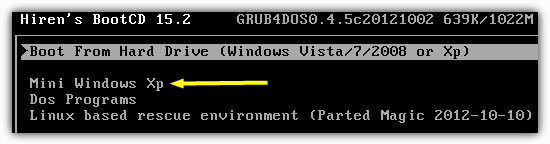
1. Download the Hiren Boot disc and either burn it to CD or create a USB bootable flash drive. Boot it up and select Mini Windows XP on the main menu.
2. After the Mini XP has booted to the desktop, double click the Network Setup icon to start the network auto configuration as it’s not enabled by default.
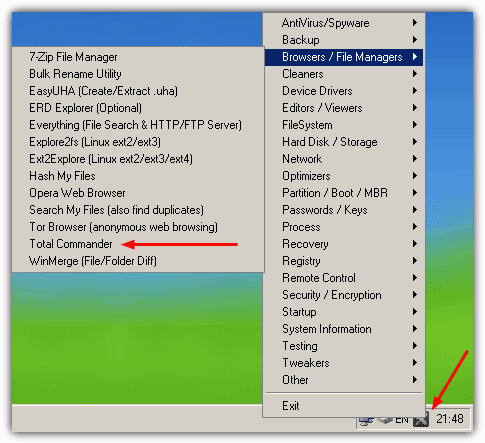
3. Click on the program launcher in the tray -> Browsers / File Managers -> Total Commander. This will launch the evaluation version of the popular file manager. If you don’t have the tray icon, launch the HBCD Menu icon on the desktop and go to the Programs menu.
Transfer to FTP
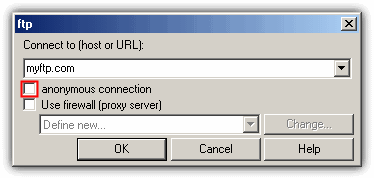
1. With Total Commander open, Press Ctrl+N or go to Net menu -> FTP New Connection. Then enter your FTP server address, and if you need to login with a username and password, untick the anonymous box. After pressing OK you will be prompted for these extra login details.
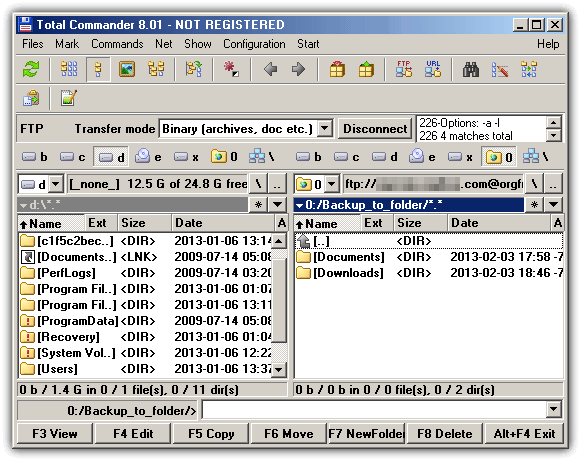
2. You will then go back to the main Total Commander window and one pane will be showing the FTP folder. The files can now be backed up from any of your Windows drives, right click to select files and folders and use the hotkeys or buttons at the bottom to copy or move etc..
Hiren also has a more traditional FTP client program called WinSCP in the Network menu.
Transfer to a LAN Computer
1. In Total Commander, go to the Net menu -> Network Connections…
2. In the Map Network Drive window enter the computer name you want to connect to along with the share folder name. Make sure to use 2 backslashes at the start. Click Finish.
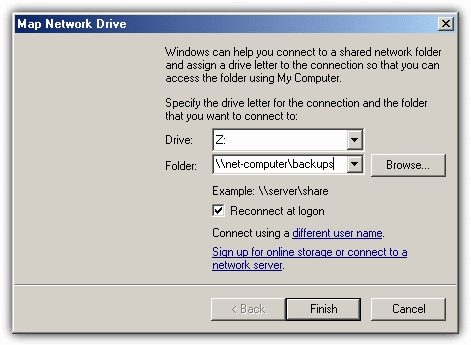
3. Enter the username and password of the user on the PC you’re connecting to and press OK.
This will now create an extra drive letter which you can access in Total Commander or Windows Explorer to transfer your files across. Do note that the sharing permissions have to be correct for the shared folder on the target computer or you won’t be able to write to or even access the drive letter.
Using Parted Magic to backup to FTP / LAN
Parted Magic is a popular hard drive wiping, repairing and partitioning Linux disc that just happens to also be present on Hiren’s Boot CD. You can use either the Hiren CD or the standalone Parted Magic disc.
Transfer to FTP
1. Download the Parted Magic ISO and put it on a CD (or USB stick). Or alternatively download the Hiren disc and put that to CD or USB flash drive. Boot the disc or USB.
2. Once at the Parted Magic desktop, click on the Start menu -> Networking -> gFTP.
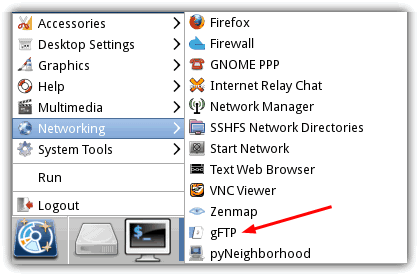
3. You can input your FTP server details in 2 ways in the gFTP program. Enter the host name, port, username and password into the boxes across the top and press the Connect icon to the left. Alternatively, to quick connect, press the Connect icon first and the program will ask you to enter a host name, username and password in turn.
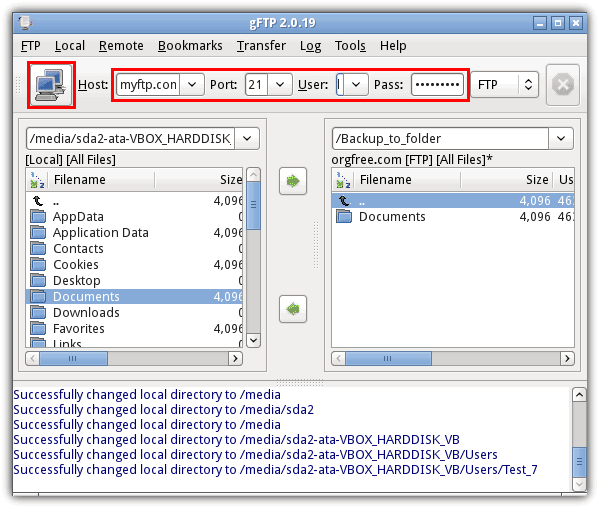
You can then transfer your files, the Windows hard drives in the left pane will be in the Media folder.
Transfer to a Remote Windows Computer
Backing up files over a LAN in Parted Magic requires the use of another included utility. At the time of writing this tool is not in the Hiren’s Boot CD 15.2 version and needs to be run from the standalone release.
1. Boot Parted Magic to its desktop, then click on the Start menu -> Networking -> pyNeighborhood.
2. Click “Add share or host” then enter the host name of the remote computer, make sure to include 2 forward slashes at the start.
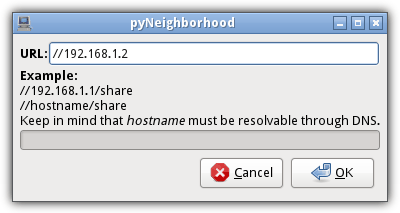
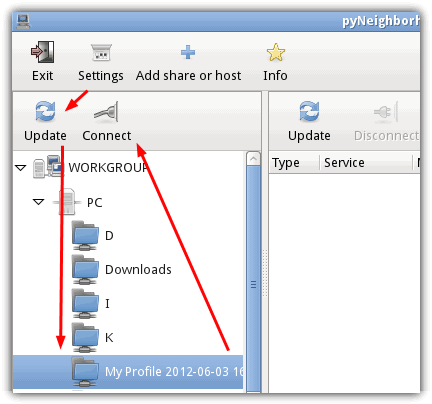
3. Click the left most Update button which should populate the left pane with a tree of your shared folders. Expand the tree and click on the folder you want to use, then click the Connect button. This will popup a password box which you can logon as anonymous or provide a username and password.
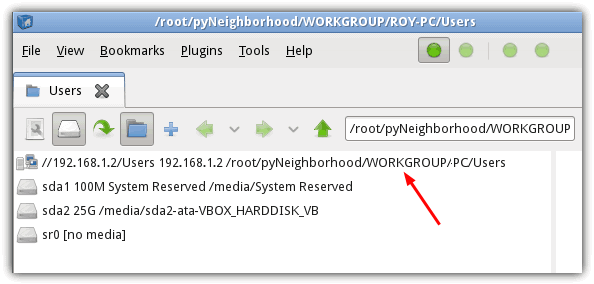
The file browsing window should now appear with your network share appearing in the list of drives, and you can now use it as a normal drive and copy your files from the other local drives in the list to it.
Backup to FTP / LAN using Slax Linux
Slax is an ideal distro for this job because unlike many other versions of Linux, it’s only a 200MB ISO and doesn’t contain extra programs you won’t need. Linux CD’s also have an advantage over live Windows CD’s because they ignore NTFS file permissions which means you won’t have trouble getting into folders Windows usually denies you access to.
1. Download Slax Linux and burn the ISO to CD, then boot to it.
2. On the Slax desktop, right click and select Open with Dolphin.
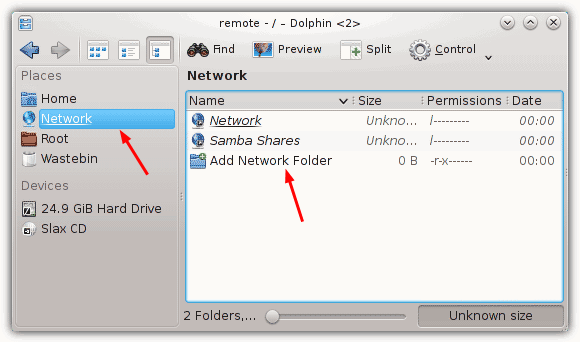
3. Click on Network under Places on the left of the file browse window and then double click on Add Network Folder in the main area.
Transfer to FTP
1. To connect to an FTP server, click on FTP then Next. On the Network Folder Information screen, give the remote location a name, then enter your username, the FTP server address, port and optionally provide a folder. Click Save and Connect.
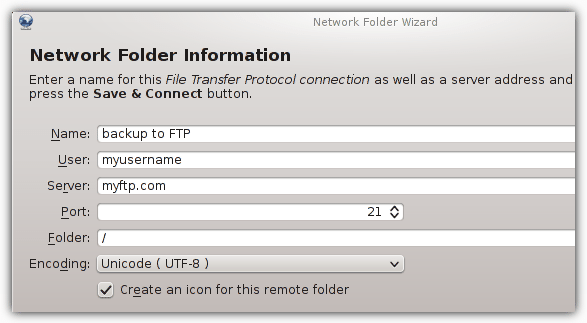
2. A password dialog will appear if one is required to login to the FTP.
Transfer to a Remote Windows Computer
1. To connect to a LAN computer, click on Microsoft Windows network drive, then Next. On the Network Folder Information screen, give the Windows share a name, type in the remote computer’s address and an optional folder, make sure there is at least a forward slash “/” in the box .
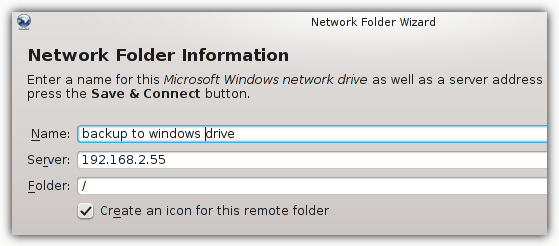
2. Press Save and Connect, a username and password dialog will appear if the remote folder is password protected.
Any configured FTP server and Windows share will show as a shortcut in the Network Places window and your local drives to backup the files from will be available under Devices.
A useful option is the Split button which splits the window into a commander type 2 pane display for quicker file operations. Other versions of Linux will also work the same way, PCLinux was even easier because it opens everything with one click, although the ISO file is a lot bigger…
Backup to FTP / LAN using Ubuntu
Most people will have heard of Ubuntu Linux as it’s probably the most well known of all the Linux distro’s. Ubuntu gains access to FTP or a Windows share in another slightly different way.
1. Firstly, download a release of Ubuntu and then burn the ISO to CD.
2. Boot the computer with the Ubuntu CD (or USB) and when asked, select “Try Ubuntu” to boot into a live environment.
3. When you reach the desktop, open and close any window, then hover over the menu bar at the top and go to File -> Connect to Server.
Transfer to FTP
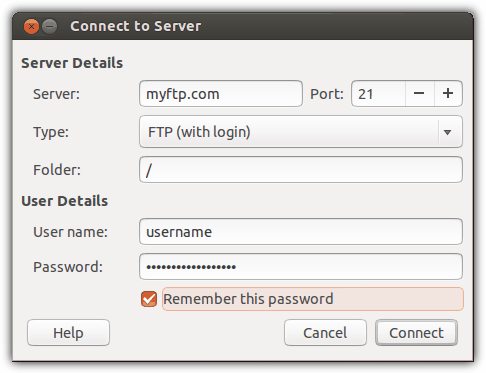
1. In the Connect to Server dialog, select your FTP server address, port if it needs changing from 21 and then click on Type: to select the type of FTP you want to connect with. Use FTP (with login) if you require a username and password to access your server. Click Connect and a window will open with the FTP server’s folder.
Transfer to a Remote Windows Computer
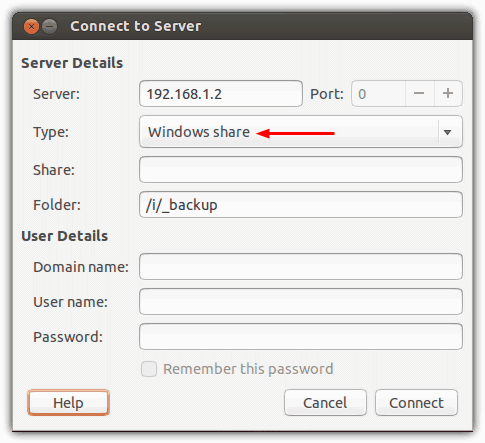
1. To access another Windows PC over LAN, enter the network address of that computer and select Windows share in the Type: drop down. Then enter a sub folder if required, the User Details can be entered later when you try to connect to a user password protected drive or folder. Click Connect and a window will open with a connection to the other PC.
You should now be able to move the files between your local Windows drives and the networked computer or FTP using the file browser. The local drives and remote locations will appear on the left of the file browser similar to Explorer.
This method will obviously work on many other popular versions such as Linux Mint in which you simply open the Home folder and access the File menu like in step #3.
Upload to Cloud Storage
This last method doesn’t really involve FTP or LAN networking, but is an easy way to upload files from a dead Windows install to another storage space using the network. If you have access to any cloud storage service such as Dropbox etc, then you can simply load the live CD’s web browser, log in to your service and then upload your files.
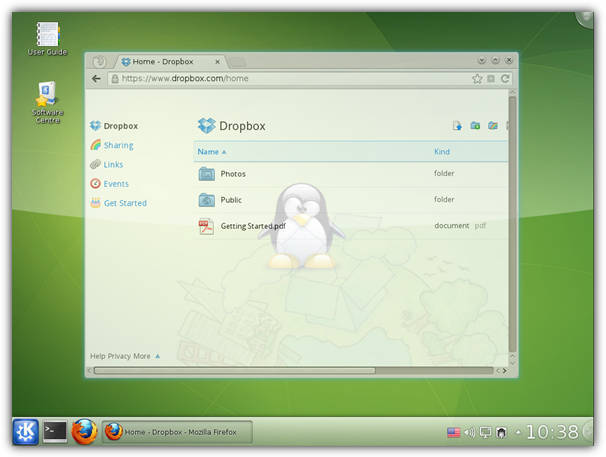
Like uploading via FTP to an online server, using cloud storage will depend heavily on your internet connection upload speeds and the amount of storage space you have at your disposal.
Editor’s Note: The method of transferring via network to another Windows computer could also be much faster in certain conditions than copying large amounts of data using USB. For example, a simple 10/100 network will copy files faster than the average USB 2 flash drive which typically writes anywhere from 3MB/s to 12MB/s. A Gigabit network will also copy faster than many USB 3 flash or hard drives.



Improve this guide

User forum
0 messages