3 ForceBindIP GUI to Force Bind Network Interface
There are times when you are able to have both a wired and wireless adapter connected to different networks at the same time. A simple example is when you’re connected to your home router using the wired Ethernet adapter while an unencrypted Wi-Fi network is also available to connect using your wireless adapter. With both wired and wireless adapters connected to different networks at the same time, Windows does not give you the advantage of binding both of the adapters to give you a faster connection speed.
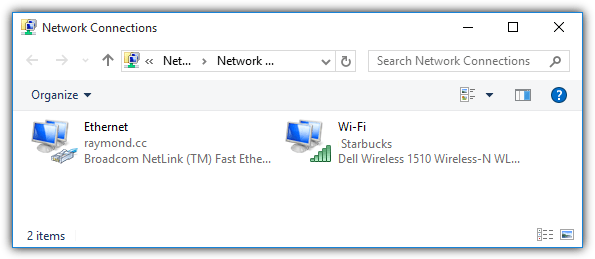
Which network adapter is being used for Internet purposes will depend on the metric being automatically assigned to the network adapter by Windows. Although it is possible to disable the automatic metric feature and override it with a custom value, this will only route all but not specific Internet applications to a network adapter.
The ability to configure which IP address or network adapter to use for an application is commonly found in a BitTorrent client software such as uTorrent, Vuze, Tixati and Deluge. If your program does not support IP or network adapter binding, fortunately there is a very unique free and small program called ForceBindIP that allows you to control which network adapter or IP address to use on an application.
ForceBindIP is a command line application without a friendly graphical user interface that allows you to easily bind a selected application with an IP or network adapter. In order to use ForceBindIP, you will need to know the IP address of the network adapter that you want to use to bind and the full path to the application. You can either type “ipconfig” in command prompt to show the IP address of the network adapters or simply download AdapterWatch and use it to display the information in a GUI.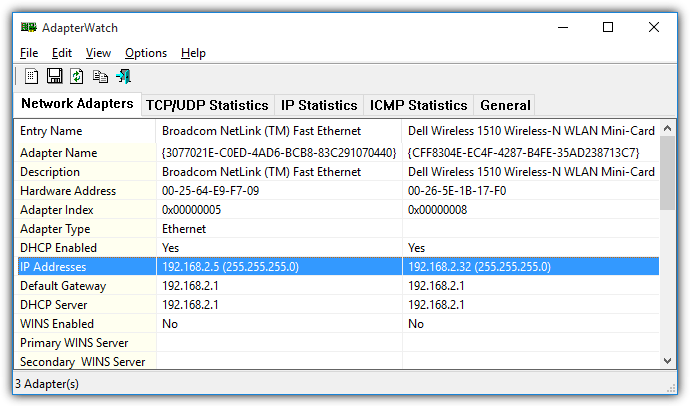
ForceBindIP was made during the Windows XP era when a 64-bit Windows operating system wasn’t very commonly used. Installing ForceBindIP on a 64-bit Windows operating system is a bit different compared to installing on 32-bit OS. Hence, the method to launch ForceBindIP is also not the same since the installation path has changed.
Install and Use ForceBindIP in 32-bit Windows
For 32-bit Windows, the ForceBindIP setup installer will copy 2 files, BindIP.dll and ForceBindIP.exe, to the C:\Windows\System32\ folder. You can conveniently run ForceBindIP.exe from any location in command prompt because the system32 path is a recognized environment variable. So if you want to bind an IP address, for example 192.168.2.32 to Firefox, the command would be:
ForceBindIP.exe 192.168.2.32 “C:\Program Files\Mozilla Firefox\firefox.exe”
It is important to enclose the full path of the program with a double quote because there are whitespaces in between the characters in the path.
Install and Use ForceBindIP in 64-bit Windows
Installing ForceBindIP using the setup installer on a 64-bit Windows operating system will result in the 2 files BindIP.dll and ForceBindIP.exe being copied to C:\Windows\SysWOW64\ and not the system32 folder. Unfortunately the SysWOW64 is not a recognized environment variable which means you cannot run ForceBindIP.exe from any location in command prompt.
There are 2 solutions to this problem which is either to run ForceBindIP.exe from SysWOW64 or manually copy the 2 files to the System32 folder and the latter will allow you to conveniently run ForceBindIP.exe from any location in command prompt. If you don’t want to manually copy the files to system32, the command line to bind Firefox to the IP 192.168.2.32 is as follows:
%SystemRoot%\SysWOW64\ForceBindIP.exe 192.168.2.32 “C:\Program Files\Mozilla Firefox\firefox.exe”
Run ForceBindIP with a GUI (Graphical User Interface)
Although ForceBindIP does not come with a GUI, the required command line parameters aren’t that complicated. However, not everyone is familiar in using command prompt and manually typing commands. Hence there are a few third party frontend GUI programs for ForceBindIP to help the less experience users in binding a specific IP address to an application.
1. ForceBindIP GUI v1.5 by LibTiff
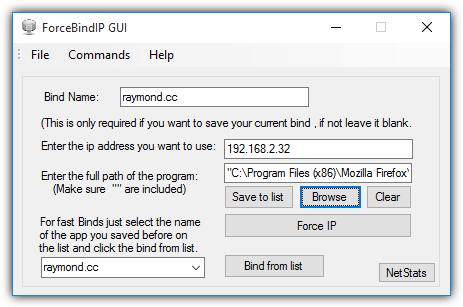
This version of ForceBindIP GUI by LibTiff requires the user to manually enter the IP address that you want to bind to the application and then you are able to browse the executable file. Clicking the Force IP button will attempt to use ForceBindIP to bind the provided IP address to the selected program. You can save the binds to an external list so that you can quickly run multiple programs with the previous binded settings.
It works even if the ForceBindIP files are installed on a 64-bit Windows operating system so there is no need to manually move the files to System32 folder. There is no -i support though.
Download ForceBindIP GUI v1.5 by LibTiff
2. ForceBindIP GUI 1.0 Beta by Michael Jones
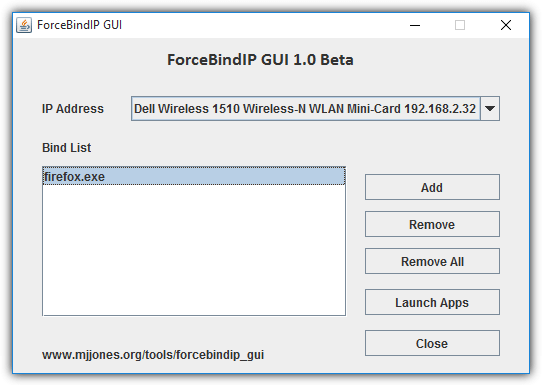
ForceBindIP GUI by Michael Jones requires Java to run and it has some advantages over the GUI version by LibTiff mentioned above. First you get to select the IP address which is very useful for users who doesn’t know how to look up the internal IP address for the network adapter. Then you get to create a list of applications that automatically runs and binds to the selected IP address by clicking the “Launch Apps” button. The favorite list is automatically saved and will be restored when you re-run the program.
Download ForceBindIP GUI 1.0 Beta by Michael Jones
3. ForceBindIP GUI by Donlawat
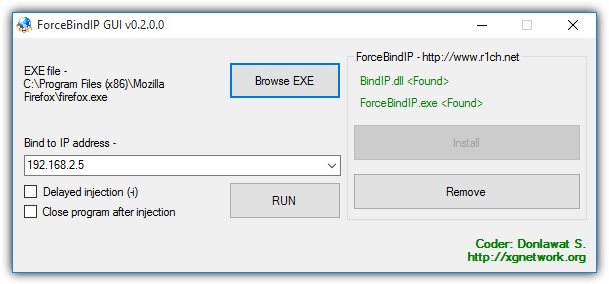
ForceBindIP GUI by Donlawat does not work out of the box on 64-bit Windows operating systems because it is hard coded to detect and run ForceBindIP from the system32 folder but not in SysWOW64. So if you want to use this GUI version of ForceBindIP on a 64-bit Windows, you just need to manually copy BindIP.dll and ForceBindIP.exe to the C:\Windows\System32\ folder. Moreover, it requires .NET Framework 3.5 to run which needs to be manually installed from “Turn Windows features on or off” (OptionalFeatures.exe) in Windows 8 and 10.
However, a slight advantage of this GUI version is the ability to bind a program with an IP address using the delayed injection -i method which is not found in the first two GUI mentioned above.
Download ForceBindIP GUI by Donlawat
Additional Notes: Although the official ForceBindIP website stated that it will only run on Windows NT/2000/XP/2003, it does actually work in Vista, 7, 8, 8.1 and even the latest Windows 10 for both 32-bit and 64-bit. If the program crashes after binding an IP, you can try adding an optional -i parameter to the command line. Not all programs can be bound to a specific IP address because they do not use the standard Winsock functions. You can verify if it is working by looking at the Received and Sent Data column in AdapterWatch.
You might also like:
 Firefox has Prevented Unverified Add-on: How Force Enable
 3 Network Bootdisk for Microsoft Network in Floppy and Boot CD
 Network Connection Manager Software: 5 Best We Tested
 5 Best Tools to Scan Shared Folder in Network [2023 List]
 4 Ways to Automatically Disable Wireless Network Connection when Local Area Connection is Enabled
i have four diffrent ip network, four pc connected one pc for aster software. help me, i can set ip per users, any solution
forget about all of the above try this it blows everything ouf the water don’t forget to tick “Global Winshock Hook”
github.com/katlogic/bindip/releases
hi
i don’t know how to build it using MSYS2 im noob with that but i searched a little bit and found that this MSYS2 software is make u use unix software in windows but i told u idk how to build bindip software please help!
PS: katlogic (the repository author) said “You need MSYS2 and 64bit windows. Just pacman -S gcc and make. To sign the dlls, you need to create your snake oil cert. I didn’t include kat.pfx to avoid malicious parties abusing it if you trust my snake oil.” ….. maybe that would help
How i can set a program to always starts with a bind IP ? Suppose i bind an application with IP 192.168.0.32, I want that when ever i start windows this programs auto starts with this IP.
This is an gr8 utility I found as my solution.
Any solution to use it with various profiles of firefox. i.e. every firefox profile with different connection.
Can anyone please help me with this as I do not wish to use any other browser & unable to run two different version of firefox at same time.
Here’s a fix for using a GUI designed for 32-bit ForceBindIP when instead you are using 64-bit ForceBindIP:
Either open an elevated command prompt with Win + X + A and paste the following two lines in one at a time:
mklink %windir%\system32\BindIP.dll %windir%\SysWOW64\BindIP.dll
mklink %windir%\system32\ForceBindIP.exe %windir%\SysWOW64\ForceBindIP.exe
Or you can copy the following into a notepad window, then click File > Save As; then you MUST select “Save As Type: All File (*.*)” and then give it a name ending with .cmd – then just put it in a convenient folder and it will prompt for Admin when double-clicked. There is also a longer version after this that uses VBScript in case someone needs that (doubtful but hey maybe you’re running XP pre-SP1 or something??)
Copy after this line, and stop just before the line that says “Ends before this line”
@echo off
icacls “%windir%\system32\config\system” >nul 2>&1
if [%errorlevel%] neq [0] (
powershell -c “Start-Process \”%0\” -Verb runAs”
exit
)
echo Running as admin.
echo.
REM –> BindIP.dll
echo Making a symbolic link to SysWOW64\BindIP.dll…
mklink %windir%\system32\BindIP.dll %windir%\SysWOW64\BindIP.dll
echo.
REM –> ForceBindIP.exe
echo Making a symbolic link to SysWOW64\ForceBindIP.exe…
mklink %windir%\system32\ForceBindIP.exe %windir%\SysWOW64\ForceBindIP.exe
echo.
echo Symbolic links should be created and you should be able to use any GUI designed for 32-bit ForceBindIP without problems now.
echo.
pause
Ends before this line
VBScript version:
Copy after this line, and stop just before the line that says “Ends before this line”
@echo off
:: BatchGotAdmin
:————————————-
REM –> Check for permissions
>nul 2>&1 “%SYSTEMROOT%\system32\cacls.exe” “%SYSTEMROOT%\system32\config\system”
REM –> If error flag set, we do not have admin.
if ‘%errorlevel%’ NEQ ‘0’ (
echo Requesting administrative privileges…
goto UACPrompt
) else ( goto gotAdmin )
:UACPrompt
echo Set UAC = CreateObject^(“Shell.Application”^) > “%temp%\getadmin.vbs”
echo UAC.ShellExecute “%~s0”, “”, “”, “runas”, 1 >> “%temp%\getadmin.vbs”
cscript “%temp%\getadmin.vbs”
exit /B
:gotAdmin
if exist “%temp%\getadmin.vbs” ( del “%temp%\getadmin.vbs” )
pushd “%CD%”
CD /D “%~dp0”
:————————————–
echo Running as admin.
echo.
REM –> BindIP.dll
echo Making a symbolic link to SysWOW64\BindIP.dll…
mklink %windir%\system32\BindIP.dll %windir%\SysWOW64\BindIP.dll
echo.
REM –> ForceBindIP.exe
echo Making a symbolic link to SysWOW64\ForceBindIP.exe…
mklink %windir%\system32\ForceBindIP.exe %windir%\SysWOW64\ForceBindIP.exe
echo.
echo Symbolic links should be created and you should be able to use any GUI designed for 32-bit ForceBindIP without problems now.
echo.
pause
Ends before this line
Looks like the latest versions of ForceBindIP (v1.32 as of this writing) support 64-bit natively. If it’s not working probably should contact the author with a bug report.
I have used this last year at work on a Windows 7 Enterprise workstation. It worked flawlessly though I did have to put the 2 files in SysWoW.
We have a new workstation this year (same Dell just an newer model) but I can’t seem to get it to work. I receive no errors and Firefox does fire up but when I check the IP, it still shows the LAN (Work Domain AD) and not the USB wireless.
I have tried every possible scenario discussed here including using GUID. Can anyone help me please?
Heres the latest version of the build guys:
ForceBindIPGUI V2.0
sourceforge.net/projects/forcebindip-gui-by-libtiff/
Changelog:
Build 2.0
=========
-Code rewritten from scratch AGAIN (Since i lost all of my sources)
-Added CMD , ipconfig , ipconfig/all , ipconfig/release , ipconfig/renew
-Added installation of forcebindip library through File->Install
-Added Delay Function -i
-Added Configuration Profiles (Add/Delete)
-Fixed some bugs
-Added some basic error prevention (null entries etc)
-Donate button , same app icon , assembly info.
I am getting the “Couldn’t run the specified command line” error on Windows 10 x64. I have tried all the troubleshooting methods i could find. My cmd line looks like: ForceBindIP -i 10.0.0.1 “path to discord”.
Any ideas? Thanks
ive been scouring the net to find someone who knows about this cool program Forcebindip which for a lot of my friends is working perfectly, however for me the problems continue, basically what im trying to do is set up seperate chrome instances and using the forcebindip to assign each chrome browser to a usb wifi dongle whilst also using my main internet (again on separate chrome) now ive seen this work first hand and ive followed guides to the letter, changing metric values, assigning each chrome with its own target shortcut pointing it to the wifi adapter etc but every chrome i open keeps defaulting to the home broadband connection, im at my wits end and have exhausted all my very limited knowledge and followed as many guides as i can and i know it could be something so simple so hoping you can help me out on here
I’d like to use the command line version with uTorrent, on top of Windows Firewall rules.
How do you unbind a program from an adapter?
I am looking for a similar application which combines 2 mobile connections in a smartphone.
I want to bond multiple 2G or 3G networks for a better bandwidth and speed.
I use a phone with multiple sim cards.
Can anyone tell me if this is possible?
Thanks for your time..
Try “Connectify Dispatch”.
Yes. But it can only be used for bonding a wifi/ethernet with 2G/3G.
Whereas I want the combination of multiple mobile data connections with each other…. (not wifi).
While ForceBindIP does run on Windows 10, it does not work anymore there.
Is there any replacement or alternative available?
Copy the 2 files BindIP64.dll and ForceBindIP64.exe to C:\Windows\SysWOW64\ folder.
Unfortunately the SysWOW64 is not a recognized environment variable which means you cannot run ForceBindIP.exe from any location in command prompt.
%SystemRoot%\SysWOW64\ForceBindIP64.exe IP-Adress “C:\Program Files\Mozilla Firefox\firefox.exe”
It´s work for me under Windows 10 Pro 64bit
Na, that won’t work anymore.
So is there a way to make ForceBindI work in Win10 64bit?
I have it running great in Windows 10 64-bit… I just downloaded the command line version, created a batch file specifying what I want bound and it works w/o a hitch
Hi, I’m wondering if anyone can figure this one out. I’m trying to get “iTeleport Connect” to bind to the wireless card 192.168.1.# while my domain connected computer runs my lan to the network. We have a verizon router that I connect to wirelessly to get outside with no blocking and I have to keep my lan plugged in so I can access printers, network shares, remote desktop. It just doesn’t seem to work because the iTeleport Connect Service doesn’t seem to be able to bind to the WLAN card and uses the smallest metric, but if I change the metric, it breaks everything else. Can anyone help?
What OS are you using?
I’ve created an Interface program for ForceBindIP featuring full support for delayed injection and 64bit as well as the ability to set a custom install directory for ForceBindIP
You can find it here:
sourceforge.net/projects/forcebindip-gui/
If you want to use the GUID instead of the IP address on the command line, make sure your guid is in UPPER CASE!
(PS: it would be nice if the next version could convert the GUID to upper case automagically).
To use -i with ForceBindIP GUI v1.5 by LibTiff:
1) Open ForceBindIP GUI v1.5
2) Enter the bind name, the ip, and the full path, as shown in the article above’s image.
3) Click “Save to list”.
4) Exit ForceBindIP GUI
5) Open the main ForceBindIP GUI v1.5 folder. There is a folder inside called “binds” – open this. In it, you will find an “.ini” file with the name of the bind you just saved, Open it with Notepad.
6) You wil see the ip address you set, followed by the applicaion path.. E.g.:
##.##.#.# “C:\Program Files\Mozilla Firefox\firefox.exe”
(The # signs represent your binding ip address).
7) Add “-i ” (without quotes, but make sure to include the space) at the start of that line:
-i ##.##.#.# “C:\Program Files\Mozilla Firefox\firefox.exe”
8) Save the file (same filename) and close notepad.
9) Run ForceBindIP GUI, select the application to load from the dropdown menu at the bottom, and click “Bind from List”
Done! Repeat for all of the applications you want to bind. This makes Libtiff’s GUI the most usable one IMO, as you can both save you favorites, and use the “-i” injection..
Hi Raymond,
I have been using ForceBindIP v1.2a on Windows 7 64-bit and it was running perfectly. Until I have reformat my PC (same OS) and upgrade to ForceBindIP v1.3, it doesn’t work anymore.
Note: I have lost the copy of v1.2a as I didn’t make copy when upgrade to v1.3 (My mistake)
My computer is running on both LAN & Wifi with internet access, What I want to do is just bind my Chrome & Firefox with browsing through the Wifi internet. Other application and IE are remaining accessing through LAN.
I have tested both ForceBindIP 32-bit & 64-bit.
ForceBindIP64 is totally not function, it will just browse through the LAN internet when I bind it to any Internet browser.
ForceBindIP 32-bit, it allow me to browse through the Wifi on only certain website, other websites it return error as no internet access. I thought it was something to do with the IPv6 and try to turn off IPv6 on my Wifi. In result I can’t access anything. Perhaps ForceBindIP v1.3 is rely on IPv6….?
I’m not really a teach savvy and would appreciate if you could provide some guideline on this matter.
This software is really awesome and too important that I can’t go without it.
Hey all, I’ve just published an updated version of ForceBindIP (v.1.3) which does away with the system32 mess and installs to its own program files folder like a well behaved application.
You can find the updated version 1.3 on my site at r1ch.net/projects/forcebindip
damn man, did you fix this bug not binding ip, but binding thourgh adapter id parameter, also in 1.3
where is brief –version –help /? – nothing.. When i bloody need to run external app it with a parameter it says before ‘couldnt run the speciefid command line” and never start, but now dont show anything at all.
few years ago already email you about it, still same… better for humanity if you not update.. now it wont run at all..bump
To run a program with parameters, make sure to enclose the program path in quotes and then supply the parameters. I’ve tested and ensured this works even for programs with spaces in the path.
Example:
forcebindip 192.168.88.209 “c:\temp\folder with spaces\nc.exe” -v -v r1ch.net 80
Hi Sir, I tried running ForceBindIP (hamachi ip) “d:\starcraft\starcraft.exe” -v -v r1ch.net 80, but the result was still the same. Can you help me with this? I’m still getting the same error. “Couldn’t run specified command line.”
Hi Raymond,
ForcebindIP indeed works on Windows 10 x64 but only if you specify IP address of a NIC. If you use NIC GUID, you get a message “Couldn’t find named adapter”. This worked on previous versions of Windows OS, even 8.1. Could you please fix this?
Did you actually test ForcebindIP on Windows 10? I’ve never had a problem with it on Windows 7/8 but it’s not working for me on 10 64 bit. It just tells me “Couldn’t find named adapter” when I try to bind via GUID, or if I try by IP it says “Couldn’t run the specified command line”.
Yes we tested ForcebindIP on Windows 10 64-bit and experienced no problems in binding to an internal IP address.
the guid should be in UPPERCASE!
you can copy guid from: HKEY_LOCAL_MACHINE > SOFTWARE > Microsoft > WindowsNT > CurrentVersion > NetworkCards > (number)..
If you get that error message you probably included the {brackets} on your GUID. Run the command without brackets.
%SystemRoot%\SysWOW64\ForceBindIP64.exe 2F084FBE-2A34-4B2A-B691-85C8476A2F1A “C:\Program Files (x86)\Microsoft Office\root\Office16\OUTLOOK.EXE”
It does however not bind on the current release of windows 10, but it doesn’t crash either.
Amazing! This worked instantly, even on Windows 7 64-bit.
THIS SOFTWARE IS AMAZING !!!!
Everyone should know about it, it’s a shame that when you google “bind software nic” everyone says that it’s impossible and they recommend to built static routes. We should tell them “Use ForceBindIP” for God’s sake !!! :)
Thanks again mate :)
YOU GUYS ROCK! Spent 3 days trying to get this working on win7 x64. Finally got it working!
this software is good…
thanks Raymond for sharing it with us…
Thanks Ray…!!!
GOOD WORK. :)
To be Honest, I was in search of such a technique..to use my Wireless & Wired connection at the same time.
You made my day..
Now a task for me to check this out..
Many Thanks,
Grr
thanks Ray…a big thank you for what you’ve shared to us. it’s awesome to combine 2 connections at the same time. very useful indeed. hahahhaa. now i got another idea. long live to Ray.
Thx It really helps for as long as I know I want to find a software whcih can combine 2 connections, so this soft solved all my problems
Thanks for the article Raymond, Glad to make a contribution! :D