
Solutions to CD/DVD Drive Letter Missing from My Computer


 7 min. read
  Published on

The usage of optical drives has slowly been on the decline for a while now. Partly because small form factor notebooks and hybrid devices are more popular and simply don’t have the room for a CD/DVD ROM drive, and also because mediums like USB flash and portable hard drives are cheap and can be used as a substitute to a CD or DVD to install software. For many of us, an optical drive is still vitally important, whether it’s for reading from and installing games, writing out your downloads, creating a music CD or making a backup of your system.
Because it behaves just like any other drive attached to your computer, a ROM drive will show up in Windows Explorer and have an assigned drive letter. There is quite a common issue in Windows where the drive completely disappears from My computer in Explorer as if it has been physically unplugged or has broken down. Even Device Manager will tell you the drive is still there and functioning correctly with no exclamation marks to denote an issue.
Before you consider replacing the ROM drive because you think it may be faulty, there are some simple solutions which nearly every time will get the drive back showing properly again in My Computer.
Here’s a selection of the most common fixes for you to try out if the CD/DVD drive letter is missing from My Computer.
Fixing the Missing Drive Letter using the Registry
There is quite a common fix for this issue which works more often than not. If you ask Microsoft Support or your computer’s manufacturer for help with a missing CD or DVD drive letter in Explorer, one of the first solutions they would offer will likely be this one.
The issue is related to registry settings that certain applications, especially burning or backup software create. Filters are drivers installed by the software and either sit in between the optical drive and its hardware driver (LowerFilters), or between the hardware driver and the application itself (UpperFilters). If the filter settings are corrupted or still present in the registry when the software itself has been removed, it could make the drive unavailable in Explorer.
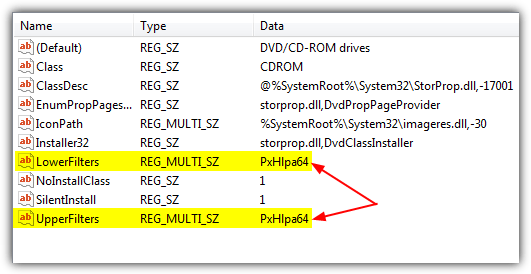
Here are the steps to fix the CD or DVD drive not appearing in My Computer problem by removing the UpperFilters and LowerFilters, it’s the same for XP up to Windows 8:
1. Hit Win+R, type Regedit and click OK. Alternatively type Regedit into the Search box.
2. Navigate to the following registry key:
HKEY_LOCAL_MACHINE\SYSTEM\CurrentControlSet\Control\Class\
3. Click on Class, then look for and click on the following key. Note, you need to find this exact key as there are several that look very similar.
{4D36E965-E325-11CE-BFC1-08002BE10318}
4. In the right side details pane of Registry Editor look for any entry called UpperFilters and also LowerFilters. Right click on each one you find and click Delete.
5. Close Regedit and restart your computer.
If you would prefer not to edit your own registry but just want to try this registry fix first, simply download the small Zip file below and run the .reg file inside to import the data into your registry. It will delete the Upper and Lower Filter entries.
Download Clear_Upper_Lower_Filters.zip
This should fix the CD or DVD drive missing from My Computer problem if the filters were indeed the problem, which is often the case.
Repairing the Registry using a Utility
If you are not one for editing the Windows Registry, thankfully there is a simple solution to get around the issue. A tool is available from Microsoft which is part of their Fix It range of utilities that runs a few diagnostics relating to your CD or DVD drive in Windows and if it finds a problem, will attempt to fix the issue.
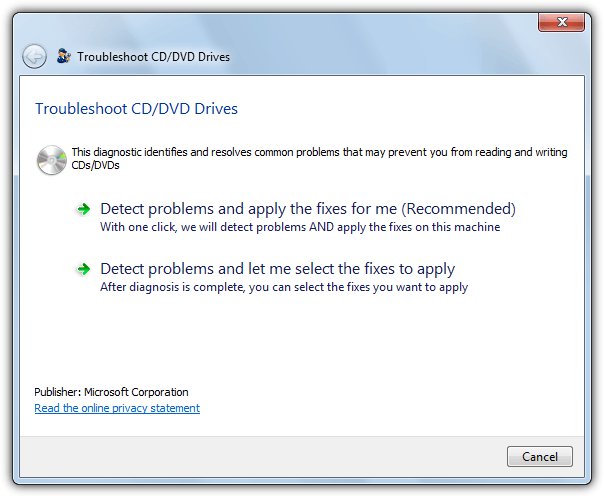
One of the checks the Fix It performs is scanning for the Upper and LowerFilters and deleting the registry keys if they are found. Download the Fix It that is for your computer:
Download Fix It CD/DVD Drive Troubleshooter for XP, Vista and 7
Download Fix It CD/DVD Drive Troubleshooter for 8 and 8.1
Run the Fix It and it will ask if you want to detect and fix issues automatically or show you what the issues are before manually choosing what to fix. The easy option is obviously auto, you will be asked to select the optical drive device which you can’t find and hopefully if the problem was an Upper/Lower filter, it will say the issue was repaired.
The Microsoft Fix It can also repair other CD or DVD drive related issues such as not being able to write discs in your burner.
Driver May Be Corrupted or Missing Code 39 or 19 Errors
In addition to the CD or DVD drive not appearing in My Computer, the UpperFilters and LowerFilters issue in the registry can also cause a yellow exclamation mark to appear on the ROM drive in Device Manager.
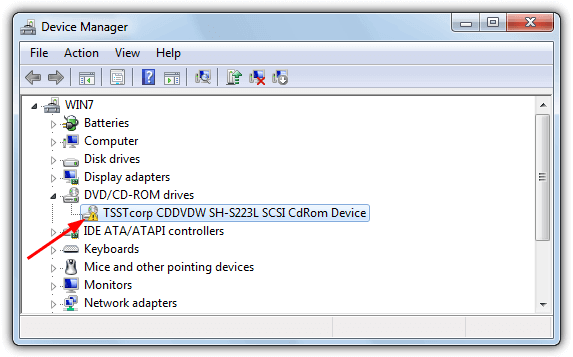
If you double click on the device or right click and select Properties, there will be an error code. In Windows XP you will probably see a “Windows cannot load the device driver for this hardware. The driver may be corrupted or missing. (Code 39)” error, in Vista and above this is more likely to be “Windows cannot start this hardware device because its configuration information (in the registry) is incomplete or damaged. (Code 19)”.
For both of these errors in Device Manager and possibly a few others too if they are affecting only the ROM drive, using the UpperFilters and LowerFilters registry fix or the Microsoft Fixit above should cure the problem.
Has Your CD/DVD Drive Been Assigned a Drive Letter?
This problem is more related to removable devices such as USB flash drives or portable hard drives, that also includes external CD/DVD drives if you are connecting via USB. Although it’s not so common for an internal optical drive to lose its drive letter, there is still a possibility that could happen if a driver has been reinstalled or you have performed a Windows upgrade, and is worth checking because no registry editing is involved.
1. Press the Win key and type Diskmgmt.msc into the Search box. Alternatively go to Control Panel > Administrative Tools > Computer Management, then click on Disk Management.
2. Look for the optical drive in the lower pane, it should be “CD-ROM 0” or “CD-ROM 1”. If there is no drive letter on the second line, “CD-ROM (D:)” or “DVD (D:)” etc, this means a letter is not assigned by Windows and will need assigning manually.
3. Right click in the left hand area where the CD-ROM text is and select “Change Drive Letter and Paths”.
4. Click Add and select a drive letter for your device from the drop down menu on the right, then click OK.
5. Once back at the main Disk Management window, press F5 or the Refresh button and the ROM drive should be assigned the drive letter. Now go back to Windows Explorer and see if the drive has returned.
Make Sure Your Drive is Viewable in Explorer
Although this is a rather simple solution to your optical drive not being visible in Explorer, it is still easily missed by even experienced users and particularly if you have recently migrated from another operating system such as XP to Vista, 7 or 8. It’s not entirely apparent to the average user but drives are grouped together in Explorer into distinct types such as fixed hard drives, removable devices, network drives and etc.
Each of these groups is collapsible and will toggle the showing or hiding of each group. A small arrow to the left (right for Vista) controls whether the group is visible, simply click on it to show the drives inside the group. It will be called “Devices with Removable Storage” for Vista and 7, “Devices and Drives” for Windows 8. There will be a number in brackets if any devices are hidden from view. Alternatively just double click on the line to expand or collapse the group. This may seem like a trivial solution but can be missed by absolutely anyone!



Improve this guide

User forum
0 messages