Hard Disk Serial Number Changer / Spoofer: 6 Best We Tested
Some multiplayer games that implement the PunkBuster anti cheat system get cheaters off the server using hardware bans. It used to ban the hard disk serial number but no longer does that since there are ways to spoof and temporarily change the so-called hardcoded serial number. So now they’ve started to ban the CD-Key. Other than that, some licensing system also uses the hard disk serial number to generate a unique hardware ID which is then used to generate an external license file to activate the software.
A simple way to find your current hard disk volume serial number is to open a command prompt (Win key+R and type cmd) and then type dir. The second line shows your volume serial number for the system C partition. Type dir [driveletter:] and it will show a different serial number even if the volume is on the same physical hard drive. The volume serial number changes every time you format the partition and Windows also uses this value during activation so you can’t simply move your install from one partition to another. If your Windows has been activated using a product key from a sticker it will probably ask for the key again after a reboot and will need reactivating if you change the volume serial number on the system drive.
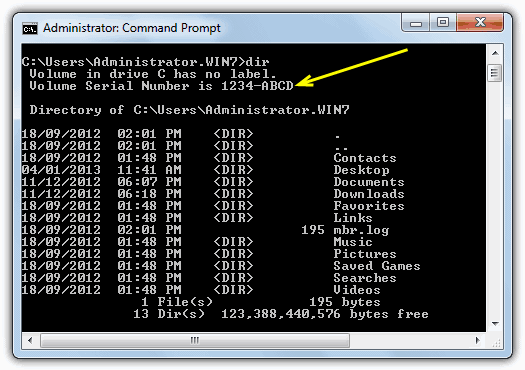
If you do a simple search in Google, you’ll find tons of information about to change your hard disk volume serial number, but not the real hard disk serial number that is hard coded into the hardware. Some people said that it is impossible to change it, but we will show you that there are ways to change both volume and hard coded serial numbers for your hard disk.
1. Hard Disk Serial Number ChangerThere are a few free tools around capable of changing the volume serial number and one of them is called Hard Disk Serial Number Changer. The name is a bit misleading though as it doesn’t actually change the hard disk serial number but the volume serial number which is different. It works on just about any Windows operating system from 98 onward and is a standalone portable executable but does need to be run as administrator on Vista and 7.
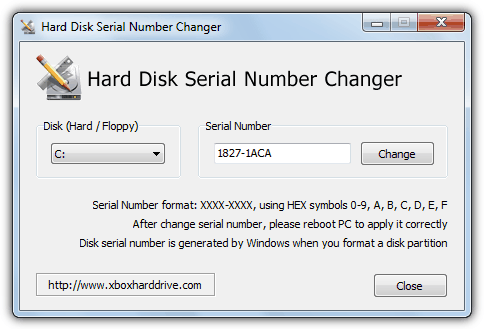
Usage is pretty straightforward and you simply choose your drive from the drop down box, enter the new serial number and click the Change button. Do note the serial number format as mentioned in the window is made up of 8 hex characters from 0-9 and A-F split by a “-” into two groups of 4. You will then need to reboot to commit the changes.
Download Hard Disk Serial Number Changer
2. VolumeID
Another useful tool to change the volume serial number is by Sysinternals called VolumeID. This tool is only usable from the command line so won’t be as quick and easy to use for some people as Hard Disk Serial Number Changer. The command line usage to change the ID of a drive volume/partition is:
volumeid [driveletter:] xxxx-xxxx
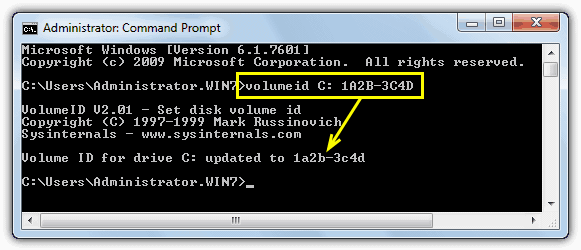
The format is again 4 hex characters, a “-” followed by another 4 hex characters. You should shut down all your running applications before using this tool and will need to reboot immediately after the changes if they are being made on an NTFS partition.
Download Sysinternals VolumeID
The tools above are fine for changing the serial number of a volume/partition but trying to change the serial number of the actual hard drive itself is a whole different story. These are hard coded into the hard drive itself and cannot simply be edited or altered using a piece of software. There are however, several tools around that can spoof the hard drive’s built in serial number temporarily which can hopefully fool whatever software you are trying to get round. Unfortunately a lot of these tools aren’t free and some are even approaching $100 to buy.
3. PB DownForce
There is a free tool that’s been around for quite a while called PB DownForce which is able to temporarily spoof your hard drive’s static serial number into a different random or seeded number. There is also an option to set your own predefined serial number although we were unable to get that function to work during testing. To use the program in it’s simplest form, all you have to do is start it up and click on the Start spoofing button. Make sure to run PB DownForce as administrator.
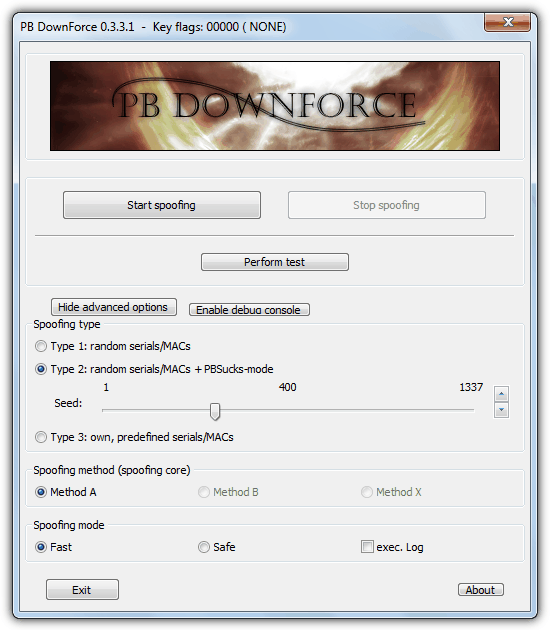
The Advanced options button shows the 3 different types of spoofing to choose, although as mentioned we couldn’t get method 3 to work as intended and it just showed a serial full of a single number. You can easily use the Stop Spoofing button and try another random number. Perform test will quickly tell what drive model name and serial has been given. The image below shows a new serial after using PB DownForce to change a hard disk serial number in the PC Wizard hardware information tool. Do note that some tools such as Speccy will still show the original serial number for the drive because they gather their data in another way, HWInfo does something different again and will show the spoofed drive as another completely new hard drive in its list.
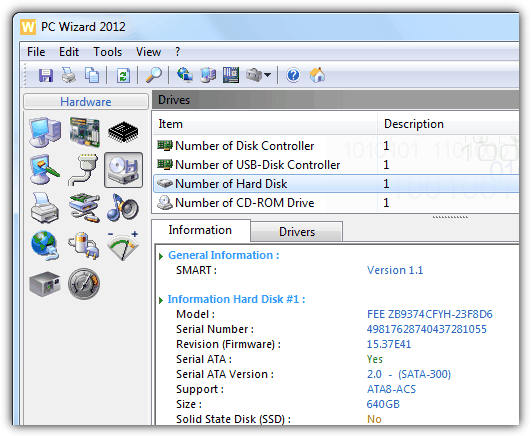
PB DownForce was tested and worked on Windows XP and Windows 7 32-bit although it still was quite random to which machines worked and which showed no change or produced an error. 64-bit Windows is not supported in any free hard drive spoofing tools we came across. The spoofed serial will return to normal after a reboot.
There are several more hard disk serial number Spoofing tools on page 2.



so you mean reboot in restart you computer or reset you whole computer?
Reboot as in restart. As far as I’m aware, reboot your computer has never implied resetting or reinstalling it.
how can i change hwid with command in bat file ?
About PB Downforce,
Well the Windows Service I grabbed turned out to be a .sys file, obfuscated by VMProtect(1.X).
It’s internal name, as Windows Explorer tells me, is: ‘helper.sys’. So, this means it’s a Windows Device Driver, a .sys file.
But that’s food for IDA Pro, when I’ve got the time.. :)
Regarding PB Downforce,
The executable drops a service into your %TEMP% folder, which it uses. It’s the temporary folder from Windows.
What I did was, preventing the removal of contents in my %TEMP% folder. Very interesting, now I’ve got the service DLL to tinker around with.. Let’s see if that contains a virus. :)
Windows Defender quickly picked the DLL up as ‘ Trojan:Win32/Tiggre!rfn ‘.. Could be bad..
Windows Defender is well known for false positives. In fact, it’s one of the worst there is.
However, tools like this will generate detections in AV software, it’s unavoidable.
Concerning PB Downforce, I got interested.
Windows operating systems based x64-bit, have KPP (Kernel Patch Protection). So the hooks on DeviceIoControl, which PB Downforce applies, are rendered useless.
If you’re on a 32-bit system, then there’s no problem for you.
Some notable strings in the PB Downforce executable are as follows, after unpacking:
IOCTL_STORAGE_QUERY_PROPERTY
SMART_GET_VERSION
SMART_RCV_DRIVE_DATA
IOCTL_NDIS_QUERY_GLOBAL_STATS
IOCTL_STORAGE_QUERY_PROPERTY
IoBuildDeviceIoControlRequest()
DeviceIoControl()
PhysicalDrive
ServiceName
PBDOWNFORCE_SERVICE
The executable file itself was packed with ASProtect, and was made with Microsoft Visual C++, with its wxWidgets.
The good news is, it does not contain a trojan.
TROJAN included at your service
Of course there isn’t, try to have a bit of common sense. Antivirus and security software obviously hates programs like these because they are essentially hacking tools.
Tried installing it it kept showing me an error dialog box Error:communication failed.
I dont know what next to do.
Please help
Tried installing it it kept showing me an error dialog box Error:communication failed.
I dont know what next to do.
Please help
PB Downforce is not working on my Windows 10 64-Bit. Please help me. Can I run it in any way?
whats the password for it BRUHHH
Downloads with a password have it listed on the download page.
hello raymond !
the Chameleon site not workin’ :(
Chameleon appears to be dead. I guess none of these tools that are currently available work for newer operating systems, sadly.
i got bluescreen . everytime i shutdown pc. when using pbdownforce
because is wirus XD
About PB DownForce.
It is mentioned that It will spoof your hard drive’s serial number but temporarly. So you’ll need to spoof your hard drive’s serial every time you open the game and connect to that certain server you’re banned in order not to get tracked?
Hello,
PB Down Force just made my day…..Thanks a lot….You are awesome.
I’m trying to use PBdownforce on win 7 64 but I’m getting error: “communiction failed”. Any help on this ? Any other tool to spoof hdd serial on win 7 64 ?
As stated in the article PBDownforce doesn’t work on 64-bit Windows, we couldn’t find any free tools that do.
PBdownforce asking for password to run.
It’s written clearly on the download page.
Another utility which allows changing of a volume serial number is “MiniTool Partition Wizard”, what’s more it changes the whole 32 bit long serial number, not only the last 16 visible bits (8 characters).
Sorry, my mistake – MiniTool reports Volume ID as a 8 byte (16 characters/64 bit) value, while other programs report only 4 bytes (8 characters/32 bits). Don’t know what is the leading 32 bits, but the last 32 bits is the same as reported by VOL utility.
hello! PB downforce is very useful for me but can you please tell me how to use my own serials and macs? I mean… what is the standard format? because I fill the fields with original and new serial and it doesnt work. Thank you very much!
Thank you very much for the info, I need to change my hardware id….
Hey
I was struggling to change the volume id but by the help of
Hard Disk Serial Number Changer i was able to change it easily
Thank you ^_^
Hello.
Thank you for this tip that is very good. bravo.
I enjoyed of this program.
COOL!!!
Well, I have been searching for that for a long time. So detailed and you provided a good research you did yourself.. lol
I am downloading the PB gui program, hopefully it will work. Thanks
Master , Genius
thanks to you I think I could find a way to temporary fix the problem with the local ban in Counter Strike using Pbdownforce..
thanks!
very good one.you changed my view. thanks
very interesting
Thank you for this great tip ;)
That was a very interesting read, you are simply awesome
Thanks! You can try typing ‘vol’ instead of ‘dir’ to see your volume label or serial number
I always enjoyed reading your articles…!
Hi, I need a tool to change my hdd serial no. without restarting my pc, Is there any tool avalable for this. If yes please share. Thnaks
awesome article !