
3 Free Online AntiVirus Scanners to Scan for Malware from Web Browser


 5 min. read
  Published on

Many years ago, it was common to find an online scanner offered by an antivirus company for free which can be used to scan your computer directly from your web browser. As we may think an online antivirus scanner that runs from a web browser does not need to download and install a program, it actually still requires to download an add-on that stays installed and enabled on the browser until it is manually removed by the user.
Most of the online antivirus scanners do not have the ability to remove or clean any found viruses as it is merely used to detect if there is any active malware on the computer. Although the online scanners are very useful for a quick scan and also to get a second opinion since it doesn’t interfere with the antivirus installed on the system, they aren’t very popular and the number of online scanners has dropped drastically from around 60 to only 3 today.
Here are the 3 remaining online antivirus scanners that works with the current web browsers. Do note we are only looking at online scanners that work within a browser window and not the many others that need you to download a custom frontend or require any form of separate installation.
1. Bitdefender QuickScan
Bitdefender is one of the top antivirus applications today and unlike other companies, they still maintain the free online scanner called QuickScan. It loads fast because it doesn’t need to download the huge antivirus definition file to the computer. Basically what QuickScan does is it creates a list containing hashes that are calculated from active process and critical areas. The list is then sent to Bitdefender’s servers for remote analysis and finally files with unknown hashes are uploaded for scanning in the cloud.

If QuickScan detects that your system is infected with a malware, the page will show a huge red notice with a button to download the Bitdefender Antivirus Free Edition, not the trial. Bitdefender Quickscan runs on Internet Explorer, Chrome and Firefox through installing an add-on. Do note that Internet Explorer runs in Protected Mode by default and this prevents QuickScan from scanning your system’s memory. To solve this, you can either temporarily disable UAC or run Internet Explorer as Administrator.
2. ESET Online Scanner
ESET has a free online scanner that only runs in Internet Explorer. Other web browsers such as Firefox or Chrome will require you to download and run a standalone program called ESET Smart Installer. Unlike Bitdefender’s QuickScan, ESET Online Scanner downloads the virus signature database to your computer which means the scanning and analysis is performed locally on your computer.
ESET Online Scanner allows you to configure the scan settings such as enabling the detection of potentially unwanted applications (PUP), scan archives, scan for potentially unsafe applications, anti-stealth technology, and even selecting the location that you would like to scan.
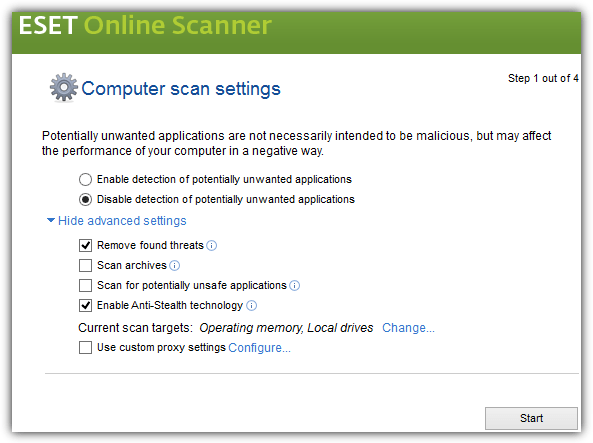
An advantage in using ESET Online Scanner is it can remove found threats. However do take note that if you’ve selected to only scan the memory but not the hard drive, ESET Online Scanner won’t be able to remove any detected threats. You need to scan both the memory and hard drive in order for the removal of found threats to work.

3. BullGuard Virus Scan
Many people have the misconception that BullGuard is the same as Bitdefender just because Bullguard uses the Bitdefender virus signature database. Although they share some similarities, BullGuard actually has a second scanning engine that focuses on behavioral and on access detection with 3 sets of definition, with one that is homemade. BullGuard Virus Scan only detects threats but does not clean.
BullGuard Virus Scan works exactly the same as Bitdefender QuickScan. It only downloads the scanning engine, creates a list of MD5 hashes from critical areas such as startup, running processes, browser plugins and uploads to the server to check for unknown hashes. Files with unknown hashes are uploaded to BullGuard’s servers for further analysis.
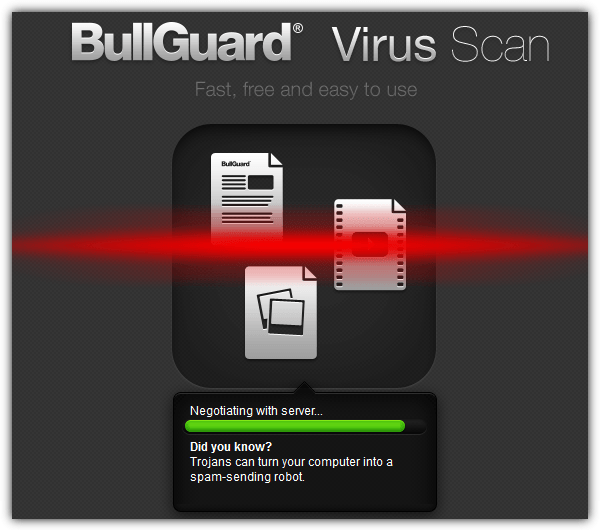
During testing, we found that BullGuard Virus Scan does not work with Internet Explorer 11 as we get the message error “Browser not supported!”. It does however work on Internet Explorer 10, Chrome and Firefox through installing an add-on. Although the online BullGuard Virus Scan feels the same as the Bitdefender QuickScan, there is an additional advantage which is you can view the scan report that tells you the location of the infected files, it lists all the files that has been scanned and uploaded.
As a simple test, we infected our test machine with a known malware that can be seen actively running in Windows Task Manager and all 3 online scanners picked it up as threat.
To test it further, we installed a stealth keylogger that uses rootkit methods to hide its presence and scanned the computer using all 3 online antivirus scanners mentioned above. Both Bitdefender QuickScan and BullGuard Virus Scan did not detect it. However ESET Online Scanner detected one of the executable files used by the keylogger as threat, and automatically quarantined the detected file but the keylogger is still running which means that it failed to fully remove the keylogger from the system.
A quick scan using the online antivirus scanners are useful to detect common malware or to get a second opinion but definitely are not powerful enough to detect the lower level types of malware.



Improve this guide

User forum
0 messages