Bookmark Converter to HTML Tool: Best to Use in 2023
If you’re a Windows user, one thing you are blessed with is a wealth of different web browsers. If one doesn’t meet your needs there’s plenty of others to try out that might be better and have what you’re looking for. While the number of browsers is huge, most of them are based on the rendering engines and/or GUIs of the three main names in this area, Internet Explorer, Google Chrome and Mozilla Firefox.
An important part of any web browser is the bookmarks that you have stored in your profile so you can quickly access your favorite sites, typing the URL is both time consuming and requires you to remember at least part of each websites address. One issue you will have if you are trying out a number of different web browsers is not all of them store bookmarks in the same format, some will offer to import bookmarks from the most popular browsers to help make things easier, but not in every case especially if you’re using a portable browser.
While it’s easy to store bookmarks online in the cloud so you can transfer them between machines, not everyone wants to use online services for what should be a simple task. What you will need is a tool to convert bookmarks for you or to know how to export from one browser to another.
Here we show a few ways to do it.Convert and Transfer Bookmarks via a Utility
Transmute is one of the only bookmark conversion tools around that allows you to take the bookmark format from one browser, convert it to another format required by a different browser and then place the bookmarks in the target browser profile. The free version of Transmute hasn’t been updated since 2011 so any newly released browsers since then with custom bookmarking formats won’t be supported.
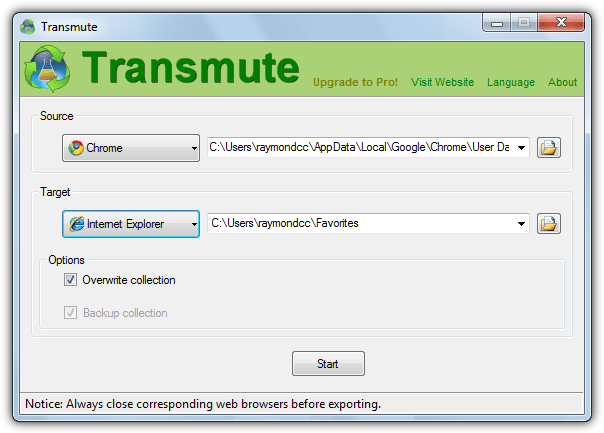
The last version supports the following; Chrome, Chromium, Firefox, Firefox Backup (JSON), Internet Explorer, Opera (old version), Safari, Flock, Konqueror, XBEL, Google Bookmarks, Delicious and Delicious/Yahoo!. The program is easy to use and also includes a portable version so installation isn’t required.
Launch Transmute and use the drop down to select the source browser you are copying the bookmarks from, and then do the same for the target browser you are transferring the bookmarks to. The browse buttons are there in case your browser isn’t installed to the default location or is a portable version, simply locate the required file or folder depending on the browser, for example Chrome stores the data in a file called Bookmarks so you have to locate that.
Transmute will only allow you to overwrite any bookmarks in the target browser and not to a custom folder, the option is disabled in the free version and only enabled in Transmute paid versions. You can however choose to backup the target bookmarks beforehand with the “Backup collection” check box. There are unsupported Mac and Linux versions available, you will need to have .NET Framework 3.5 or above installed which is built into Windows 7 and above.
Exporting and Importing Browser Bookmarks Manually
Many of the most popular browsers are able to import and export their bookmarks in standard HTML format so you can quite easily transfer them between browsers. Here’s how to export for several of the most popular web browsers, the option to import the HTML file is usually found in the same place as exporting and a simple case of just browsing for the file.
Internet Explorer 11
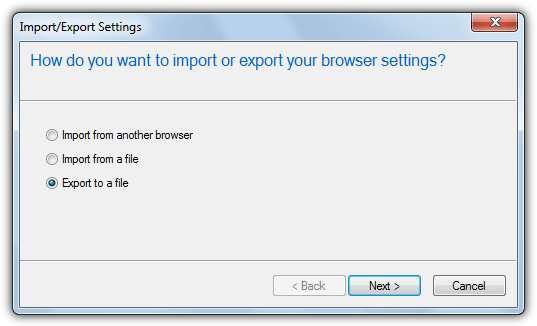
You can open the Import/Export Settings dialog in IE a few ways, a simple one is pressing Alt > F > M, choose Export to a file, Next, tick Favorites and then Next again. Highlight the folder you want to export, highlighting Favorites will export all your bookmarks. Then browse for the location to save the HTML file and click the Export button.
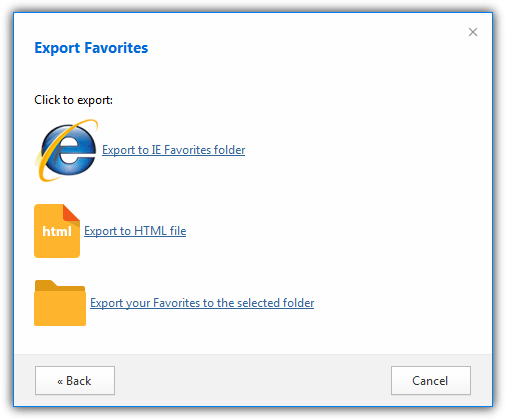
Click the Settings button (three horizontal bars) > Tools > Import/Export user data. Press the Export Favorites button and select Export to HTML file at the next window, then choose the filename to save as and browse where to save the file, click Save.
Google Chrome (and compatibles)
Click the Settings button > Bookmarks > Bookmarks Manager or press Ctrl+Shift+O. Press the Organize button menu, select “Export Bookmarks to HTML file” and then choose where to save the file and what name to give it.
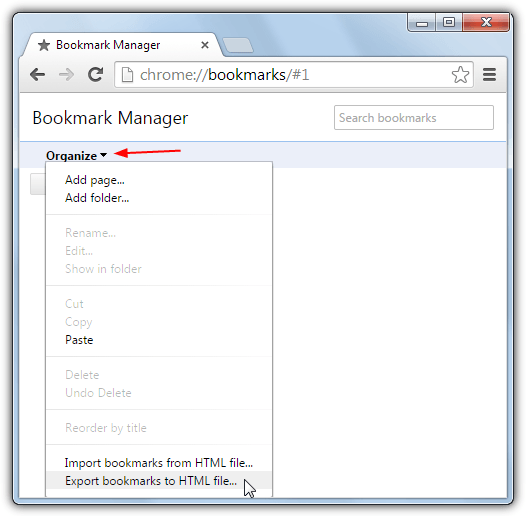
This same method will also work with most of the browsers based on Chrome/Chromium such as Comodo Dragon, SRWare Iron, Slimjet, Torch Browser etc.
Mozilla Firefox (and compatibles)
Press the key combination of Ctrl+Shift+B to bring up the Bookmarks library, then click the Import and Backup drop down menu and select Export Bookmarks to HTML. Give the file a name and save location and click to save it.
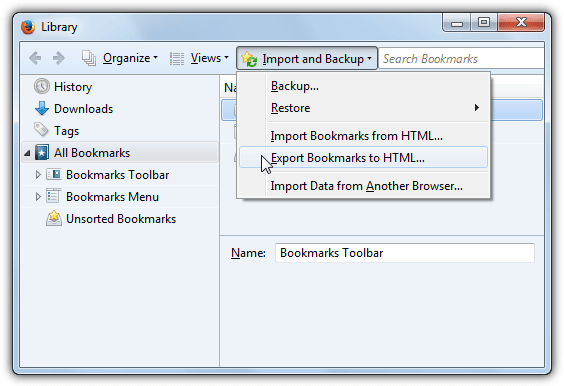
This also works in Firefox based browsers like Waterfox, Cyberfox, Pale Moon, Tor Browser, Comodo Ice Dragon etc.
This one’s very easy, just click the Settings button (icon with 9 tiny squares at the top right) and select Export Bookmarks, then give the file a name and save location.
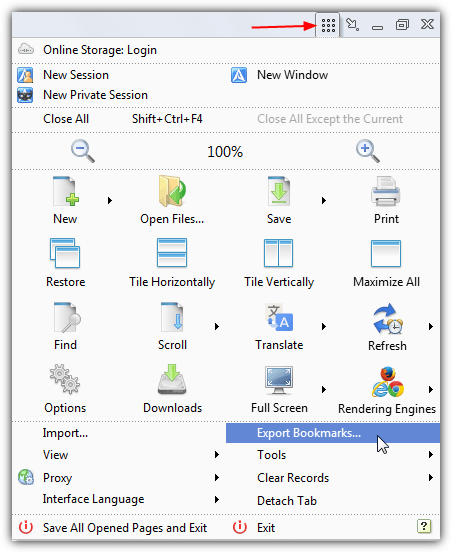
For some obscure reason Opera decided not to follow other browsers by using a standard way to import and export bookmarks and there is no way in newer versions of Opera for you to do it. Instead an Opera addon is required which will be able to export to HTML or import from the same format.
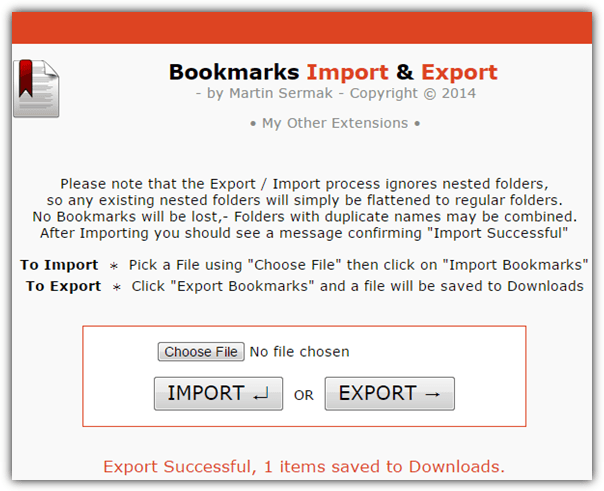
After install just click the Export button and the file will be created in the default location of the Windows Downloads folder.




How do you export a certain folder within bookmarks.
This should not be rocket science but maybe it is….
Depends which browser you are using. You can copy a folder from one Chrome based browser and paste it into another.
Failing that you could export all bookmarks to HTML and edit the file, not ideal but doable.
Thanks for this Nice & useful info Ray.
This still works great. Thanks so much. I had backed up my firefox bookmarks as a json extension and my computer broke down and now I am using Chrome, so this did the trick!!
You save my life :P
Great stuff Raymond!
And here was I thinking only I had discovered this great tool a few weeks ago…ben recommending it everywhere since!
Brilliant stuff and, for the record, I have tried them ALL and none of the others have the simple function that this one has. It does what you want it to do and does it really well.
this looks rather good.
Thanks for the share raymond, thats a great little piece of software, I’m going to have to try it when I can get my bookmarks sorted first.
nice
:-)
Thanks for this wonderful info Ray.
Thanks ray,
I’ve been searching for a software like this!!!
GOOD! :)
great.. thank you for this..
Great find.. thank you..:)