Crack or Decrypt VNC Server Encrypted Password
Virtual Network Computing or mostly people just calls it VNC is a system to remotely control a computer as if you are sitting in front of the PC even though you are away from it. Although Windows comes with remote desktop feature that accomplishes the same thing as VNC, most server administrators still prefers to use VNC due to cross platform compatibility plus they are also free unless you are using the Personal or Enterprise version of RealVNC for extra security and features such as the deployment tool. The VNC comes in two modules which is the Viewer that is used to control the Server module.
Just like any other remote control software, the VNC server can be password protected to prevent unauthorized users from controlling the server. The password that is saved on the server is encrypted with DES but unfortunately the algorithm has already been cracked long ago. There are quite a number of third party tools that claims to automatically decrypt and display the VNC server password but most of them are not updated to work with the latest versions of VNC. From what we’ve tested, VNCPassView by Nirsoft can only display UltraVNC password, VNCPwdump by Patrik Karlsson failed to display RealVNC password with either the -s or -c switch, and VNC Password Decryptor too failed to fetch and decrypt VNC passwords on a local computer.
These automated VNC password recovery tool doesn’t work because the location of the DES encrypted password that is saved on the computer has changed and they are not updated to read from the new paths. Here we will guide you on how to locate the VNC encrypted password and also how to manually decrypt them either through web based or locally via command line tool.
Locating the encrypted VNC password
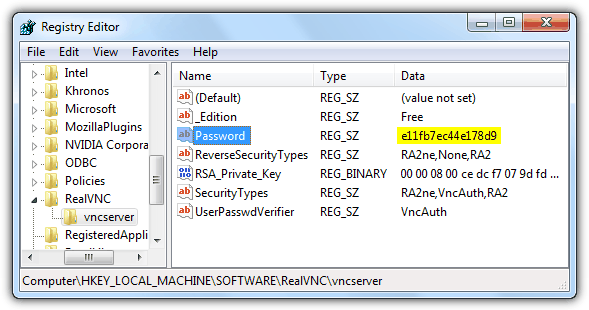
Most of the VNCs encrypted password are saved in registry while only UltraVNC is saved in an INI file. Here is an example on how to get the encrypted password for RealVNC based on the registry location provided below.
1. Click the Start button, type regedit in the Search programs and files bar followed by pressing Enter.
2. Expand the HKEY_LOCAL_MACHINE folder by double clicking on it and continue doing that for SOFTWARE, RealVNC and until you reach vncserver.
3. At the right pane, you should see a registry name called Password with the type as REG_SZ and random characters for the data. The random characters you see for Password is the encrypted password for RealVNC and please take note of it for decryption.
RealVNC
HKEY_LOCAL_MACHINE\SOFTWARE\RealVNC\vncserver
Value: PasswordTightVNC
HKEY_CURRENT_USER\Software\TightVNC\Server
Value: Password or PasswordViewOnlyTigerVNC
HKEY_LOCAL_USER\Software\TigerVNC\WinVNC4
Value: PasswordUltraVNC
C:\Program Files\UltraVNC\ultravnc.ini
Value: passwd or passwd2
Once you’ve got the encrypted VNC password, the next step is to decrypt it. Here we offer two choices which is the web based that is very easy to use but requires an internet connection to access it or a command line tool that works on an offline computer but requires to run from command prompt.
Decrypting the encrypted VNC password
Method #1: Web based
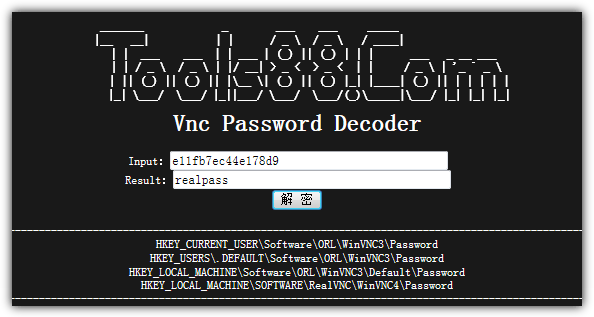
The online VNC password decoder at Tools88.com has been online since 1997 and is still working today. All you need to do is paste the encrypted password at the Input box, click the button with two Chinese characters and the real password will be instantly displayed at the Result box.
Method #2: Command line tool
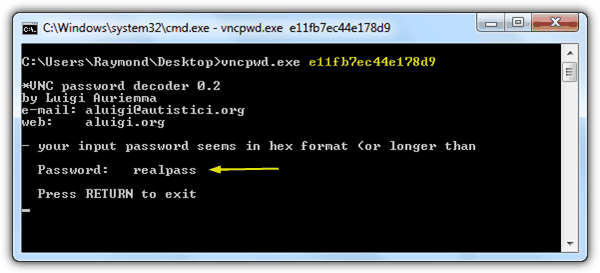
The VNC Password Decoder (vncpwd) tool by Luigi Auriemma can decrypt classic VNC DES encryption method. Simply embed the encrypted password after the command line tool and the real password will be displayed. To use vncpwd, click Start button, type cmd at search bar and press Enter. Change to the directory where vncpwd.exe is located and run the following commnad line:
vncpwd.exe ENCRYPTEDPASSWORD





Method #2 works with the UltraVNC server 1.1.6 password saved in C:\Program Files\UltraVNC\ultravnc.ini
Great job! Method #2 worked like a charm!
Thank you very very much!
thank you
worked
thanks
Awesome, worked here too!!!
2019
very useful!
Is it possible to do the other way?
Encrypt a password like Real VNC does?
You can use common DES encryption (ECB) alghorithm with some changes:
You should mirror hard secret key of VNC:
vnc_key = [23, 82, 107, 6, 35, 78, 88, 7]
new key for “normal” DES:
vnc_key_for_classic_DES = [232, 74, 214, 96, 196, 114, 26, 224]
No password changing needed.
Good tool!
i’m saved =D
A really great program ! Works fine !
yes, it works.