Donation Goal
Donate Now Goal amount for this year: 799 USD, Received: 100 USD (13%)
Please donate to help support this website. The funds will be used to purchase owned license of LiteSpeed Web Server Enterprise (2-CPU). It provides superior performance in terms of raw speed, scalability and anti-DDoS capabilities.

Create Kaspersky Update Server Mirror for Offline Updates

Posted By Raymond In Category: Computer

Apr
20
2009

One thing I don’t like about Kaspersky product is after installing, it takes a very long time to fully update the program modules and bases files. Currently if you do a fresh installation of the latest version of Kaspersky 8.0.0.506, you’ll still need to download around 18MB. It’s not big but the problem is Kaspersky update servers are painfully slow… Combined with my customer’s place where the internet speed is crawling like a snail, I can never get to update Kaspersky to use the latest program modules and bases. It’s pointless having one of the best antivirus installed on the computer but without updating it.
Update Kaspersky Offline
Fortunately Kaspersky has came up with a very useful official tool that is able to create a “mirror” of the Kaspersky Lab’s update servers. This is very useful when you are like me who runs around installing Kaspersky products on other people’s computer. You can also use this if you have a few Kaspersky product installed in your network and you want all of the computers to update locally instead of individually downloading from Kaspersky and wasting your bandwidth. Most of the time this can only be done on “enterprise/corporate” version of the software but now you can also do it on desktop version.


Basically this tool is called Kaspersky Updater and is able to automatically download latest anti-virus bases and application program modules for all Kaspersky applications. For my case, I save the downloaded files in my USB flash drive, install Kaspersky software, and configure it to grab the updates from my USB flash drive.

If you want your computers in your network to grab the latest definition from a local server, then all you need to do is to share the “Updates” folder and configure Kaspersky to get it from the folder that you just shared. Best part is Kaspersky Updater supports scheduled updates so it can run automatically without you checking on it all the time.

There are 2 parts that in the whole process that is to run Kaspersky Updater to download latest bases and modules and finally configure the computer to grab the updates locally. Here are the steps on how to use Kaspersky Updater.

1. Download the latest version of Kaspersky Updater GUI from official Kaspersky forum. You will need to sign up in order to download. The official stable version of GUI is v1.0.3.30 but I prefer to use v2.1.0.15 Beta because it has Schedule feature.

2. Download the latest version of Update Utility. Extract both GUI and Updater and make sure they are in the same directory.
Extract Kaspersky Updater

3. Run KasperskyUpdater.exe.

4. Select “Download databases for the selected products” and check the boxes according to which version of base that you want to download. Click Apply then Start and it will start to download. First time will take quite a while to complete downloading but after that it should only a few seconds because it supports incremental updates.
Kaspersky Offline Server Updates

Optional: If you want to schedule Kaspersky Updater to automatically download the latest bases, then click the Schedule button, and choose whether to you want it to run automatically every few hours, days or weeks. Click Apply. For some weird reasons I am getting an error “not a valid date and time”. Well it’s still in beta and hopefully they’ll fix this bug.

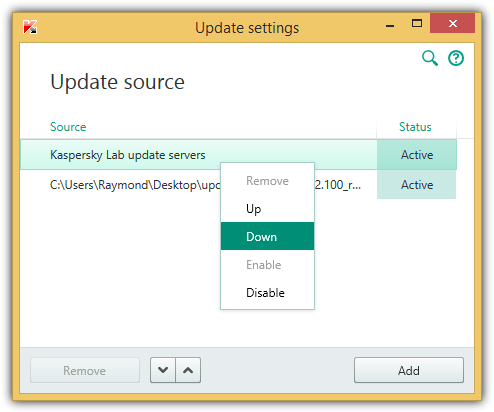
Now you’ll have to configure Kaspersky software to grab the updates from your USB flash drive or from the shared folder. Click Settings > click Update on the left pane > Click the Settings button > click Add, browse the location of the Updates folder and click OK > Uncheck Kaspersky Lab’s update servers > and click OK to close the update settings window. You can refer to the animation below on how to do that.
kaspersky update

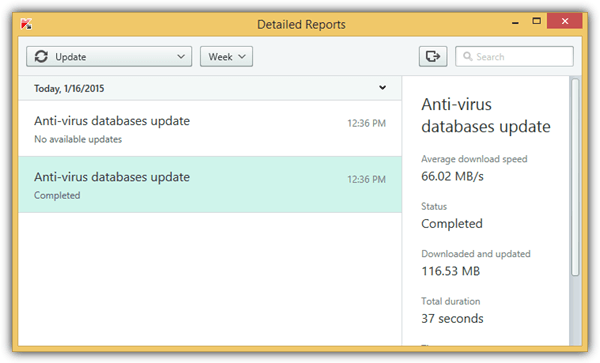
First time updating directly from Kaspersky Lab’s online update server takes about more than an hour but when done locally, it takes less than a minute to download 18MB of updates!
Fast Kaspersky Update
I highly recommend every tech people to have a copy of Kaspersky Updater with latest bases and modules with them all the time.


Related posts:
  • Manually Update AVPTool Kaspersky Virus Removal Tool Signature Databases
  • Offline Windows Update
  • AutoPatcher Alternatives for Offline Windows Update
  • Manually Update AntiVirus Virus Definition Signatures Without Internet
  • Windows Updates Downloader
    • john bosco

      man i needed this………thanks ray.

    • Blackcobra

      Thanks Ray, Kaspersky Update’s really suck. Takes quite lot of time.

    • Book mini

      Now i will use pirated key.and update manually.

    • http://www.antivirus365.net Mok

      We heard this and the arrangement is on the way!

      Thank you for supporting Kaspersky.

    • http://www.itechnobuzz.com SARANG DRAVID

      WOw.. thanx.. its gud for premium users like me :D

    • mindtracker

      Thanks for the g8 tips ray…

    • flashkidz

      thanks ray this will be very helpful to the kaspersky users everytime they gets pc reformat.. ^^

    • Kumar gaurav

      It’s very useful for me because i always use kaspersky Internet security and it save time.
      Thanks ray

    • Mitschl

      Thx, unfortunately i did not win your kav-birthday-giveaway…
      If someone doesnt get along with kaspersky, please send me the key in forum ( nick is same as above ), maybe we could arrange a deal ( i got lots of other licenses for security products )!

    • MAZIN

      THANX ALOT RAY .. TODAY I WAS SEARCHING FOR THIS METHOD .. TILL I GOT YOUR EMAIL ..

      YOU’RE THE BEST ..

    • CH

      Great tip. Thanks Ray!

    • http://Christmas-Net.dk/ puma99dk|

      i can’t get it to work with “Kaspersky Anti-Virus 8.0 for Windows Workstations” for Windows 7. KAV still says Database out of date

    • http://PleaseHelponKasperskyUpdater FaIzaL

      Nothing happen when I start the application. Firstly, when I run Updater.exe, it show error “15 – Incorrect product configuration”. Then when I run the KasperskyUpdater.exe, it show error “19 – Process is terminated”. I also install the “Microsoft.VC80.CRT” to fix this error, but still can’t solve anything. What should I do to run the kaspersky updater successfully?. Please help..

    • fantio

      thnx ray for this info..

    • mafia87

      Thanks for this one.. ray… :)

    • suresh

      great tips ….

      continue ur job ..thank u

    • Sajan

      How many Mb to download the first time using updater? I have got a slow connection and it is going on forever. So far downloaded 24 Mbs how many more?

    • Ali

      just wondering, wat app did u use to record:
      http://support.kaspersky.com/images/support_new/localupdateflash_9(en).gif

      thanks :P

    • Mangesh

      there is another simple way to do this.
      first you need to access another pc where kaspersky product is installed (you may install the trial version).

      then follow these steps:

      1) before updating KIS, Click Settings > click Update on the left pane > Click the Settings button and then click the “additional” tab from the top of the dialog.

      2) select the checkbox named “copy updates to folder” and select the folder where you want to copy the updated files. then click ok.

      3) now update the antivirus from the internet. all update files will be copied to your folder (specified in step 2)

      4) now copy the folder which you’ve specified in step 2 to your pen drive or any other media.

      5) Now you’ll have to configure Kaspersky software to grab the updates from your pen drive or from the shared folder.
      Click Settings > click Update on the left pane > Click the Settings button > click Add, browse the location of the Updates folder and click OK > Uncheck Kaspersky Lab’s update servers > and click OK to close the update settings window.

      then click the “start update button” that’s all.

      @sajan – the first time you update KIS, the size will be around 40 MB.

    • shivgoyal

      will it prevent the keys from blacklisting??????

    • shivgoyal

      Can anybody please provide me the KasperskyUpdater_2.1.0.16_RC1.zip on mediafire coz i am not able to reg. at their site (some anti spam problem) :(

    • sugat

      thanx i need this very much.u r doing a good job

    • Rush

      Awesome, Ray. Thanks man. This is good to have.

    • http://www.yahoo.com kiskinng

      hey ray i know this method for quite a while now but when i tried to update kaspersky Internet-Security 2010 9.0.0.459 Beta this method doesnt work dunno y …..
      try it on this version when i select this folder as the source for updates it starts updating but after a while it says no source selected……hence no updating is done plz find a way to offline update this version

    • http://softwareroxer.blogspot.com baskar

      hoooooooooo man thanks alot

    • fadel

      Thanks, really a big help

    • bonme9512

      that good
      I like this

    • fadlallah mohamed

      iuse kaspersky 2010 the update status is isolette so how this happen itry to update my computer but ifail please help

    • fadlallah mohamed

      how to update when the status is always ofline

    • Erickson

      Posso utilizar esse método para atualizar os KAV Rescue Disk 2010? alguém pode me dizer? Obrigado a todos!!!!

    Copyright © 2005-2012 - Raymond.CC Blog