Detect Packet Errors in Your Network LAN Connection Status
Many of us are already using fast broadband connections these days and it’s important to know whether the information you are sending or receiving is correct and error free. When there is an error in sending or receiving data you might have problems downloading or uploading files and they could fail MD5 checksums or appear corrupt and the downloaded Zip or Rar archive won’t open etc. For example, if you keep getting errors sending packets but not receiving, then that could actually point to a faulty network adapter.
Error information can be an important first step in troubleshooting a connection. It’s very easy to view the basic network connection information, and you can see a network connection’s current status, connection duration, speed and packets or bytes sent and received for the connection. This is usually found by double-clicking the status icon in the system tray or going through Network and Sharing Center > Change adapter settings in Vista and above. The Status dialog box by default shows nearly everything but weirdly chooses not to display errors for the connection.
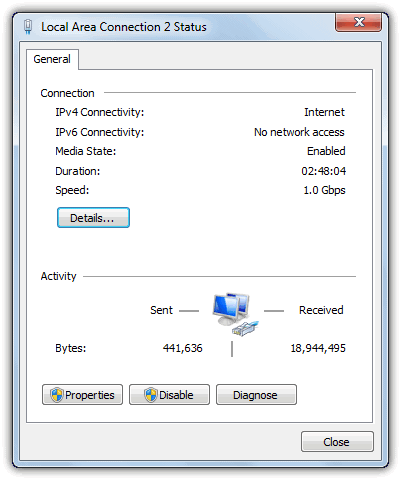
Before using sophisticated or tough to use packet sniffing software to detect packet loss and errors, you can just enable a hidden setting in Windows to show you any possible errors with your connection. Here’s how to do it with a quick registry change and the information will be added to the status dialog window.
If you’re not comfortable in the registry or just want to make things as quick and easy as possible, we’ve made a small registry file. Simply download and double click the file to import the ShowLanErrors value into your Windows XP, Vista or 7 registry. There’s also a .reg file should you wish to turn the error display off again.Download ShowLanErrors | Download Disable ShowLanErrors
Alternatively, please follow the instructions carefully as editing your registry incorrectly could cause problems.
1. Press Win key+R to bring up the Run box and type regedit to launch the Windows registry editor.
2. Navigate to the following registry location:
HKEY_LOCAL_MACHINE\SYSTEM\CurrentControlSet\Control\Network\Connections\StatMon
If the StatMon key is not there, right click on Connections, select New -> Key and enter the value as StatMon.
3. Inside the StatMon key, set the ShowLanErrors DWORD value as 1 if it’s already there. If ShowLanErrors is not there, right click on StatMon and select New -> DWORD value. Set the DWORD value name as ShowLanErrors. Double click on ShowLanErrors and set the value data as 1.
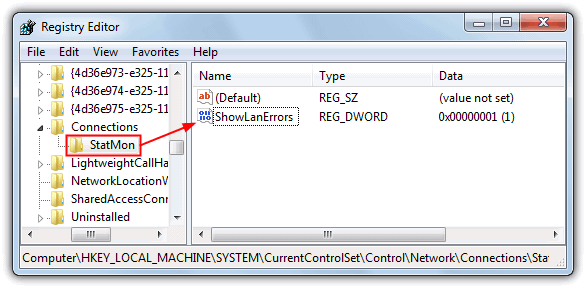
To turn error count off again, just set the ShowLanErrors DWORD value to 0. Microsoft claims that because most users do not need this information and might find it confusing or misleading, error counts do not appear by default. It certainly can be useful in diagnosing the network reliability though and should be enabled by default, or at least have a tick box somewhere so you can turn it on easily.
You will now see an additional Errors information in your connection status below the Sent and Received Bytes. If you still can’t see anything, restart your computer although the effect should be instant when you right click and select Status.
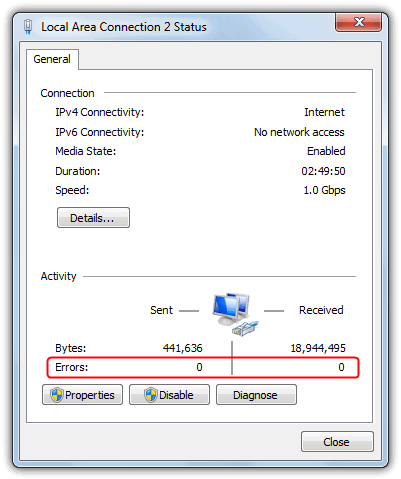
Unfortunately there is a drawback with the packet error display which is not every version of Windows will show the errors. It is known to display on Business, Professional or Ultimate versions of Windows XP, Vista or 7. Windows XP Home and any Vista or 7 Home editions we believe don’t work. Also, this registry edit seems to have no effect in Windows 8, we tried on Windows 8 Pro x86 without success.
When connected via VPN, the connection status window also shows the error. It appears that as long as you have a connection that goes through your network interface card (NIC), it will show the error information. In addition, the connections that can display the errors also include USB ADSL modems and WiFi adapters etc.
You might also like:
 4 Ways to Automatically Disable Wireless Network Connection when Local Area Connection is Enabled
 Network Repair Tool: 10 Best to Fix Internet Connection [2023]
 Network Connection Manager Software: 5 Best We Tested
 4 Tools to Increase TCP/IP Half Open Connection Limit
 VNC Scanner Tools: Best Software to Use in 2023
how can you input the key for wireless network
Still works on Server 2016. Many thanks.
For the lazy ones:
CMD as Admin:
reg add HKLM\SYSTEM\CurrentControlSet\Control\Network\Connections\StatMon
reg add HKLM\SYSTEM\CurrentControlSet\Control\Network\Connections\StatMon -t REG_DWORD -v ShowLanErrors -d 1
Very helpful, ty! Am running W7 Pro sp1, x64. Chose manual regedit solution and it worked perfectly. BTW, had to create both StatMon and ShowLanErrors. For ShowLanErrors had choice of Dword 32 bit or Qword 64 bit. Since this change was OS related selected Dword 32 bit.
win 7 sp1 x64, works! Thank you!
Working perfectly on Windows 8.1 Pro x64
Worked like a charm on Win7 Pro and Win2003!
Thanks!
Useful post. Thank you =)
yes it work with USB ADSL also
works on my vista business (SP1) and without restart. thanks ray :)
Eh, folks… This works perfectly fine on any Windows starting with 2000 and ending with 2008.
Thanks Raymond ,, it worked with me perfectly
it works in vista ultimate Sp1.
Thanks!
I have Vista64 Ultimate and its activated by default! When I enter “Broadband Connection Status” it shows me the error information right under compression information and the amount of data transferred! :)
very nice!
Excellent,works fine in XP.
Thanks
FYI: no need for a reboot on WinXP here.
It showed up after adding the Regkey.
You don’t need to restart your system. After editing the registry (XP SP3) it showed the Errors right away. Just needed to close/open the status window.