How to Boot From USB Without BIOS Support
Although it’s not such a major problem with computers manufactured in more recent years, if you have a slightly older computer, something it might not be able to do is boot up directly from a USB device. Being able to boot your computer from USB flash drive is an advantage because there are so many tools around that can be used to install or repair Windows such as Antivirus discs, and repair CD’s. Having them on USB is easier and quicker than burning discs every time.
Installing Windows by running the setup files from a USB drive is also popular because it can be a good bit quicker than installing from a CD/DVD drive, even Windows 8 setup files can be downloaded and copied straight onto USB these days. It depends entirely on the computer’s BIOS as to whether USB booting is supported and some manufacturers may have provided a BIOS update to enable it. However, what if you encounter an old computer that doesn’t support booting from USB?
Thankfully, all is not lost because there is an excellent little tool called Plop Boot Manager which can do the impossible and allow you to boot the computer from USB even if the BIOS does not support it. Plop can boot different operating systems such as Windows or Linux from hard disk, floppy, CD/DVD or from USB.
There are probably 2 main scenarios where you would like to use Plop; firstly to be able to boot a USB device when you already have Windows installed, maybe loading a Live Linux or a rescue/antivirus disc etc. Another way is when you have no operating system currently loaded and perhaps would like to install one via USB. Here, we’ll show you both ways to install the Plop boot manager, one using the Windows Boot Menu and one from a bootable CD.
Adding Plop to the Windows Boot Menu
The easiest way to set up Plop to boot your USB flash drive is by adding it to the Windows boot menu so when you have the option to choose a Windows installation on boot, you will also have an entry to load the Plop Boot Manager and launch a USB boot.
This isn’t nearly as complicated as it used to be because to get the entries into the boot menu, you used to have to edit the XP boot.ini or manually use BCDEdit in Vista or 7. These days it’s far easier and only requires the execution of a batch file to get the Plop Boot Manager entry inserted into your windows boot menu.
1. Download Plop Boot Manager, then extract it to a folder.
2. Navigate into the plpbt-[version]\Windows folder. Run the InstallToBootMenu.bat file. If you don’t have full admin rights already in Vista and 7, right click on the bat file and “Run as Administrator”.
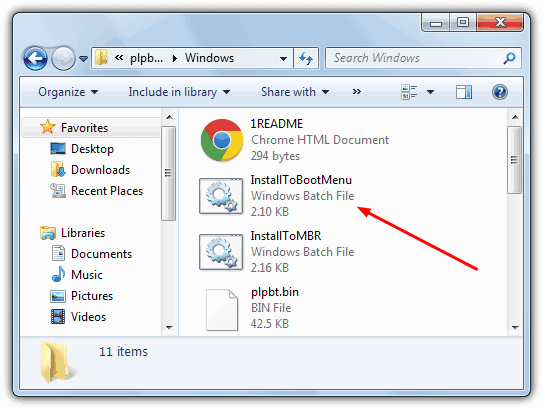
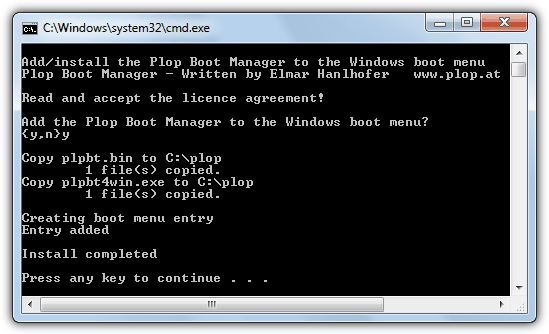
3. When asked if you want to continue, just press Y and enter. The necessary files will be coped and the boot entry added to the menu.
Now when you boot your computer, the Plop Boot Manager entry will be there and you can now select it and boot from a USB flash drive.
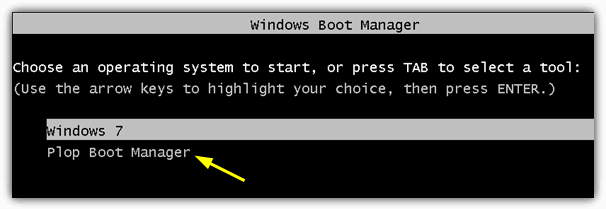
Even though they have different boot menus, running the batch file will create the correct menu entry for both XP or Vista / 7 depending on which you’re using. For anyone who wants to rename the default “Plop Boot Manager” menu entry, open the InstallToBootMenu.bat, look for “set ENTRYNAME=Plop Boot Manager” and change it to what you want.
Removing the entry from the Boot Menu
1. This is quite easy whether you have XP, Vista or 7 and you just need to run the C:\plop\plpbt4win tool or run plpbt4win from the Windows folder in the Zip you extracted in the previous step 1.
2. Type L and press enter. This will give you the current entries of the boot menu, note down the ID number for the Plop Boot Manager entry.
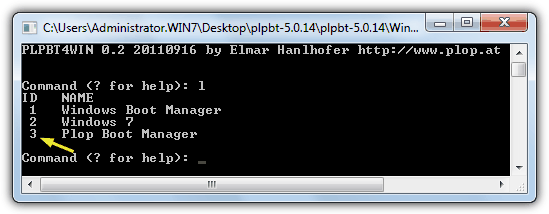
Type R [ID] to match the ID from step 2 which removes the boot menu entry.
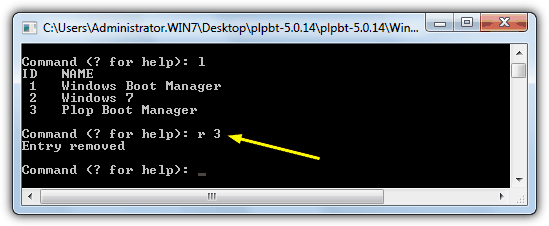
For example “R 3” will remove the Plop entry from the list above.
Installing Plop if You Don’t Have Windows installed
If you want to boot your computer from USB and have no Windows installed, then you’re probably looking to install Windows from a USB flash drive which can be quicker than using an optical drive. Plop Boot Manager does itself also include an ISO image which can be burned to a CD and then USB can be launched from there.
1. Download the Plop Boot Manager Zip file, then extract it to the folder of your choice.
2. Navigate to the extracted Plop main folder and find the plpbt.iso file, it’s the disc image file around 550KB if you have show extensions turned off in Explorer.
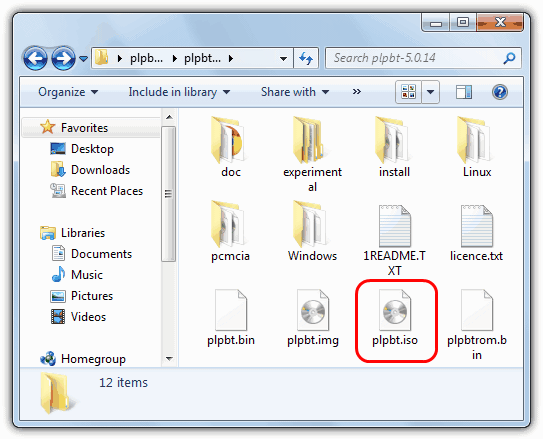
3. Now all you have to do is burn the ISO file to a CD and then boot from it. To make a bit more use of the leftover space on the CD, this next solution could be useful…
A rescue and repair CD we just can’t stop recommending to people is Hiren’s Boot CD. This disc has so many useful tools there are very few things it doesn’t do when you need to perform a number of fixes or recovery operations. Another one of its included features is the Plop Boot Manager which can be loaded straight from the main Hiren menu.
1. All you need to do is Download Hiren’s Boot CD if you don’t already have it, and then burn the ISO to a CD.
2. Boot your computer using the CD and you will get to the main Hiren boot menu. Use the arrows keys to go down to the “PLoP Boot Manager” option and press Enter.
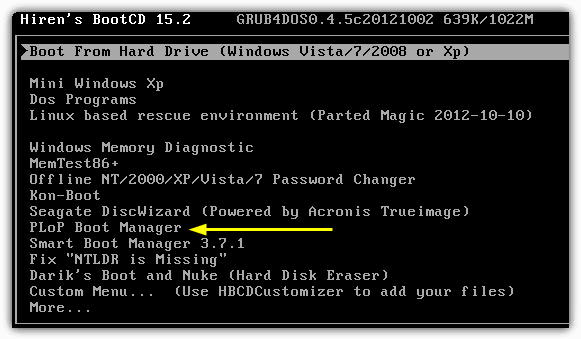
You will then get the standard Plop boot options and can boot from USB.
Using Plop Boot Manager
After you have either booted from a CD or used the Windows boot menu and selected “Plop Boot Manager”, a new menu will appear. If you want to boot your computer from USB, make sure the flash drive is inserted and use the arrow keys to highlight the USB option and press enter.
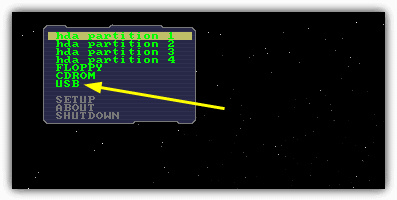
If your computer is old enough to not even have a boot from CD-ROM option, a floppy version of Plop can be downloaded from the website and it can be used to boot a CD in a similar way. When we tried tried Plop on a laptop that couldn’t boot from USB, it was able to boot up a Windows 7 or 8 setup from USB and install the operating system with no problems at all.
Try all the options until it works. its not quite straight forward. Buy the dev a cup of tea as well.
it did not work for me
Samsung N130
I managed to get it to work. it required a few trial and error fiddlings with the menus and options. certainly not a plug and play option for me but happy it works
I have a old Toshiba Tecra A2 Year 1998 with Xbuntu installed.
The BIOS doesn’t support booting from USB.
After I select the USB my PC hangs and just shows the screen “loading ehci driver searching on hosts host 1”.
Tried:
1. different versions 5.0.14 & 5.0.15.
2. different USB’s (small and large capacities)
3. Different USB ports
But all produce the same result.
Have Linux installed and was wanting to try some other versions from a “Multiboot” or “Yumi” USB stick to save burning multiple CD’s
Any ideas, would be really cool if I could get this old thing to boot from USB and try a few other linux distro’s without constantly burning CD’s :-)
Same here Brian.
It worked smoothly. Thanks a ton!
This is EXACTLY what I really need for my older machine with non-updateable BIOS that won’t allow USB boot. I’ve migrated the machine to Win. 10. The disc Win 10 creates is too large for a standard DVD leaving no emergency boot options.
But. Using PLoP, there’s no way can I get the keyboard horizontal arrow keys to function leaving only the first option available to me. Boot from Floppy. Useless.
Please Please help. Several different keyboards have been tried and failed to resolve this issue.
I had the same issue. To solve it
1. See if you have PS2 keyboard dedicated. Connect with it
2. If it did not work go to bios see for options ..device options and enable USB keyboard. Mostly aopen ameritrends have this option. Dell HP dont.
Plug a USB key board
Transferred data HDD to SSD, messed up BIOS, pc wont start eve with the old drive
But keyboard does not work ? any solution to that ?
if you’re using a laptop use an external keyboard. Or just try another USB port and another keyboard
w10 v1809 or later
does Pllop Boot Manager, still install and work?
thanks a lot it s work
WORKED. Easyy. Thanks for this, I earned 10$ from this ???
Hahaahha… Nice ! XD
Thanks, but the Plop boot manager does’t see the usb stick upon rebooting. I tried using different usb sticks with the same result. Shame.
Well I got this in my Windows boot menu as directed and on reboot it appears as a selection but when I select the option the Plop boot menu screen appears & disappears almost instantly making it impossible to select any of the menu options. This is on a machine with a supervisor password on the BIOS so I can’t change the boot order from HDD.
whenever i try this method in my xp it is showing some error has occurred . (unsupported operating system) .Can u help me to solve this???
what to do if boot entry has not been installed error is written on a screen.
Very nice and very helpful article. Thanks a lot I was just thinking how to boot from USB on my 10year old laptop to format and install Linux and donate the laptop, this article really helped me to solve my problem. :)
but what if my nootbook have no os installed and cd-drive is not working…..??
If you have no means of booting your computer, either from USB, ROM drive or HDD then there is not a lot you can do. A computer needs to be able to boot from something to work.
Take out HDD put into another computer (take out other computers HDD), install OS swap drives back. There is also DOS bootable USB creators, but this is still BIOS dependant.
Thank you soooo much!!!
Thank you so muuchhhhhhh! You saved my life.
Thanks a lot! It was really helpful
Thanks a lot pal….I was running out of options and was confused with little time in hand…..this turned out to be a great option for me…..great help, KEEP GOING !!!!!
This is a lifesaving article! The presentation is clear and concise. Good job!
Hi, thanks but after I select the USB my PC hang its doesn’t move and its shows the screen “loading ehci driver searching on hosts host 1”
very useful. thanks
thank you for useful information
The font used in this software is just stupid !
I would agree it’s not the best. You can change to a better font although it needs a bit of work if you want to default to it on every boot.
hello…I have already windows xp on my pc and i want to format and install windows 8..
Firstly,i boot from cd ,which i have burned with the plop boot manager.
Secondly, i choose to boot from usb.
But when the time comes to recognise my usb device the program stops and doest do anything.(My usb is ok because the light on it is on)
what should i do now?
Thanks very much!
Awesome! You make my day! Cheers from Venezuela!
I have tried using Plop Boot manager on CD to run Linux Mint from a usb flash drive as my bios only supports USB-ZIP0, but Plop hangs after it has detected the USB port. I have tried different ports and settings in the boot manager but the same thing happens every time, resulting in having to press the power button. I have used both the USB universal installer from pendrivelinux.com and also Linuxlive USB creator to make bootable flash drives with the Linux Mint iso. It is getting very frustrating and I would be very grateful if someone knows of a solution.
Thanks
PLoP did not work for me because it was confused by the 4 in 1 SD card reader that I have installed which made the PC hang. I could try installing DOS on a SD card or try some alternative to PLoP.
None of this is of any use if you have a laptop that has its BIOS password protected.
That depends, if your BIOS is locked and you can’t boot to anything including Windows, then this tool won’t help. If you can boot to Windows but can’t get into the BIOS to change the boot order then Plop Boot Manager will do the job just fine.
Thanks man !!! :)))
Very useful indeed! Many Thanks! It will make my work much easier!
You are wonderful and this topic is no1 technical boot support without any hardware changes.
thanks again friend.
It works!! OMG man you have no idea how long I have been searching for this. You are amazing. I want to let you know how helpful this was. Gave my Thinkpad r31 a few more years. Now to install win 7…
I’ve been searching for something like this for a couple years now. I have 3 laptops that are old enough to NOT naturally boot from USB but now, since I found this , they ALL can use ISOs I install on USB sticks. Thanks pal,
I owe ya a beer.
Wow, what a find. Have a HP DV5000 with a knackered optical drive and no bios support for USB. Was almost resigned to buying a spares unit from ebay to transplant the optical drive – until I found this.
Followed the instructions, and it works a charm! Now able to boot my USB copy of Windows 7, and as an added bonus also able to boot the long corrupted recovery partition on the D: drive in case of any major malfunctions.
Many, many thanks for this – you’ve just breathed new life into an old friend.
Thanks Man!
thaks.. raymond,,
Yes. I can’t believe there’s such a thing. I also don’t need PXE boot for my old notebook anymore. Thanks this blog a million !
Raymond.. you are the man!!!!!! you have no idea how long i’ve been struggling with an ancient pc of mines from the 1990s and it doesn’t have floppy or usb boot also cd. DAYS now i’ve been trying to find endless solutions i even came across pxe boot which somewhat was too complicated i mean i got it working once but that is once in a lifetime so white out pxe boot and i found this miracle article and BAM BOOM WW3!!!!! the computer is able to boot .. anyways thanks so much man
Excellent………………Man
Thanks
thanks again ray, it works
thanks with this article i augmented my knowledge as yours article has been brilliant
great ray
That’s AMAZING! Now I can USB boot, instead of wasting countless CDs! THANK YOU SO MUCH!
thanks ray :D
Yeah…
Everybody loves raymond!
Thanks ray for this article…
You are an asset for all around.
Dwayne
Everybody Loves Raymond!
Thanks! really nice info.
always good ideas
thanks ray :)
Ray , you are unbelievable
you are amazing
thank you Raymond
Great Raymond
Nice and useful tool again :-)
Many thanks
Fantastic! That’s what I was in real need for. Never imagined it was possible.
Thanks for the info. Hope the program is stable enough, though.
Works for my XPS t500!
thank you very very much sir raymond!
it has been interesting every day at your blog. timing! i will fix a old computer. this tool is very useful!
wow! raymond i think this app is good!! :)
Thanks a lot raymond.
Now this ensures to me that this blog is really about “computers, made easy”…………
thanks a lot
Thanks for this great article.
Thanks Ray!
Thank You
nice info….
Nice work Ray
thanks Raymond
thanks raymond….
Go hard Ray!!! You the best homie! I really needed this.
useful whatever
Ray , you are unbelievable
you are amazing
thank you Raymond
Really! excellent trick
thanks Raymond
Thanks Raymond
Thanks :)
Another great article. Thanks raymond.
thanks ray
Hey thanks Ray…
God bless those who don’t know about your site and are struggling for help… :-)
nice one raymond.
thanks a lot raymond :->
sweet post Ray!
Thanks :)
really useful thanks
Great article Raymond ! :)
Thank you for sharing very useful information Raymond.
God bless you. :)
Thank you Raymond!!!.
I’ll grab this utility. This weekend my computer goes unbootable and finally I’ve make a Repair using CD-Rom but It should be better if I could boot from USB.
I thing this can save time and effort to other people with this trouble.
Best Regards Raymond!.
Thank you.
Thanks for this nice tip, now i think my pc will boot from usb, it supports all others.. :-)
Thanks !
another nice tips from Ray ;p