A lot of virus creates an autorun.inf file at the root of your local drives and USB flash drive. The reason for this is when you open My Computer and tries to access a drive, it will run the virus to infect your computer. Very often anti-virus is able to remove executable virus from system but not autorun.inf. This is because autorun.inf that’s located at the root of your drive is only an instruction file that tells Windows what to automatically run when you access the drive from My Computer.
So even after the virus being cleaned, you’ll find that you’re unable to access your C drive from My Computer. Some people double click C drive, a search window will appear. For some, it’d say that it cannot find the script or file to run. Most common of all, when double click C drive, it gives you an option to choose a program to open.
For computer experts, one look and they’ll know they had to remove the autorun.inf file from C drive. Usually the autorun.inf cannot be easily deleted because it has system, read-only, and hidden file attribute. You can go to command prompt to remove the file attributes and then delete it. Sounds easy for an advance computer user but might be tough for a novice. Here’s how to easily double clicking C drive at My Computer and not opening problem.
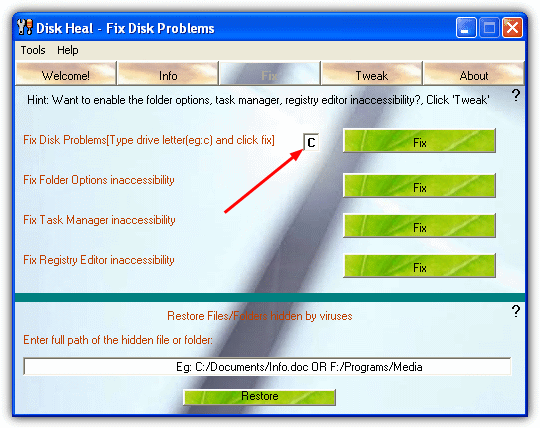
Disk Heal is a useful tool that restores the condition of your storage device after being infected by a virus. Disk Heal is a useful tool that performs many functions. Initially it was a program which fixed disk problems that occur after a virus has been removed with a few additional features like changing the icon of a drive. Currently it performs various other tweaks as well. More will be added soon.

To fix your C drive problem, download, install and run Disk Heal. Make sure you have administrator privileges. Click the Fix button, type the drive letter and click Fix. Other than fixing drive not opening problem, it can also restore folder options, task manager, and registry editor. Just like what RRT does.
Other than fixing problems that virus creates, it also has a bunch of other useful security, appearance, Internet Explorer and Control Panel tweaks.
Security Tweaks:
-Enable/Disable Task Manager
-Enable/Disable Folder options
-Enable/Disable the registry editor
-Lock the location of ‘My Documents’
-Enable/Disable Display Properties
-Enable/Disable ‘Search’
-Enable/Disable ‘Run’
-Enable/Disable Control Panel
-Enable/Disable Shutdown
-Enable/Disable CPU Beep
-Enable/Disable CD Auto-run
-Hide/Unhide Start->(All) Programs menu
-Enable/Disable the Context menu in My Computer & Desktop
-Enable/Disable My Computer
-Hide/Show ‘Pinned’ items from the Start menu
-Remove ‘Manage’ in My Computer Context Menu
Appearance Tweaks:
-Change drive icon
-Enable/Disable Clear-Type (Also known as ‘Font smoothing’ Fonts)
-Enable/Disable smooth scrolling
-Hide/Show the left panel from My Computer
-Hide/Show the current user in the Start menu
-Hide/Show the windows version on the Desktop
-Hide/Show windows error messages on startup
Internet Explorer Tweaks:
-Enable/Disable Auto-complete
-Check if Default Browser
-Lock current home page
-Increase simultaneous downloads to 10
Control Panel Tweaks
-Hide/Show Accessibility Options
-Hide/Show Add or Remove programs
-Hide/Show Console Options
-Hide/Show Date and Time Options
-Hide/Show Display Options
-Hide/Show Fax Options
-Hide/Show Hardware Wizard
-Hide/Show IR Port Options
-Hide/Show Regional Options
-Hide/Show Internet Settings
-Hide/Show Joystick Options
-Hide/Show licensing programs
-Hide/Show Keyboard and Mouse Options
-Hide/Show Mail Options
-Hide/Show sound Options
-Hide/Show dial-up Options
-Hide/Show network & connectivity Wizard
-Hide/Show modem Options
-Hide/Show Netware client Options
-Hide/Show ODBC options
-Hide/Show PC card Options
-Hide/Show port Options
-Hide/Show power Options
-Hide/Show scanner and camera Options
-Hide/Show server manager Wizard
-Hide/Show speech Options
-Hide/Show System Properties
-Hide/Show Telephone Properties
-Hide/Show TweakUI Properties
-Hide/Show User Manager Properties
Disk Heal is FREE and portable that works on Windows NT, 2000, XP and Vista. After installing Disk Heal, go to C:\Program Files\Disk Heal\Disk Heal v1.47 and copy the Disk Heal.exe to your USB flash drive. Great and useful tool.
[ Download Disk Heal ]
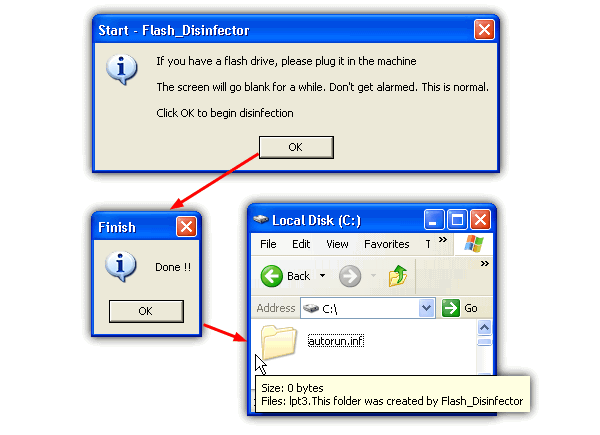
There’s another tool called Flash Disinfector by sUBs which you can use to easily remove USB flash drive malwares… It also works on local hard drive. Very easy to use. Just run Flash_Disinfector.exe and it will tell you to plug in your flash drive that is infected by malware. The screen will then go blank for a while. After a few seconds, you’ll see a popup window saying “Done!!”. I’ve personally used it to remove Bha.dll.vbs and it works perfectly.
Flash Disinfector will target the following Flash malwares(in general):
W32/Perlovga (copy.exe | host.exe)
VBS_RESULOWS.A (Hacked by Godzilla, Hacked by Moozilla)
Bha.dll.vbs
w32automa worm (Autorun.vbs)
Trojan.Win32.VB.atg | Win32/Dzan | Worm_vb.bnr (tel.xls.exe | mmc.exe)
W32/RJump.worm (RavMonE)
Worm.Win32.Delf.bf | W32.Fujacks (spoclsv.exe)
W32.Fujacks.BH (Fucker.vbs)
WORM_AGENT.PGV (soundmix.exe)
W32/Hakaglan.worm (RVHost.exe)
Trojan.Win32.VB.ayo [AVP] (Macromedia_Setup.exe)
Trojan.VBS.DeltreeY.b#1 (Destrukto!!! | destrukto.vbs)
What will Flash Disinfector do:
- Clean up junks created by flash malwares
- Deletes autorun.inf from every root folder
- Fix back damages done to your system
[ Download Flash Disinfector ]
Related posts:
same of me.. I can’t remove it.. theres a Message when i right click my hard drive saying “HELLO WORLD!” i used several anti virus but it doesn’t work
in my windows xp, when i am double clicking on ‘local disk C’,it is saying “hello world” caption and not opening.
please give me the solution on my gmail account which is given.
thanks man! now i found an interesting program
thanks it reaally works its best i love that site thanku
Just GREAT!!!!
Thanks!
I have to say, every time I come to raymond.cc there is another remarkable article up to read. One of my friends was talking to me about this topic a couple weeks ago. I think I’ll send my friend the link here and see what they say.
Hi,
i tried the disk heal on my Desktop, worked.
but then i install on Labtop, it just keeps showing me :
Run-time error ’339′:
Component ‘TABCTL32.OCX’ or one of its dependencies not correctly registered: a file is missing or invalid
EVEN when i already copied the “tabctl32.ocx, comdlg32.ocx” to “C:/windows/system32″.
Any help will be very appreciated…..
HI, thanx for the tip, problem! My computer boots up ultra slow, and when its finished about 30 minutes later, most features dont work, it just displays the desktop window. When i click anything it takes even longer to display the window, but will not open anything. So i,m pretty stuck, Please help!
Thanks alot ,disk heal is really good
It’s works like miracle. Thankxxxxxxxx
thanks you v much
please send me the link for freely downloadable flash disinfector 1.0
I can’t delete from my hard disk drive. Please help me. Anytime I try to delete a progarm, it says the program or application is being used by a person or anothe program.
Million thanks…… Raymond. Finally this disk heals my wounds…. Hats off!!! God bless u….. Muaaahhhhhhh!!!
this probel solved by disk_infector tool this is best solution
i fixed my external n my thumbdrive
i downloaded it from here tho..
softpedia.com/progDownload/Disk-Heal-Download-79552.html
-YBC-
Will Diskheal or Flash Disinfector delete everything in my flashdrive or the files in my comupter?
men u rock..thanks for giving out this free goodies
Thanks a ton, this has really helped me.
Excellent software
Modifying the registry can cause serious problems that may require you to reinstall your operating system. We cannot guarantee that problems resulting from modifications to the registry can be solved. Use the information provided at your own risk.
The first and easiest way to hide all the drives in My Computer is via a policy. If you don’t understand how to use policies you should review Microsoft’s Guide to Policies and Profiles.
After locking the drive when u try to open it, u will see a msgbox like this”This operation has been cancelled due to restrictions in effect on this computer. Please contact your system administrator”.
hi raymond! it didn’t work for me. When I open it. It says run-time error ’399′
Component ‘TABCTL32.OCX’ or one of its dependencies not correctly registered: a file is missing or invalid
What will i do? Thanks for your help raymond
Dear Raymond
I am not able to assess any of my drives (partitioned in C,D,E and F). windows xp is working fine. I am able to open all the files of desktop but none of the folders of desktop are getting open?
Exact massege i am getting, while opening my folders, is
This operation has been canceled due to restrictions in effect on this computer. Please contact your system administrator.
I am trying healdisk. afetr entering the drive name and clicking the fix,
Heal disk response is \\\\\\\”please make sure that the drive letter was entered correctally. \\\\\\\”
Kindly look in to the matter and advice me. i will be highly thankful to you.
regards
good software
Hats Off!!!! to Raymond…… thanks it’s done……cheers
Hi! Can you please tell me how to cleaned the above mentioned virus (C:\WINDOWS\system32\ieso0.dll) as if it is can’t been deleted by ESET Anti-Virus. Thank you sou much!
JOSEPH DAVID SANTOS
Hi! Can you please tell me how to cleaned the above mentioned virus as if it is can’t been deleted by ESET Anti-Virus. Thank you sou much!
JOSEPH DAVID SANTOS
svp j’arrive pas a ouvrir mon msn il me demande tjrs de faire updet pour windows et a chaque fois il me dit que j’ai un probleme critique
أريد يا أخي منك مساعدة ، فقد تغير عندي شكل أيقونة جهاز الكومبيوتر وأصبح على شكل ورقة
وقد استفسرت عن هذا الموضوع وعلمت أنه فايروس عندي على الجهاز وقد اتبعت كثير من الطرق ولم أستطع أن أحل هذه المشكلة ، أرجو منك المساعدة اذا كان لديك علم بهذه المشكلة
ولك كل الشكر
Well done mate,
This was driving me crazy, dl’d the disk heal app, did the job. I thought I was in the clear when I deleted all traces of virus with avast antivirus… untill I found that i could no longer open my local drives with the a simple double click, Disk heal was the icing on the “sweet – my pc works again” cake.
Thanks for pointing me in the right direction.
i locked my drives with easy drive lock software,after some time,i tried to open my d,e,f drive those were not opening,i tried to unlock with those passwords,but it is not working.how can i open my drives.i dont want to loose my data. plzzzz help me urgent…………….
thanx alot, got my problem solved
before this i used to format my all drives which takes time and also i used to lose many of my important files.
Thanks for all, disc cure solved my problem. I just post some in portuguese and notice that all page are in english. LOL
One of my 3 parts of my computer didn’t work when I was trying to access in my computer in the usual 2 clicks. I just opened the Disc Cure and add the letter drive I had problem and ordered to fix the current drive. It works fine after boot the system. Thank you for all.
O Disc Cure resolveu meu problema que era o seguinte. Meu HD é particionado em 3 partes, uma é o drive C em que está o Windows e mais outras duas partições, essas maiores, onde estão todos meus arquivos, por algum problema ou vírus, no caso o autorun.inf, me impedia de acessar o drive E com dois cliques. Só conseguia acessar atraves do explorer digitando E:\, mas o atalho para faze-lo diretamente em “Meu computador” não existia. Fiz o download do Disc Cure, abri o programa e somente digitei a letra do drive que estava com problema e pronto, após reiniciar a máquina tudo voltou ao normal. Obrigado pela dica.
hi,, thanks a lot,,, it works perfectly fine…. my problem is solved,, thx
Sweet. thanks raymond. really helped me
Thanks a lot for the flash disinfector.
c drive in my pc is opening but other drives are opening with program archive, this has happen when i connected my pen drive and copied a folder from it while it also had a autorun.exe file in it which runs the drives to open through autorun program.
but as i deleted it from ny removable disk , so thid has affect other drives and can not locate that file. help me to run my drives as normal to open directly.
thanks guys the stuff worked as a dream real good
thans mate any idea how to enable vieuwing my hdd
in my computer
T H A N K Y O U V E R Y M U C H!
Thanks for posting and disk heal is the biz and it worked so fast.
Thanks again.
There\’s another way to create an unaccessible empty Autorun.inf so double-click on any removable drive won\’t open anything. This may stops accidentally opening the virus executable. Origin from \”bbs.et8.net/bbs/showthread.php?t=929213%E3%80%82\” (in simplified Chinese).
It works on FAT/FAT16/FAT32. Just change the normal file attribute from Archive (0×20) to Device (0×40) or set the file attribute bit6.
To do so, create an empty \”AUTORUN.INF\” at the root of the removable drive and make sure the filename in upper case. Run Tiny Hexer or WinHex to search the whole drive image for exact \”AUTORUN INF \” (two spaces within). The filename should start at the biginning of a 32-byte boundary and these 32 bytes should end with 6 zeros. Replace \”AUTORUN INF \” with \”\”AUTORUN INF@\” and save. Eject the removable drive and insert again. Check to see if you can read, rename or delete AUTORUN.INF.
T H A N K Y O U!
Perfect solution solved my problem perfectly perfectly.
Thanks for posting and disk heal is the biz and it worked so fast.
Thanks again.
Hi i am sanil from New Delhi
when i click on local drive its not direct open only it open with ie but i have download this tools then fix it drive
it strange its open
thanks many many thanks
great
hi iam vinay gupta from delhi
iam use in windows vista i am face some problam in windows mail . when i am click send&reciving its not recive any mail and its not send its come errer hangs what can i dow. but when only recive it is ok
what is ression
thanks for your valuable advice.
when i double click on my local drive d \\\\\\\\ the message is showing . choose the program open with
We would like to thank Raymond, the author of this blog for buzzing about our product Disk Heal, Thank You!
We wish you more success in this already successful blog.
Thank you bro! its great software Disk Heal.. after seconds… my drive c will open fine.. ..
thanks
Thank u Very Much this tool is very helpful at any given point of time……………………………………….
what a great posting raymond. Keep trying, sure you can be a great person someday.
when i double click on my local drive d \\\\\\\\ the message is showing . choose the program open with.
when i double click on my network drive the message is showing recycler\\\\desktop.exe file not found make sure the file name and path are correct.i format the pc but the problem is same please help.
my system is error any time shome error C Drive is full when only install windows XP, some softwar, dont show hidden file and temp file, what is this Error and breaff me this problem i am wating for any person….?
a gr8 job dude…thanks a lot…
thx a lots mate.
those software working well!
thx to you. im going to fwd this blog in my blog.
thanks i help me a lot,b4 this to solve this problem.i restore my pc.and back to normal.but i have a fast way.
thanks
I’ve updated the link.
i cannot d/l the disk heal.. said it maybe an old file from the url…
thnaks very much for \”disk heal\” it is really helpful.
i have faced the same problem and computer heal works wonder
thanx
I used this tool due to a virus infection which has really made my day. It is called W32.gammima.AG which has cased lots of corruption in my laptop although it is rated as a “LOW RISK” in Symantic website. I ran the anti virus and Cleaned/Deleted the infected file but the problem of not getting the drive “C” opened. Thanks for this tool.
Hey man. Thanks a lot for the post. It solved my issue of “Computer drives not opening on double click”. This tool is really cool.
i am avinash…….i have installed Folder Vault software in my system……wen i use it i locked my drive D:\ and after sometime…..wen i unlocked it …i used to double click my drive D:\ and its not opening……..it shows some error…..like”””D:\ refers to a location that is unavailable. It could be on a hard drive on this computer, or on a network.Check to make sure that the disk is properly inserted,or that you are connected to internet or your network and then try again.If it still not be loacted,the information might have been moved to a different location.””wen i see the properties on my drive D: it shows both free and used space ’0 bytes’……………Please solve my problem…….i dont want format that drive……..bcoz i have important data on drive D: …NOTE:my drive d contains only data and no program files or windows files……..please solve my problem please…………i want to get back my drive………please……..is there any solution…….please…..
i am avinash…….i have installed Folder Vault software in my system……wen i use it i locked my drive D:\ and after sometime…..wen i unlocked it …i used to double click my drive D:\ and its not opening……..it shows some error…..like”"”D:\ refers to a location that is unavailable. It could be on a hard drive on this computer, or on a network.Check to make sure that the disk is properly inserted,or that you are connected to internet or your network and then try again.If it still not be loacted,the information might have been moved to a different location.”"……………Please solve my problem…….i dont want format that drive……..bcoz i have important data on drive D: …NOTE:my drive d contains only data and no program files or windows files……..please solve my problem please…………i want to get back my drive………please……..is there any solution…….please…..
Thankss..Raymond
its really a great tool to clean such junks from PC…
Thankzzz a lot…I hope u keep posting more n more…
Thanks Raymond.
I can fix my problem that cannot open c drive by double click
Regards
If u can/know how use dual-booting. In Ubuntu you can access your hard drive and delete the autorun.inf file. If you want u can also run an antivirus for linux like avast!
thx Ramond
I really appreciate ur efforts to help people out.
regards
You can remove , system read-only hidden file by disabling “ Hide protected operating files system files” from folder option , and remember to make show hidden files and folder , however disabling this option is dangers, because you might accidentally delete an important system file
Thank you
God bless the internet! Thanks for the shareware Flash Disinfector it really works. I tried many well known antivirus but it doen’t fix my drive virus. Now I don’t need to reformat my C: and I save my other program licenses.
i accendentally install a crack.exe but iam able to see my local disk but my real problem is my desktop taskbar and icon is kind of refreshing in about 2 sec. thats why i cant entirely see whats inside my local drive and cant erase the .inf is this tool can help me???
iam facing that problem at the moment any suggestions will be gratefull
thanks ray,
Thanks mate ;-)
thnx for ur valuable post and disk heal set
thanks for this… i was currently facing the same problem with my pen drive :)
Sohail, that’s because you still have virus in your computer. Try going to forum and get help there.
I can’t see hidden files in my computer :(
When I click on “show hidden files” under folder option and click OK then I reopen folder option, I find option changed to “don’t show hidden files” automatically. I think something is preventing the settings to be saved. I have cleaned my system with Kaspersky and used Hijackthis etc. but still the same problem.
Will anyone help me to solve this problem please?
Thanks for this nice tool Raymond, I used to do it manually, I go search for the autorun.inf file and try to delete it…
Thanks for this Raymond, Disk heal is surely an amazing tool. ..Downloading it right away!
thx for this info raymond
[...] desinetworkmbolie wrote an interesting post today onHere’s a quick excerptThe reason for this is when you open My Computer and tries to access a drive, it will run the virus to infect your computer. Very often anti-virus is able to remove executable virus from system but not autorun.inf. … [...]
[...] desinetworkmbolie wrote an interesting post today onHere’s a quick excerpt [...]
[...] desinetworkmbolie wrote an interesting post today onHere’s a quick excerptThe reason for this is when you open My Computer and tries to access a drive, it will run the virus to infect your computer. Very often anti-virus is able to remove executable virus from system but not autorun.inf. … [...]
[...] Ryan wrote an interesting post today onHere’s a quick excerptThe reason for this is when you open My Computer and tries to access a drive, it will run the virus to infect your computer. Very often anti-virus is able to remove executable virus from system but not autorun.inf. … [...]
[...] desinetworkmbolie wrote an interesting post today onHere’s a quick excerptThe reason for this is when you open My Computer and tries to access a drive, it will run the virus to infect your computer. Very often anti-virus is able to remove executable virus from system but not autorun.inf. … [...]