
6 Free Ways to Download Clips from Video Sites


 8 min. read
  Published on

Video streaming is big business these days and watching Television programs or movies online is more popular than ever. Places like Netflix are the most common for paying subscribers but websites that show free videos like trailers, guides, or just plain fun clips are just as popular. These include Dailymotion, Vimeo, Facebook and even Amazon has recently launched a similar service.
The problem with a lot of videos now is they are uploaded in higher resolutions, such as 4K, 1080p or 720p, which means when you watch the video you need to have a more stable and faster internet connection to keep it playing smoothly. A simple solution to this is to download the video clip first and then watch it offline at your leisure, the clip can also be easily transferred to other devices such as phones or tablets for offline viewing while roaming.
Here we have 6 methods for you to download video clips from popular sites on the internet, there is a mix of ways so if one doesn’t work for you, another might.
1. 4K Video Downloader
4K Video Downloader is a plain and simple video clip download tool that can grab videos from the likes of Vimeo, Facebook and Dailymotion. The program is open source and cross platform with versions for Mac OS X and Ubuntu Linux as well as Windows. If you want a portable version, there’s a zipped one available.
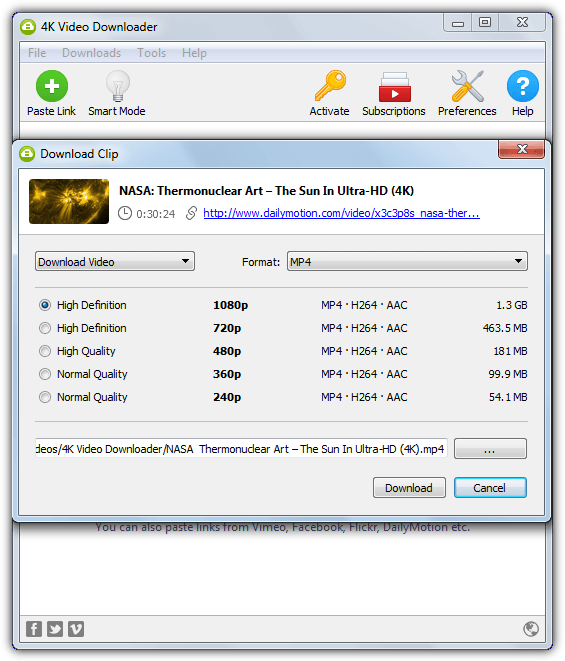
Install or run it, then copy the video clip URL from your browsers address bar and click the “Paste Link” button or left click in the main window. The address will be picked up and after parsing the information, a window will pop up with all the available formats and resolutions the video can be downloaded in. If you want to extract just the audio, there’s an option to do that also. For some reason we couldn’t get the program to download 4K clips on Vimeo and Dailymotion.
Multiple files can be downloaded at once and there is also a one click Smart Mode where you can set the default file format and resolution, the select clip window will be skipped and the file will automatically download. There is a small Donate nag screen on 1st run and also a Donate ad will appear in the download window although you can hide it.
2. Freemake Video Downloader
If the claims that Freemake Video Downloader can download video from over 10,000 websites are even half right, then that’s still a mighty impressive number. This includes Facebook, Vimeo, TubePlus, Dailymotion, Megavideo and many others, as well as adult sites. For that last reason, Freemake has an option to enable parental control by restricting video access from these sites by means of a password. Connection speed and number of downloads can also be controlled.
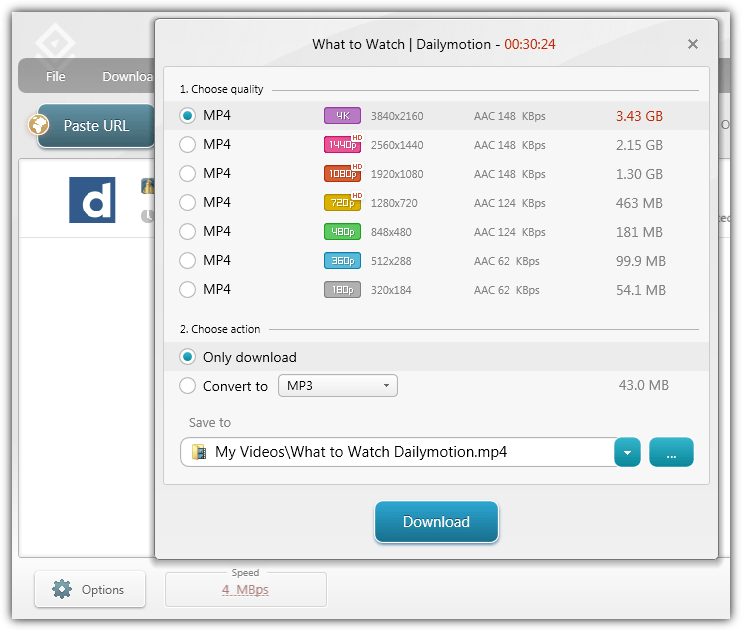
Freemake Video Downloader is well laid out and easy to use but can also be quite powerful. Copy the URL from the browser, load the program and click the blue Paste URL button to copy the address from the clipboard, after which you will be presented with a window where the quality can be selected, including 4k. The video file can be converted after download to a number of formats such as MKV, AVI, MP3 and also smartphone compatible formats.
There is a one click download mode button where all videos will be downloaded or converted and at the specified quality. Freemake Video Downloader on install includes some adware dialogs which you need to watch out for. A restriction in the free version limits the downloads to a total maximum speed of 4MBps.
Download Freemake Video Downloader
3. EagleGet
EagleGet is one of a number of download managers that are able to grab video clips as well as most other types of file. JDownloader is another one that can also accomplish this task but we like EagleGet because it’s small, fast, easy to use, has plenty of useful features, has a portable version, is ad free and light on resources. A browser extension is available which can also be installed when you install the main application but we found it not quite as reliable as using the main program for grabbing video clips.
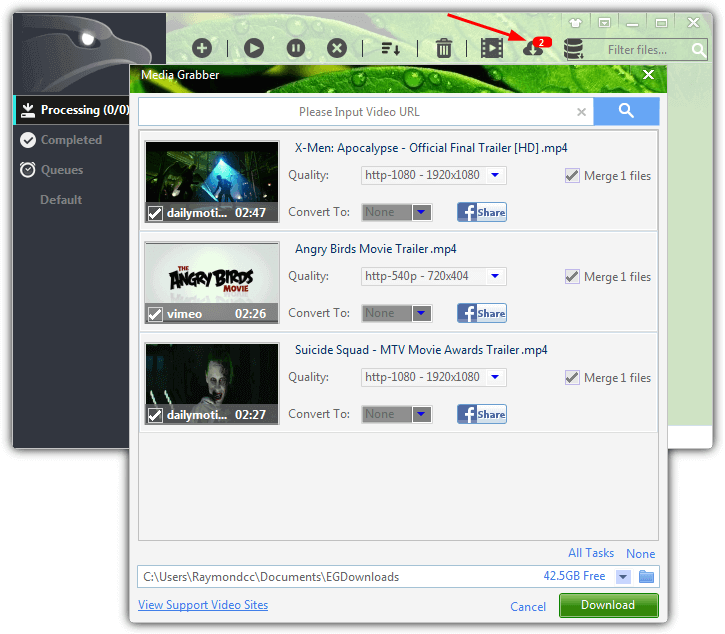
For downloading video files, EagleGet supports an impressive selection of websites, including all the most popular. If you’re lucky it will auto detect the page you are on has a video and popup the Media Grabber window, if not, it can be opened from the main interface where the URL of the page can be pasted in. Select the quality from the drop down and press Download. EagleGet does include a media converter that is able to convert to different video or audio formats although you need to install the FFMpeg component manually through the settings.
4. Flash Video Downloader Browser Extension
There are some of good reasons for installing a browser extension to help you download video clips. An important one is you are not exposed to the adware that many standalone video downloading tools include in their setup files. Flash Video Downloader is an extension for both Firefox and Chrome and despite sizeable user interface differences between the two, they appear to be the same tool made by the same developer. We’re looking at the Chrome version.
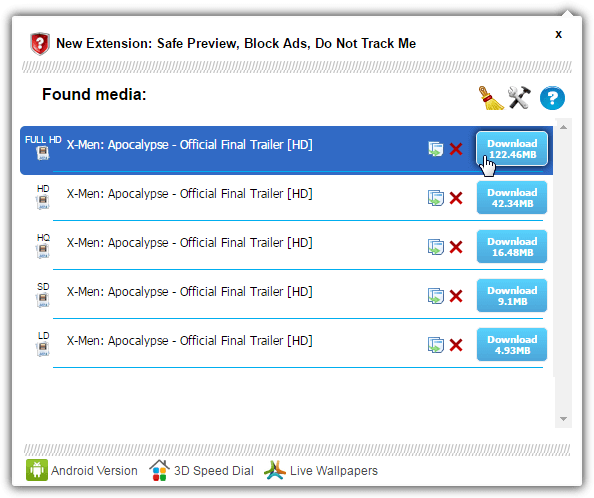
The number of download sites supported is slightly vague although many of the common ones appear to be available. After installing the extension and loading the page containing the video clip, a blue arrow will light up on the browser toolbar, click it to open the download window which will display the available clips and resolutions for the video. Copy the link of the selected video to the clipboard or press the blue button to download the corresponding file.
There is an options window that allows you to enable or disable downloading of specific video formats like MP4, WEBM, SWF or FLV and an option to only trigger the downloader on videos above a certain size. On some sites there will also be an additional download button below the video to quickly choose and download the clips you want.
Download Flash Video Downloader Extension For Chrome
5. Slimjet Browser
One of the easiest and safest ways to have the ability to download clips from video sites is having the feature built directly into the browser itself. There are dozens of third party browsers based on Chrome and Firefox, FlashPeak Slimjet is based on Chrome and includes a number of useful features, and one of those is an integrated video downloader.
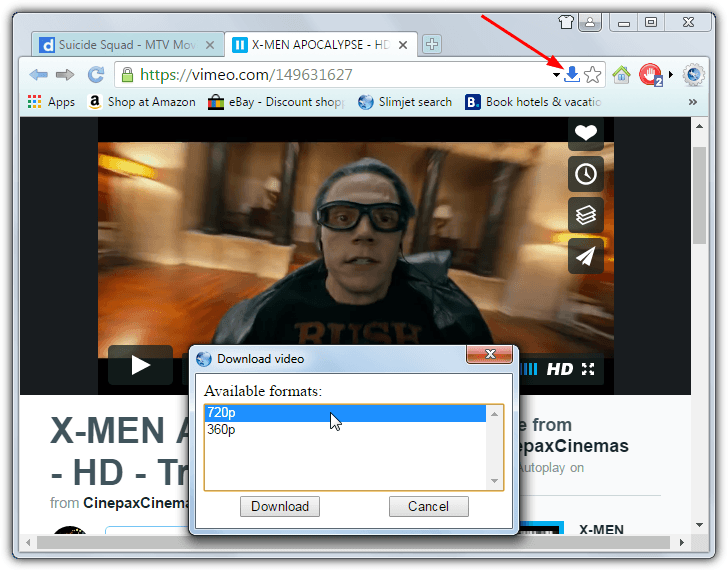
Another good thing about Slimjet is there’s an official portable version so you can try it out without installing. Dailymotion, Vimeo, Facebook and a few others are supported and all you have to do is visit the page with the clip you want to download and press the little blue arrow that appears in the right of the address bar. A window will then popup with the available formats, select which one you want and press Download.
6. SaveFrom Online Video Downloader
There are many online video download websites out there and while many are perfectly usable, some contain misleading advertisements or want you to download third party programs or browser extensions. If you are forewarned and know what to expect before visiting a specific site, you will be fine. SaveFrom is one such service where using some common sense can turn it into a very useful resource for quickly and easily downloading video files.
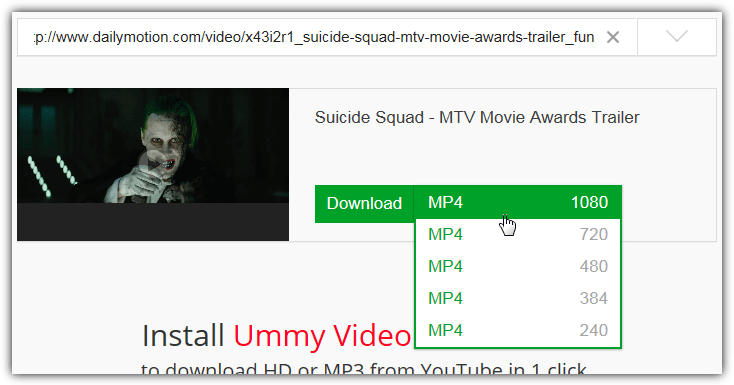
SaveFrom is able to download video clips from around 30 different sites including Dailymotion, Vimeo, Sendspace, FaceBook and Metacafe. Grabbing a video clip is very easy, paste the URL of the video into the box and press the blue button. Below appears a thumbnail (which you can click on to play) and the download button. Press the button to download the clip at the displayed resolution, if the video has different sizes available you can select manually from the drop down, the best is selected by default.
The SaveFrom site as expected has a number of ads and “recommended” downloads which if you ignore or use an ad blocker, it won’t be much of a problem. It also advertises a helper application and extensions that can add a download button directly into the clip’s page, but we’d recommend you don’t touch those unless you are an advanced user.



Improve this guide

User forum
0 messages