
Ketarin Automatically Keep Your Software Setup Installers Up-To-Date


 5 min. read
  Published on

If you’re someone who likes to install and try out software or a computer technician, installing new applications is something you’ll probably do a lot and making sure you have the latest version of the setup installer is important. Having the latest setup files for security software or web browsers etc is good for security and also because the program will likely update itself on install and you’ll essentially install the software twice if an older setup package is being used.
There are tools that can update your software in different ways. Programs like SUMO and FileHippo Update Checker scan installed software and let you download the latest installer, others like CNET’s Tech Tracker can silently update your installed programs. When you’re installing/re-installing Windows or installing new software, what you need is the latest setup installers, and the tools above can’t do that. There are online services such as Ninite that can help but you’re still required to download the setup files just before install.
This is where a utility called Ketarin comes in because it checks for and automatically downloads the latest setup installers for the software YOU tell it to, not what’s installed on the computer at the time. Ketarin is not specifically designed to keep your current system updated, but rather to maintain a compilation of setup installer packages which can then be burned to disc or put on a USB stick.
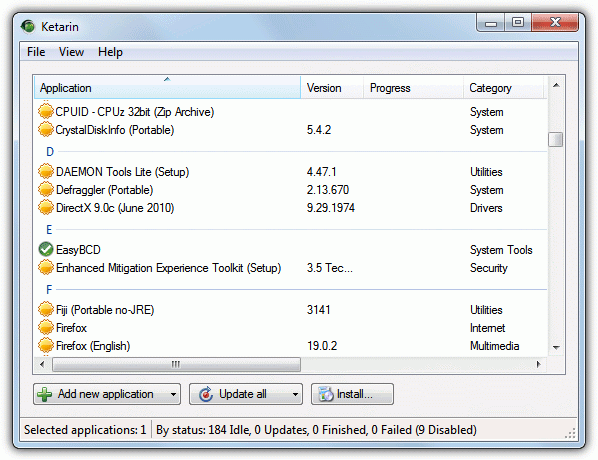
Using Ketarin can be quite easy, but there are some very advanced functions if you want to go down that route. Basically, what it does is monitor the content of specific web pages for changes and if the page lists a newer software version, Ketarin downloads the latest installer to your hard drive/USB flash drive.
Updating Applications
By default Ketarin has no software listed but you can add applications in various different ways. An application list can be imported from an XML file, you can create a new entry yourself, or alternatively use the built in online database function where you can search and select what entries to include from an online repository.
Method #1
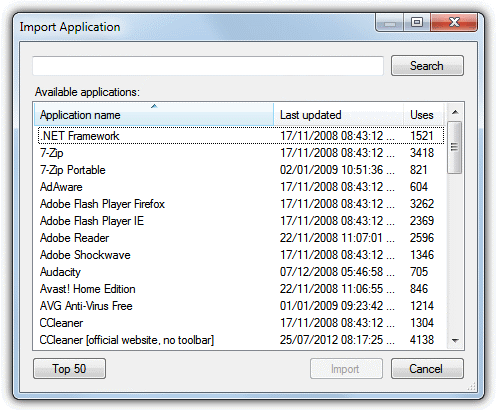
To quickly add a title from the online database, click the “Add new application” drop down, select “Import from online database…” and browse or search through the database for what you want, then click Import. There’s a handy Top 50 button to display the most popular downloads. Once imported, click on the “Update all” drop down in the main window and choose to “Check all for updates only” because several database entries are outdated and don’t work.
Method #2
Another easy method of getting a software list into Ketarin is to import the database. There might be a few around the web, but for your convenience we have listed a current database which was downloaded from the Ketarin forum, then edited and updated to make all entries work at the time of writing.
Download and extract the two files below, one is the database, and the other a settings file with some custom settings and variables. There are 184 applications with several portable update entries as well as setup installers. Just delete what you don’t want and then select Update all to get all setup packages.
Download Ketarin Database – Click Add new application -> Import from file.
Download Ketarin Settings – Click File -> Settings -> Import (at the bottom).
Method #3
A third option is to use the built in support for downloading files from the popular FileHippo download portal. First you need to visit FileHippo.com and find the page for the software you want, in this example we’re going to use Firefox, a software that’s constantly updated.
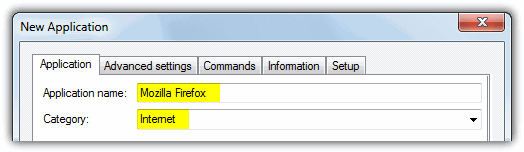
1. Click the Add new application button in Ketarin. In the window, give the software a name. In this example, Mozilla Firefox. Although not essential, you can also supply a Category.
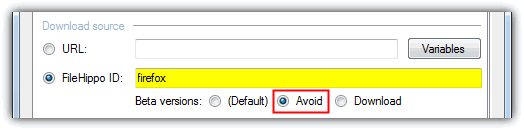
2. On the Filehippo software page right click and copy the URL of the page from your browser address bar. In this case “http://www.filehippo.com/download_firefox/”. Paste that into the FileHippo ID box in Ketarin. The name will change automatically and if you don’t want beta versions click the Avoid button.
3. Select a download folder or folder and a custom file name, then press OK. The new entry will appear in the main window. Now you can right click on it and select “Check for update” to see if it works and “Update” to download the latest installer version.
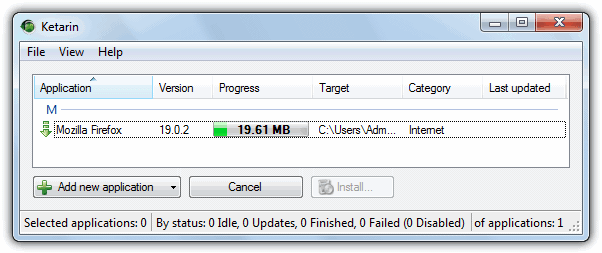
Ketarin also has options to setup your own custom update configurations where webpages can be checked by arguments and regular expressions, but you will definitely need more advanced knowledge and it’s essential to read more about how it all works at the Ketarin Wiki pages.
It also has some other functions where you can set Ketarin to automatically delete the previously downloaded file to save space, spoof the HTTP referrer and also execute custom commands before and/or after downloading. Ketarin is portable and you just need to extract the zip file to use it. There is a slightly updated Release Candidate version from 2012 available in the forums.



Improve this guide

User forum
0 messages