How to Delete Spam & Pending Comments in WordPress
Although there are many different content management systems available to use, WordPress remains one of the most popular today and has won a couple of awards such as the Critic’s Choice Best Open Source PHP CMS and People’s Choice Best Free CMS in 2014. When many websites uses the WordPress platform, this will obviously attract spammers in creating a tool that can automatically spam links to the comment area in a post.
While there are also many antispam plugins to block comment and trackback spam, Akismet remains the top plugin being used to detect spam comments. However these antispam plugins are not perfect as there are times when a spammer finds a way to bypass antispam detection and manage to slip through a few spam comments. Other than that, an unhappy visitor might use these tools to flood a website with thousands of useless comments in hoping to overload the server and causing it to crash.
If one day you wake up to find thousands of spam or pending comments in your WordPress admin area, do not be afraid because there are easy ways to quickly delete the comments. If the spam comments keeps coming in, you should first configure your website to stop accepting any comments.
Login to WordPress admin, go to Settings > Discussion. Tick the “Users must be registered and logged in to comment” checkbox ad click the Save Changes button. Then go to Settings > General and make sure that the “Anyone can register” checkbox is uncheck. This two combination settings will prevent any visitor from being able to post comment on your website. We’ll start to clean up the pending or spam comments once this is done. Here we have 3 different ways to delete all WordPress spam comments.1. Built-in method
WordPress has a built-in method to easily and quickly remove all spam comments. Go to Comments, click on Spam and you will find a Empty Spam button. Clicking on that button will instantly delete all the comments that are flagged as spam.
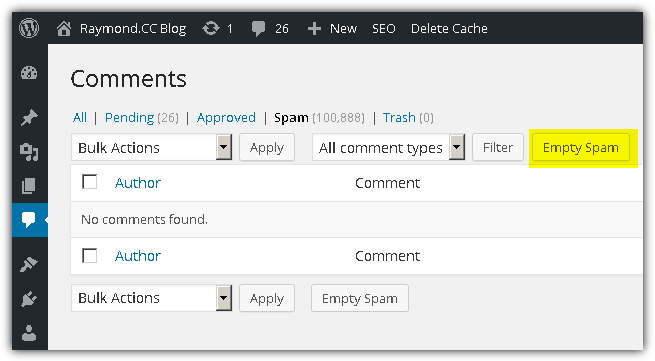
There are two possible problems in using the built-in Empty Spam feature. If your website is hosted in an underpowered shared server, the empty spam process might time out and even possibly cause the web server software to crash if you are attempting to remove tens or hundreds of thousands of spam comments. Another possible problem is if the comments aren’t being flagged as spam and appears in Pending, there is no button that can allow you to delete all pending comments.
2. Batch Comment Spam Deletion
If you are facing the above problem where the Empty Spam process is timing out due to large amount of comment spam, you can install a plugin called “Batch Comment Spam Deletion”. This plugin simply modifies the Empty Spam action to delete the spam messages in batch rather than all at once. To install the plugin in your WordPress website, go to Plugins > Add New > search for Batch Comment Spam Deletion at the top right box, and click Install Now button.
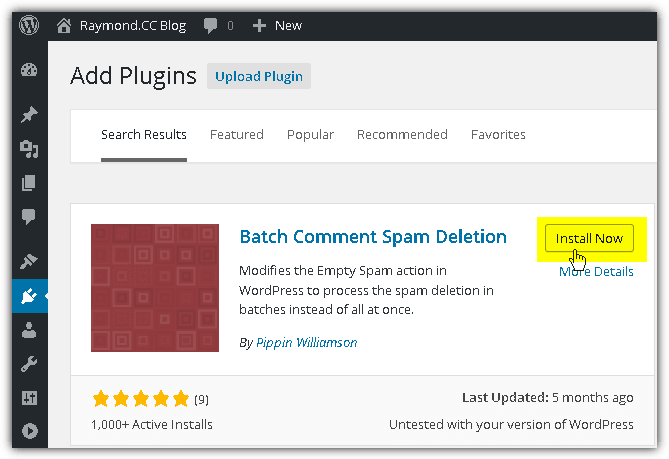
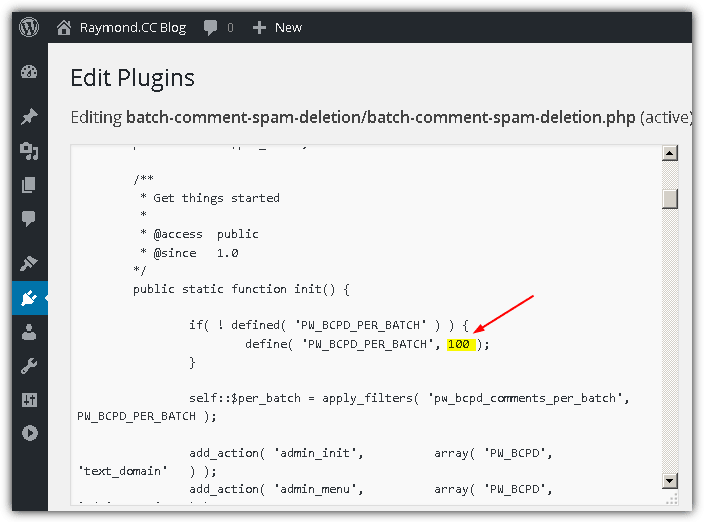
There is nothing else to do after installing the Batch Comment Spam Deletion plugin. It automatically modifies the action of the Empty Spam button. If your server is still timing out after installing this plugin, you will have to reduce the number of spam comments to process. From the source code, it shows that this plugin process 100 spam comments at a time and this can be changed by adding a filter in functions or by adding a constant to your wp-config.php. Another quick and easy method is by directly editing the plugin file from Plugins > Installed Plugins > click Edit for Batch Comment Spam Deletion, change the value 100 to a lower number and click Update File button.
Download Batch Comment Spam Deletion
3. SQL Command
Using the SQL command is very powerful because you can probably delete all spam or even pending comments in less than a second without time out. However, it is a bit risky because a wrong command can empty a table or even worse, wipe out the whole database. So it is advisable to at least create a full backup of your database using a really easy to use plugin such as “Dropbox Backup & Restore“. After installing the Dropbox Backup & Restore plugin, click on Dropbox Full Backup from the top left bar and click “Create Local Backup” button. If anything goes wrong with the SQL command, simply click the “Restore” button.
You will probably find a lot of examples on other websites telling you to use phpMyAdmin to do it but we think that is a bit overkill because not all web server has phpMyAdmin installed and selecting the wrong database might end up cleaning the comments for other websites hosted at the same account. An easier and safer solution is to install another plugin called SQL Executioner that allows you to execute SQL queries for the WordPress website that it is ran from.
To install, go to Plugins > Add New > type SQL Executioner in the search plugin box located at the top right, and click “Install Now”. After finished installing and activating the plugin, go to Tools > and select SQL Executioner. Click the $comments link to describe the comments table and take note of the table name.
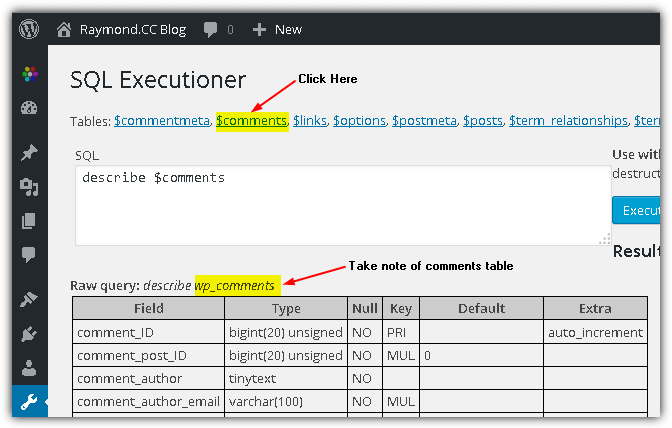
Most of the time the default name of the comments table is wp_comments. You can confirm this by checking the name of the comments table after clicking the $comments link. Now here are a few different SQL commands to delete all spam or pending comments.
To remove all pending comments:
DELETE FROM wp_comments WHERE comment_approved = "0"
To remove all spam comments:
DELETE FROM wp_comments WHERE comment_approved = "spam"
Type the command in the SQL box and click “Execute SQL” button. Click OK button to confirm the query to modify data in your database. The number of rows affected shows the number of comments being removed from database.





Thankyou. Not bad at all! Not bad at all (7.809 pending comments deleted in 2 secs)!
When doing delete using mysql request then you need to delete also wp_option called “_transient_wc_count_comments” so admin comment count will be reseted.
Thank you, I’ve been searching all over for this answer.
I can not find this “_transient_wc_count_comments” on wp-option and I got numbers on the admin area even I have deleted all comments
This was really helpful.
With more than 65 000 spam and not approved comments you sir saved my life.
Thank you!
Thank you very much. You article saved me a lot of time.
If you don’t want to get rid of them all, try these SQL statements where you may be getting a lot of insurance, medical or what have you spam. Of course you can replace them for whatever keywords you like.
DELETE FROM wp_comments WHERE comment_author_url LIKE “%insurance%”;
DELETE FROM wp_comments WHERE comment_content LIKE “%Medic%”;
I got rid of over 18,000 pending comments! thank you! thank you! thank you!
Brilliant solution
got rid of over 200,000 thrashed spam comments and halved by sql database size
Thanks for this..i had over 1400 pending comments which i wanted to delete. The SQL Executioner plugin was perfect for the job
Very helpful. Thank you.
Thank you, thank you, thank you! I had over 320,000 spam comments. I had tried bulk delete plugins but nothing worked. Everything kept timing out or not doing a thing. THANK YOU so much! I spent all day deleting 200 comments at a time. I knew there had to be something out there. THANK YOU!
Thanks so much, 3rd step is very helpful.
Thank-you so much! This was extremely helpful as I had 7000 comments pending, and they were all spam. Problem fixed, thanks to your clear, detailed instructions.
thanks, got rid of 71k comments that were possibly harming my database and took part in messing with the speeds of my host
Thx, you saved my life – and night – found 13,000 comments in my database;)
Thanks for these instructions. Helped me clean up the comments spam on our website. Cheers
thanks, this article helped me get rid of 730,000 trackback spams that were on a website that no one was taking responsibility for.
Great, It helped me in deleting 9992 pending comments – thank you
Thank you. Thanks to you I just wrote my first SQL txt. And it worked deleted 40000 spam comments in 1,7 seconds
Thanks man .. I had 15.000 spam comments and with your help I can easily clean-sweep my 5 sites. Cheers.
Thank you very much! Works pretty fine! =)
This is so great, had a ton of spam, and now none.
wonderful
Thank you! That it only took 0.0891 seconds to do it. I had over 1300 pending. Yikes.
it helped anyways thank you so much
Thank you! Just what I wanted… I had more than 5,000 unapproved comments! All spam!
Thanks, man, that saved a lot of time. Had 1,453 this morning from a bot in the Netherlands.
Man you saved me with this. I just updated some themes and when I did things reset and the next day there was 500 comments.
I also had the same ip break in to one site. They used admin in wp some how. They set up admin credentials and put a script on my server. So check your sites guys and gals
I was beginning to think I was doomed to forever have 17,000+ unapproved comments in my database. Thank you for this article!
nice info, thanks for sharing ;)
Nice Shoot Guy :)
Thank you very very much !
nice trick, nice work
Good on you Buddy! That worked out like… SWEET!
Unlike others who’ve had the problem, I only had 2,100 spammin’ crammers on my site.
Thanks for sharing your brain cells with the rest of us!
EnK
WordPress stores comment count in a separate field in the database for each post (that is an understandable way of optimizing the system, meaning that there is no need to count comments upon every page load), and automatically updates the comment count field on each new comment.
So, do not forget, that after deleting the comments like that manually from the database, you will have to manually update the appropriate comment count field in the database for each affected post, which might be a headache.
Thankyou verymuch ….. i have deleted 2328 spam pending comments !!!
thanks a lot! i got 3000++ spam messages. now it all gone. thanks!
Thanks for the idea. I had a client with 7,000 spam comments. No way was I going to delete all of those by hand, plus the front-end timed out when trying to list more than 20 comments.
Ray,
I’ve gone in and deleted over 29,000 spam comments by removing them from the database.
Gosh, this made my day. I installed Akismet on one of my sites running WP as a CMS quite late and now I have over 1,200 comments awaiting moderation. This makes me breathe easy again. Thanks for the tips!
thanks, i had 1500 unread comments after a holiday. using php myadmin did the trick.
Thanks ray, another great article as usual :P, anyway steveo there are CAPTCHA additions on phpBB, just search their site for some. It should slow down the registration process on the spam. oh and disable accounts from the same e-mail and IP.
Thanks for that Raymond. a very informative piece for someone like myself that is just starting out with WordPress.
Thanks Ray!
Unfortunately, it’s those spammers that make it harder for those who actually enjoy your articles and want to comment easily. There are times when even ReCAPTCHA is hard to read for a actual people. I know there is a refresh button but it’s just an annoyance that I don’t like to deal with. Most of the time I’d rather just not post than have to deal with those silly things.
Oh well, with popularity comes annoying kids who have nothing better to do with their lives.
Good luck Raymond and thanks for the tip.
Nice trick there Ray.
Good on you Raymond. To all spammer of Raymond.cc blog – Get a life, bother some one that deserves it! I’m not gonna get political, but be cool, Raymond.cc is on the people’s side!
Nice work quick actions save the rest of us from these little kids.its a shame they waste their time with these sort of things especially on this kind of site which is just informative and causing no problems anywhere.
shame on them and good on you ray.
Great. Lesser spam more useful
Great post Ray!