
4 Tools to Disable Windows Default Newbie Features


 6 min. read
  Published on

When you install Windows or purchase a new computer with Windows preinstalled, it’s rarely going to be setup the way you like it. As an advanced user or geek, you’d probably make a number of simple yet important changes to the way Windows looks and behaves just to get more detailed information and to have better control. This can take a while making your way through tons of different windows and settings.
For example, if you want to show all file extensions or hidden and system files by default, you have to open a couple of Windows to do it. If you want to change the Windows eye candy settings or control how Microsoft updates are installed, they are separate areas again you have to go and configure. Here’s a selection of programs that enable advanced users to more quickly get these settings applied to your computer.
1. WinBubble
It’s probably a good thing WinBubble is a tool we’d recommend only for advanced users because inexperienced users would probably get lost in it and do more harm than good. That’s simply because WinBubble is stacked full of hundreds of different options to tweak settings, disable settings and generally help make Windows a little less noob friendly.
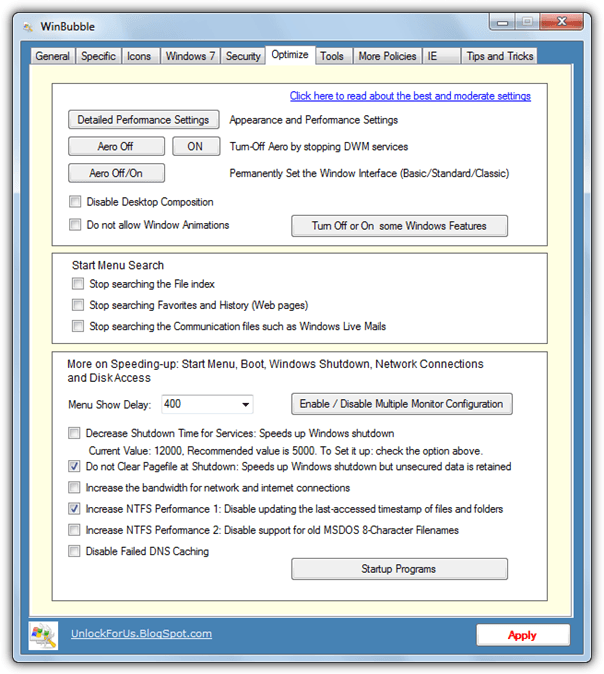
Besides including installable and portable versions of the program in the same package, WinBubble covers a broad range of options. There are graphical tweaks including setting the OEM branding/logo information and a customizing the the welcome screen, editing core system icons, customize the screensaver, and also adjust the Windows appearance settings like turning on/off Aero and window animations.
More advanced options are customizing the Explorer context menu entries, editing UAC, hiding drives in Explorer, file indexing, user account editing, customizing Internet Explorer and a few general Windows performance tweaks. If you want to go the other way and lock down a computer for less experienced users, there are several options to do that also. If you change too much there’s an option to reset back to Windows defaults. WinBubble is listed as Windows Vista and 7 compatible.
2. Vista4Experts
As you can tell from the name, Vista4Experts is a small utility designed to allow you to quickly configure or turn on and off a number of settings that a more advanced user is going to want to change. Although the program has never been updated to officially support newer operating systems than Vista, because of the similarities Vista has with Windows 7 and subsequently Windows 8, most of the functions still work fine. Some even work on XP.
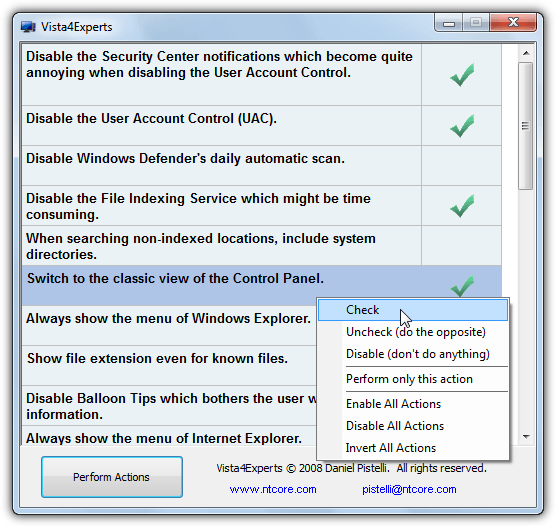
Vista4Experts is a portable executable and you simply run it and scroll through a list of the 20 or so options that will appear. You can edit features such as disable User Account Control, turn off Windows Indexing, always show file extensions, disable Aero, check for but don’t download or install updates, always show the Windows Explorer or Internet Explorer menu, and several more.
Just right click and choose to check, uncheck and disable the feature. Note that some options like the IE default search will do one thing for Check and another for Uncheck. Click Perform Actions when you’re ready to apply the settings, a logoff may be required if the setting requires it. Any options that can be reversed, just use uncheck and then apply.
3. XdN Tweaker
XdN Tweaker is probably a utility that falls in between the two programs we’ve already mentioned, it has more options available than Vista4Experts but nowhere near as many as WinBubble. Many of the options it does have are perhaps a little less for “expert” users but there are enough to make it similar to the tools above.
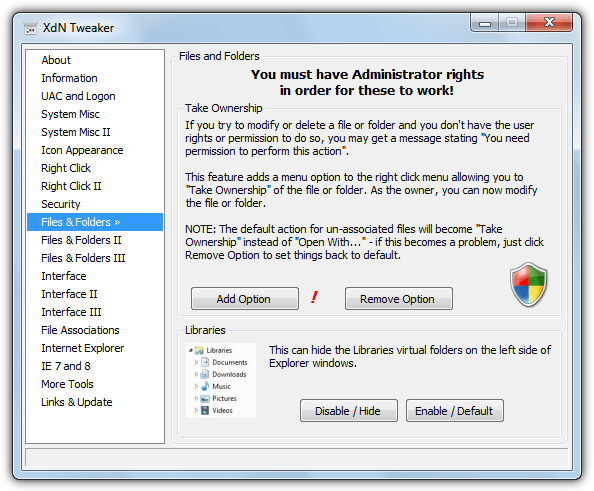
What we like about XdN Tweaker is the nice and clean interface, with some other programs you can spend so much time looking at all the options you don’t need, you might as well have just changed what you wanted manually to save time. Functions such as controlling hibernation, changing Windows Update settings, adding some right click menu entries (including take ownership), and a few interface related tweaks are available. For more substantial tweaks you will have to look elsewhere, a portable and setup installer are available.
4. GIGATweaker
Although GIGATweaker is not the most comprehensive program here, that prize goes to WinBubble, it is a very nice blend of being easy to use and having plenty of the functions you as an advanced user would likely want to edit on a default Windows install. And that perhaps is the point, you want to make the changes quickly and with the minimum of effort.
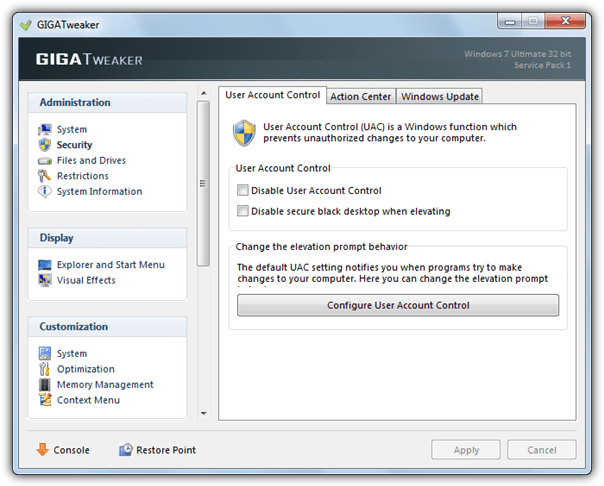
GIGATweaker also has some other options you may or may not want to make use of, such as a startup manager, uninstall manager and a Windows Utilities section that has many of the built in Windows tools and snap-ins located in one place. The section even has a Windows rearm option to reset the Windows evaluation period and the ability to create the Windows God Mode shortcut for you.
The real power of GIGATweaker for our purpose here is the selection of options in the Administration, Display and Customization sections. There are several tweaks to adjust logon and logoff, User Account Control, Action Center, Windows Update, System and OEM information, Explorer, Taskbar and Start menu tweaks, and also Windows visual effects. Open the Console at the bottom to show what the tweaks are doing to the registry etc. GIGATweaker is listed as compatible with Windows 7 only, a portable version is available.
Of course there are hundreds of Windows tweaking tools around but we have tried to stick to a few that simply alter settings a more advanced user might want to change on a clean install of Windows, not the thousands of other minor changes you can make. These are sort of Vista and 7 versions of XP’s TweakUI.
Note: Do note that many settings found in these tools will lower the overall security of your system, but many of them are things an advanced user or expert will always change because they want more information and control over their own system. Default Windows settings are there for the benefit of the average or inexperienced user but annoy the heck out of the rest of us. Obviously you need to be careful about what you enable or disable but that should depend on your confidence and experience level.



Improve this guide

User forum
0 messages