Directx 10 for Windows XP: How to Download & Install
As far as Windows gaming goes, Windows XP was probably left behind way back in 2007 when Vista was released. One of the main selling points of Windows Vista was that gamers simply had to upgrade because of the integration of DirectX 10 into the new operating system. Newer versions of DirectX bring audio and visual enhancements to gaming along with better performance, so if you’re a gamer, you really want the latest DirectX you can get your hands on.
DirectX is tightly integrated into the operating system when installed so you can’t simply install DirectX 10 or 11 on XP because it won’t work. Although we’re now on DirectX 11 for Windows Vista, 7 and 8, and the next Windows will probably come with DirectX 12, Windows XP is stuck on DirectX 9 which is now over 10 years old. Some games are not made to be backwards compatible with DirectX 9 either these days and you just can’t play the game, whether your graphics card fully supports DirectX 10 and 11 or not.
So what do you do if you want to use DirectX 10 on XP but it was never officially released by Microsoft?
There was an unofficial attempt to create a DirectX 10 distribution that enabled you to get some of the benefits the update brings. It was called the Alky Project and they made several alpha releases but this involved quite a bit of manual work copying hacked DLL files and the DirectX SDK etc. In the end they couldn’t get it to work as well as they wanted and after several months discontinued the project.As always when you’re trying to install modded or hacked system files, make sure you have adequate backups to hand because a Blue Screen of Death (BSOD) or a system failure is not completely unheard of when trying tools out that are so integrated into the operating system.
DirectX 10 For XP by LWGame
A Russian group called LWGame came along and made another attempt at getting DirectX 10 to work on XP in late 2008. This version is far easier to install because it’s just a simple executable setup file so you don’t need to do any manual work. Just download and run the 4MB DirectX10_RC2_Fix_3-Pre-Final.zip installer inside the archive.
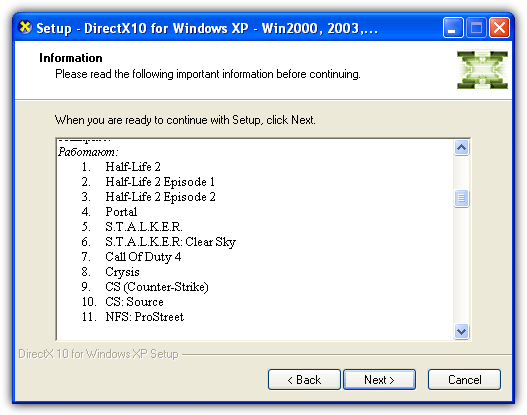
Installation is straightforward and simply a few clicks of the Next button. During install a small list of tested games is shown. Although the list is in Russian, the first listed games are known to work (pictured), the second is partially working and the last is tested and not working games.
Download LWGame DirectX 10 for Windows XP
DirectX 10 For XP by KM-Software
This package is from very late 2009 and KM-Software continued the work of LWGame with about a dozen updates. It’s the last attempt we know of to get DirectX 10 working and called DirectX 10 NYV (New Year Version). A number of stability fixes and tweaks are included as well as a fix that previously caused the installer to trigger alerts in antivirus software.
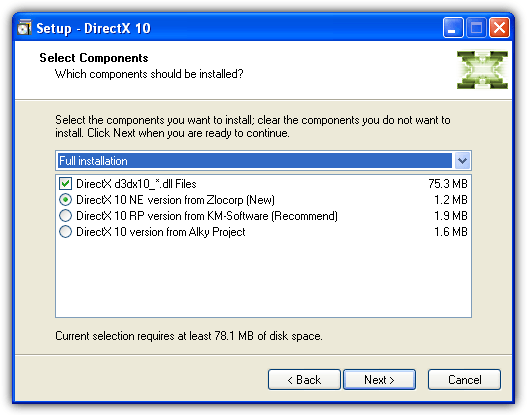
Like the previous package, this is another standalone executable and everything is self contained inside the installer. During install it actually gives you the choice of selecting one of three different DirectX 10 versions; Alky Project, KM-Software’s own version and Zlocorp. The useful thing here is there’s an uninstaller in your Start menu so you can remove it if there’s instability or performance issues.
There’s also a folder named “GraphicX” in the archive that contains a number of individual tweaks and fixes for specific games and options to edit the DirectX version via the registry.
Download KM-Software DirectX NYV
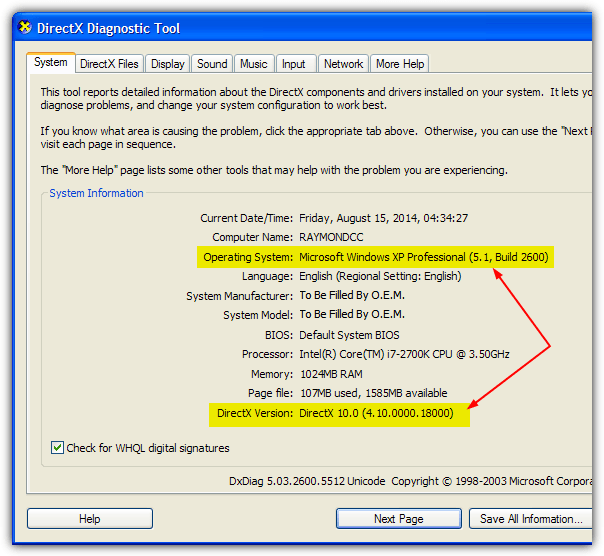
To check which version of DirectX you currently have installed in Windows, simply open a Run dialog (Win+R) and type in dxdiag. At the bottom it will give you a version number of the current DirectX, obviously if you want to try and use DirectX 10 and it’s displayed, you can then see how well it works for you.
Disabling DirectX 10 While It’s Installed
Once you have DirectX 10 on your computer and you’re trying it out, you might want to play a game that requires DirectX 9 or even earlier run. Not all games are going to run smoothly while you have these patches installed, even if they worked fine before. And you’re not going to want to remove the DirectX 10 package every time, so here’s a simple little solution to the problem.
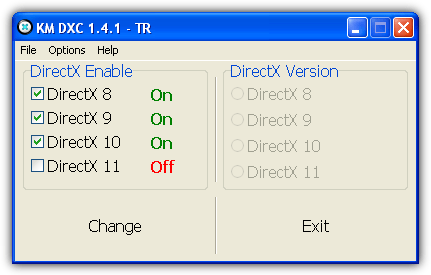
KM-Software came out with a tool called DirectX Changer 1.1 that is shareware costing $10.95 to enable you to change your version of DirectX on the fly. This seems to be a newer beta version or fork of that tool, is free to use and a portable executable. Run it and whatever versions of DirectX you have installed will be ticked and shown as “On”, if you want to disable a version simply untick it and press Change. You can even try and turn off DirectX 10 and 11 in Windows Vista or Windows 7 if there is a specific need to do so.
Note: It’s fair to say that these DirectX 10 versions are never going to be a true substitute for the real thing and if you’re serious about gaming you should think about getting an operating system that has native support. For the most part these programs try to emulate large parts of DirectX 10 and they will sometimes give you the ability to run a DirectX 10 only game but won’t give the added graphical enhancements. Performance may be reduced also, but if you’re desparate, these programs are your only hope.





thank you! only just now, in 2016, got a videocard that supports up to DX11 and found this – priceless!
update: i was able to run my favorite game, World of Tanks, at up to 50 FPS with this new-found [for me] DX10 hack instead of 20/30 FPS before; now i can put on 2xAnti-alliasing and get 30-40 FPS; this has greatly improved my enjoyment of the game and the gameplay runs faster itself – very, very cool stuff! i will be following this web-resource often now! thanks guys… [whoa, i am going back to game now, no more breaks :p]
thanks
Direct 9 was superb in quality, however using Direct X 10 when I saw it in the PC of my friend, it was comparably amazing. It was really great in 3D rendering! Thanks a lot!
yes. thank you.
thanks RAYMOND
nice one
directx changer software KM nice
cool
wow, Ray, I’m gonna tell all of my friends…
actually I only use vista for gaming on a separate boot partition – for work xp just runs a bit speedier on my Q6600|2GB|HD4870 pc, and I don’t like the big amount of background processes vista is running – so this dx10 for xp now means higher gaming stability and more disk space to me – awesome!
I just came across your site for the first time ever o0 shame on me!
great job, you’re bookmarked! ;-)
Thanks Raymond. You must have spent days on this.
thanks ray!!
nice ray!!
thanks man
RAY THANKS LOT FOR ALL SOFTWARES
cool trick for xp
awesome
Thanks mate
thanks
Thanks for the tips Ray
love you ray!
cool , thanks raymond , but i have not been fan of games so this article is for my knowledge augmentation
thanks so much for this great information.
omg, thanks!
well done Ray………
Thanks Raymond for nice information…
Thank you for a good tip, Raymond!
I’ll try it.
cool stuff…thanks..!!!
Thanks raymond.
I am a great fan of your tips.
Keep up the good work.
thank you
Hi raymond, Thanks for the post.
Wow thanks ray.
Awesome!
Ok, It Works!
very cool!
Thank you Raymond
thank you very much your info Raymond, i will be waiting for another good work from you :p
Thank you for a good tip, Raymond!
WOW This is so great Ray.
Thank you so much
WOW, This is really awesome. Thanks Raymond :D
Good to know, Raymond. Keep up the good work!
excellent job ray thanks a lot :-D
Thanks Ray!
cool :D
Thanks Ray I’ll try this…. :-)
Thanks for the info Ray…