
Over the past two weeks, I’ve been playing around with Fedora, and trying to see what makes it tick, how can I break it, how can I fault it for being something I don’t want it to be. Unfair, I know, but that’s how most reviews these days try to aim to do, to slam a product for not being exactly what the person who reviewed it wanted. I received a lot of backlash by a certain individual for not taking advantage of virtual machines, but the truth of the matter is the operating systems I’ve tested are not supported by virtual machines. As well, it’s meant to be harder to install actual drivers and see how the program works under not ideal conditions, but in the worst conditions, to provide a fair review. So I scrapped the first test I did in on a real machine to install Fedora in a VM, then once I found out it was buggy that way, I installed it to my desktop computer. And while my desktop is by no means powerful or new, I did find some things out about Fedora and how it works. And believe me, it works well.
Since this is the Fedora review, I’ll be covering the case against the virtual machines at the bottom of this article. But long story very short, Fedora has impressed me. Completely. I downloaded the Gnome Desktop edition because I have a slower internet speed, and because I had no DVDs to burn the DVD edition. That on top of the fact that GNOME with me is usually a hit or a miss at the best of times, I figured it would be worth a shot to see how Fedora might have made it their own. Booting off the liveCD and installing it was extremely easy as was installing it, much like installing Ubuntu on the ease of use. Nothing caught any problems and I certainly didn’t have any hiccups setting it up. After setup completed, the reboot to get into the main system was painless though also took a bit of time to do some auto-tuning. After that first little bit, I noticed it had gotten a lot of it set up correctly and was working extremely smoothly and quickly, the only problem being my ATI card but that’s because the current Xorg doesn’t work well with the ATI Radeon cards.
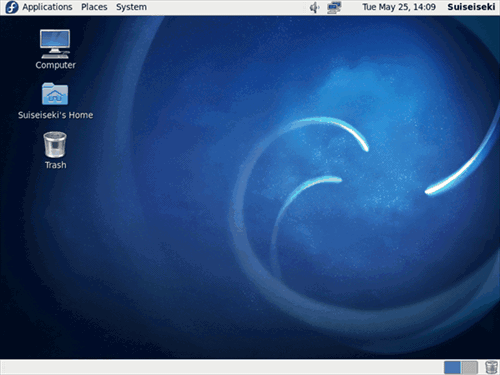
Fedora 13′s Desktop [not mine, though I customized mine heavily so I couldn't show mine]
Setting up the restricted extras was rather unique though, because the documentation offered only the Fluendo MP3 plugin, which while free, getting the rest of them going isn’t so cheap. In this sense, it seems, if you are not using open formats before switching to Fedora, you will be forced to once in Fedora, as the wiki suggests paying for the closed formats. Ditto on the DVD playback.
Turns out that restricted formats are in a third party repository, as reported in the comments. The wiki page I have linked to has been updated and now explains how to install all the restricted formats you’ll most likely need, such as MP3 and DVD playback. There is also EasyLife to install the restricted extras for you as well. So in the end there is a way to play your restricted codecs! Seeing as my music is in many formats, including the open OGG and FLAC formats, I persisted and found it to be a rather easy time to play the music. Unlike OpenSUSE, the music sounded nice and fair, and wasn’t grating on the ears. I found Fedora to be extremely responsive unlike Ubuntu on the same system, and was quickly impressed by the fact I could still get so much done, even without the codecs. Installing programs was a breeze using their Add/Remove software, which you can see below.
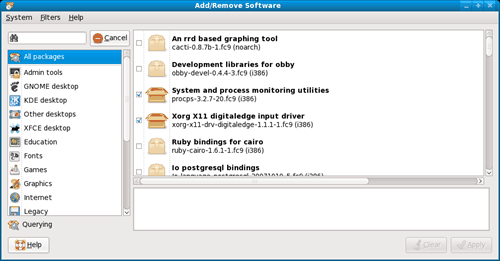
It’s not everyday you get something this easy!
I faced only one ‘serious’ bug during my time in Fedora, but only because I didn’t think about it. One of Fedora’s defining features is SELinux, which is a Security Enhancement for Linux, and I forgot to add an exception into the Firewall/SELinux to allow me to connect to it. Otherwise, Fedora was completely uneventful and great. I’d rate it about an eight and a half out of ten. I was rather impressed and if there was a better way then paying for the closed source codecs in the official documentation, I would have given it higher, however, seeing as Fedora tries to stick perfectly to the ideas of Open Source, it is completely understandable why they weren’t included. However, to many people that aren’t so lucky to have a varied library, they will no doubt be turned off by this factor. Ciao until tomorrow!
Related posts:
@khiang, my opinion of Mint is a resounding 1/10. You have to deal with slower boot-times then Ubuntu, slower upstream updates, all these ‘Mint apps’ that are just front ends to front ends, the web installer drives me batty (you simply don’t do that for Linux if you ask me), it drains battery life faster then any other OS I’ve seen to date, including Ubuntu, it’s clunky slow on everything I’ve used it on, it’s Slab menu is a stab at KDE… when it’s just a customized and heavier GNOME. And if you really think it’s more secure, then I’ve got news for you, my friend… it’s not. You have to customize it to get the more security, as with any Linux OS. Fedora’s one of the few that I could actually say does more out of the box in terms of security, but Mint is no bulletproof vest, let alone a small shield. It’s as wide open as Ubuntu is with a barely configured firewall.
I could go on but I’ll never review it. Mint is the god send to some but to me, it’s a pain in the rear end. There is nothing good that has come from Mint from what I’ve seen, especially the politics, and he’s dug himself into more holes then even Stallman of the F/OSS movement has. And that’s saying something.
Mint encourages people to review things compared to it. If you want a fair baseline to know how to review things to, install and use Debian or use Salix or something more advanced, that allows you to do more customization first. Then you’ll see how restricted Mint is and why I hate it, one of the major reasons at least. You’ll also see why I jumped ship from Ubuntu… because they’ve started locking things down too.
However, in the end, the choice of Linux is up to the end user. If you wish customization, use something that will allow it. Mint won’t, and because of that, and I want customization, I will not use Mint. But if you want something easy to set up, something fast to set up, something that most of the choices are done for you? Mint will be the way for you. Just remember… as much fun as Mint might be for you, it’s not an end-all-be-all. Mint has it’s flaws too, it’s haters just as much as it’s lovers.
i think Linux Mint is the best and good choice!!! It build from Ubuntu (most popular distro) and Mint also have codec built in, so no need to find another codec for playing audio & video as i have slow internet connection here !!!
better security also provide by Mint
Linux Mint is 9 out of 10 (my opinion only) :)
@Rahul Sundaram, it would appear so. Thank you very much for replying and updating me, the post has been changed to reflect this, and your distro earns a rather nice 8.5 out of 10. If I ever get bored with Salix, Fedora will most likely be the distro I go to, thanks to support like this. I might even throw it on my laptop because chances are good it’s faster then Salix is on boot.
@Techishare, I had no updates crash me out when I updated, so I don’t know what updates broke for you. Perhaps it was a third party package that broke for you. I couldn’t say. Also, your forum link shows active support and ways to fix it… perhaps you should let them know your hardship, like I posted here. Rahul corrected me as well as helped me, as did you. Thank you both for your help in getting the restricted add-ons going though!
It appears you found out a old and outdated multimedia wiki page and I have updated it now to clarify any confusion and provide more clear. Fedora has third party repo for additional multimedia software and we don’t require you to pay for anything
Hey buddy… wait a minute. For first few days Fedora worked great for me. But sadly, fedora used to struck after doing an UPDATE!. Man, normally updates are there to remove bugs, but here updates bring you bugs!!! What the… At first I thought it might be an installation issue, and I re-installed fedora again and done the update and again Fedora strucked.
forums.fedoraforum.org/showthread.php?t=245304
If you really love fedora, then don’t update for a few weeks, until they fix it.
To install media codecs, there is a much better way of doing it. Check out, “easylifeproject.org”
@F3Speech, Fedora and Ubuntu both go no where near my personal choice. If you want my opinion of a great OS, it’s Salix… but you have to have more experience under your belt to use it. Wine has it’s own database that you could check for advice, and as for the “Perfect *”, I’m afraid I couldn’t… as my needs are different from what most people need. However, Fedora is an amazing OS and I’d recommend it to anyone over Ubuntu at this point.
@sm1, that I didn’t test, but that’s because I don’t have a CD/DVD burner to test on. I’d assume so though.
@Dan, understandable, but you have it reversed. Linux tries to support a lot… but a lot doesn’t try to support it. It doesn’t have a lot because the developers aren’t writing drivers for Linux. That’s all.
@Uplink, go for it…. I don’t try to make them in my testing though.
EDIT:Dan, I just received word on how to support the third party codecs now, so the post has been updated to support that.
I wanna install Fedora when I get a home multimedia server :D
No, I wouldn’t want to pay for the closed formats. So I guess I’ll pass on Fedora, and stick with Ubuntu. Overall Linux is great. The only complaint I have with Linux is the lack of drivers. Too bad they don’t have something like ndiswrapper for printers, scanner, cameras etc. Right now the only way to have everything working is to build a system using only Linux compatible parts and accessories, but in the end it is well worth it.
Thanks for the review HellNoire. Can Fedora burn CDs and DVDs when logged in as user and not root? In the past I had difficulty in burning CDs and DVDs in openSUSE when logged in as normal user. I had to enter the root account just to write CDs and DVDs.
@Paul, would you say your OS os choice is Fedora now then; or Ubuntu still topping the chart?
I used to dabble until I got Win7. My heart wants Linux but my gaming hands wont install it ^^
I would like to see a review if you have time about how some of the big name games run on Linux distros via Wine (BC2,CoD,etc..). I think if I could get past thinking my PC is going to be so much slower gaming in Linux (assuming they run) Id be more likely to get back involved I think.
Also, I’m sure youve seen the ‘The Perfect Ubuntu Set-Up’ guides etc there are a few for different distros, would be nice if you to maybe do a weekly post on setting up your prefered distro up from scratch and configuring/maintaining it as needed (I find trouble shooting a nightmare in linux) etc. I guess it could turn into a post of your weekly linux issues/problems/fixes :)
Cheers.
@Jonathan Gowdy, Fedora tries to stick to Open Source Software wherever they can. Unfortunately, for the end users, usually that means they can’t include codecs for average users
, due to patients on most file formats we use, such as MP3 or DVD playback. So I do agree… that is the one point that will make or break your experience in Fedora.though they have ways how. I’ve just been updated on this, so I’ve updated the post as well as updated my comments lol.@Val, Fedora 13 seems to be a big step up from what I used before, which was Fedora 11. I didn’t like 11 because it never worked out at all for me and at the time, Ubuntu was also my favourite, so I was biased against anything not Debian based. So I’m rather impressed with how Fedora’s now won me over.
A shame that not much for the average media user is provided in this OS.
I used to love Fedora, until i upgraded Vista to 7 so i didnt really want to dual boot Linux anymore. may try this one though!


