10 Free Tools to Find Duplicate Files Across Multiple Drives
Even though the size of hard drives these days stretches well into the Terabytes, it still doesn’t take long to start filling them up with all kinds of files which don’t necessarily belong or need to be there. These can come in various forms such as junk files, temporary files, or even those which you just don’t need anymore. Another type of data you probably don’t really want is duplicate files.
It’s easily done that you can copy several files onto your drive and either give them different names that help recognize them easier or forget they are there and then copy them over again into a different folder. This means there are now multiple copies of the files on the drive where a single copy would be enough. The rest are now taking up extra space and making organization more complicated.
Simply searching for a certain file name usually isn’t enough on its own which is why many tools employ advanced methods to try and find identical files, even though they may not look the same on the face of it. Here’s a selection of 10 free utilities that can help you search for and identify these duplicate files and help reclaim some of your hard drive space.
Note: As with any tool that allows you to delete files from the system, a degree of care is needed because removing files that belong to Windows or software could cause Windows or the application/game to become unusable. Some files are duplicated by design. In general, it’s recommended to restrict these actions to areas such as data drives, Document/Download folders, and etc.1. AllDup
AllDup is a duplicate file finding tool that is absolutely packed with functions. In fact, the program might completely confuse the average user so it’s perhaps best left for more advanced users. There are comprehensive option windows for searching, filtering, which folders to search, and what to preview. It has standard name, date, attribute, size, and extension search modes, but also can search hard links and file content.
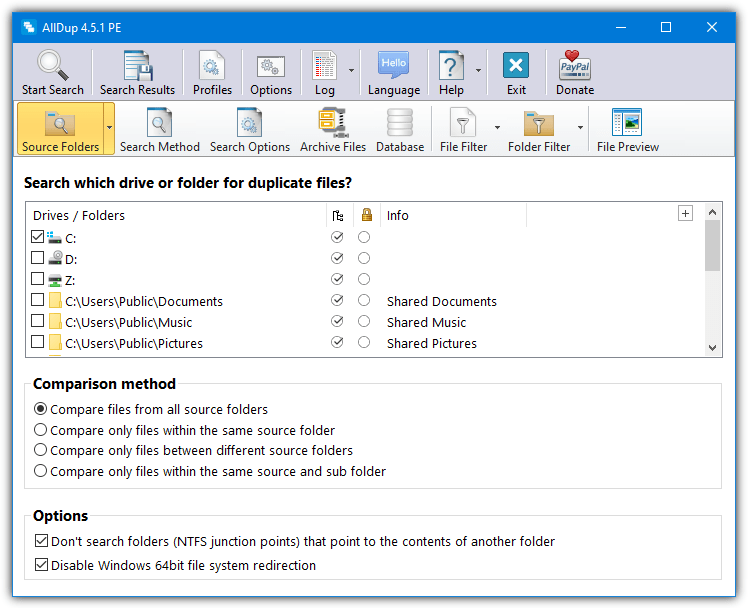
Other useful features not found on many other free tools are searching inside 16 different archive formats and storing checksums inside a database for faster future content searches. When all the duplicates are found, AllDup has loads more options to select the files to delete, move, copy or rename. Use the Select menu to choose from a host of options for what to keep and what to remove. A portable version is also available.
2. Glary Duplicate Cleaner
The handy thing about Glary Duplicate Cleaner is it’s not restricted to just being a component of Glary Utilities. There is also a standalone version for users that don’t want the full suite of tools. After install, you will be given the choice to scan whole drives or multiple folders. Click the Options button to change the search criteria between the same file name/size/time, file types, exclusions, and minimum size.
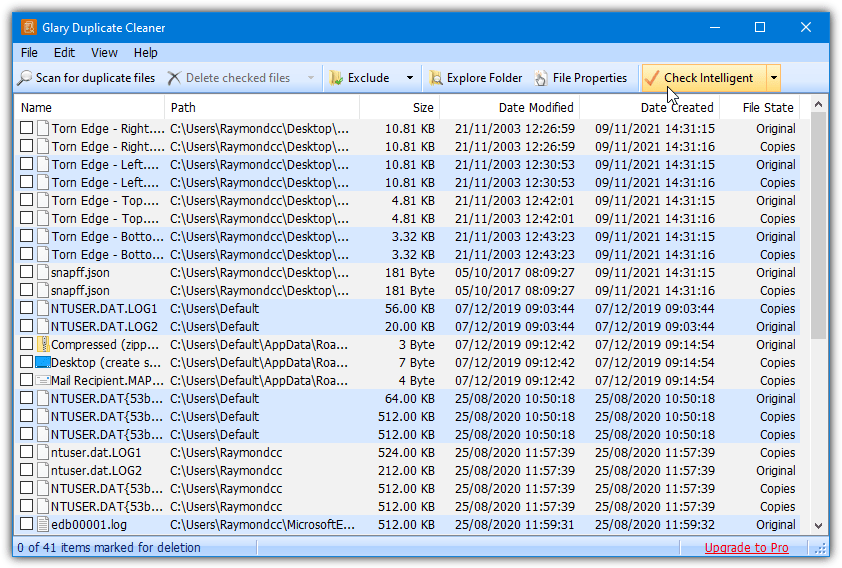
As the file size, name, and time options are checked by default, you might have to disable one or two or there could be very few results. We recommend selecting View > “All File View” as that layout is more intuitive and easier to read. Use the check boxes or click “Check Intelligent” for the program to make a decision on which of the duplicates to keep. Use Check Options in the drop down to set your own intelligent selection.
Watch out during install of the Duplicate Cleaner standalone version as it will offer to install the full Glary Utilities suite.
Download Glary Duplicate Cleaner
3. NirSoft SearchMyFiles
SearchMyFiles is a smart little portable utility from NirSoft and is more of a general file searching tool. However, a duplicate finder function is built in. Simply select “Duplicates Search” in the Search Mode drop down at the top. In this mode, the program will first search using the settings you configure in the main window such as attributes, files sizes, time and date, file contains, exclusions, and etc.
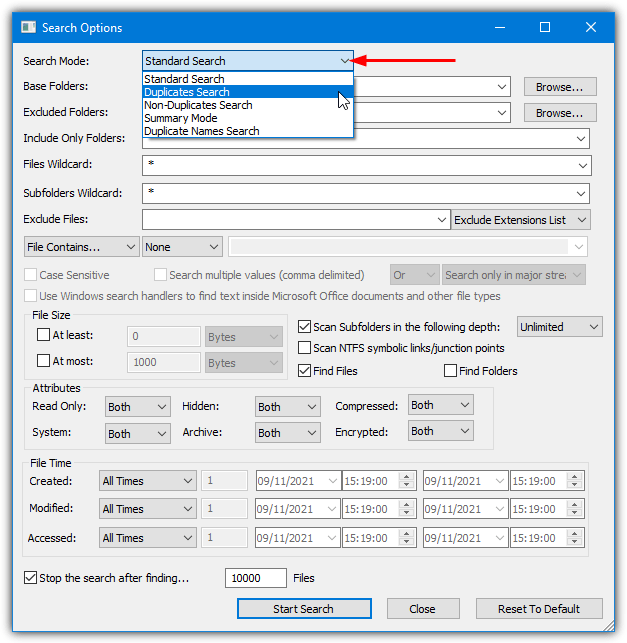
A second pass will take the first pass files that match and compare them byte for byte. The finished matches will show in the results window with different color blocks to group the duplicates together. Selecting the duplicates for removal has to be done manually (Shift/Ctrl+click works) and be aware that some color blocks look very similar, don’t delete files that look like duplicates when they aren’t.
4. Anti-Twin
Anti-Twin is free for personal use and is able to search for duplicate files based on a number of different conditions. These include a file filter to exclude file sizes and extensions, search for certain types of files, compare by extension, filename, byte by byte, and also to compare images by pixels (a preview window is included). You can also define a match percentage for files that you would consider close enough to be included.
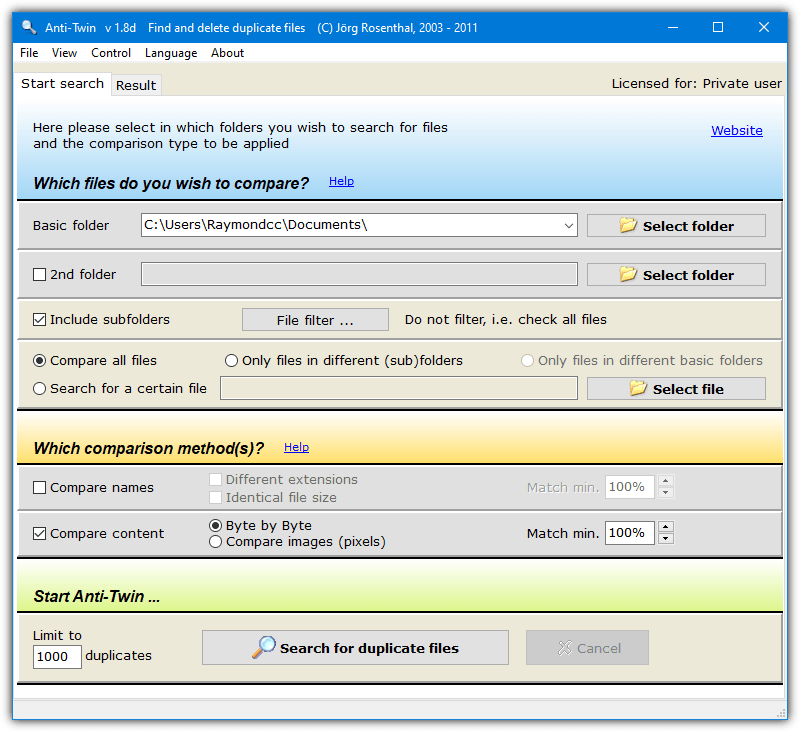
After a scan, there are some useful options to exclude specified folders from the delete selection (such as a master folder). There’s also a “Selection by Properties” window where you can select files to delete by creation date, file size, directory levels, or file name copy indication. A second opened window will offer tips for the best results. Anti-Twin has setup and portable versions.
5. Auslogics Duplicate File Finder
Auslogics may be better known for Boostspeed and Disk Defrag, but Duplicate File Finder is another program of theirs. It can look for certain file types and choose to ignore above and below certain file sizes, also names and dates can be ignored meaning the program will search and find matches based on MD5 checksums. Network drive searching is not supported.
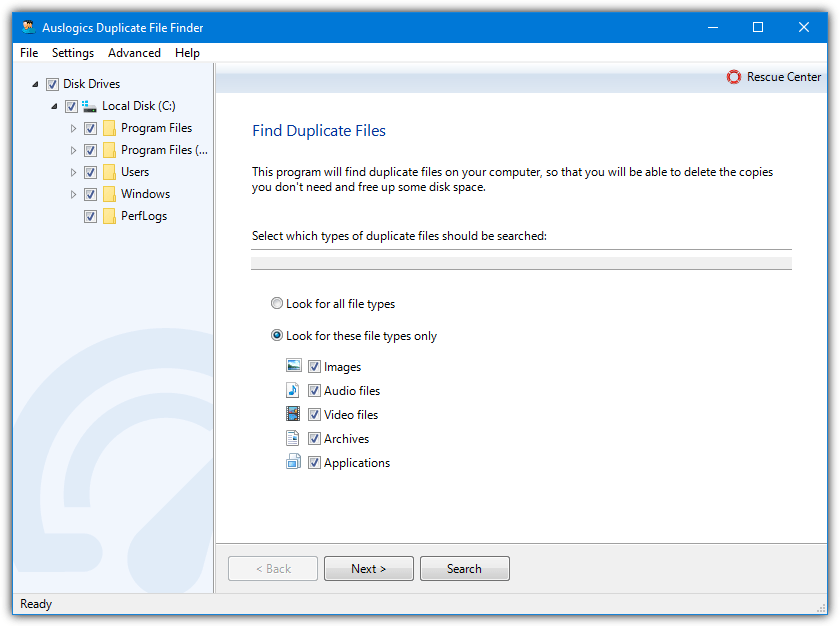
After scanning you can easily select one or all duplicates of each file with the click of the drop down menu. A handy fallback feature is the option to send files to the recycle bin or even make a backup of deleted files to the Auslogics Rescue Center, accidental deletes can then be restored later. Watch out for the adware being offered during install.
Note: The version we look at here is 3.5 from back in 2014. Auslogics loves to ruin its software by adding tons of advertising not only during install but also in the programs’ user interface. Each new version gets progressively worse by putting in more ads so we prefer the older version. A newer version might have a few more options at the expense of more ads.
Download Auslogics Duplicate File Finder 3.5 | Duplicate File Finder Newest Version
You might also like:
 8 Ways to Find & Remove Duplicate Lines in Text Files
 5 Tools to Find & Replace Text in Multiple Files [2023 List]
 5 Tools to Delete or Replace Multiple Lines for All Files in a Folder
 6 Ways to Merge or Combine Multiple Text Files [Notepad++]
 10 Free Tools to Monitor Files & Folders Changes in Real Time
Later…
——-
In addition to my earlier remark: Duplicate File Detective has an option to disable comparing contents.
This results in an incredible speed-improvement.
BTW: this program is hardly being reviewed, probably something to do with the price, being usd.55
Sometimes there is no need to perform an exact duplicate file search – meaning to say – based CRC of SHA hashes. Most (if not all) duplicate file finders have hash calculations built in by design: there is no option to disable this lengthy calculations. When checking for duplicates in multiple folders with hundreds of GB’s, this takes unnecessary llllong time, whereas the user can quickly see/judge about the duplicates.
I’ve depended on Doublekiller for over fifteen years!? There may be more sophisticated tools now, but the essence of a good tool, like a knife, is it does a clear function extremely well. I am conditioned to Tab-advance rapidly to the boxes/entry windows, and I can cut-and-paste from other search tools to narrow the range of folders/subfolders searched. One can enter advanced filters, of any suffix, and select which duplicates to move/delete. The Results window is uncluttered, and groups files with a slight shading change between each set, which I learned to use for quick visual skimming before deleting. If any group of files needs to be “deselected,” after the preliminary choice has been made, mouse drag select can include a range, or with Ctrl-click, add or subtract specific files, which one can then “Uncheck selected files.” Results doesn’t confuse with too much information, but you can open any file there, and click it to open its parent folder in Explorer.
Old as it is, it is tiny, one click, and will search USB and other external drives, even mounted virtual drive images in case you want to see if data is already safely backed up elsewhere.
I like this software because it works very great.
That is a pretty good collection of tools for finding and removing the duplicate files and freeing up the disc’s space .
I was all frustrated because of this duplicate files issue but this sounds like an interesting work. I will surely do it.
That’s a pretty good list! I use Easy Duplicate Finder on both my Windows and Mac laptops and it works very well. But you have an ancient screenshot here – the program looks very different now.
As noted in the article this is for the last free version that was available, it’s now shareware and costs a small fortune.
Hey, would you mind telling me the equivalent of these for a mac laptop?
much appretiated…. :)
To the rescue again, Hal9000! Much appreciated. Great list of freebies, with Auslogics being my favourite duplicate file finder.
Thanks – as always, your articles are very useful :-)
thanks bro – was looking for somebody to “cut to the chase” and you did.
appreciated
“Duplicate File Finder” is absolutely roaring through duplicate photo archives here –
much appreciated
This is the best free hassle free software i have ever used! Dont waste paying money for deleting files. This should be your one stop solution!
Thanks for sharing the information, i could get back almost 5gb of disk space from my mp3 collection!
Thanks Raymond a good start.
I think the speed in the first 3 is because they don’t do a full binary compare first up. Certainly HCCLite makes its lists based on name, size etc. Then it will do a Binary compare on any of the lists it found with the fast methods (using the toolbar button at the bottom). It takes much longer to do this. FileDup may be doing this on the first pass which would explain why it is so slow.
Ciao
Raymond,
for a couple of years I believed ‘Black Viper’ was the most respected Guru online …. I have to say …. you have snatched that crown, in my humble opinion.
Thank you for a very credible and useful site. My compliments – you are required reading in my arsenal now.
Merlin
Thanks … I was getting fed up myself with all the duplicates on my poor overused computer ;-)
Lol, same situation here. A lot of drives, small space left and no idea of what is inside. Very nice tools, will try it soon…
thanks Raymond