Fix WordPress Not Acceptable Error 406
I’ve been able to publish new articles on my blog and sometimes I do save them up before publishing for editing/updating it later. For no reason, I was unable to save an article which I was working on. When I click on the “Save Draft” button in my WordPress, I get the “Error 406, Not Acceptable. An appropriate representation of the requested resource /wp-admin/post.php could not be found on this server” error.
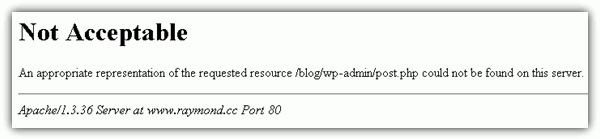
This problem has caused me to lose all my writings on the post and clicking the Back button on the web browser does not recover the text that I’ve typed. That is why it is important for anyone who uses WordPress to install a plugin called Lazarus where it saves everything you typed in a web form and allows quick recovery if for some reason the web form got cleared out. Lazarus works on Firefox, Chrome and Safari. After getting the 406 error, I tried writing a new article with any random story and this time was able to save! I researched the cause of this problem and found the solution.
The good news is this Error 406 is caused by your webhost and has got nothing to do with you. Most of the webhost that offers shared hosting installs ModSecurity, an open source web application firewall to protect their servers from you abusing it and also from being hacked by hackers by using a bunch of rules. One of the example is you cannot run RapidLeech script on some webhost that has a rule to match the text pattern in the script. The first step in attempting to solve this problem is to contact your webhost and ask them to fix it by checking their audit log file and disable the rule for your account.If they are not being nice to help you out, you should consider moving to a new webhost simply because the trick of turning off ModSecurity filtering from the .htaccess only works on ModSecurity v1 and is disabled in ModSecurity v2. That is why some of you may be getting the 500 error if you insert these rules “SecFilterEngine Off”, “SecFilterScanPOST Off” or “SecRuleEngine Off” in .htaccess file.
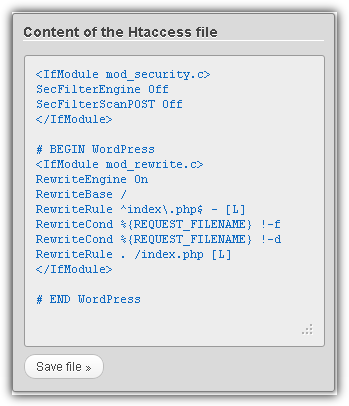
Nevertheless, you can definitely try it out because it worked for me and for some others. At the root of your blog, locate the file .htaccess and add a line SecFilterEngine off. An easier way to edit the .htaccess file without using a FTP client is by installing a plugin called WP Htaccess Editor. Login to your WordPress Admin panel, go to Plugins > Add New > enter WP Htaccess Editor in the search box and click the Search Plugins button. Click the Install Now link for WP Htaccess Editor and activate the plugin. Now click on the new Htaccess option that appears on the left hand menu, enter the following rule in your htaccess file and click the Save File button.
SecFilterEngine Off
SecFilterScanPOST Off
Do take note that you will still need to manually edit the .htaccess file using a FTP client software or the cPanel File Manager to remove the SecFilterEngine rule. This is because you may not be able to access your own website when the error 500 starts to appear.





Just had this very thing happen. HostingCo first tech support guy of course blamed incompatible plugins. I called back equipped with your info. and viola- you are right! They are editing the ModSec rules as I type. Thank you for saving me hours of activating and and deactivating plugins, testing and well you know the drill. YOU ROCK!!!!
I tried many fixes and nothing seemed to have helped getting rid of the issue. So I decided to reinstall WordPress ( How to Uninstall and Reinstall WordPress ). Even the reinstall didn t help! Later I found out that the Not acceptable! Error 406 occurs due to Mod Security updates on the server. So if you are having a similar problem then you can try one of the following methods to fix it.
Thank you. This works for me.
I got my fixed by simply disabling the modsecurity from the cpanel.
Hi, i dont try to use it get, but i leave it ready to go. Thanks!
SecFilterEngine Off
SecFilterScanPOST Off
# BEGIN WordPress
RewriteEngine On
RewriteBase /
RewriteRule ^index\.php$ – [L]
RewriteCond %{REQUEST:FILENAME} !-f
RewriteCond %{REQUEST:FILENAME} !-d
RewriteRule . /index.php [L]
# END WordPress
tnx for your help. i had a big problem when deleting menus in WP. now i deleted that menus :))
Merci beaucoup !!!
Thank you.
I solved a timthumb problem with “SecFilterEngine off”.
King Regards.
Thanks, this works for me,.:D
Anyway thanks.. its works..
Thanks very much…. I searching every where about this error.
I don’t have words to thank you!!! You really helped me a lot, you can’t imagine how much important is this fix for me! I’m about to delivery an important work for a major customer, and this recurrent problem was a true nightmare for me. Again, THANK YOU!!! :-)
thanks
Thanks for your solution. It works!
It’s working! Thank you.
That’s a great help!
WordPress is so difficult to some people, at least for me.
Thanks!
JTYS
great, that worked fine for me!
As a webhost, I’d like to chime in on this issue. This is indeed caused by mod_security, however, simply disabling mod_security isn’t an ideal solution. To that end, I’d like to provide the syntax for shutting off just this one rule.
For servers running mod_sec 1, it’s SecFilterRemove 300040. For servers running mod_sec 2, it’s SecRuleRemoveById 300040.
YMMV, as there may be more than one rule that is causing the problem, but any decent webhost should be more than willing to find the rule number in the mod_security audit.log file and turn the one rule off. After all, if they’re running mod_security in the first place, they would seem to have your interests, or at least a lack of desire to fix a problem caused by not having it, at heart and thus motivation to solve the problem for you.
Wow, this really worked. You saved me a lot of time!
Thanks.
Thanks a bunch! This worked perfectly.
Work great! Thanks a lot!
thanks a lot man. helped me too. you might wanna note that in order for the .htaccess file to be editable on WP’s admin area it needs to be editable.
Good job ..It worked…
You saved me lot of time…
Thanks for the 411! Big help.
thanks, worked!
Works like a charm. Thanks dude.
thanks man!!! your solution really helped!!!