6 Free GPU & VRAM Memory Test Tools [Best for 2023]
If your system memory is faulty, it can cause all manner of weird and wonderful problems, many of which you wouldn’t relate to system RAM is the culprit. Another part of your system that might have its own memory is the video card. That could also fail or become faulty as well. While a problem with system RAM can sometimes be difficult to pin down, video memory problems should be easier to identify because the issues will be related to displaying the image on the screen.
This can manifest itself in a few ways, such as getting a blue screen of death or a restart while playing games. If you are getting lag and fps drops in games, here’s a complete guide on how to fix stuttering issues.
Problems are more likely to occur when your graphics card is working hard. You can use a GPU stress test to monitor system stability under load, which can help determine if you need to replace or return your card.
Here are the six best GPU memory stress test tools to test the performance of your graphics units.
Also read: Best USB flash drive testing tools
Best video memory stress test tools
- CineBench – best video memory stress test tool overall
- OCCT – best for testing GPU stability and thermal performance
- FurMark – best for testing overclocking stability
- Hwinfo64 – best for GPU monitoring and reporting
- Unigine Heaven – best for GPU benchmarking and real-world stress testing
- MemTest86+ – best for overall system hardware testing
1. CineBench– best video memory stress test tool overall
<IMAGE>
- Operating System: Windows, Mac
- Pricing: Free
- Developer: Maxon Computer
CineBench is a powerful utility for monitoring and evaluating system hardware performance capabilities.
This tool is designed by Maxon, developers of the popular modeling and animation software Cinema 4D. CineBench is designed to test the performance of your computer’s CPU and GPU by subjecting it to a series of rendering tasks.
CineBench effectively tests the real-world performance of your system hardware through the use of advanced rendering algorithms. It renders complex 3D scenes and calculates the time taken to render them, providing users with a reliable and accurate benchmark score.
By comparing the rendering scores, you can make informed decisions about hardware upgrades or optimizations.
Furthermore, Cinebench is a versatile tool that caters to different use cases. It is commonly used by gamers, content creators, and hardware enthusiasts to assess the capability of their systems for demanding tasks such as 3D modeling, animation, video editing, and gaming. Additionally, it can and is used by system builders to test the performance of various combinations of hardware configurations.
2. OCCT – best for testing GPU stability and thermal performance
<IMAGE>
- Operating System: Windows, Mac, Android, iOS.
- Pricing: Free for personal use
- Developer: OCCT
OCCT is a well-known testing tool that is able to stress multiple parts of the system like the CPU, video card, and power supply. It does also have a dedicated option specifically for stress-testing video card memory. A more general GPU stress testing feature is available for testing other video card stability areas. The OCCT memory test is OpenCL based and can run on pretty much any video card.
After running the program, click on Memtest neat the bottom. Select the video card from the drop-down if you have more than one card in the system, then press the big red play button. If any errors are detected, the program will log and display them. OCCT is portable, so it doesn’t need to be installed.
3. FurMark – best for testing overclocking stability
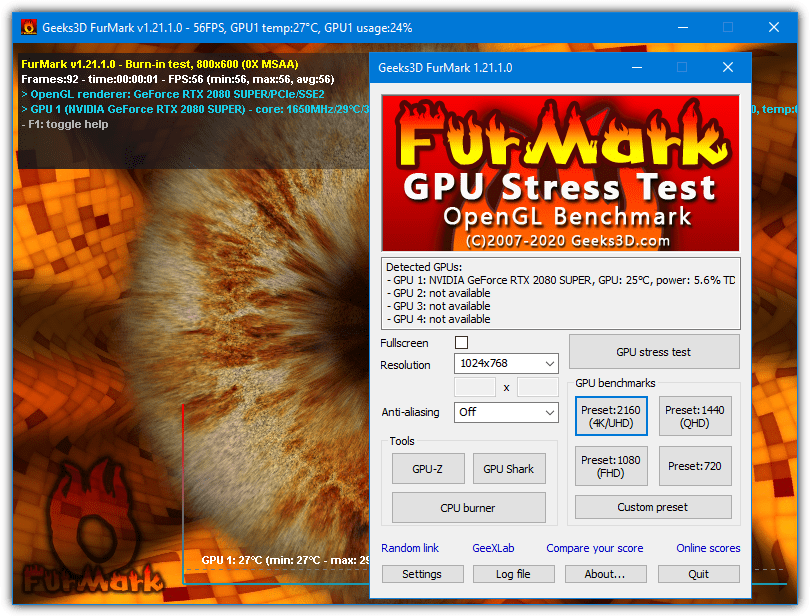
- Operating System: Windows
- Pricing: Free
- Developer: Geeks3D
While FurMark doesn’t specifically scan for memory errors, it does run a demanding test that will stress the video card and its memory. Because of that, it could show errors that the video card’s RAM produces. FurMark has been around for many years and is a popular tool to stress test the graphics card for stability when it’s being overclocked. It’s an OpenGL-based test and should run on most video cards.
After downloading and installing FurMark, run the program, select the test resolution you want, and then Press GPU stress test. Run the test for several minutes and watch for any artifacts during the testing. The very useful GPU-Z and GPU Shark, video card information tools, are also included.
4. Hwinfo64 – best for GPU monitoring and reporting
<IMAGE>
- Operating System: Windows.
- Pricing: Free
- Developer: Realix
Hwinfo64 is a simple GPU diagnostic tool that monitors your system hardware components and provides basic information about the configuration.
If you want to audit your system configuration, you cannot go wrong with this tool. It scans your computer and reveals an incredible amount of relevant, real-time data. The information is more on the technical side, like logical CPU cores, battery wear, memory speed and usage, etc.
There is a dedicated Sensor button that displays your PC’s sensor-related data in its own dedicated section. You can also export the data is one of six formats.
One of the downsides of Hwinfo64 is that it lacks proper benchmarking tools compared to other entries on this list. Instead, it is a continuous monitoring and reporting tool that is easy to use and enables real-time system monitoring under real-world usage.
5. Unigine Heaven – best for GPU benchmarking and real-world stress testing
<IMAGE>
- Operating System: Windows
- Pricing: Free
- Developer: Unigine Company
Unigine Company develops one of the most popular proprietary cross-platform game engines and offers an extreme benchmarking tool to test your GPU to no end.
The tool lets you test your graphics card, the power supply, and the cooling system from a single window. Unigine offers a few tests, like Superposition, Valley, and Heaven. These tests create visuals from the Unigine game engine and test the ability of your graphics units to render these images under different interactive objects.
You can also monitor critical GPU stats like usage, temperature, FPS count, etc., in real-time. Moreover, you can run these tests for an extended period to test your GPU stability under heavy load.
Another great stress-test tool is 3DMark, which is similar to Unigine Heaven, and we have covered that under the best CPU Comparison Websites.
6. MemTest86+ – best for overall system hardware testing
<IMAGE>
- Operating System: Windows
- Pricing: Free
- Developer: Company Name
MemTest86+ is a popular standalone memory tester for x86 and x86-64 computers and extends the functionality of BIOS memory tests.
Memtest86+ is developed by the same company as MemTest86, but the former is essentially a development fork of the test and is developed by completely different teams. Nvidia, AMD, Intel, and any other video cards should be compatible with MemtestCL.
Both versions of Memtest are command-line based, so to configure them from the defaults, you will need to add arguments in Command Prompt or a batch file. Running the executable without arguments will perform a default test of scanning the first 128MB on the first card in the system and run 50 passes. The tests are a mixture of custom patterns and some based on Memtest86 test patterns.
To test more memory and/or alter the number of times it runs the test, run the program in Command Prompt and add an argument to the command line:
MemtestCL/MemtestG80 [-gpu #] [amount of GPU RAM to test in MB] [number of tests]
If you have more than one graphics card in the system, use the -gpu option, otherwise, it can be excluded. By default, these tools will ask to send statistics to the Folding@Home group; you can disable this option through the command line or press n to answer no. An open-source version of MemtestCL is available on GitHub that excludes the data logging options.
Overview of best free video memory test tools
| Software | Top Features | Best for | Price | Platform |
|---|---|---|---|---|
| CineBench | CPU and GPU benchmarking | Professionals and enthusiasts | Free | Windows, Mac |
| OCCT | Stability testing, monitoring | Overclockers, system stability testing | Free | Windows |
| FurMark | GPU stress testing | Overclockers, GPU stress testing | Free | Windows |
| Hwinfo64 | System monitoring, hardware information | System hardware diagnostics | Free | Windows |
| Unigine Heaven | GPU benchmarking, stress testing | Gamers, GPU performance testing | Free | Windows |
| MemTest86+ | System testing and diagnostics | System stability testing, memory testing | Free; Pro version available | Windows, Mac |
How to choose the best GPU stress test tool?
There are several factors you need to consider when selecting a GPU diagnostics tool to test your graphics unit. Here are some of the key considerations that will help you make an informed decision.
- Stability: Since stress testing involves pushing the limits of your hardware system, you need to look for a tool that is renowned for its stability and reliability. The software should allow you to push your GPU to its limits without crashing or causing instability issues.
- Customization: Before choosing a tool, make sure that you know the variables and what exactly you want from the tool. Look for features you need, like display resolution, anti-aliasing, and frame rates, allowing you to simulate different scenarios and test specific aspects of your GPU’s performance.
- Realistic workloads: Look for tools that can simulate intensive gaming scenarios, complex rendering tasks, or other demanding applications that your GPU will likely encounter in real-world usage.
- Brand compatibility: Some tools work better with specific GPU brands or architectures. Make sure to check the platform’s compatibility before choosing a tool to test the graphics unit. Additionally, consider if the tool supports the platform you’re using (Windows, macOS, Linux, etc.).
How do I check my GPU and VRAM?
Apart from the tools mentioned in the list above, there are several different ways to check your GPU and VRAM, depending on the operating system you use. Let’s take a look.
Windows
- Use Device Manager – Right-click on the Windows Start button and, select Device Manager, expand the Display Adapters category.
- Using DirectX Diagnostic Tool – Type dxdiag in a Run command window, and you will find the GPU model under the System tab.
MacOS
- System Information – Go to About this Mac and click on System Report under the Overview tab. In the left sidebar, under the Hardware section, click on Graphics/Displays.
- From Terminal – Launch Terminal and type the following command, and press Enter.
system_profiler SPDisplaysDataType
Final Thoughts
Stress testing is a great way to monitor system performance under various circumstances and determine real-world applications. It can help you find potential issues if you plan on overclocking your graphics unit and can be used to troubleshoot existing errors in your workstation.
You can use any of the GPU memory stress test tools to check the performance of your graphics system. Pay attention to the hardware temperature and make necessary tweaks as you go.
Before you start stress testing your system, it is important that you know the variables involved in the process. As long as you know what you are testing, it is highly unlikely that something will go wrong. Most modern GPUs have a built-in protection mechanism that will throttle the GPU performance when temperatures reach critical limits.
All of these tests don’t work, because they only identify 3Gb ram of video.
You can see in your print screen.
That’s incorrect, SOME of the tests will only scan up to 3GB of memory. OCCT and two of the third party Furmarks can scan close to the 8GB of my RTX2080 Super.
OCCT V7.2.3 Only Scans the 3072 MB of 4GB Card (Free Version).
And 6GB of an 8GB card. So it appears to be able to scan roughly 75% of GPU memory.
Listed tools do not work for me (RTX2080Ti).
The following two tools do work (but you need Linux):
* github.com/wilicc/gpu-burn
* github.com/ComputationalRadiationPhysics/cuda_memtest
Few more details here: nvidia.com/en-us/geforce/forums/geforce-graphics-cards/5/286136/has-anyone-tried-any-gpu-memory-tests-on-the-2080-/2335577/
By testing my graphics card with memtestcl, i see that i have plenty of bad ram blocks or whatever. is there a way to fix it by modding the bios or blacklisting those specific blocks(don’t anyone dare tell me it’s not blocks) or do i have to replace the memory chips altogether?
Post your test results. And it’s not blocks, that’s not how vRAM works. And you can’t blacklist specific addresses either.
At least memory stress test showed me what I had in suspicion while all GPU experts and geeks said there is no problem, out of nowhere my GTX 980Ti has lost 4GB capacity, yet all I was doing was playing games only on 1080p mid high settings and kept GPU at 70C, while here where I live it gets like 30C hot on daily basis.
Very nice, but once one has identified any defective memory; is there a way of disabling it??
No. You can try turning clocks down but that’s not guaranteed to help.
Missing from the list is programming4beginners.com/gpumemtest
Thank you
Thanks once again for some very helpful information and for also providing the link’s too. Cheer’s Raymond.
Thanks
This seems like a handy tool.
nice article.
very good
thks
Hmmm….seems a test like the Prime95 torture test for overclockers. Worth a try.
Great tip!
time to change my video card
Now if only We could get a “fan stopped turning” warning. heh..
Always run a temperature verifyer, aida, afterburner, etc, gpuz, that will show temperature in gadget, taskbar near time, etc, you will know when a fan fails
Thanks, Raymond this tool will come in handy.
Thanks for the share Raymond. One useful tool for my friend, going to suggest him ;).
Very helpful. Time to check my old nVidia card