3 Ways to Add Two or More Subtitles to Video
There’s a huge wealth of TV programs and Movies made around the world and obviously the total back catalog probably runs into the millions. Although it’s easy to get hold of virtually anything these days thanks to the internet, it’s probably not going to be possible to get everything in your native language. This is especially the case if you plan to watch the video with someone who isn’t fluent in the language it was produced, and even though you might be able to understand it better, you might be more comfortable in another language again.
The common thing to do is download or run subtitles along with the video. But there is something most software media players, TVs and DVD/Blu-ray players can’t do, and that is display two different subtitles at the same time of two completely different languages. The best you’ll be able to manage is perhaps switching between different languages, but there will still only be one subtitle on screen at any one time.
Thankfully there are ways to display several different subtitles at once on a video, all you need to hand is the video file and the subtitles you want to watch (in the form of correctly synced SRT files).
Here we show you how to do it.Merging Different Languages into a Single Subtitle File
Software media players and many TVs and DVD players can play subtitles when they are in a separate file with the same name as the video file (excluding extension), SRT is most commonly supported while SSA, ASS and possibly IDX subtitles could be depending on your hardware. Merging the different language subtitles into one file means the player will play them all at once.
For SRT Compatible Players
There are a couple of ways to do this but we found the easiest is to use an online tool that does the hard work for you.
1. Visit SRT Merger, an online tool that merges multiple SRT subtitle files into 1 SRT file.
2. Click Choose File and locate the first SRT file on your computer, if your subtitles have special characters you might need to change the Encoding drop down to match, use UTF-8 if you’re unsure. Give it an optional color change and then click Add file.
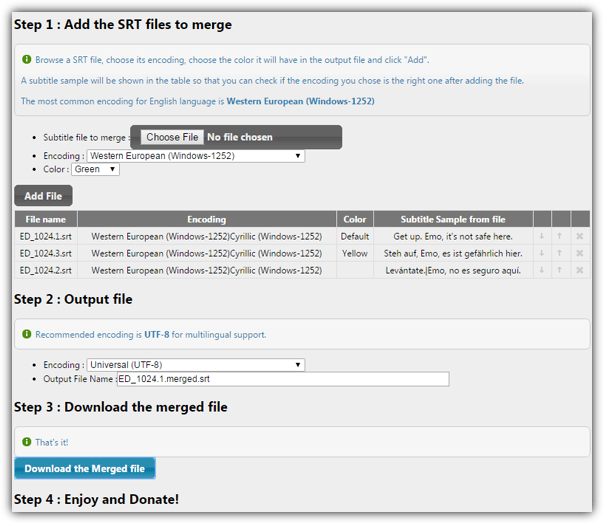
3. Do the same for the second subtitle, you can also add more if you wish. Subtitles can be moved up and down the order of display just below.
4. For the output file leave the encoding as UTF-8, give it a name and click the button to download the merged file.
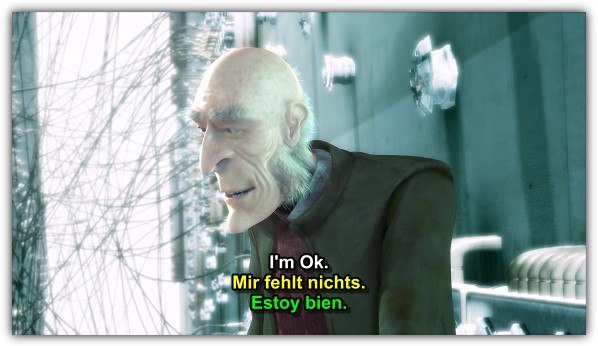
Now you can use this as the standalone subtitle file for your video and all the subtitles you have included will show on the screen at once. Note not all hardware players will display the different colors, but most should.
For SSA/ASS Compatible Players
If you would like to separate two subtitles on screen and have one shown at the top of the video and another at the bottom, try this.
1. Visit 2SRT2ASS, an online tool that creates a subtitle file from two SRT files with one at the top and one at the bottom of the video.
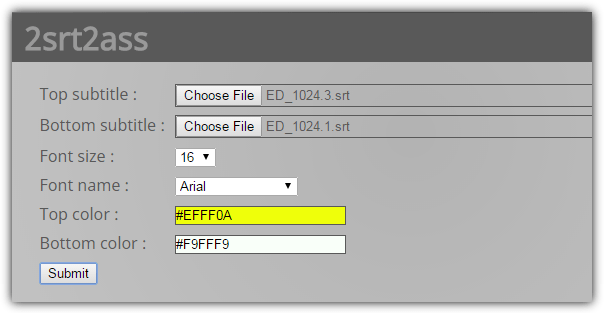
2. Click the Choose file buttons and browse for the SRT files to go at the the top and bottom.
3. Optionally change the font, its size and each subtitle color and click Submit to download the .ASS file.

This format is less compatible and not all PC based players respect the positioning of the subtitles. VLC Player, Daum Pot Player and Jetaudio work correctly, MPC-HC needs to have the Default style turned off. TV’s or DVD/Blu-ray players might not use the color and position formatting, you may have to check the devices documentation or experiment.
Permanently Encoding the Subtitles into a Video File
If your TV or media player device cannot read SRT or ASS subtitle files, you will have to encode the subtitles directly into the video. This obviously takes time because the whole video will be re-encoded and the text permanently imprinted onto the video stream, but it doesn’t matter where you play the video, the subtitles will always be shown.
Permanently adding an SRT subtitle file to a video is actually very easy because most video converters will allow the addition of a single SRT file to be embedded into the video stream. We have previously written an article about permanently adding a subtitle file to AVI video and using MPG4 or MKV is the same process just using a different output format. Or simply follow the guide below to use the popular encoding application Handbrake.
1. Firstly, you need to convert your video file into Matroska video (MKV) which includes the subtitle file. Download MKVToolnix (portable or installer) and run mmg.exe (mkvmerge GUI).
2. Drop your video file onto the mkvmerge window, it will show the video and audio streams. If you have any other subtitle files untick them. Now also drop the ASS or SRT subtitle file created earlier onto the window. Optionally you can add both an ASS and an SRT to the video if you would like both to be available, then you can choose which one to encode with later.
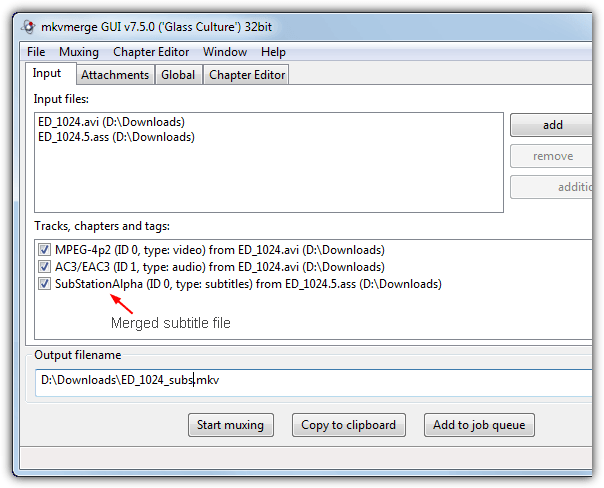
3. Give the output file a name and click Start Muxing, the process is quick because no encoding is taking place, MKV is only a container to hold the formats. Close the program.
4. Download Handbrake and install then run it. Click Source > File and open the MKV file you just created.
5. Setting up the encoding portion of Handbrake is down to personal preference although the default of H.264 and a Constant Quality setting of 20 is a good starting point and produces decent results. Choose where to save and what name to give the output file, and also choose the container format of MKV or MP4.
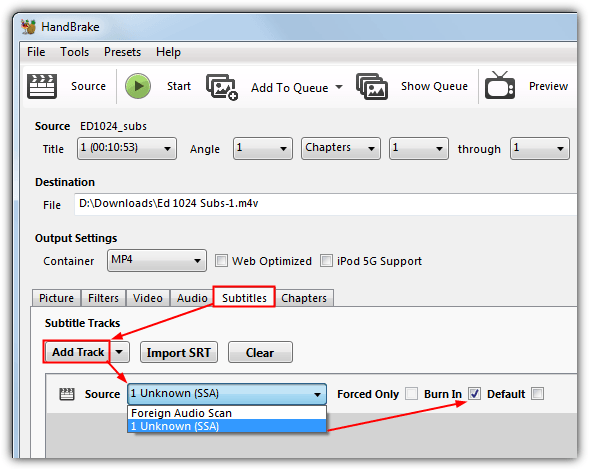
6. Go to the Subtitles tab and click Add Track. This will add the subtitle file from the MKV video created in steps 1-3. Select “Unknown (SSA)” for the ASS or “Unknown (UTF8)” for the SRT subtitle in the drop down. Tick Burn In to the right and Start the encoding process.
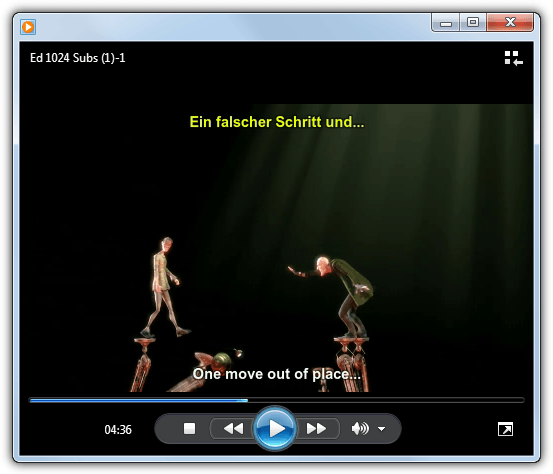
Once it’s complete, you can play the video on any MP4 or MKV compatible player and the subtitles will be displayed in their correct place with optional custom colors, even something like Windows Media Player works OK.
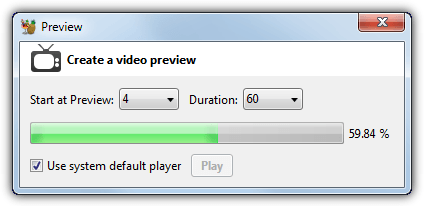
Handbrake offers a preview function so you don’t have to encode the whole video for testing but instead just encode from 5 seconds up to 4 minutes to see if the output is good enough and the subtitles are correctly displayed.
Burning the Video File to DVD
If you don’t have a USB connection on your TV or media player where the file can be played from a flash drive, you can always burn your new multi subtitled video to a standard DVD disk. There are many free converters around such as Freemake Video Converter, Any Video converter and Free Studio, but they all contain adware and/or toolbars on install, so you have to be quite careful.
Because we have previously mentioned how to use Freemake Video converter to burn a video file in our “4 Ways To Add and Burn Subtitles to AVI Permanently” article, we’ll run through how to convert and burn the video using Any Video Converter because it’s quite easy to use.
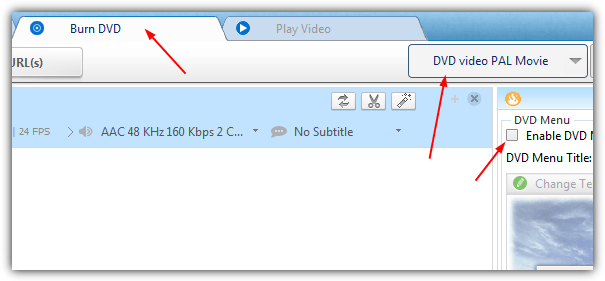
1. Install and run AVC, click the Burn DVD tab at the top and drag or press the Add button to locate your video file.
2. Choose whether you want a PAL or NTSC video from the drop down and untick the Enable DVD Menu option.
3. You won’t really need to touch any of the settings in the Audio, Video and Basic windows unless you know what you’re doing. The Burner window is for setting the DVD label and selecting a burner if there’s more than one on the system. Simply Press the Burn Now button after inserting a blank DVD, then sit back and wait for it to process and burn.
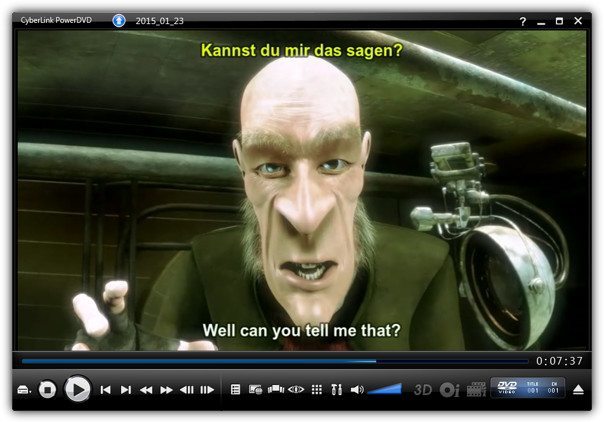
The resulting DVD disk will be playable on any DVD player, complete with your multiple language subtitles!





Here is another method:
Make Preparation: Free download and run iDealshare VideoGo
Step 1 Click “Add File” button to import the MP4 video files which you want to add subtitles to.
Step 2 Attach subtitles to MP4
Click the “Effect” button to open the Video Edit window;
Click the “Subtitle” tab to switch to “Subtitle” pane in which you can add and edit subtitles.
Click the “+” button to add a subtitle file in .srt from your local disk. It will be displayed in the subtitle list.
Step 3 Click the “Convert” to finish adding subtitles to your MP4 movies.
Hi!
This is very helpful, but what if I want to play the video with just one subtitle and have the option to change the language whenever I want to? It is to say, 1 video, 3 (possible) subtitles, 1 subtitle at a time.
Thx!
This is exactly what I am looking for! Did you figure this out at the end with multiple selectable subs??
I’d like gosubtitle.com. It can translate/convert a video/audio file into subtitle in less than a minute for any language.
On other website for dual subtitles : dualsubtitles.com The advantage for this website is : compatibility with Kodi (XMBC) and automatic detection/conversion of the files encoding to UTF-8.
thanks a lot !!!
thanks a lot …
thanks a lot man i tried to looking this and finally after 3 days i got it man thanks a lot.
Thanks , Great guide for me .
Hey,
Cool guide. Really helpful.
thanks ray. looks nice, i never thought it would the THAT easy to add more than one subtitle.
Thank you Raymond. :) wish you all the best