
5 Tools to Backup and Restore your Windows Drivers


 7 min. read
  Published on

I know many of us find it a hassle to search for drivers after formatting a computer. Although a lot of drivers will get picked up automatically by Windows, there could still be many left over that are important for the associated devices to function properly. For example, if you need a third party network driver to get on the internet which isn’t recognized by Windows, then you can’t go online to get the latest drivers for other hardware until the network driver is installed. That’s why I always keep the 3DPNet integrated drivers in my USB toolkit just in case.
It’s even worse if the computer belongs to someone else and they don’t have any idea what is on their computer, or even what a driver is sometimes. You’ll have to run third party software to identify the hardware components and search the manufacturer websites for the correct drivers. Some drivers such as display drivers from the likes of NVIDIA are very large in size (200MB+) and you’ll have to wait for them to download and then install.
Thankfully there are some free tools around that can backup and then restore your system drivers for you. Here’s a selection to have a look at.
1. DriverMax
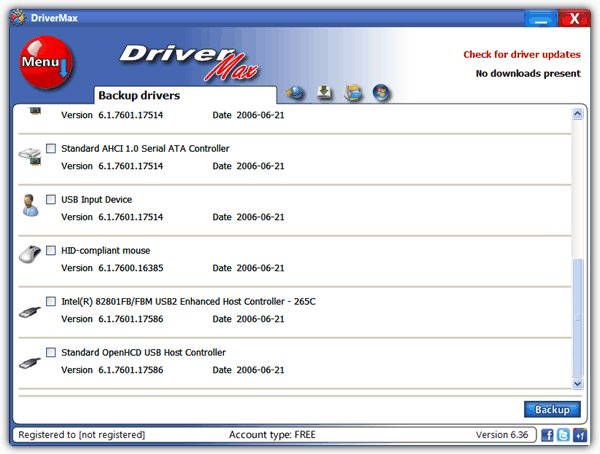
DriverMax is primarily a tool to scan your system for outdated drivers and then download and install the most up to date ones for you. To allow the program to update drivers you need to register for a free account at DriverMax. I prefer to use a temporary email address for something like this as you only need to receive the email to activate the account.
The programs function to backup and restore your drivers happily does not require the account registration and can be used freely. Clicking the big red menu button brings up the options to backup and restore, and there’s also options to do a system restore and perform a driver rollback if there are any present to roll back to. You can choose to backup selected drivers through ticking the boxes, or all drivers at once.
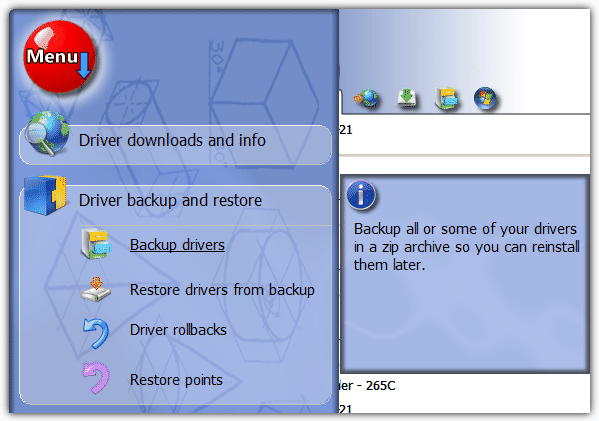
Only third party drivers are listed which is useful as you won’t want to sort through the Microsoft drivers. The backup is stored as a zip file in “Documents\My Drivers”. The restore process is a simple reversal of backup apart from you may have to locate the backup zip on a clean install.
DriverMax works on 32-bit and 64-bit versions of Windows XP, 2003, Vista and 7. Watch out for the offer of adware during install, and make sure to quit the program afterwards as it stays in the system tray. Right click the tray icon -> Exit.
2. Double Driver
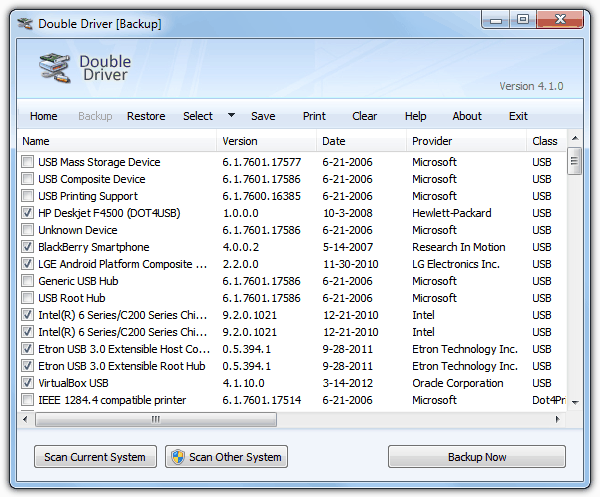
Double Driver has been quite a popular tool but sadly hasn’t been updated for a few years and development seems to have stopped on it now. It’s still a very useful tool to have around though because it’s quite good at driver backup and restore. The program is also handy for the USB toolkit being a standalone executable.
When you choose to backup and run a scan of the system, all drivers found will be displayed including Microsoft ones, but only the third party drivers are selected by default which is useful. There’s also a button that can scan for drivers on another Windows install, but I got an error when I tried it on an offline XP. The backup can be output in 3 different ways; structured folder, zip archive or as a self extracting executable. Unfortunately the last option caused my Double Driver to crash.
The restore is simply a case of choosing the file or folder for whichever method you used to backup. Administrator privileges are required to used all functions and the program will tell you on the main window if it’s running as admin. Double Driver works on Windows XP, Vista and 7 32-bit and 64-bit.
3. SlimDrivers
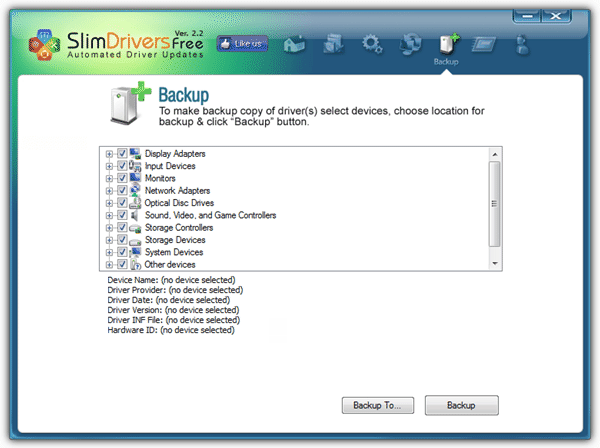
Although SlimDrivers is eventually a portable standalone executable, you have to install it first using the mini installer which then downloads the main file in the background. So the installer is really only a vehicle for you to be offered adware which you need make sure you opt out of. This is a utility much like DriverMax in that it’s more of a driver scanner and updater with an option of backing up and restoring current drivers included for good measure.
The drivers found include all Microsoft drivers which you don’t want so will have to sort through them manually to find the 3rd party ones. Once you Backup or Backup To, a folder will be created with the drivers in uncompressed form. The Restore process is just as simple and requires you to tick or untick the drivers to restore.
If you want to use the driver scan and update function, it again requires registering for a free account and if you’re not going to use it often, try registering using a temporary email, it worked for me. It also needs closing manually from the system tray using the icon. Compatible with Windows XP, Vista and 7.
4. DriverBackup!
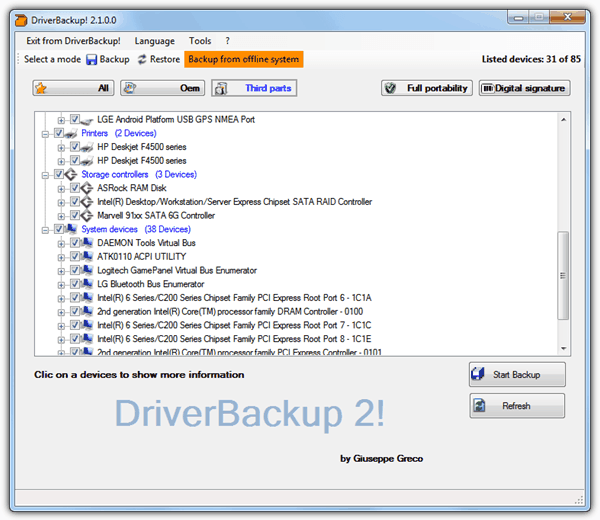
DriverBackup! is a useful portable tool that can backup and restore your drivers, and also includes a backup option from an offline system that actually works. Drivers can be filtered by All, OEM (Microsoft) or third party only, and also fully transferable drivers as well as non digitally signed files can be hidden. Just before starting the backup you can setup a custom naming system if there are to be multitple backups.
A backup .bki file is created along with the driver files and can be loaded into the program using the “Open backup file” button in the Restore tab. You can also create a backup which generates the needed files for an automatic driver restore although I encountered a language error testing this out.
There is also a function called a “Command line builder” where you can select a number of the programs backup and restore options, and the valid arguments are created for you to use through the command line or in scripts and batch files. DriverBackup! requires the .NET Framework version 2 installed if you’re using XP (Vista and 7 already have it) and supports Windows XP to Windows 7 32-bit and 64-bit.
5. Driver Magician Lite
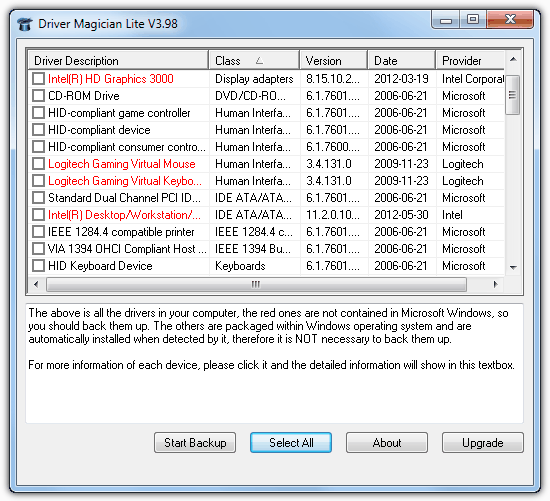
This last tool is not a driver backup and restore tool, but rather a very effective program for backing up only. The full version costs $29.95 and includes the restore option, driver updating and removal. The free version though, is very useful for backing up and then you restoring the drivers manually yourself which is a good idea if you prefer to have full control about what gets installed and when.
All the drivers in the system are displayed but those in red are the non Microsoft third party drivers that are the important ones to backup. The drivers are stored in a non compressed format so when you need to re-install the drivers, they’re ready to be pointed to when choosing to locate a new driver.
There are portable and installer versions available and Driver Magician Lite works on Windows 98 up to Windows 8 including 64-bit.
Personally I would recommend you use driver backup and restore tools to perhaps get a system up and running with only unknown devices, hard to get drivers or network drivers being installed. When you’re able to download the latest driver version from the manufacturer, the other drivers can be installed with the correct and latest versions. These types of programs can be temperamental at times due to all the different hardware and supporting drivers available.



Improve this guide

User forum
0 messages