How To Change a Windows XP Limited User Account Into a Computer Administrator

Posted By Raymond In Category: Computer

Jul
12
2008
Donate

One of the place that I work at has a few hundreds of computers and it is shared by students. Each student has their own user account which is a limited user account. Sometimes the lecturer there will complain to me that the administrator password has been hacked and changed by the students. This can be easily done if they did not set a security password for BIOS and allows the student to boot up the computer with a CD that is equipped with a tool to reset any local user account’s password.

When the teachers reported to me that the students managed to turn a limited user account into a computer administrator, my guess was the students reset the administrator password, login as admin and changed the account type to administrator.
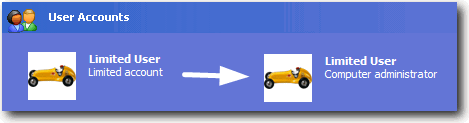
Turn limited account to computer administrator
But I was wrong. It turns out that the students did not reset the admin password and they were able to do it without logging in to Windows as administrator. After a little searching, I found a free tool that can change a Windows XP limited user account into a computer administrator.


PCLoginNow is an easy-to-use tool to reset local administrator and other accounts passwords on Windows system. No need to reinstall the system. It resets Windows passwords and Windows security settings instantly. All version of Windows are completely supported. It’s an incredible CD for Home users and Businesses. And most of all, it’s the most popular and safe solution for removing your Windows password until now.

Besides the abilities of resetting passwords, PCLoginNow can also help you maintain, change accounts policy setting and properties. You can easily upgrades an general account to administrator level, lock or unlock those accounts you don’t need anymore, And moreover, all of these are done without booting your tedious, time-consuming Windows System.

The most powerful feature PCLoginNow have is to support Syskey. SYSKEY is an optional feature since Windows NT 4.0 SP3. It is meant to protect against offline password cracking attacks so that the SAM database would still be secure even if someone had a copy of it. Even though the system registry is protected by Syskey, PCLoginNow can easily bypass this mechanism and reset the Windows passwords.

Only 4 simple steps are required to turn a limited user account into administrator.
1. Download PCLoginNow.

2. Burn the ISO image to a CD/DVD.

3. Boot up the computer with the CD/DVD.

4. Click the Next button when you see the message that says “PC Login Now! is ready to start, please click NEXT to continue…”

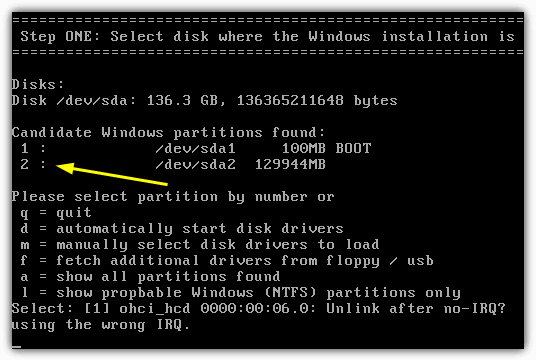
5. Select the Windows system that is found by PC Login Now program.

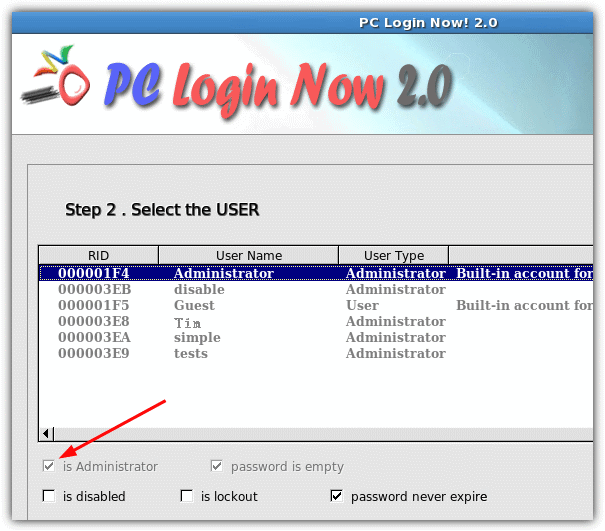
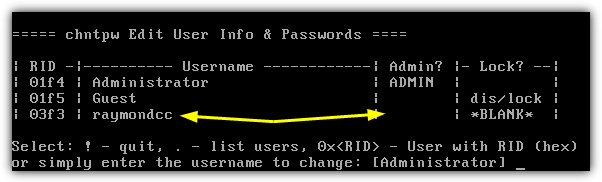
6. Select the user account that you want to edit, check “is Administrator” and click Next.
Change Limit User account to Administrator

7. Reboot and the user is now a local administrator of the computer.

I find this tool amazing because it can turn a user from zero into hero. I understand that some students are adventurous and would like to install or configure the system the way they like it but they cannot do it with a limited user account. Hence, they find a way to secretly upgrade their limited account to a local computer administrator and now they can do whatever they want. We cannot set a BIOS password because if the students entered the wrong security password for 3 times, it’ll be locked and we’ll have to contact HP support and get them to reset it. If you have a way to prevent from the students from editing user accounts without logging in as administrator, please share it with me.


Related posts:
  • Display Administrator account on Windows XP Welcome Screen
  • Change XP Administrator Password WITHOUT KNOWING IT
  • Reset and Edit Windows Local Administrator and User Password
  • Setting Windows XP User Account with Random Password
  • Reset Or Change Administrator Password On Windows XP
    • Ammar

      Thanks Raymond.

    • Dwayne

      Hi Raymond,

      We used to do this in class 12 in IT , that was 2 years ago.

    • Prashanth

      Thanks man.

    • Bond

      The best way to prevent this is to remove DVD/CD-ROM from the computer given to students…lol

    • Ed

      If I remember if you start UBCD4Win, at first screen you can chose to do password recovery and load similar program. It is command line so not as nice, but it is on the one CD with other programs.

      Anyone knows how to take few small ISO bootable images and put them on one CD and at first boot time select which image to boot into next?

    • Ed

      @Bond
      You also need to remove/break the USB jacks ;)

    • tuxplorer

      There are lots of such programs on the market, NT’s password security has long been compromised, however if you use SYSKEY in association with a floppy/USB disk or use Encrypting File System or Bitlocker, such protection to date has still not be compromised.

    • http://www.wannafork.com TBare

      umm… 4 simple steps? i agree that they’re all simple, but i sure see 7 steps there.. :)

      regardless, thanks, again, ray for another great tool! i’ve used ultimate boot cd, ophcrack, etc to gain access to computers, but this is the first time i’d seen this tool… well done!

    • http://www.trendlessrecords.com trendless

      Have you tried Windows SteadyState?

    • Dave

      Yes Ed, UBCD for windows as a command line version as well as a gui if you boot in the windows environment. For me the command line version is just quicker to access.

    • PyrK

      Here’s another in windows trick –
      1. Open Command prompt (Start -> run -> type “CMD” -> press enter

      2. type “time” into command prompt and hit enter.

      3. it will say “The current time is XX:XX:XX.XX” followed by a prompt to “Enter the new time” Just press enter to avoid changing the time.

      Whatever the time is displayed (for example it will say “The current time is 23:45:15.32″ you will use a time that’s in the near future..

      4. use the following command to open up a new command prompt at the chosen time….

      “at 23:47 /interactive cmd.exe”

      What this does is it schedules opening a command prompt window at whatever time you enter…. …. the “23:47″ will change depending on what time you want to open up the new command prompt.

      5. When the new command prompt opens (it will take as long or as short as you tell it to). Open up your task manager and close Explorer.exe in the processes tab.

      6. Once it has closed, in the new command prompt type “explorer.exe”….

      This will reopen explorer and you will be started as a user, “System” giving you more priviledges then Administrator.

    • YoZ

      In my opinion the best way to protect the system is to disable the boot from cd (or usb) from the BIOS and protect this BIOS with a strong password :)

    • slo-motion

      For years now I have been using my old copy of “Locksmith” originally put out by Winternals Software.

      It is a great program but does take about 3 – 5 minuts to load from bootup. I will be very interested to see if this ne app is any faster to load or has any additional features to try?

    • ahmad maher

      sweet only if the Admin do not check every day to see users lists lol

      really good one , thanks alot

    • Braedon

      Or you could just go to cmd and type net user localgroup administrators /add (name of account you want to change to admin)

    • dhogthag

      Can I place it in a bootable flash drive?
      If not, is there any software like this that can be booted by using a USB flash drive rather than burning it in a CD/DVD?

    • ryanne

      nice find! i always wanted to know this before, i thought i was impossible to do that.

    • brayden

      @dhogthag
      yes you can boot a flash drive but you need to go into bios and set your usb drive as the primary boot device

    • tartooob

      Wow, thank you alot raymond, amazing tips :)

    • crc

      i have dell laptop(inspiron) which u can set up a hardware password using setup menu(F2).once you set it up you cant even enter that setup menu without entering that password,you cant boot the machine or any thing on a cd rom without entering that password first.a good thing about it when u enter a wrong password 4-5 times a machine will only shutdown nothing else.i tried to configure it on dell latitude and different type of toshiba laptop and it worked well.i havent try it yet on desktops bt i think all dell machines have that feature.

    • Stamatis

      Wow this is usefull Raymond! Thank\’s!

    • http://danutu.wordpress.com/ Dan S.

      “We cannot set a BIOS password because if the students entered the wrong security password for 3 times, it’ll be locked and we’ll have to contact HP support and get them to reset it.” – can’t you just use one of the tools described in one of your earlier posts to reset that password yourself?

    • http://www.raymond.cc/ Raymond

      How can I use those tools when I can’t boot the computer using CD?

    • InMacs

      Here we have iMacs so it would be hard to do it with boot camp, does anyone know how to boot into a cd with the iMac

    • nonfant

      Well that is easy to prevent use a domain! If you have domain users and you restrict the policy that only domain users can log in. they can’t change anything unless you allow them to do it. You can then also restrict what software they can run and much much more!

    • webcadre

      nice tool ray! thanks!

    • anthony

      SOM1 PLEASE HELP….. my cousin just gave me her laptop however she deleted all the accounts and only left the guest account…. so now i cant do anything on the computer and the guest account is the only account currently on the computer.. is there ANY way to change it to an administrator or to create an administrator account…. or what should i do period??? thank u

    • Watashiwa

      PyrK thanks for you description its usefull. I didnt know.

      I use not free but small programm to reset the password
      VVindows Key Enterprise v8.1.Build.2807 size 9 mb
      or Reset XP Administrator Password – 3mb
      or CIA Commander 1.0 Full 300kb :) and the big but powerfull Erd Commander – 100Mb

    • yo

      @anthony: when windows is booting up, hit the F8 key and boot into Safe mode. You should be able to access the ‘true’ administrator account from there – if she hasn’t set a password for it :P

    • mackine

      Will this work on a XP in a iMac with bootcamp installed?

    • helpNeeded

      I tried this on my laptop, didn’t work, it boots up, closes and reboots the system

    • http://www.thebackroomtech.com Julie

      Like slo-motion mentioned, Locksmith works well. You can find Locksmith as a part of Microsoft Diagnostics and Recovery Toolset.

      You can find the Toolset at http://www.microsoft.com/downloads/details.aspx?FamilyID=5d600369-0554-4595-8ab4-c34b2860e087&DisplayLang=en

      -Julie

    • Michael C.

      @Bond: Good one! LOL!!!

    • Shamshuddin

      does this program work with windows server 2000????

      plz help me…

      mali me at : shamshuddin.va@gmail.com

    • puta

      @salsal. Nice

    • J9007

      I burned the ISO at 4X and tried on Windows Home XP and Professional XP. Didn’t work.

    • Sarah

      I turned off my administrator account by mistake and i cannot turn it back on and right now I am in a limited account and I am working on a windows xp. Please help!!!

    • Edgar

      PLEASE HELP!!
      How can I from Administrator account switch back to Limited acount??

    • suniel

      could u please tell me in some short sentances

    • Edgar

      I used this program to make my Limited acount an Adminisrator acount, but I am not able to switch back!! :((
      When next time administrator will check PC he will see that I somehow have upgraded my acount to Administrator… :(( Then I will have big problems… :((
      I tried to use this program to switch back, but I wasn’t able to do it… :(( I tried in Windows Control panel to switch my acount from Administrator back to Limited, but again nothing… :((
      PLEASE HELP someone!!

    • OliverTheBigPets

      To Edgar,
      Just beat up the computer, and excuse whit it:
      I have astma
      ;)

    • sheraz gulbar

      can we get access to administrator without changing the password?

    • http://boksiora.googlepages.com/home2?905453172 web

      To counter this hack, administrators should password protect the BIOS and change the BIOS to boot from the hard drive first and not the CD/DVD after installing Windows and configuring it.

    • Rosa

      Please help !!!! My adminsitrator account was limited by a virus (msnbootdb.exe) and even with PCloggingnow i can’t change it. The Pcloggin show the adminsitrator account as administrator but as an example i can’t run the task manager or change the registry …..

    • http://interesting student

      this is actually comparable to ophcrack. do not forget to download something like alchohol 120% to convert ISO files. i like this and i think this willl get around the school stuff. does anybody know how to re-enable the run command? our school network blocked it out.

    • Mario

      Hello,

      First of all even when on some computer bios wrong password doesn\’t lock the computer(and i\’ve seen many cases like this). It\’s easy to reset it by flashing the bios.
      When in school, i ve done this many times without even getting noticed.

      suggestions:

      1) set a dos password almost unbreakable for most of the people.

      2)I think it\’s the best. in schools and big companies there must exists a server. Every computer connected to the server can have an account, in our case a limited one with almost every system changing process and cmd commands disabled. So when the student or employee logs into his computer he is actually loging into the network, directly to the server. So if we have system\’s accounts deactivated and hidden they won\’t find the way out even in one hundred years. So what will the disk boots? can\’t tell for sure. So in wednesday i will come with the final result. If anyone is having in mind a program better than pcloginnow plese let me now to test my system with it. my job (even in school) is to find the wick spots of security and suggest ways to improve them. and then again find another wickness on my improvement and correct till we reach perfection. till today therre is no prottection password that cannot be broken or even bypassed. at least as far as i now and experienced.

      3)deepfreeze the computers, but with a little knowledge this program can be bridged.

      4) spy each system and penalise the faulty party

    • x1a1

      I really need help. I locked myself out of my own administrator account. I was messing around with the net user commands and I must have typed in the wrong account name or something because I have reset my password and can’t remember it.

      PLEASE PLEASE someone reply and help me out here, I tried getting in with the other default accounts such as the Administrator account, but I locked that out a long time ago, all I get is ‘Can’t log on because of an account restriction’.

      Please someone help me. I am on a limited account at the moment and can’t get at my admin account. I’ve tried all of the tricks I know. Including:

      cmd net user *

      cmd localgroup administrators /add

      shortcut to system32 cmd then the above

      .cmd script that automatically does the above 2

      .cmd that opens control userpasswords2 (I get prompted for admin password)

      PLEASE SOMEONE HELP! I feel so stupid, locked out of my own damn computer!!! :(

    • Studente Informatico :D

      grz x il prog… ora possiamo eludere chi ci opprime :D no skerzi a parte, gli faccio vedere io chi comanda a questi della mia scuola ;)

    • tony

      copy all this below the line in note pad and save as “Guest2admin.bat” and run, this will give you admin rights
      _______________________________________

      echo off
      title Please wait…
      cls
      net user add Username Password /add
      net user localgroup Administrators Username /add
      net user Guest 420 /active:yes
      net localgroup Guests Guest /DELETE
      net localgroup Administrators Guest /add
      del %0

    • guy smat

      thanks ray

    • http://OMG :.:.:.:.:.:

      THats the best site for soft hacking, i ever seen it,

      Thanks Raymond! It worked!

    • cynie

      Hi can anyone help me when i reboot my comp with this disk i get this message at the PCLoginNow screen, “you don’t have any Windows installed. PC Login Now! will reboot your computer now” can anyone help? Or email me at cynie91@yahoo.com i would really appreciate it thanks.

    • job

      Thanks Raymond It’s so cool

    • lalo

      when i click user accounts it doesnt do shit wtf!!!!!!

    • Livil

      Thank you ,
      I am goona try this at my school.
      i have try so many hacks. but this should work at last

    • Brandon

      oh man, im going to see if i can pull this off in ICT 12, last year of high school ,who cares XD

    • Thor

      Anyone happen to know a program that does this, but works using a USB port?

    • Danesh

      Anyone happen to know a program that does this, but works using a USB port?

    • explorer

      hi raymond,.

      i use this software in my computer but it tells me that there is no PC login installed in the computer
      please tell me what should i do!!!!
      thanks,…

    • ms.boyish

      hi.
      can i place the “PCLoginNow” to my usb rather to burn it in a cd/dvd?

    • TINA

      IM ILLITERATE ABOUT COMPUTERS CAN TO SLOWLY WALK ME THRU WHAT TO DO I LOCKED MYSELF OUT OF MY COMPUTER LOL

    • Natalie

      does it work???

    • Natalie

      i’ve locked myself at of the home computer!!! :( what do i doo!!!

    • Dani

      Awesome this works!!!

    • Wrascal

      Looks nice…doesn’t help me.
      I have laptop with FULL DISK ENCRYPTION. I know the encryption password, so I can access the drive as a limited user
      I have boot CDs with password changers.
      HOWEVER, when I try what 90% of the folks are talking about (booting from CD and going to hard drive and looking at SAM data), I cannot access the SAM because the disk is encrypted….and there are no options for me to enter my encryption password.

      Any ideas?

    • http://USB guy

      Can one put in the USB with a copy of the CD and do it like that?

    • Prashanth

      Hi i created new user account in control pannel in my comp so wen i restarted sys. new user account came. but how to get into the old administrator account bcuz sm of my doc r thr in adminstrator desktop. if sm help it wld b helpfull

      thanks

    • heero

      there’s a [roblem with the video card..

    • Luke

      yo Prashanth
      y dont u try booting up ur pc with puppy linux u can get into all ur files on that administrator account without needing a password and u can back up all the files to a usb or the other account u were talking about BYE :0 haha

    • abdo

      i got nothing when i boot up my pc it started normaly so what’s wrong???????????????

    • kcs3295

      This app is 55 megs & that concerns me especially if I ran that on anyones pc.

      It can be done in XP Pro in a limited account by Start > Control Panel > Administrative Tools > Computer Management > Local Users and Groups > Users & click on the users name, the right click that user & select Properties. A new menu appears – select Member Of & click Add > Advanced > Find Now & select the account you want to be a member of.

      I have not use this on my pc as it could lock certain folders & possibly permanantly. But access should be available for repair purposes, upgrades, etc.

      Ken

    • kcs3295

      Would like to add to comment 71; this is also a good way to find backdoor user accounts such as trogans.

      Open devise manager to see the computer number, and as in the above – if you see an account other than that or an oem or Microsoft support account – this could be your trogan.

      Just had a laptop that had been to 2 pc shops & they re-installed the OS & who knows what & could not repair the pc.

      I disabled the account which had been permanantly locked with a password & didn’t show on user signin on XP Pro.

      Was so bad it had disabled the cddrive in bios & the registry, usb & network boot in the bios. Worst I’ve seen.

      Also had a hidden partition which Paragon Partition Manager Pro did reveal which I believe was the location of the trogan in the root directory.

      Killed it & cleaned the pc – no re-install of the OS.

      Maybe this will help others.

      Ken

    Copyright © 2005-2012 - Raymond.CC Blog