5 Free USB Flash Drive Tester & Checker Tools [Best in 2023]
One of my friends came up to me a little while back and asked me if I was interested in buying some USB flash drives from him. He had about 200 pieces, they are all new and are about 60% below the current market price. It’s a very good deal when you can buy a $20 new USB flash drive for only $8. He couldn’t reveal how or where he got it from and that alone got me a little worried about the quality of the USB flash drives. He also told me that there won’t be any warranty if the USB flash drive fails. So I thought that the possibilities are they could be either stolen or are rejected stock from the factory.
The only thing I am afraid of is using a stick for a few times and it couldn’t read the files or can’t detect the drive anymore. I have also heard several stories of people buying USB flash drives from places like eBay and their true capacity being only a fraction of what was advertised. With all this in mind, I told him that I’d like to test the USB flash drives first before buying and he agreed. Windows comes with scandisk or chkdsk which I can use to scan for bad sectors but it lacks any soft of burn-in test or a test to check the true capacity. Don’t forget to also explore our recommended USB monitor software for a comprehensive USB management experience.
So here are 5 tools you can use to test the current condition and performance of a USB flash drive.
1. Check FlashCheck Flash (ChkFlsh) is a very simple flash drive testing and maintaining tool. I have used this tool several times to run a burn in read and write test on USB drives. If the device is able to survive after a few cycles, the USB flash drive should be OK. There are 3 access types and 6 action types for you to select. To access the actions of “Read stability test”, “Save image”, “Load image” and “Full erase” you have to change the Access type from temporary file to a logical or physical drive.
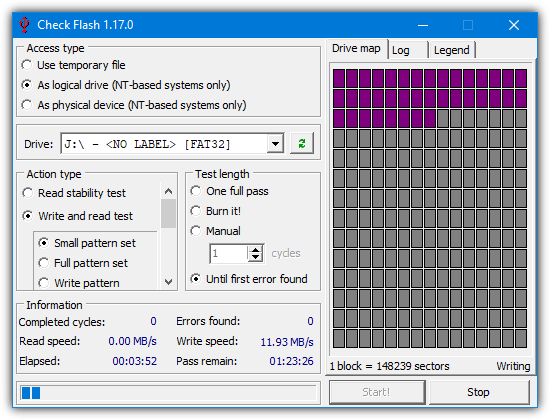
Other than checking for drive errors, it can also determine the read and write speed. The test length can be set to scan the drive just once, several specified passes, or leave it running until an error is found, or you tell it to stop. Check Flash is a free and single portable executable file. It can only test USB flash drive and not external hard drives.
2. RMPrepUSB
RMPrepUSB is a tool which is actually a USB formatting, partitioning and bootloader creation utility as opposed to a USB testing tool. While it’s not meant to be useful for doing a complete read and write scan, it does have a little function that can test your drive to see if there are missing or bad parts and what the actual usable size is. This is ideal to check if the drive is the capacity you believe it to be and is infinitely quicker than scanning the whole drive if that’s all you want to do.
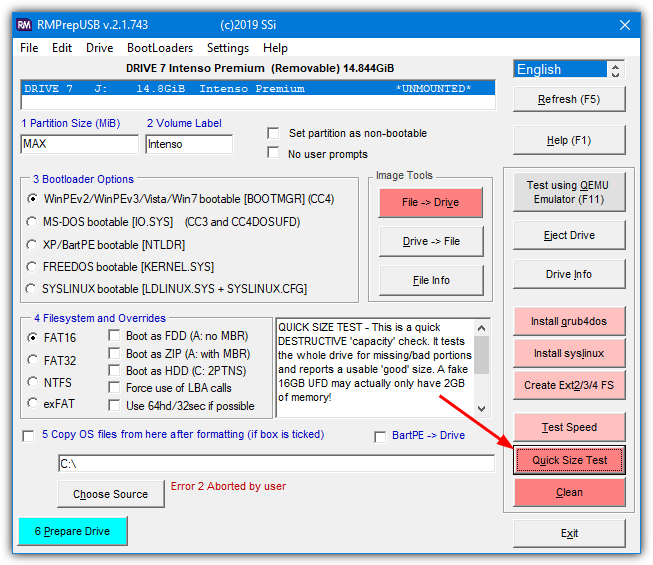
Make sure the USB drive IS EMPTY because any contents will be deleted. Simply insert your drive and select the “Quick size test”. Portable and installable versions are available. This is also quite a good tool to experiment with bootloaders on your flash drive as there are several different types that can be used.
While the Quick Size Test will give you a general idea of whether the entire size of the drive is available and working, it won’t run a complete test. To do that, you can download FakeFlashTest which is by the same developer and includes the quick test and another more comprehensive test.
3. H2testw
H2testw is able to test USB flash drives, memory cards and also internal, external and even network hard drives for errors. It simply works by filling the device with 1GB chunks of test data and then verifies it by reading the data back again. Usage is very simple. Select the English language because it defaults to German, select the target device, and then choose whether you want to test all available space or a specified amount of Megabytes.
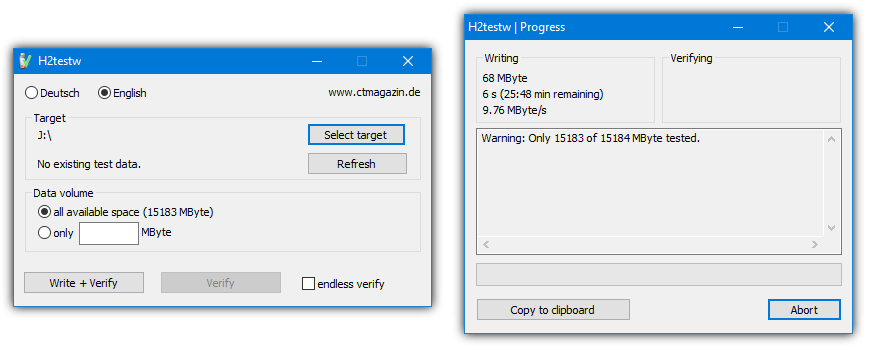
Although H2testw is non destructive in that it won’t overwrite anything present on the drive, for best results, it’s recommended to have an empty and newly formatted device. This program has been found to be very good at testing both for errors and to find USB sticks with a fake capacity. H2testw is also a completely portable standalone executable.
4. Flash Drive/Card Tester
Flash Drive/Card Tester is a tool we’ve mentioned before because it’s a simple tool but can be used in a few different scenarios. In addition to being handy useful for detecting fake capacity drives, it can also show you how fast the drive can read and write data. Another thing it’s good for is testing for bad or problematic sectors on a flash drive or memory card.
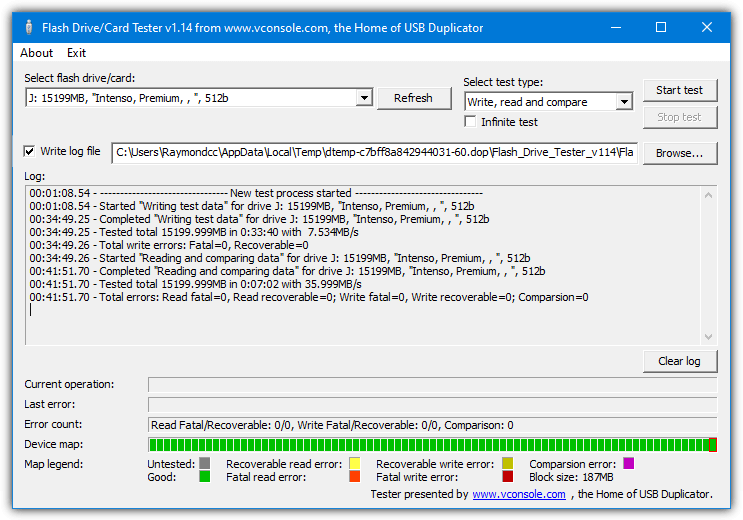
All you have to do is select the drive to test and choose a “Write, read and compare” test, then start the process. The device map at the bottom will show a graphic representation of passes, write fails or read fails. Choose the Write log file option to output a possible list of errors to a text file. The program actually comes as a setup installer but we’ve zipped the two files to make Flash Drive/Card Tester Portable.
Flash Drive/Card Tester Portable
5. USB Memory Stick Tester
This tool is very old dating back to 2005 but it still works and is only 66KB in size. USB Memory Stick Tester is a pretty simple tool to operate and will write and then read data to test for errors on the drive. There are only really two options to speak of.
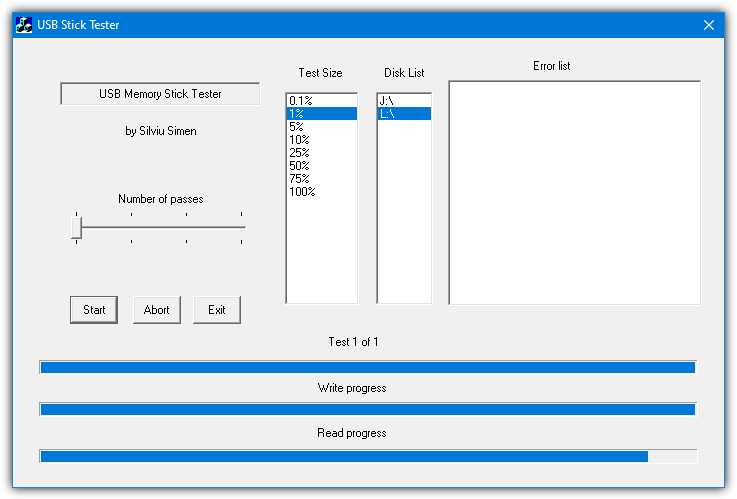
The first thing you can change is the number of passes slider. Although it doesn’t say, we assume it can be one to four possible passes. The other option is the test size which will be a percentage of the total size of the flash drive. Obviously, the higher the proportion of the drive is tested, the more likely it is that any issues or errors will be identified.

thank you very much
2tb flash drive? unless this cost 1000s of dollars it is definitely fake
Buy a M.2 2280 2 TB SSD, put it inside a USB enclosure and voila! There you are. And it doesn’t cost thousands.
I suppose that having 400 hours of remaining process for the ChkFlsh to complete the test is good news about the 2TB flash drive pen I got as a gift… Anyways, I still doubt this strange little thing is really having that damn much capacity lol
Check Flash (ChkFlsh) fails on a read test on the last block for both of my USB drives. Flash_Drive_Tester flags no errors. I don’t trust ChkFlsh and removed it.
Why would you install it then in the first place, if you didn’t trust it? What is the cause of it not reading the last block? Is it related to the drive, or the software? Context is important.
Didn’t the guy have to install it???!!!
How could he have come to not trust it without having installed and tried it? Where are you coming from?
Same here with this program. It fails on almost any drive, that I tested. It is complete s**t. Delete this program.
Worked fine during testing and completed without issue on two or three drives. I can only assume there’s an issue with specific drives/systems/USB devices.
Some of these programs are quite old, and I doubt whether they are able to cope with the larger flash drives available today. For instance, the last Flash Drive Tester version, 1.14, dates back to 2009. I always depended upon it until I bought some 128GB sticks from MyMemory, a reputable supplier, and it reported errors. The company insisted that the sticks were sound, so I tried other programs, like h2Testw, which passed them and they have given no trouble since.
Thanks for presenting these flash drive testing tools, all in one place.
I have some media on order from Groupon that I was subsequently told [after purchase], might be fake.
As soon as I get my Groupon order I will be testing them with these tools.
Been years since I tested a flash drive with these tools. Glad you still had these tools listed online.
Warning re RMPrepUSB: I’ve downloaded and am testing all 3 apps mentioned in this article. I ran the “Quick Size Test” and found that as a result of that test the formatting of the flash drive was deleted. All I wanted to do was have it check for missing/bad portions but got “more” than expected.
It’s not a big deal and I might have done something wrong so my report is mentioned as a FWIW.
Because of this I’ve decided to uninstall RMPrepUSB from my computer.
The program clearly warns you that it is going to erase the drive and you must click OK to continue.
Thanks guys…just found a fake drive…(512gb memory showing and actualy he has only somewhere around 15gb) also usb 2.0 not 3.0 :D so that means…a 16gb memori flash.
You want to be careful on how you test flash drives. Flash memory has a limited number of write/erase cycles (Google “flash endurance” for info). Too many writes to flash when testing could result in premature failure. And never defrag a flash drive since that creates excessive writing to the drive.
While it is true that flash memory has a limited number of write cycles, your concern about longevity is not reasonable. All flash memory on the market has a limit of between 10,000 and 100,000 P/E cycles. (Program/Erase cycles. Each set of Program and Erase functions represent one cycle.) Let’s put this in context. If you have a cheap flash drive that experiences such extreme use that, every day the drive is completely erased and filled to capacity; that flash drive should last 27.39726 years before it reaches complete failure. The heaviest use a flash drive is likely to see is when it is used as a ReadyBoost drive. This is when Windows is allowed to use flash as a buffer for a hard drive. I have two 8 GB drives serving that function and they each see daily use of around 4 GB per day. The expected P/E life is about 13.69862 years. The reality is that any flash drive will fail for other reasons long before you use up your P/E cycles. You also need to consider that the flash drive you favor today, is going to look pretty shabby in 4 or 5 years. Tech standards and data requirements change constantly and your hardware needs to change to keep up with those changes. So while I still appreciate what my pair of 8 GB USB 2.0 flash drives gave me in their time, they still got replaced with my pretty new 64 GB USB 3.0 drive. (It’s 4x the capacity and real world performance for the same price.) Needless to say, I know longer care about the 2.0 drives. And in a few years I won’t care about my 3.0 drive. As if all that were not enough to convince any rational person that P/E cycles are a non issue, the next big leap expected in the NAND architecture is the introduction of 1,000,000 P/E cycles to MLC NAND. (That is highly speculative, but it is the boon the SSD market is hoping for. Think SSD’s that can compete with hard drives in terms of price, capacity and endurance.)
Note, the 10,000 P/E cycle is for 50 nm MLC NAND and 100,000 is for SLC. With smaller lithographies and cheaper NAND pricing, the amount of P/E cycles have actually gone down for NAND used in consumer applications (e.g. consumer SSDs, cheap flash drives). The move to ~30 nm dropped down P/E cycles to 5,000 and ~20 nm dropped it further to 3,000 (but yay for cheaper SSDs!). Planar TLC NAND actually varies from 500-1,500 P/E cycles, iirc. Granted, the move to 3D upped P/E cycles by ~3x. While you may have NAND capable of 1,000,000 P/E cycles right now, no one’s using them for $10-20 USB flash drives. Enterprise-level SAN or industrial applications, sure.
Granted, even at 1,000 P/E cycles, this is a non-concern for average users. 32GB * 1000 P/E cycles = 32 TB worth of NAND writes (not factoring write amplification). One would be more likely to lose the flash drive or have bought a bigger one before writing that much data to the drive.
Mind, I actually have killed a few flash drives running PortableApps due to excessive wear on specific cells (non-recoverable read/write errors). Guess wear leveling wasn’t particularly good on those drives.
thanks, I was getting worried about the earlier comment
One more utility for testing and debugging USB which wasn’t mentioned – USB test software eltima.com/products/usb-test-software/
I got writing errors using 2 programs. Are there any programs to fix my USB flash drive?
Hey, thanks a lot. useful tools, i’ve downloaded them all. Problem is, the drives I’m testing is 1TB large. 90 hours with “Check Flash”… 95 min with the RMPrepUPB– good advice
Again, thanks
Are you saying that is took 90 hours or so to test a 1 TB drive? Should I assume around 60 hours for a 64GB drive?
1TB is 1000 GB so 64 GB should take about 6 hrs
I made like 3 cycles on ready only mode with check flash and it didnt find any error, but in write and read test if found 48 errors, is it fake?
You can also try FakeFlashTest.exe as a very quick test for fake flash media.
Dear Raymod
Well Done for your useful article.
h2testw is kinda slow especially takes long while if you have very large size drives. Personally I used HDDScan to test usb flash.
I used the h2testw on 128GB, 1TB, and a 2TB flash drive. USB 2.0 metal keys configurations from China.
Ran over 100 hours, day and night.
It Loaded thousands of files onto the flash drive.
Read them back presumably.
Gave output drive size.
Close to as advertised.
I did a DEL *.h2t to get rid of all those files. ThAT HAPPENED IN A FLASH.
i need this tools
thanks.
thank you very nice
Thanks, it works.
Thanks Raymond. You rock.
Nice tool Raymond.
There’s more easy way to do that using the same OS API calls that will be used by any file manager tool should you happen to be needing to copy/write something on your USB drive. To do that you have to the following.
1. Select Start+R type cmd to start command prompt
2. In the command prompt window type:
fsutil file createnew X:\\dummy.dmp Y
where X is the drive letter for your USB stick,
Y is the number of kilobytes you want to write to your dummy.dmp file. Like if you want the file to be of 1 megabyte size type 1048576 instead of Y here (1 Mbyte=1024*1024=1048576 bytes)
If utility will fail to write this file, it may indicate you have problems with addressing or microchip on your USB drive.
thanks Ray. nice tool.