How to Increase Brightness of Laptop [Acer, Dell, HP]
Previously we’ve talked about how you can manually turn off a notebook or laptop LCD screen using a utility called Turn Off LCD. Today we will share with you another tip on how to dim or brighten the LCD screen. I can easily brighten my Acer laptop’s screen by pressing the Fn + Left key simultaneously to brighten it or Fn + Right key to dim it. The combination keys are different for each notebook. Some are Fn + F7 to turn it down, and Fn + F8 to turn it up.
You should be able to see which keys are used by looking at them, and looking for which ones have a symbol for brightness, quite often in light blue. If you can’t seem to find it, just check your notebook’s manual for whether there is a shortcut key for this purpose. But most of the ones I’ve seen are either Fn keys, number keys or special keys such as the arrow keys etc..
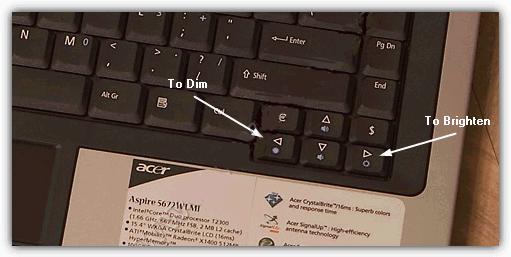
A laptop LCD screen is not like a desktop LCD monitor where there are buttons for you to adjust the brightness, contrast, colors etc… So if your laptop doesn’t have the combination key that can be used to adjust the brightness of the LCD screen, or if you have a key combination that doesn’t seem to work because of a broken FN key that cannot be remapped, then you’re pretty much stuck with either too dim or too bright a screen.
But not to worry because here are a couple of solutions for how to easily adjust the brightness of your LCD screen.
1. DimScreenDimScreen is part of Skrommel’s 1 hour software hosted at DonationCoder. It is small, easy to use and serves its purpose, that is to dim the whole screen.
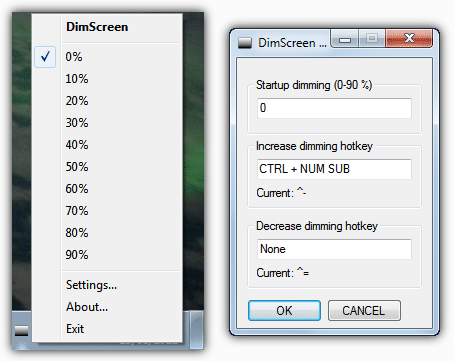
DimScreen is portable and only 400KB in size. While it is running, it only takes up 1.6 MB memory. To change the brightness, you can right click on the tray icon and select the percentage of dimming. If you go to the settings, you can configure a hotkey to easily increase or decrease the dimming.
There’s only 1 problem with this tool that is it when you are playing video on your computer. The video would only show black screen. However, I tried dimming the screen with DimScreen and played Counter Strike but with no effect at all. DimScreen has been made with the AutoHotKey scripting language.
2. Volumouse
Volumouse is a utility developed by NirSoft and can be used to adjust the screen brightness. It was originally developed for controlling the system’s sound volume via the mouse wheel, but as time has gone along, a lot of other features have been added to it. Volumouse is only about 100KB, much smaller than DimScreen and can do much more.
To use Volumouse to control the screen brightness, you’ll need to set up a rule for it by selecting a qualifier key from the first dropdown box and the choosing “Screen Brightness” from the Component dropdown. The image below is for when I press and hold the Ctrl key and scroll down the mouse wheel, the screen will dim. And when I press and hold the Ctrl key and scroll up the mouse wheel, the screen will get brighter.
Volumouse also has an option for an on screen display or percentage meter in addition to making the rule specific to certain programs.
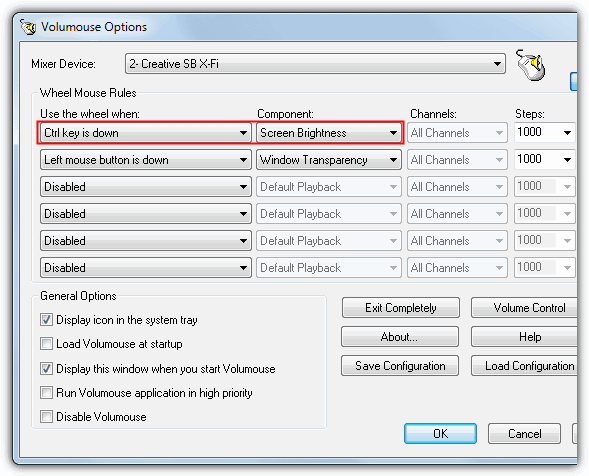
Obviously if you want to use Volumouse on a laptop, it will depend on whether you have a mouse connected or your touch pad has a scrolling option.
If you want to permanently make you screen brighter or dimmer, it’s also worth checking the graphics adapter driver settings because there’s often an option to change the display’s color, brightness, gamma levels, RGB etc.


Thank you, it worked! Really appreciate your good work,
Dimscreen does not actually dim the screen, it only changes the color of windows. If you want to dim the backlight and save energy, use Screenbright or ClickMonitorDDC (with hotkey support)
ClickMonitorDDC is effective!!! Thanks to you! I was able to adjust brightness using hotkeys! My Arrow keys are broken that is why I had to remap the brightness adjustment function.
I have been using Volumouse for quite sometime to control audio volume but never knew it could also dim my screen (and a million other tasks!) Thank you so much for this post and the many others you provide. Your site is so very helpful.
thank you for the dimscreen app! My laptop’s Fn key got broken and since my laptop has been reformatted, the brightness function or drivers for graphics were not properly installed. I have been suffering from headaches because I can’t take the brightness of my laptop..This is truly a Life saver! Thumbs Up!
awesome! exactly what I was looking for.thank you very much
thanks why i was easily understood your note.
thanks really thanks i waste my 20 days bcz my laptop have an issue in brightness after upgrading on 8.1
THANK YOU for this Clear, Simple, Direct, Easy-to-see (pictures added!!!) and Understand directions!!!! I searched yesterday and then played around at night messing up some setting and it was as easy as Fn and using my arrow keys!!! I never even saw the Fn button bec. I had no idea what it was so my mind tuned it out. Cheers for your great team! Laptop screens are ALWAYS too bright for me and my eyes and head now thank you too…no more headaches from glaring background light!!! :)
Thanks Julia,
My screen is back to normal again.
Peter
Cheers guys! DimScreen worked like magic. Bloody windows 10. didn’t want the update in the first place, but the pestering notifications kept on coming. I’ve tried so many things, ran so many bug fixes. seriously, you guys rock!
thank you
Thank You very much!! Now my eyes are not going to suffer from strain of too much brightness!! Wish I could have known this before. I just used the fn button and my arrows to lessen the brightness!! WOO HOO!!
I tried all the applications to adjust brghtness, including ibrightness, gamma panel, etc. None worked. All you need do is install the correct VGA of your laptop and all your pains will be over. Download it from the brand site (Dell. Acer, Hp etc), go to device manager on your desktop, Display, then update the VGA driver. Restart your system, and you are good to go.
From Nigeria
Thankyou ! you saved my day :)
Note that these are not adjusting the backlight of the LCD panel, but the gamma ramp (LUT) of the graphics chip.
It’s definitely not as dark as when I dim the screen through the power options in Windows. I’m going to see if I can write a script for Windows users to do this like Volumouse, but have it change the actual brightness.
Dear dz, thanks for this extra tip. never hurts to know/ hear the truth of what is actually being done/ taking place. Nice of you to share with us non-techies :)
Oh my word, thank you so much!!!! Yay!!!
Very useful. Thank you !!!
Thank you Raymond, straight forward and easy advice re: screen brightness!! Have added your page to my favourites list :)
Thank you very much! I can finally adjust the brightness of the screen after trying so many ways!
You are awesome! I immediately found my answer to darken the screen of my new inspiron! thanks!
————————————————————-
Wait! The other option on Other Laptops isss.
FN + Up Arrow
FN + Down Arrow
It’s not just left and right. now it’s up and down too. I just found this out by testing. I was disapointed when F7 and F* didn’t work then I found this and Left Right Arrows didn’t work Boohoo. then I tried up and down. It Works! Woohoo Weeeeee
Thank you so much!!! Couldn’t figure out for the life of me how to brighten my screen
thank you sir. You fix my problem and you save my eyes
its all information really useful new user plus all computer user
thanks dear.
thanks so much, you fixed my problem!!
Thank you very much my dear friend…GOD BLESS YOU ALWAYS!!
Thank you very much I’ve been trying to figure it out forever. i have an gateway and mine is Fn+ F11 to darken and Fn+F12 to brighten
THANKYOU!!!! my daughter got hold of my laptop again and the screen was very dim. I was thinking I would have to by another inverter and was a bit… well anyways, I thought lets see what you think first and woohooo brightness! oh on my dell its fn and the up and down arrows!!
I really like this program I have problems with bright lights,only thing I cannot figure out is after every restart I have to re-install the program
Thanks so much for the info on dimming my screen. I have an HP notebook and had no idea those function keys were there. Will have to explore what the others do. Your help is very much appreciated.
This was very helpful! Totally forgot about the Fn key! Thanks a bunch, this was the only website that actually helped me.
just wanted to say Thanks Ray
Thank you my headache will leave now. What do all the other little ‘blue’ keys do? lol I suspect it has to do with the Fn key so I will find out. TY again.
Volumouse 64-bit version worked great on my HP notebook. It dimmed both the notebook’s screen and my external monitor at the same time. I have a third monitor attached by a USB Graphics Adapter and that was not dimmed by Volumouse, so I have to do that manually using that monitor’s own controls, but I really would have been surprised if Volumouse had done that one, too. So, overall, I’m very pleased and for a free utility this is very nice. It does have one slightly annoying feature, which is that you have to view the configuration display in order to use the mouse wheel – you can’t just use the mouse any time you like to dim the display – you have to 1) bring up the program, including its configuration display, and then 2) use the mouse wheel to dim the display. But there is a convenient tray icon for bringing it up, so this is a minor complaint.
what a relief for my eyes! Thanks .
thanks – just the solution I was looking for
Oh my Goodness–thank you for this info!! My eyes feel better already!!
This is how web information should be presented. No BS just answers. Thanks
Wow. Thank you! I was about to order a new bulb/inverter and a headache to fix the dimness of the screen!
Ten seconds on your page and I had the fix.
Thank you!
Great help. Thanks so much for the tip. I downloaded the DimScreen and used it on my laptop. And what a relief for my eyes! Thanks again.
nice, i use it as my screen is led and it is extremely bright, it irritates my eyes when i am using my laptop in a dark place i tried dimming it using the control panel but it is still too bright. Thanks nice software
Aaaah you’re king! I’ve got a Dell Studio laptop which pulls a lot of juice by itself, but the minimum screen brightness is still way too high for working in dark places. With this tool, I can get it down much lower, almost doubling my accu time! Thanks!
Thanks so much for the tip! I must have accidently hit ‘Fn’ + F5 at some point. I was beginning to become distressed at how dim my screen had become. A google seearch on ‘dim laptop screen’ brought you right up, and the suggestion regarding the Sony laptop then worked like magic. I can see clearly now! Thanks!
Works like a charm. I was successfully able to reduce the brightness of my Fujitsu laptop. Way below than it minimum brightness level. Great software and wonderful suggestion.
oh my goodness it really worked. now my eyes can stop hurting so much. thank you very much for the tip
perfect fix: easy, fast, and works!
Thanks much. The NVIDIA settings on my Toshiba could not get the brightness to low as I would like it.
YAYY
I can’t thank you enough!
I’ve been attempting to find this with no avail
THANK YOU
i am very much happy that upon reading your very informative tip on how to brighten my lap top screen thank you very much i hope i can ask again your line for another brilliant info.
thanks a lot
from
Philippines !!!!!!!
Thank you so much, Ive been sitting here for days trying to see with a too dark screen… thought it was time for glasses
Wow,really works,thank a lot..
awesome thanks!!!
Lovely tip indeed, thanks. My cat slept on my computer and must have pressed the keys to dim with her paws. Now I can see again.
:)
I adjusted the brightness of my screen, thinking that was what was hurting my eyes but they still burn when I look at the screen.
Thanks for your help. You have just help to resolve my laptop’s brightness problem. especially for the volumouse software. very helpful!!!!!!!!!
Thanks for the info… I have been searching it for a while :)
sometimes they do not know that Fn key is..and ignore the button… hard to tell somebody that too Orthodox with computer
Nice Tip, thanks