
How To Disable, Uninstall or Remove Windows Defender


 7 min. read
  Published on

Since Windows Vista, your operating system comes with an anti spyware program called Windows Defender. It’s a small piece of software that runs in the background to help protect your computer from various pieces of spyware and malicious software. Defender has been around since 2006 and although not a fully featured security application, it does at least offer some protection for Windows Vista and 7 out-of-the-box. In Windows 8, Microsoft went a step further basically renaming Microsoft Security Essentials to Defender, and it’s now an antivirus package as opposed to just small resident anti spyware tool.
The problem with all Defender versions in Windows Vista and above is it’s integrated into the operating system and installs by default with no visible or hidden option to uninstall. Many people are looking for ways to disable, uninstall or remove it from their system as they prefer to use other software. Windows XP users at least have the luxury of choosing whether they want to download and install Defender in the first place as it’s a separate package, and then have the option to uninstall again through Add or Remove Programs.
Luckily most of the time when you install a new anti spyware program or antivirus application that includes anti spyware, it should be smart enough to disable Windows Defender as your new software takes care of it from now on. However, if Defender is still running or causing other issues, you need to know how to turn it off manually or in more extreme cases remove it from the system completely. Here we show you how to do both.

Disabling Defender in Windows Vista and 7
Defender in Windows Vista is slightly more integrated into the operating system as opposed to Windows 7 with added options for protecting Internet Explorer, startup items and services/drivers etc. It also includes a tray icon for the program which is started with Windows that needs to be removed. There are two easy ways to disable Defender in Windows 7 and Vista:
Method #1
1. Click Start and type services.msc into the search box, or go to Control Panel -> Administrative Tools -> Services.
2. Look for “Windows Defender” in the services list and double click on it to bring up the Properties window.

3. Click the Stop button to stop the Windows Defender service and then click on the Startup type drop down menu and select Disabled. Press OK.

Method #2
1. This way is just as easy, go to Control Panel -> Windows Defender, or if it’s running in the tray under Vista, simply double click on the tray icon.
2. Click on Tools and then go to Options.
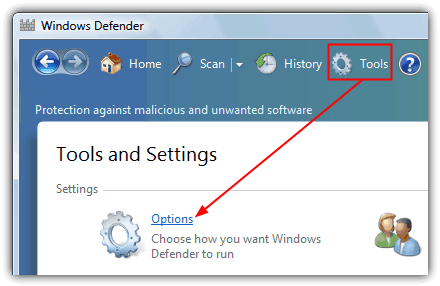
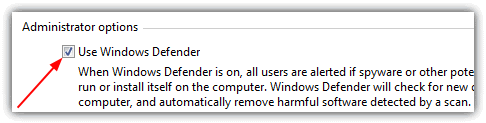
3a. In Windows Vista scroll right to the bottom of the window and you’ll see an option “Use Windows Defender” under Administrator options. Simply uncheck “Use Windows Defender” and click Save, Defender will now be turned off.
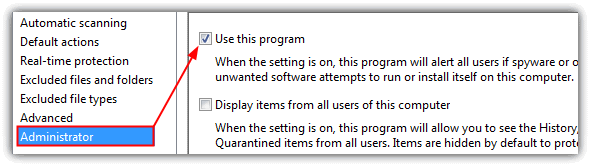
3b. Defender is laid out slightly differently in Windows 7. In the Options window, click on Administrator down the left and then uncheck “Use this program” and click Save.
Removing the Startup Entry
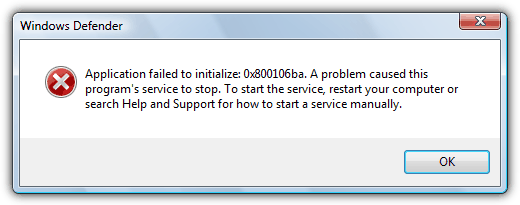
If you stop and disable Vista’s Windows Defender from Services and do not disable the Windows Defender tray program (MSASCui.exe) from starting with Windows, you’ll likely get the following error message:
Application failed to initialized: 0x800106ba. A problem caused this program’s service to stop. To start the service, restart your computer or search Help and Support for how to start a service manually.
1. Click Start and type msconfig into the search box.
2. Go to the Startup tab and uncheck Windows Defender displayed in the Startup Item column. Click OK and at the restart box check “Don’t show this message again” and then click “Exit without restart”.

Of course, there are many other tools around that can disable Windows startup entries such as CCleaner which you can use instead if you wish.
Disabling Windows Defender in Windows 8
As we mentioned above, Windows 8 Defender is now pretty much the full Microsoft Security Essentials antivirus software under the Defender name. It can also be disabled using two methods which are basically the same as for Windows Vista and 7. The first method of disabling the Windows Defender service is exactly the same as Method #1 above, the second is slightly different because of the MSE looking interface.
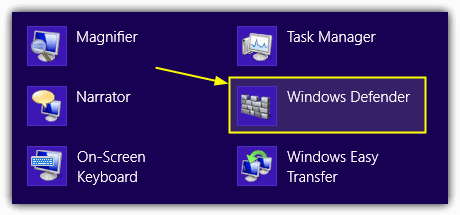
1. Go to Control Panel -> Windows Defender or click on the Start Screen -> right click -> All Apps -> Windows Defender.
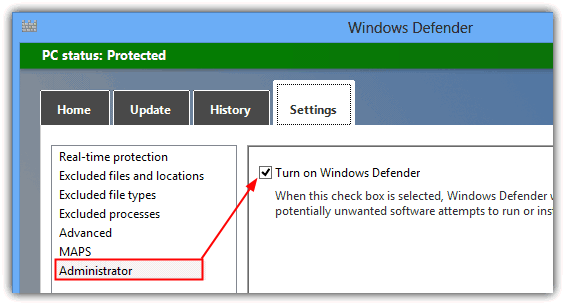
2. Click on the Settings tab -> click Administrator on the left, and then uncheck the “Turn on Windows Defender” box and save the changes.
Completely Uninstalling Windows Defender
For most users, simply turning off Windows Defender or disabling it via the Services Control Panel should be enough to stop it running. If for whatever reason you’re still having some sort of issue or are determined to remove Defender completely from the system, unfortunately is isn’t possible using Programs and Features or the Turn Windows features on or off window.
Although there is no official way to cleanly uninstall Defender, it is possible to remove the service, Control Panel entry, other related registry entries and all the files and folders manually so Defender is unofficially removed from the system. This does present its own set of problems though as the registry keys, files and folders are all protected with enhanced permissions and you have to take ownership of them all. Also, once removed, you can’t re-install Defender again because it isn’t a separate package.
As there seems to be no tool around to do it for you, we’ve decided to create our own little utility that can delete all the necessary protected registry keys, files and folders at the click of a button. Currently the program works great on Windows Vista and 7’s Defender but does not work and shouldn’t be used on Windows 8, we may include full Windows 8 Defender support in future if people request it.

Simply download the portable Windows Defender Uninstaller and run it, then click the button to uninstall Defender. The lower pane will show what’s being deleted and if there are any errors. For best results, it’s best to disable Defender beforehand using one of the methods above. Please use this tool at your own risk as once Defender has been removed, it cannot easily be re-installed, make sure you have backups to hand in case you change your mind later on.
Manually Removing Defender
For the more experienced, removing the Windows Defender service, files, folders and Control Panel entry can be done manually, but as they’re all protected, you need to know how to delete a protected registry key and how to take ownership of folders with a tool like WinOwnership or the Take Ownership context menu.
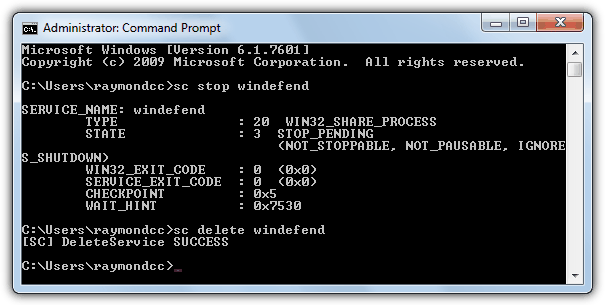
1. Open a command Prompt and type the following to stop and then delete the Defender service:
sc stop windefend
sc delete windefend
2. Next you need to grant full permissions to and delete the following registry key so the Defender Control Panel entry can be deleted:
HKEY_LOCAL_MACHINE\SOFTWARE\Microsoft\Windows\CurrentVersion\Explorer
\ControlPanel\NameSpace\{D8559EB9-20C0-410E-BEDA-7ED416AECC2A}
3. Also grant full permission and delete the Defender program registry key:
HKEY_LOCAL_MACHINE\SOFTWARE\Microsoft\Windows Defender
4. Now take ownership of and delete the following folders:
C:\Program Files\Windows Defender
C:\ProgramData\Microsoft\Windows Defender
C:\Program Files (x86)\Windows Defender (for 64-bit users only)
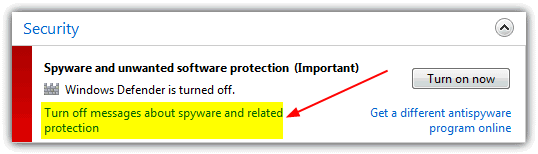
After that is done, Defender should now be removed. Windows may complain that Defender is turned off but this will disappear after a reboot or you can go into Action Center and tell it not to monitor your anti spyware software.
Of course we don’t recommend disabling or uninstalling Windows Defender for the sake of it, especially if it’s causing you no issues or there is no specific need to do so. Disabling Windows Defender will leave your computer unprotected from spyware and other malware, so you obviously need to make sure you have another anti spyware program or security package to replace it.



Improve this guide

User forum
0 messages