10 Ways To Eject a CD From MacBook If it is Stuck
Devices made by Apple have a reputation for being well built and made with high quality components, whether it’s the iPhone, iPad, IMac or Apple’s own version of the laptop, a MacBook. Macbooks are well known for being good quality hardware wrapped in a very stylish shell. Unfortunately, sometimes form gets in the way of function, and one of those areas on a Macbook is the CD/DVD optical drive, otherwise known as a SuperDrive.
Although during general usage there shouldn’t be any problem with a SuperDrive, if for whatever reason you insert a disc that cannot be read correctly, the drive might refuse to eject the disc, even if you push the eject button a few times or right click eject from the desktop. This can be especially troublesome trying to boot because the drive will get stuck in a loop trying to read the disc and it makes the MacBook unusable until you remove the disc, you might not reach the desktop at all.
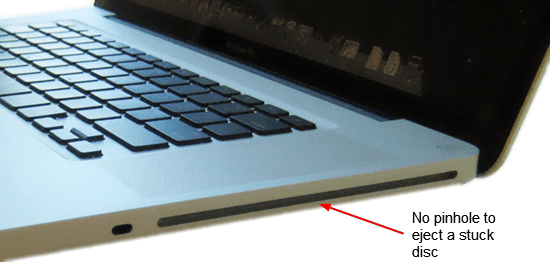
Unlike ROM drives fitted to Windows PC’s and laptops, the Macbook SuperDrive does not have a small pinhole where you can insert a paperclip to forcefully eject a stuck disc. Actually removing a stuck CD or DVD from a MacBook is pretty easy if you know how.
So, before panicking about having to send your MacBook away to get the stuck disc out, try the steps below and it might just save you time and money!
Standard Ways to Eject a Macbook SuperDrive
1. This first method is pretty straightforward. If you have a mouse or mighty mouse connected, reboot the MacBook and hold down the mouse button while booting. If you are lucky, this simple trick will work.
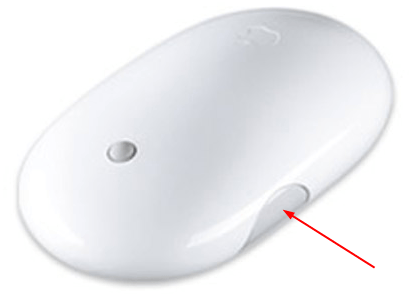
2. This is a follow on solution from above but applies if you don’t have a mouse connected. Press and hold the trackpad/touchpad button while booting the Macbook to try and eject the disc from the drive.
3. Although this is more of a long shot, some people have reported success by simply leaving the MacBook turned on for around 5-10 minutes while it’s attempting to boot. It might eventually boot up and the stuck CD/DVD will automatically eject.
Eject the Disc via Software
There are a few tools around that can try and forcefully eject the optical media from your drive. As it’s a bit safer to try ejecting the disc via software, we’d advise you to try these programs out before resorting to the other methods.
ForcEject is a tiny little tool of about 100KB that simply does what is intended and tries to force your Superdrive to eject its stuck optical disc.
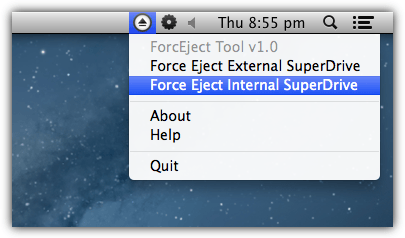
To use the ForcEject Tool, download and run it and an icon will appear on your menu bar. Click on the icon to popup a menu and either select to eject an internal or external SuperDrive. Hopefully this will pop out the stuck disc in your drive.
5. ReDiscMove
ReDiscMove is a slightly old tool dating from 2007 but it’s even easier to try and eject your stuck disc because it consists of nothing more than a confirmation window.
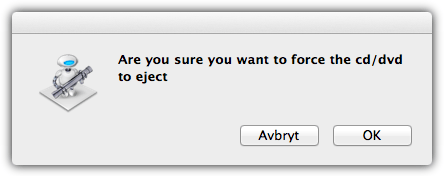
Download and run ReDiscMove and it will simply popup a window asking “Are you sure you want to force the cd/dvd to eject”. Click OK to try and force the disc to eject itself. The “Avbryt” button is Swedish for cancel and to abort the attempted eject, the author must have forgot to translate the button.
6. DiskEject
DiskEject has two versions in the archive, one for Intel based systems and one for PowerPC based systems, so you need to make sure to run the correct version for your Mac. “About this Mac” from the Apple menu will tell you which is needed.
It also has three different versions of the tool for you to use. The Standard version is what you should run first, and if that doesn’t work try the Advanced version. Note the Advanced tool might cause your SuperDrive to make a few strange noises while running, this is normal. There is no interface or popup, so if it didn’t work after a few seconds, the program likely wasn’t successful.
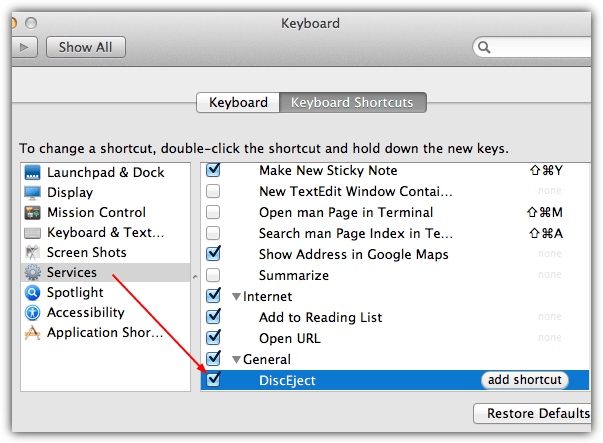
The third version of DiskEject is a service that you can install and then call via a keyboard shortcut, a useful option if this is not a one off. Run DiskEject in the “DiskEject Service” folder and let it install the service. To set up the shortcut go to the Apple menu > System Preferences > Keyboard Shortcuts > Services > General > DiscEject, and then supply a shortcut of your choice.
7. Using the OS X Terminal
This last software based solution is using a built in command line program called drutil which can perform a number of optical disc related functions, one of which is to eject an optical disc. To use drutil, go to Applications > Utilities > Terminal and type the following if you only have one optical drive:
drutil eject
If you have an internal and external drive, use the appropriate command:
drutil eject internal
drutil eject external
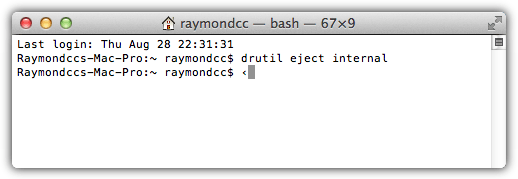
Once you have done with the Terminal window you can simply close it. If none of these methods have worked so far, you will have to move onto more manual methods below.
Eject the Disc Using Other Methods
These are other methods or tricks to eject a disc from a Superdrive when it refuses to using software or the default button hold down methods, obviously be careful while attempting these.
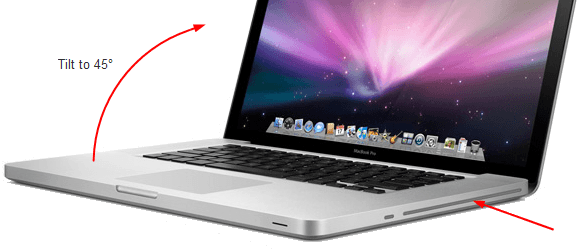
8. This method is to tilt the MacBook to an angle of about 45 degrees so the disc would effectively drop out if it wasn’t stuck, and then press the eject key. Tilt Macbook sideways if the drive is on the side of your Macbook, forwards towards you if the drive is at the front.
9. While the tilting above often works, sometimes a more extreme version of that method is required to get the disc to eject. Instead of tilting the Macbook to 45 degrees, simply turn it completely upside down while simultaneously pressing the eject key.
10. Since the disc is being read in an infinite loop, you can try using a small piece of cardboard and insert it into the gap until it touches the disc to stop it from reading, then press the eject key few times. An example of a good material is battery pack cardboard or a thick birthday card or even a credit card may work as well.
Good luck in removing the stuck disc in your MacBook! Hopefully one of these methods works which could save you time and possibly money.



Dear Raymond from Malaysia:
Thanks so much for putting together these help pages. I use a 2019 Macbook Pro running MacOS Mojave, and I have the Apple Superdrive plugged into a USB-to-USB-C cord which then plugs into the Mac. There is no “eject” button marked on the Macbook Pro Keyboard, but your suggested terminal command of “druxil eject external” worked like a charm to eject a DVD I had just burned! I was delighted.
Please stay safe, and best regards from North America.
Sincerely,
Patrick from Olympia, Washington USA
Sorry for the typo in my earlier email Raymond and others. The eject command is “drutil eject external”, not “druxil…”
I tried # 8
Was perfect. I just tilted the Mac and it dropped
Thank you for you help
I was cleaning up the thousands of CDs and DVDs that have accumulated over the decades and one got stuck in the external Mac Apple “Superdrive.” I tried all the tricks to eject it, including rebooting. Then the OS wouldn’t even show that the external drive existed. There were lots of suggestions online of how to eject the DVD and I tried most of them — saving the most extreme for last, which involved prying open the housing with a flathead screwdriver.
My solution was to unplug the drive from the Mac and plug it in to a Windows 7 laptop. The laptop found the correct driver and automatically ejected the disc. I posted this solution to the Mac
support forum, but they took it down, because “the post was not a
technical question.”
I think the irony of Windows 7 fixing a “Superdrive” was too much for them.
#7 was the solution. Instant success!
I used the drutil eject external to get the CD out of my superdrive. It worked perfectly.
Wow! turned the MacBook (#8) and it vomited the CD out like a miracle.
Thank you very much.
I tilted it and it worked! im so fcking happy right now!
After getting frustrated with several other methods for over one hour, I decided to try No. 7. One shot and the cd is out! Do not type:”drutil tray eject”, use: drutil eject
I tried drutil tray eject, as suggested by another site, many times but has never worked.
Many thanks, HAL9000
Victory! Tried it all. I think the double stick taped cardboard pulled it closer to coming out. Then, after I nearly gave up, I inserted two butter knives in the drive and was able to sandwich the disc in between and yank it out. If you had asked me before if I’d ever insert two butter knives into a computer I paid so much for, I would have told you never.
thank you we used #10 and it was a miracle worker
You know your stuff! Took turning it upside down , but it popped right out!
Thanks!
Thanks so much! Number 7 did the trick–my MacBook Pro was not even indicating the disk was IN the SuperDrive!
Thanks! Turning Mac (#8) worked great.
wow number 8 is incredibly work. thanks
My Mac Book is broken and cannot be turned on at all. Any way to pull out the stuck disk?
Yes!!! After spending all night and day on this, number 8 worked!!!! Thank you!
Not sure what actually did the trick – I think it was turning the mac upside down – letting it sit for a couple minutes & then trying the eject button again. Many thanks!
Just did method #10, the cardboard trick. Worked like a charm! Thank you! I was indeed stumped when I couldn’t resort to the pinhole, and the reboot didn’t do the job either.
Great solution. Thanks so much. The last one worked instantly.
Thanks so much, it worked! Saved me a trip to the Apple store.
YOU ARE A GOD. Thank you!!!! (Upside down method worked for me)
I had been browsing solutions for awhile stressed about the repairs for this stupid CD and after trying everything I came upon number 8 and it slid out like magic!!! I honestly cant thank you enough!!!!!!!
A combination of 2 and 8 worked after numerous attempts. Thank you very much!
#8 did it for me!! Awesome!! Thanks!!
My Mac Book hard drive had failed so stuck in a loop trying to run from DVD. Once it got into the loop, nothing would work and Disk Utility kept saying the DVD was in use so would not eject. The Paper trick worked. I pushed a sticky note into the slot, this made the DVD stop turning. I was then able to use the eject button.
Thank you so much. No. 7 Terminal worked right away!
Been sitting in front of this stupid computer ALL DAY trying to get this disk ejected!!!! Came across your info. Number one worked right off the bat! Sooooooooo Happy!!!!!!!
So nice! My driver didn’t even had a disk stuck it just stopped working after my baby was messing with a cd, I used the Force Eject tool (#4), and I worked right away, THANKS!
#9 worked for me after many other tactics. Thank you!!
the number 1 is worked, thanks
For me worked way Nr 2. Before I was getting mad with this piece of junk. I have tried many options before but nothing. So with A1181 Nr 2 works fine. first one doesn’t work as I have no mouse but other options I couldn’t use because there was no OS X too. And I couldn’t use an USB to reinstall it because damn DVD disc still was in and it went directly there. Huge thanks for author for all those tips…
Hi guys Force Eject Tool did it straight off this is apple stuff when it work ok when it does not then just ask thank you for the tip .
David
turning the computer while the Cd player facing down works. cd came right out and it took months
Hey thanks number 1 worked i was going crazy !!!!
AWESOME!!!!! WAS HELPING MY SISTER BURN A DVD AND GOT IT STUCK…WHAT LUCK!
READING THE COMMENTS TO PRESS ON IT WHILE I TILTED IT WORKED FOR ME! THANKS FOR USEFUL INFORMATION. SORRY FOR ‘YELLING’…..SOME OF MY KEYS ONLY WORK WHEN ALL CAPS ARE ON. ;-(
The tilting-it–upside-down did it for me. Thanks.
Number 9 works so fast. Good stuff! Thank you
the best way to get the cd off was with the method 9
It worked with the ForcEject app, while holding it sideways and pressing my finger on the bottom of it!! Thanks!!
Made it worse
If you couldn’t eject the disk and now you still can’t eject the disk after trying these solutions, how can it have made it worse???
Your app/utilities/terminal solution worked perfectly! Thank you!
Seconded! I tipped it back as well and it popped out after a few tries.
Great advice thank you
My powerbook G4 17 had a system disc that was stuck in the drive and which would not stop spinning, I cut a credit card in half and pushed both of them in while holding steady and wiggled them close to the central ‘spindle’ that you can feel. Didn’t think it could possible work after 2 days of trying everything else, by wiggling the credit card pieces and pressing the eject key with the machine vertically, slot downwards – out popped the dratted disc. Still cannot get my system to re-boot but that is a different story.
I can always get the discs out by restarting and press the ejection button….but that could not be the way a Macbook pro from 2009 with Yosemite should function…but that is how it behaves. Of course I wonder why.
Yay!!! It worked!!! I turned my Mac upside down, tilted in a 45 degree angle, pressed the eject button and shoke it a little….and VOILA, that darn DVD finally came out. Thanks for the tip! Greatly appreciate it :D
Tilting the macbook totally worked for me had given up hope. Thanks for the advise
Option 8 worked. I tried it intermittently and one day it worked! But this is cheaper than taking the macbook pro to a service centre. Now I’m planning to get an external dvd drive.
Number 9 worked! Turned MacBook Pro upside down and shook it excessively while it did the whirring ejection and disc came out
Terminal route was super clutch!!!
#9 finally worked – turn it completely upside down while simultaneously pressing the eject key. Thank you for the tips!
BINGO! My son jammed a second disc into our drive and both were stuck tight (library discs, too, so I didn’t want them damaged). The eject button had given up (wouldn’t do anything when I pressed it) and in fact, the computer didn’t even recognize that there was any disc in there, let alone two. What finally worked was a birthday card inserted so that the one disc that was showing just a wee bit was between the two parts of the card, making a disc sandwich between two cardstock pieces of bread. That effectively extended/thinned my fingers so they could fit into the drive and I could grab the disc. No damage to the discs! Phew!
Tilting my Macbook to a 45 degree angle after hitting the eject button on my keyboard worked on the first try! Thanks for the tip :)
After many attempts and after having given up and put everything away, I decided one more try! My drive is exterior/not inside my mac. So, I held it, opening facing downward, pressed Eject from file menu and it popped right out. Thanks for your suggestion to TILT it!
using the tilt method, it worked for me while giving the Macbook nice firm shakes (like shaking the last drop of candy stuck in the bottom of the tin) while the ejecting process is being initiated. worked like a charm ;)
use another CD to pry it a bit.
worked for me
Fantastic! Credit card worked. I had given up hope.
#10 worked like magic–it took several tries–but–out it came!!’
Thank you so much! Number 7 worked.
I had a mini cd stuck in my MacBook…my son tilted the laptop so the side with the dvd writer was facing downward and then he shook it. Voila, the mini cd fell right out :-)
Go the paper trick – cancel my Apple Store Genius Bar appointment.
Awesome!
Number 10 worked for me
#2 worked for me thanks!
9 worked for me…thanks much.
Thank you!! Number 5 worked.
Kat
Cardboard did the trick thank you!
Thank you! I did not have to take MAC to the shop!
Leave it trying to read the disk it will find it can’t and spit it out!!!!!!
this works!!!!
Thanks a bunch! Number 10 worked. I used a index card pushing it all the way to the back.
Not only did one CD come out but two!!! DUH. But then, I’m 80 years old
Thanks, nothing worked until the last one – credit card was too small, but I used a folded commercial letter, pushed it gently right in as far as it would go, heard a click and when I pulled it out the disk came too. Now I just have to try again so see if a cd actually works!
thanks putting paper in it works. cheers
THANK YOU SO MUCH!!!!!!!!!!!!!! holding the trackpad helped me!
Awesome! The method of holding the trackpad button down while booting got my CD out. Now trying to get the MBP to boot up (it’s been spinning on the grey screen with the Apple logo, after accepting the PGP password). Any help?
#7 worked perfectly.
Well …after two hours of reading how to problem solve with NO results, I found this article and Duh! I finally tried the tip it and press eject idea in your article and my “stuck” CD fell out, but NOT from the CD opening. It was stuck under my thin computer and the fan it sits on !!!
I feel like such a duffus! but thank you for your article. It was the clearest one out there and you could say, even though my stuck CD was under the computer not in it, that indeed it solved my problem so Thank You!
Thanks! I used methods 8, 9 and 10 combined. My disc wasn’t recognisable by my mac but it the size was correct. My computer kept on making loud sounds when the disc was inside. And now, it finally came out! Thanks again! :)
Thanks I used no7, my stuck disk had not been recognised by the mac, it was one of those small disks, so on eject on upturned machine less than 1mm protruded from the drive, a metal tooth pic was needed to pull it from the drive as the space was too fat for tweezers. Wont be putting this sized disk in the machine again !
THANK YOU THANK YOU THANK YOU! #1 method worked for me, holding down the trackpad!
thanks so much!! god bless u!! #7 method worked.
The track pad option worked well for me…. Thank you
None of these options worked for me, the only thing that saved me was going into Disk Utility and unmounting the dvd first and then ejecting it through Disk Utility.
#7 worked, thank you.
Thank you. I used multiple methods. Up side down worked.
Thank You Thank You!!!!! #8 worked for me with a little tapping on the bottom of the macbook while it was fully sideways – like burping a baby really.
Rock On!!!!!
For anyone who tried everything to no end, I found what works EVERY TIME for me now is to hold the macbook at a 45 degree angle while spamming the terminal eject command as fast as possible by using the up arrow key and enter, then eventually the edge of the disc will pop out but be quick and grab it because it will go back in. It was the only thing that worked, and it has worked consistently with over 10 cd/dvds
It worked with #8 method. Thank you very much!
It work with #8 method. Thank you so much!
drutil eject was the only thing that worked for me and it popped the disc out immediately.
upside down with a credit card worked for me; there actually was an obstruction in the drive port, and it came out with the disk!
#8, upside down at a 45 degree angle worked for me! I have been trying for three hours to get this disk out. I could hear it trying to eject, but it would never come out. As soon as I turned it over and ejected, it popped right out! Thank you so much!
Tried almost all of them without any luck until #10. Then, it worked and the CD came out. Thanks so much.
I independently came upon #9 on my own; using the force of gravity along with the defective ejection motor worked and the disk did pop out for removal.
Thank you! That was so easy. Phew!!!! Used the OS X and it worked, no sweat. Best website assistance I’ve had in a LONG time. Love YOU. <3
THANK YOU!
Turning it upside down with the card did the trick!
The Force Eject tool software was easy to download and effectively removed the CD!!!
Thank you!
Thanks for all the advice powering up and pressing the eject button worked
DiscEject software did it for me. Thanks!
Thin card stock with double-sided tape (or scotch tape looped so that one side sticks to the card stock and the other side is “exposed”) on one corner worked for me. Carefully slid card stock corner with tape in drive so that it was on top of the disc and pushed the eject key. Tape helps to “catch” and lift the disc enough so that it can pop out of drive.
Real smooth… Powered up Mac Book Pro and held finger on mouse— disc came right out. Thank you!!!!
upside down did the trick. thanks
THANK YOU SO VERY MUCH! THE DRUTIL EJECT POPPED IT STRAIGHT OUT!
Thank you! I left a reply under mcl5126’s comment a ways down the comments thread, but thought I’d post separately also in case anyone who needs to see it can see it sooner: the only trick that worked for me involved 2 PIECES OF CARDBOARD AND A SHARP, FLAT KNIFE (just be careful with the knife, obviously). A paper pad backing thin cardboard, and a battery package backing thin cardboard, one inside top part of drive slot, the other inside bottom part of drive slot — pressed EJECT button and slid sharp flat knife in between the cardboards inside the slot, then quickly slid knife back out while still holding button (I think, happened so quick that it’s hard to remember when I pressed Eject and stopped). After sliding out knife, 1/4″ of disc popped out, and I was able to pull the rest out with my fingers. Yay! Thanks so much for this thread, because of you and the collaborative effort of comments I got my installation CD back :)
I turned it off, then, while powering on i held pressed the trackpad and the cd got ejected!
November 15 / 2014
ForceEject app was successful.
Mac OSX 10.7.5
MacBook Pro circa 2008, optical drive front slot, last model with matte finish screen
Thanks much!!!
Thanks! The mouse button held down on boot up worked for me. The DVD label was too thick for the SuperDrive and caused the disc to stick!
had a problem on start up and problem removing cd.. tried your method and was able to remove cd and mac started up as usual… thanks
Tilting the MacBook worked great! So relieved!
THERE IS A LAST WAY TOO %100 WORKS. SAVE ALL DATA ON CD FIRST IF YOU CAN.THEN USE A TWEEZER TO PULL CD GENTLY(MAKE IT FLAT ENOUGH).AT THE SAME TIME PUSH TO EJECT TOO..MOVEMENT OF CD (0,1 MM+-) WARN SOME KIND SENSORS TO PUSH CD.AND ITS OUT !
..
I tried many of these options to no avail; however, I eventually flipped my Macbook upside down and simultaneously pressed the eject button and presto…out it popped!!!! Maybe it was a combination of the attempts? Just happy to finally have the disc ejected! :)
HAHA! Upside down totally works. Thank you!
Thanks – I tried several different things but eventually the disc drive ejected the DVD on its own. The computer had to be up and running for about five minutes before it took the action on its own. I was just getting ready to try the tilt method…
the method worked thank you very much………….
It worked! Half a Hallmark card in the slot with the disk, turn it off, wait a minute, turn back on and the disk automatically ejects without a command to do so! Muchas gracias con todos!
the credit card did the job.
thanks a lot!.. it worked on my macbook!.=D
cardboard trick totally worked ! you’re the best
cardboard failed but the TILTING ROCKED!!!
Life saver! The cardboard trick totally worked!!
thank you my man!! i got it out!
Thanks a lot ! The tilting method worked perfectly for me. =)
Thanks man!
Inspired by (3), I just inserted credit card into the slot and moved it for a while inside. Eject button worked properly after I’ve done so.
THANK YOU!!!! Holding the mouse click down worked brilliantly! So grateful!
Thanks so much!!!!!
You are The MAN! Thanks so much!!!!!
Thanks for this. I just tipped it forward, as suggested, and it slid out. Might have saved a timewasting trip to the Mac Shop. Simon
Holding down the mousepad worked!!! Thank you!!
The cardboard one worked!!!!
– thank you
Thankyou so much! Holding down the touch pad actually worked….who would’ve thought!
Wow man… Girl works at a movie store and gets dvd’s “early” from the public… Got it stuck in my macbook. Saved me true hell Raymond. Mad Respect.
Thanks for all the tips for future referance. I got mine out by pressing the F12 key while booting. (this was before I read your tips)
It worked! Thanks, so much!
45 degrees – genius!
thanks a lot. held down the mouse button and it came right out. was panicking as i’ve only had my mac a day :)
Saved the day. Thanks so much.
Thanks!!! The 45 degree angle worked immediately!!!
thanks the 45 degree one work for me
you are awesome man!
tilting the macbook 45 degrees forward and DiskEject (app for forcing to eject disk) worked like a charm, so guys when you are desperate try tilting the laptop 45 degrees. (it simply works!!)
keep it up ray :)
oh my god
I GOT IT OUT!!!!
Thank you I used costa caffee reward card :)
You have to stick it pretty deep though.
It worked Thank you !!!!!
Saved my day
THANK YOU SO MUCH. Stopping the disk in action worked. You guys pwn n00bz.
Thanks a lot! the mousepad worked!
Just used a battery cardboard as suggested & it worked like a charm. Thank you thank you thank you for saving my night!
Thank you so much!! I tried to do the duo thing of both mac and windows, and while doing windows it got stuck and i could not stop it from constantly trying to setup windows….this was the only thing that worked…thank you x 1 billion
Suggestion #4 worked just as described above. I turned on my Macbook and let the DVD spin for about 10 minutes. After that, the disc automatically ejected and the OS booted normally. Thanks for saving me a trip to the repair shop Raymond!
I stupidly inserted a mini-CD (3″ diameter) into my Macbook drive without thinking. It pushed in but the machine never noticed it was there so it wouldn’t eject. A friend told me to try using the removed metal shutter from a 3 1/2″ floppy disc. I inserted it into the slot and squeezed the upper and lower surfaces together by hand when it was most of the way in, grabbing the mini disc from above and below and pinching it between the two surfaces. After about three quick tries I pulled the CD right out.
holding down the mousepad worked perfectly thank you so much!
thank you!!
i held down my mouse and it ejected right before the log in menu popped up
Thank you! Inserting cardboard while holding down eject popped the DVD right out. Thanks again for your help! :D
This worked.. holding down the touchpad button while restarting ejected the damn thing. Thank YOU!!!!!!!
just try to burn something and the disk will be spat out …..
Thanks you so much. I was about to cry, its my dads laptop, if I had broken it man I would have been busted. So thanks
Thank you so much!!! The tilting it forward 45 degrees thing totally worked!
I tried for over 2 hours to eject a disc and after reading this I restarted computer and held down touch pad. Thank you so much, prob saved me hundreds in unneeded repairs!
Thank you so much holding trackpad button and piece of paper worked great!!!
Hey, I took it to the apple store and the guy got it out in literally 60 seconds. What happens is over time, the aluminum shell of the cd/dvd drive (plastic macbook 2008) gets bowed down and what happens is it traps the cd from getting out. What the guy did is he took two business cards (made of cardboard, not plastic) and put one on the upper brim of the cd slot and one on the lower. He then just took a mechanical pencil ( i’m sure almost anything with a cone tip works here) and inserted it between the two cards and sort of pried it open if you can visualize what i’m saying. He did it about twice (gently) and bam, cd was out.
I tried EVERYTHING but ONLY YOUR SUGGESTION WORKED! I knew for me it was the same issue because I once dropped my MBP and you can see the DVD section is “bowed down” just like you said. Well I just put 2 thin pieces of cardboard on top and bottom of slot (one from paper pad backing, and the other from battery package) then pressed eject and stuck a sharp flat knife in between in the middle — as soon as I slid the knife out, about 1/4″ of the disc popped out and I was able to pull it out! PRAISE GOD! (AND YOUR SUGGESTION!) I’ve been at this driving myself nuts for hours. Good thing I scrolled down to read enough comments to reach yours, because the other methods do NOT work for those of us with a metal casing that is bent down over the drive! Thanks for saving me a trip to Apple store! :D
OMG IT WORKED!!!
I used the cardboard, and it worked!!
I love you as hell. Thank you!!!
It seems like many found this useful. So my comment might not be necessary, but a “thank you” is never unwelcome.
Thank you!
Thanks for the very very useful tips.
This helps the mac users a lot.
THANK YOU SO MUCH. holding down the keypad did it! i was trying to get it out for like an hour. then i went to your website and god it felt good when that DVD came out i got to tear that piece of crap apart. thank you so much again.
WOW! Thank you, holding the track pad worked for me! I tried everything and finally that worked! I was so close to throwing it out the window and having an even bigger problem! thanks again!!! :)
Oh man, I’ve been trying like everything for the past two or so hours to get it to work. The tilting one work a charm for me. Thanks! I thought I’d have to take to a shop and actually have to pay to get the problem fixed.
Thanks! I tried the cardboard in the slot and was THRILLED that my problem was solved.
thanks, the 45 degree angle thing worked!
Whew!!! This totally worked. Thank you so much
Worked like a charm! Mine wouldn’t boot up at all. I used an index card and followed your instructions. CD came out and it booted right up after that!
GREAT SUCCESS!!!!!!! THANK YOU!!!!
Nothing worked except the cardboard. Thanks for the tip!
Thanks so much!! I just saved my self a hundred dollars!! You are a God send!! I used one of my kids flash cards and tried what you said to do and it worked!
AMAZING
the cardboard trick did it
THANKS YOU SO MUCH!!!
Thanks for the help. I tried various ways including all the ones in the “help” section on my macbook. Restarting the computer while holding down the eject button finally got mine to come out!
Pressing the touchpad button worked first time.
Many thanks!
jon
Hey! The first method worked! Amazing! Thanks!!!!
You just saved my macbook from being hammered to death by me.
Thanks so much! Just got the disc out!!!
Wow, I was freaking out. Disc stuck but my MBP booted fine, no issue there. was trying to copy a dvd. The master had a label printed with a printer (very thick) i suspect that as culprit. used my driver license, partially in the drive door (1/4 inch), hit eject and it popped out> I was so happy. No genius bar visit for me!!!
Just tried the “45 Degree” approach. THAT worked, after many other unsuccessful attempts. Thanks for the tip!
Anything worked with mine to eject the dvd and I had to TURN the macbook pro OFF (not just restarting it) and then press the touchpad button and the button eject at the same time.
Thank you for your recommendations. They were really helpful.
Disk Utility works great. It’s in Utilities folder in Applications.
Just select the DVD driver on the left panel and then press a EJECT button on the top panel
Voila!!!! your stuck CD/DVD will simply come out.
THAT was EASY
Worked like a champ – we did both the “reboot holding down the mouse button” while simultaneously placing a 3×5 card on top of the stuck disc. Super. Vielen Dank.
Thank you so much for your advice. I looked all over the help systems and discussions and nothing worked. By holding the track bar down and simultaneously putting an envelope in the hard drive to stop the disk from spinning it ejected ending a 6 hour ordeal. We had the exact problem that you described which was that it kept trying to boot from the CD. Now we get to fix a corrupt kernel, but at least we have a fighting chance. So thank you. Very practical advice.
THANK YOU RAYMOND! Your tip on holding the trackpad button worked!! YOUR AWESOME!
great tip thank you, i’d have gone nuts without it since mac help didn’t help actually.
Your post really saved me money ,while helping me resolve a month long problem. Be blessed thanks again for your kindness in sharing your knowledge with me a perfect stranger.
Best post ever, thank you so much m(._.)m
I was attempting to burn a disc on iTunes. I guess this was a disk error because all other discs work fine, yet this one doesn’t? Must try on our iMac, though I don’t want to get that drive stuck too. Also hitting the keyboard right over the SuperDrive then hitting the “Eject” key worked nicely.
I had the same problem but my CD wasn’t being recognized at all by they computer. So, after reading through a few forums I shut down my computer, waited a few seconds and turned it back on. As soon as I hit the power button I held down the track pad key but my macbook started making horrible noises so I let go and decided to press the eject key. Neither worked BUT I heard the CD spin up and realized my computer could read it. Once my computer was fully booted up I took a thin piece of cardboard and stuck it gently in the slot and pressed eject… out pops the disc. I hope this helps someone who had the same issue.
i got mine out! thanks!
I’ve had a disk stuck in there for over a week… I used a combination of holding down the trackpad-bar while booting AND holding the machine at a 45 degree angle (both suggested in the article)… IT WORKED… thanks!!!
Thank you, thank you, thank you.
Disk ejected… Thanks for posting the tip!
Interesting and informative. But will you write about this one more?
Your tip 3 worked – thank you so much for putting your wisdom out there on the internet!
I did it! It worked, I jammed cardboard paper, and it took a few times but it worked in the end, thanks for the help!
thanks sir!
your a life saver was racking my brains for hours thanks dude!
The cardboard (I used cover of a glossy paper back book) worked very well! I also combined that trick with the 45degree angle thing.. and it worked!! FINALLY! I tried all of the eject buttons and forced eject key method, and this was the only thing that worked! THANKS!
Thank you!!
thanks, the 45 degree trick worked!
thanks! cardboard helped.
thank you very much!
i didn’t have cardboard so i folded up an old letter and had a good poke and the disc got stuck between the layers of paper and i pulled it out, with no damage to drive hope that helps! also i had an installation disc stuck which i didn’t check was only suitable for windows and thats why it could not be read or ejected (i think!) and i tried all the other tricks above and they didn’t work. folded paper all the way!!x
I was starting to get really worried, till i found this page and all your tips! I turned off the macbook, then held down the eject button and turned the power back on. I finally got the damn disk out! WOOOHOOO!
For everyone that couldn’t get one of these methods to work, what my wife figured out what to use a credit card to move a piece of the superdrive out of the way in the front (rightish) of the drive. It was stopping the CD from going in or going out. I know this really sounds like a true hardware issue, but once we physically moved the piece out of the way (by gently sliding a card underneath it and moving it toward the screen) the CD came right out….3 hours later!!
I placed a small DVD from my Handcam into my MacBook CD drive .. it won’t come out.. I tried most of the suggestions except the cardboard… where do you stick the cardboard…
Kathy
Thank you man work Good for me…
God continually to give you idea to seek
a combo of 3, 4 & 5 did the trick for us! thanks!
This page solved it! I had a music CD that wouldn’t eject. It didn’t effect start-up.
**> I leaned the MacBook toward me 90 degrees so it was on its front edge. Keyboard perpendicular to the table. Pressed the eject button. OUT IT POPPED! I grabbed immediately so it wouldn’t hop back in.
Thank you!
THANKS!!! I inserted the cardboard and it came out in about 10 seconds! What a lifesaver!!
Thanks, Man! You saved my life!
i did number 3 it worked! haha. thanks a bunch
Thanks — I had just about given up on getting the disc out of my black macbook.
thanks for the tip. I finally got it out, wooo hoooo.
Thank you so much for the advice! Just held down the trackpad on the new aluminium mb
relieved now, and people with the bootcamp problem hold down ctrl and choose macintosh. thanks again!
this solution page worked when all else failed.
Thanks so much! You just saved me a trip to the apple store!
You can also try using Disk Utility.
In the utilities folder in Applications (Finder>Applications>Utilities>Disk Utility) and click on the super drive and press eject!
worked for me on a macbook!
Thank you guys for the help, Clicking the trackpad on startup ejected my windows disk which hung up in there in an unsuccessful attempt at using bootcamp.
I was too exhausted to get up to get my mouse or cardboard, so I just tried tilting my MacBook forward 45 degrees and pressing eject – “Poof!” – out it came after several stubborn days! Thanks a million!!!
holy crap that cardboard thing just worked for me. i’ve been fighting with this disc for a couple days now. thanks!
I had this exact problem the other day. The way i did was shut down the macbook. then turn it on, as soon as u have pressed the power button press and hold the C key until the disk ejects. works a charm
This was an extensive explanation and it helped me get out the nasty DVD (through the card method), thanks man.
I just did number 5! AND IT WORKED! Thanks so much!!!
Just wanted to chime in that this worked for me! I have an Intel based Macbook. I’ve always had some problems getting DVDs to eject – they never spit out far enough so once I eject it, it goes right back inside. Usually if I take a q-tip moistened with a little running alcohol and run it along the opening it will help. Also, I generally do have to tip my laptop on its side to let gravity do its job. This time, though, it wasn’t even *trying* to eject the dvd. I had just burned something to disk, which was successful (from what I’ve read, seems like unsuccessfully burning a dvd or cd seems to cause this problem.) Every time I would hit the eject button, the image would flash like it was going to eject then….nada. No noises, even. The disk was no longer even spinning, there was just no response at all.
Anyway, I turned it off, let it sit for about a minute and turned it back on – pressing the trackpad button the entire time. It tried to eject after about 45 seconds, but was sucked back in. Once OS X was starting to load, I tried just hitting the eject button (with laptop on its side) and the stupid thing finally spit out.
Thanks so much for this post!
I have the black macbook and the ticket/battery card didn’t work for me, it stopped it, but still couldn’t get it out. The 45 degree angle eject tip didn’t work either. I rebooted and held down on the touch pad and it finally got me to my desktop and stopped the DVD from spinning, so I went to iTunes to “burn a disc” and it told me to insert a blank one and spit out the stuck DVD!! Oh yeah, my computer was on for at least 5-10min. Kinda took a while!! HOPE THIS HELPS MY FELLOW MACBOOK USERS!!
Thank you so much for different ideas. I was also in same problem that my cd was stuck in my mac book. Finally it came out. Friends it is worth to read all.
Thank you so much!!
The battery cardboard trick worked! I was getting very anxious that the DVD wasn’t going to come out. Thank you!!!
Thanks so much for the advice. I am a chemist in training and decided to use Proactiv’s face toner since I didn’t have any rubbing alcohol. However, the major ingredient (some sort of long chain alcohol) along with the polymers in solution caused a film on the disk and enabled my computer to read the disk. I just stuck a piece of cardboard in the disk drive and waited for the disk to stop rotating and then repeatedly pressed the ejection button on the keyboard. Finally a box appeared on my screen that asked which task I want to perform and I selected to eject. It worked like magic!
Thanks for the tip! The cardboard trick worked for me too, except I used a visiting card. Also, my problem was more complicated as my Keyboard and Trackpad are non-functional.
Thanks for the advice! Restarting with the mouse button worked for me.
Then another DVD got stuck and I didn’t want to restart while I was in middle of a lenghty download so I think I found a new way:
Like before, I couldn’t get any apps to recognize the disk inside. Tried DVD Player, FrontRow etc. And eject button didn’t work.
But then I tried the Disk Utility from Applications/Utilities. I selected the dvd drive on the right hand panel and the Utility showed an eject button on the top panel. And that worked! Whew!
Thanks for the cardboard trick. Looking at the front of my MacBook Pro I saw that the upper part of the case was a little bent downwards which prevented the DVD from ejecting. Problem is that the case has to be repaired (replaced?), at least I don’t need to walk around with a DVD in the slot.
This worked for me!!!
i know a much easier way to eject a CD or DVD thats stuck, just use a burning program, I use Toast. All I had to do was open the Toast application add a file to burn and click burn, it will then say something along the lines of “This disc cannot be burnt please insert a new disc” and it will then eject the stuck CD!
I opened iTunes and chose some songs to burn to a CD knowing I had a DVD stuck it would ask me to eject. I still had a problem but, I went with another persons advice and stuck a card in the slot so the disk would not turn thus not being read. After a few times of doing this and also holding down the eject key another window popped up in iTunes asked if I wanted to eject disc. I clicked yes and Walla disc was ejected. What a nightmare this has been. Thanks to Dani for the help… Howard
Thank you so much! Ok, so stuck a piece of cardboard, tilted the macbok and then rebooted
thank you so much man! i did it ^^
thanks for the tips the card trick worked like a charm.
Thanks a lot, guy,
you just prevented me from completely disassembling my shiny new macbook aluminium because of a wrecked xp-disc i tried to bootcamp with.
Thanks!
Philipp
hey, my macbook is in the question mark flashing mode. i put in the wrong disc (just a blank cd) and it wouldn’t come out. i tried holding the eject button while starting, holding the mouse button while starting, f12, c, x, command s… everything i could find on the internet. ultimately, I got it out by holding the eject button while starting and shoving cardboard in as far as possible… hope that helps.
You are brilliant!!! Thank you for your help.
Perfect. I owe you one. My computer is back…
Thank you so much. Got a CD stuck just now and your method saved me getting even more annoyed with myself and even more tears, so thank you.
I have the Aluminum MacBook. I forgot to eject the disc after finishing some software installing that required a restart. It would only read from the disc. Clicking down on the track pad during boot worked for me. COOL!!!
wow thats a cool trick man….
Thank you soooo much!!! Sheer panic, now i can sleep peacefully.
You saved me a ton of headache.
Bless you!
ya the same thing as victoria and Monica happened to us. well thanks. p.s. Victoria and Monica if you two visit this site again to see our comments well hey you two sound cute! L8r
My DVD couldn’t play it would only go in half way and when the tech guy at my dad’s work tried to put it in he got it in but with force and it was stuck. This info really helped thank you so much.
As a Mac tech, all good and useful ideas.
Here’s another:
Open a terminal window and use Disk Recorder Util:
drutil tray eject
The 45 degree angle worked like a charm. I was also pressing N so I’m not sure which did the trick, but it’s out!!
try F12 button works for me
Raymond,
You saved my day!!! Thanks for the info@!
Gr Frans
its friday night and i spent the last hour trying to get this stuck cd out of my drive. Eventually got it out by turning on computer, tilting it and pressing eject. Bingo it worked. Thank you for saving my weekend.
thanks a lot you saved my day,i had a dvd stucked inside my macbook pro and i followed the instrution above and it works. i think it was the battery paper that did the job,any way thanks a lot you are the best.
for older macbook (not intel)
1) boot in OPEN FIRMWARE using
command-option-O-F
2) type in ‘eject cd’ without quotes
and hit enter
3) type ‘mac-boot’ without quotes
and hit enter
Kudos to you!!! I stuck ever so gently a piece of cardboard from a battery packet… touched it on the CD and pushed the eject button a couple of times while coaxing out the stuck CD… Whoo hoo it works… now I don’t have to visit the Apple people!
Holy crap, that worked. I just bought my macbook a few days ago and one of my cd’s got stuck. Thanks for the tips.
Thanks, Holding down the mouse button on my MACbook while booting worked for me
OMG-It WORKED- I took it it several people who wanted to
take my computer for repair. I tried all of your methods several times, then after i put a thick card in and tilted it and pushed eject, took out the card-out popped the CD- Many thanks.
Thank you so much. The 45 degree+ straighten a paper clips and put it in the driver worked for me…. Thanks……
Sue
I tried the holding down the mighty mouse key and it worked. Thanks
i know a much easier way to eject a CD or DVD thats stuck, just use a burning program, I use Toast. All I had to do was open the Toast application add a file to burn and click burn, it will then say something along the lines of “This disc cannot be burnt please insert a new disc” and it will then eject the stuck CD!
You can also hold down the eject key while turning the system on.
Ejecting a disc when all else fails
If you’ve tried all the usual methods of ejecting a CD or DVD disc from your computer’s optical drive, there are some manual methods you can try.
First, quit all applications that are using files on the disc. Then try one of these alternate methods:
Choose Apple menu > Restart and hold the mouse or trackpad button down until the disc ejects.
If your drive has an emergency eject hole, put the computer to sleep and insert a large, straightened paper clip in the small emergency eject hole of the drive (the location varies, depending on the drive). Push firmly until the disc ejects.
Use Open Firmware to eject the disc if all other methods fail (this may not work on all computers). To use this method, you have to start up and briefly use the computer using Open Firmware, not the standard Mac OS X desktop.
To eject a disc using Open Firmware:
Restart the computer.
When you hear the startup sound, press and hold the Command-Option-O-F keys. (The Command key has an Apple on it.)
Release the keys when you see a white screen that says “Welcome to Open Firmware.”
At the prompt, type:
eject cd
Press Return, then wait a few seconds. The disc drive should eject the disc, and “ok” appears on the screen when the action is complete.
Type:
mac-boot
Press Return.
Your computer starts up normally and you see the familiar Mac OS X desktop.
I’ve tried all combinations. My leopard CD was stuck inside and all it did was install the software upgrade. I cannot boot. I’ve tried all possibilities. holding the trackpad button do the job for me. Many thanks from a switcher.
– Sato
Thanks a lot! Pressing and holding the trackpad button seemed to do the trick for me.
Thanks!
Thanks, I’d definitely try one of these steps next time if I would to face a problem like this =/