Time Stopper Software: Best to Extend or Reset Trial Period
Normally there are two types of restrictions for shareware. The first one is the demo version with limited or crippled functionality that doesn’t have an expiry date and another type is the fully functional trial version that expires after a certain period of time. The amount of days given to try are normally around 30 days but it could be shorter or longer depending on the author of the software. In the earlier days, you can easily run the expired software by simply backdating the date on your Windows operating system but some software has got smarter to detect this and instantly ends the trial period.
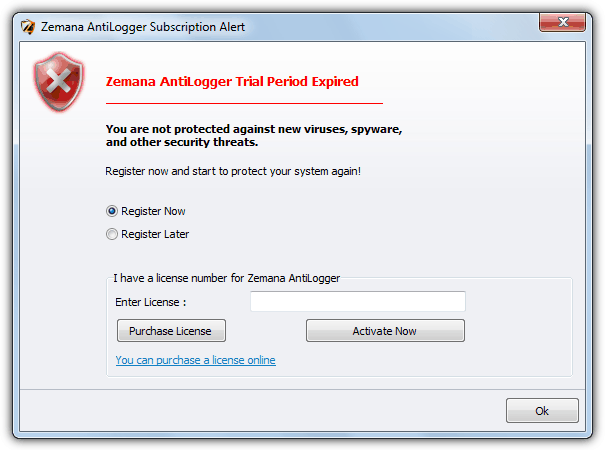
You might think to yourself, how does the shareware knows how many days left in the trial period? Most of the time these commercial and freeware protectors drop some information somewhere deep inside your computer after installation so they know when it was installed and then comparing with the official current time pulled from the Internet. It is possible to find the location that records that information by using file or registry monitoring software including third party uninstaller software such as Revo Uninstaller but it can be tedious and frustrating work.
Here’s a few simpler ways on how you can extend trial periods of software using various different methods.
1. NirSoft RunAsDateAs the name might suggest, RunAsDate performs a trick on the trial software that has expired by injecting the time and date you specify into its process. This has a similar effect to manually setting your system clock to a different time and date, but in this instance your real clock remains unchanged. RunAsDate can also have multiple instances of its program running at once, and each one can have a separate date, all different to the real one.
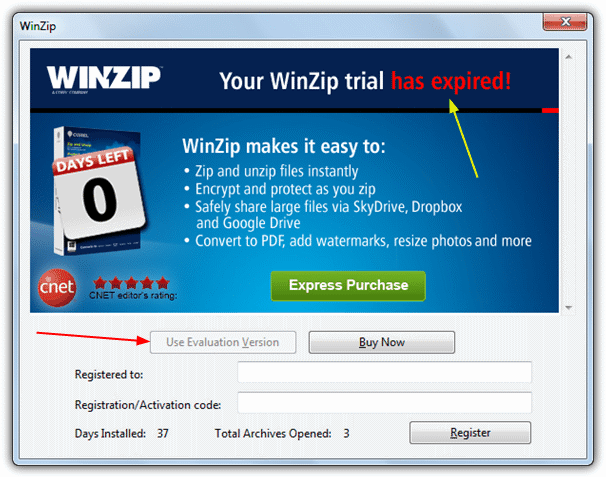
As a simple example, if you’re using the popular archiver WinZip and its 30 day trial period has expired, it won’t let you use the program anymore, and you either have to purchase a license or uninstall it. Using RunAsDate, you can set the date back to be within the trial period making WinZip usable again. The image below is WinZip after the 30 day trial has passed, note the “Use Evaluation Version” is now grayed out.
If you now load up RunAsDate, all you have to do is browse for the application to use the program on, in this case “C:\Program Files\WinZip\WINZIP32.EXE”, then choose a date and time from the pop-out calender to before the trial period expired. Now simply press the Run button.
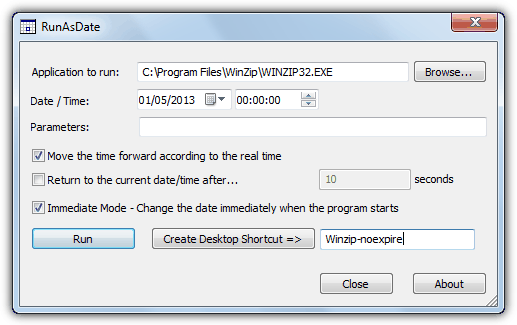
RunAsDate has a few other options such as allow arguments to be applied to the executable, and also a useful option to create a desktop shortcut which will automatically launch the application with the configuration options you’ve supplied in the window. The Immediate Mode check box can be used to inject the date/time earlier in the process, but is known to cause crashes on some programs, especially those using .NET.
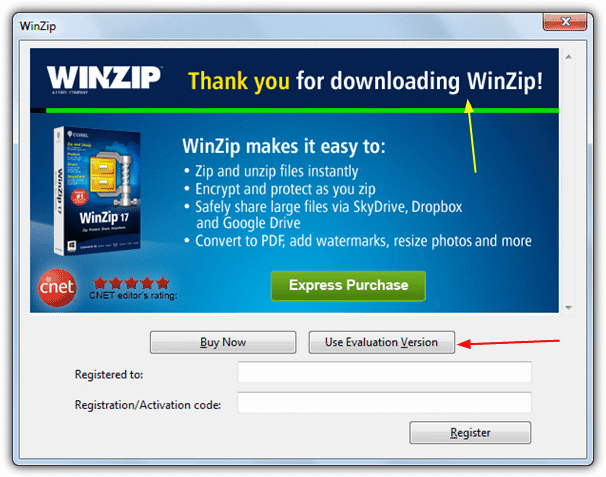
If you run WinZip after entering the right date and time numbers and press Run or launch it via a shortcut, you’ll notice it no longer says expired and the Evaluation button is clickable again. Although time and date altering isn’t going to work on all trial software that has an expiry, it is a very quick and easy thing to try out first before turning to more advanced methods.
2. Trial-Reset 4.0
This is the final version released in 2010 by “The Boss”, and is able to scan and remove 45 types of commercial and freeware protections including some software that uses custom protectors such as Reflexive, Namo, ABBYY, WinRAR, WinZip and etc. In fact if you know the registry location of where the trial information are recorded for a shareware program, you can create your own text file and save it in the Lists folder.
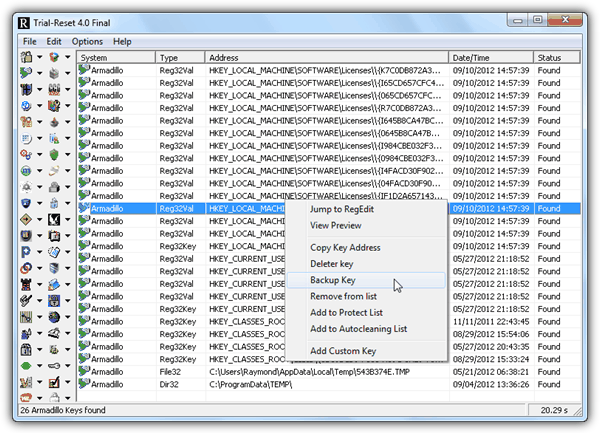
Do note that Trial-Reset does not modify the shareware in anyway. It simply cleans the registry keys generated by the protectors which are normally not removed even after uninstalling the software. This is how a lot of shareware knows you have no trial period left, even if you uninstall and re-install the program again. Trial-Reset is very easy to use. To start scanning, simply click on the All located at the bottom left. The scanning will take a while since some of the methods require scanning the hard drive. The right pane will show all the detected keys that are used by any shareware titles.
You can backup, view or delete the keys, add to protect or auto cleaning list from the right click context menu. If you have a lot of shareware installed, there will be quite a number of results and you will need to do a trial and error to find the key that is associated with the software that you want to reset the trial period.





my typing master is not working and showing demo version expired. plz give me solution.
At one stage, Lotus 1-2-3 (spreadsheet) should be “unlocked” by carefully HEX editing where the serial number would normally go, with a random number LOL.
I see these are the “least intrusive” ways to do it. I was watching things on YouTube earlier and saw a bunch of people messing with reverse engineering and debugging with OllyDbg, for example. But that’s quite complicated stuff.
People can waste months in that thing ending up in nothing. And the example you said that the info is stored on the servers, like MAC address, current IP and other hardware ID stuff that might lead you to a dead-end trying to crack software which you actually will have a lot of work and in a few updates your cracking method is gone (if published widely).
I’m trying to extend an specific software and this article was pretty useful, actually. Thanks for sharing. I’ll try the last method that interested me. I’m a bit broke right now, but I’ll see if I can get the donation version, so it can come in handy for some situations, where I can’t find specifically cracked software.
Hi, Did you find any solution. I’ve used runasdate before but for a specific software its not working. What runasdate does it adds configs to launch as previous date (Which it writes on shortcut). But now when try to open the shortcut the application wont launch. Any help?
Does this application – Trial Reset – remove the hidden files of Articulate Storyline? Can it detect and remove the keys etc and allow reinstallation of trial software?
Does any of this work with the modern Adobe software? such as photoshop and lightroom?
which one can be use to extend trial period of treeage?
which one works for trial anti-virus program like avg/kaspersky/bitdefender?
A slim possibility #4 might do something but software that connects to the internet as much as antivirus does will likely store data about your trial online, which you can’t change because it’s held elsewhere.
Where are other three ways?
Try page 2…
There is zero reason to ever download, trial, or worse pay for winzip. 7-zip does more, is equally (more?) usable, and is free and open source, with regular releases for Windows.
Just because you prefer one bit of software over another, doesn’t mean you should be instructing others not to use it. Winzip has a different feature set to 7-Zip and they are certainly not equal. If others want to pay for or use Winzip, they are perfectly entitled to do so.
You should be happy there’s so much choice out there and people have options to choose what’s best for them.
For me it’s just a matter of which looks nicer, i don’t need any of the extra things 7-zip does.
thank you sir raymond.
Thank a billion! It perfectly works for most of my trial software.
God bless Devs from RunAsDate and also Mr. Raymon for giving us info about this amazing software.
The first option worked for me. Thank you so much :)
Please does this work on AutoCAD 2012. I just have 15days remaining.
Any body know how to reset trail date key
I look at the ResEdit only show date I try to download again yesterday
I want to know where is date it compair so I can change that date
Have to be 30 day Less than current date
I greatly appreciated if some can tell me where in registry I can change
LIte Matt I can’t find the password – have downloaded the zip file but EVERYTHING needs a password? Any help would be great thank you
The password is clearly stated on the download page…
can someone tell me if this works for holdemresources? it does not work for me
Found a better way to extend trial:
Close Quickbooks
Delete all the files in this folder: C:\ProgramData\Intuit\Entitlement Client\v8
Then enter Quickbooks.
Interesting that for example Sketchup Pro trial doesn’t need to be reset. Just switch off internet and change date to future like year 2050 and then install Sketchup. Do not run yet. Change date back to today and then delete %appdata%\Sketchup and %localappdata%\Sketchup and %programdata%\sketchup. Then run it and it will have trial that doesn’t expire until year 2050.
Any suggestions for Toon Boom Harmony
I suggest to run any exe described here with sandboxie to isolate the damage and later delete the files from sandboxie. You also might like to use Oracle VM and mess as much as you like.
RunAsDate works perfect for any version of LabVIEW.
Thank you very much! It helped a lot.
Does anyone know if RunAsDate works with QuickBooks. I’m in month 3 of a 6-month trial that came with a textbook for a class I’m taking. I still have time, but it would be so nice to be able to hang on to the software when the class is over.
VIRUS FOUND:
Trojan:Win32/Tulim.C!plock Alert Level: Severe
Category: Trojan
Description: This program is dangerous and executes commands from an attacker.
Recommended action: Remove this software immediately.
Items:
file:C:\Users\USER\Downloads\Trial-Reset40Final\Trial-Reset40Final\Plugins\Reflexive.dll
That is obviously a false positive and the file isn’t malicious, it happens a lot I’m afraid.
Like I say to everyone, if you are not comfortable, don’t use the program.
Does any of this work for IDM? if so, which one works the best
We’re not sure as we don’t use IDM, your only real option is to try things out and see…
I’d suggest trying Free Download Manager instead of trying to extend IDM. I used IDM initially but FDM is just as good if not better and, as the name suggests, free.
Rather than extending it, why don’t you unlock it manually right away? There are lots of tricks available online!
After extracting and trying to run the application on windows for trial rest 4.0, it comes with an error.
Hi – thank you so much for this blog. It has helped me a great deal!!
It absolutely does work !
Thanks for this much-awaited post. It is a boon for those who can not afford very high price of the software!
the Trial-reste40final.zip needs a password to open. What is it?
The password is listed on the page you downloaded the Trial-reste40final.zip from.
Glad you found it…