Raymond.CC Blog
  • Home
  • Forum
  • Giveaway
  • X-Ray 2.0
  • Contact
  • About
  • I’m Feeling Lucky
Search the site...
You are here: Home » Computer » How To Make a CD With All Current Drivers for Windows XP

How To Make a CD With All Current Drivers for Windows XP

Updated by Raymond - 1 year ago - Computer
  • Like
  • +1
  • Tweet
  • Printer Friendly and PDF

I am sure this article will be very useful for computer technicians. Many years back, my first job was a computer technician and I am required to reinstall Windows very often. Whenever there’s a problem I can’t solve, the only solution is to format and reinstall Windows. The most annoying problem that I encounter was finding the correct driver for network adapter, sound card, display card, and etc after installing Windows. Some people don’t keep their drivers disc and it can be tough looking for the correct drivers especially if the hardware is some OEM parts from some unknown manufacturer.

When we couldn’t look for the correct drivers, we have to waste more time in downloading and trying other drivers which can result in blue screens, lockups and auto reboots. How nice if there was a CD or DVD that contains ALL latest drivers for main hardwares such as LAN, sound, chipset, CPU, graphics, storage and Wireless LAN?

Look no further because I will show you how to easily create a CD that contains all current LAN, sound, chipset, CPU, graphics, storage and Wireless LAN drivers.

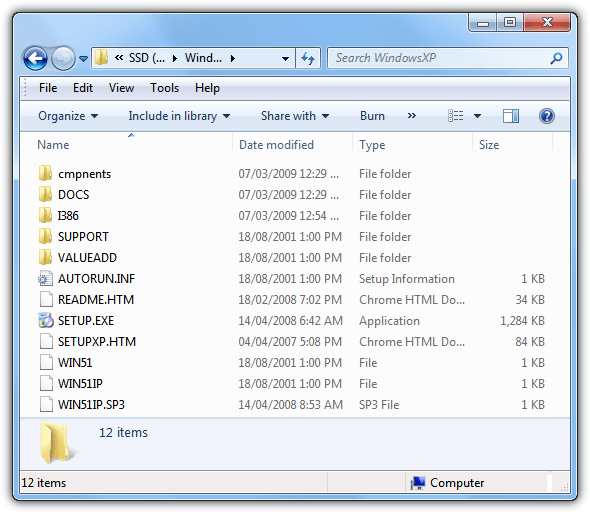
1. Copy everything from your Windows XP CD to a new folder, for example C:\XPSOURCE

Make CD with all drivers

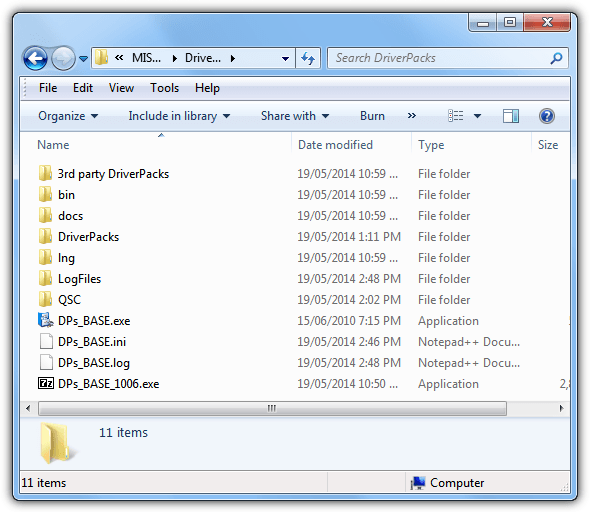
2. Download DriverPacks Base and place the self-extracting file to a new folder, for example, C:\DriverPacks. Run the DriverPacks Base file and allow it to extract it’s contents to the folder you picked.

Download all drivers to CD

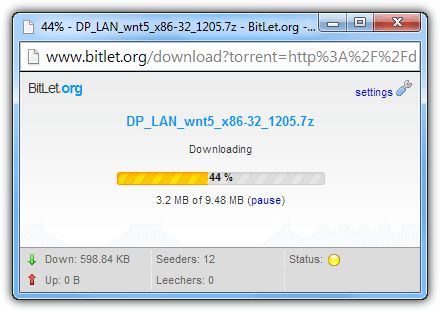
3. Go to DriverPacks page and download the pack you want. It has driverpacks for Chipset, CPU, Graphics, LAN, MassStorage, Sound and WLAN. Copy the packs to C:\DriverPacks\DriverPacks. You do not need to unzip them. Just download and copy the .7z file to C:\DriverPacks\DriverPacks

4. Now run DPs_BASE.exe from C:\DriverPacks. Select your language and click the Next button. Click Next again when you’re at the Settings page.

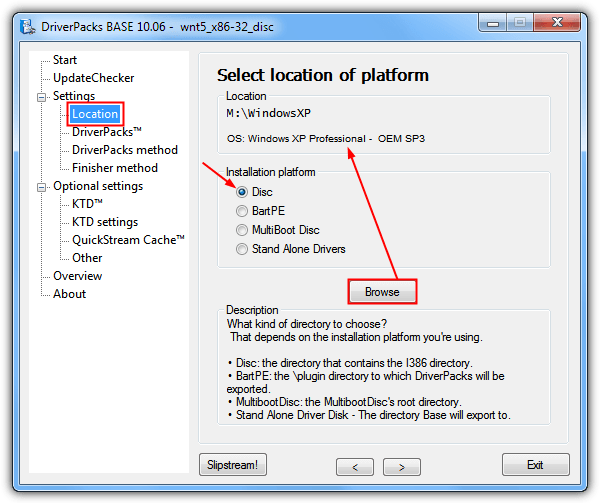
5. When you’re at the page asking you to select location of platform, make sure “disc” is selected, and click Browse button. Browse to C:\XPSOURCE. It will identify the operating system type. Click Next.

Latest drivers in CD

6. Select the packs that you want to slipstream and click Next.

7. Choose “method 1” and click Next.

XP CD with latest drivers

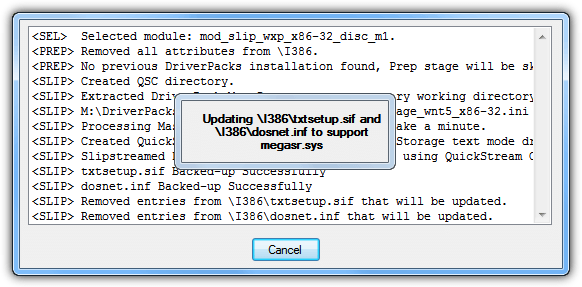
8. Now click the Slipstream button.

9. Go to C:\XPSOURCE folder and you’ll notice a new folder “$OEM$” being created. Burn the “D” folder from “Source Folder \$OEM$\$1\” to a CD.

Congratulations! You now have a CD that contains all latest drivers for Windows XP! If you’re burning the drivers to a DVD, you don’t need to go through all the steps above. Just download the driverpacks and extract. Burn the \D folder to a DVD. The reason why we need to go through such long process for CD is because all uncompressed driverpacks takes up 1.3GB of space but a CD is only 700MB. So we need to cab compress the DriverPacks to fit in a CD.

This article might be a little outdated as there are newer version of DriverPacks. Do visit DriverPacks official website below for updated information.

[ Visit DriverPacks ]

You may also like:

How To Perform a Repair Install of Windows XPHow To Perform a Repair Install of Windows XP2 Ways to Integrate Floppy SATA RAID Driver into Windows XP CD2 Ways to Integrate Floppy SATA RAID Driver into Windows XP CDInstall XP: Setup did not find any hard disk drives installed in your computerInstall XP: Setup did not find any hard disk drives installed in your computerCreate a USB or DVD with All Hardware Device Drivers for Windows XP, Vista and 7Create a USB or DVD with All Hardware Device Drivers for Windows XP, Vista and 7

40 comments on “How To Make a CD With All Current Drivers for Windows XP”

  1. Raymond says:
    4 years ago

    Usually I do not approve your type of comments but I’ll let it through. Let me lighten you up.

    1. You don’t own the keywords.
    - Try searching in Google and you find hundreds or thousands of sites with similar keywords.

    2. I write the article myself and didn’t copy everything from your site.
    - Those are the steps that I took to create a XP driver CD, so I written them myself to share it with my readers. I see no wrong in teaching people for free…

    3. I did not “LEECH” your bandwidth but I send my visitors to your site.
    - I did you provide direct link to your EXE files, so I am NOT leeching your bandwidth.

    4. This is MY blog, I have the rights to write about my review and opinion on your software.
    - No explanation needed. I can share whatever I want since it’s my site as long as I don’t hurt anyone.

    5. Outdate, yes it happens.
    - I review hundreds of software and they all will get outdated some day. That’s why I have to re-review them or at least the author of the software can “politely” contact me for a re-review.

    6. My readers thank me because I show them step by step, the plain and easy way on how I did it so they can follow. And NOT because they think I created this.

    I am closing this comment as I see no further discussion needed. I see no wrong in copyright or whatsoever.

  2. OverFlow says:
    4 years ago

    PS we get 32,000 downloads a day we dont need you to “promote” us BTS is one of the best known names in the IT profession – but you knew that and that is why your trying to leech our hits with the search words below – correct?

  3. OverFlow says:
    4 years ago

    If you wish to help Please join DPS
    Please privide a link to pages that refer to our stuff on our site so we can verify its accuracy. Or better yet you could have offered your tutorial to us.

    for example this post is extreemely out of date…
    if this were a link to info on our site it would be current.

    I don’t see anywhere where you say you COPIED the info we have. I Don’t see ANYWHERE where you credit BTS, Myself, the team, as near as i can figure you are not even a member of DriverPacks.

    People who try to pass others work off as there own are known as Pie Rats. I think it is you who misunderstand. You are leeching If you dont first get permission. and so many of these people have thanked you, clearly they think this is your work. not once did you say the credit goes to Bashrat the sneaky and the DriverPacks crew.

    Join the forum privide a link to here make any suggested changes by the team and myself.
    and for sake of everyones sanity get a recent copy of our software and remove the keywords below.

    I am not opposed to this – you just need to do it properly and with our permission.

  4. Raymond says:
    4 years ago

    Jeff, I think you misunderstood. I am helping you to promote your software and never claimed that I am the coder or author of Driverpacks.

    If you don’t want me to do that, I’ll gladly remove your links to your software.

  5. OverFlow says:
    4 years ago

    I see that my previous post was deleted…

    If this post is deleted i will turn you in to your ISP for violation of TOS…

    stealing Driverpacks.net Info and redistributing it as your own is Theft…

    If you wish to Link to our site that is fine…
    however taking credit for our work is not only rude it is a viloation of our copywrite.

    If you wish to use our info please get the proper permissions and give the original authors the credit since they did the work not you.

    Jeff Herre
    Adminstrator Driverpacks.net

  6. Assa40 says:
    4 years ago

    Salut cher Raymond,
    Merci pour ce document. Mais aide moi encore pour un peu d’éclaircissement. La gravure du dossier “D” sur CD peut permettre à l’installation de windows XP? Ou bien c’est uniquement un CD de driver. Merci de me repondre car étant un technicien j’en ai fort besoin.

  7. assa40 says:
    4 years ago

    Salut Raymond et tous les amis,
    J’ai trouvé ce document très interessant mais il y a quelque chose que je ne comprends pas très bien. On peut utiliser ce CD pour installer windows xp et tous les pilotes automatiquement ou bien c’est rien qu’un cd de driver car ce dossier “D” ne contien aucun fichier de pour installation de windows ni un fichier pour booter la machine pour commencer l’installation. Merci de me repondre car c’est très important pour moi aussi en tant que technicien.

  8. nelsonblu says:
    4 years ago

    9. Go to C:\XPSOURCE folder and you’ll notice a new folder “$OEM$” being created. Burn the “D” folder from “Source Folder \$OEM$\$1\” to a CD.

    The point 9. for me it is incomprehensible
    it refers to this?

    devcon.exe
    DPINST.exe
    DPInst.xml
    DPsFnshr.exe
    DPsFnshr.ini
    DP_Install_Tool.cmd
    DriverPack_CPU_wnt5_x86-32.ini
    DriverPack_Graphics_A_wnt5_x86-32.ini
    DriverPack_Graphics_B_wnt5_x86-32.ini
    DriverPack_Graphics_C_wnt5_x86-32.ini
    DriverPack_LAN_wnt5_x86-32.ini
    DriverPack_MassStorage_wnt5_x86-32.ini
    DriverPack_Sound_A_wnt5_x86-32.ini
    DriverPack_Sound_B_wnt5_x86-32.ini
    DSPdsblr.exe
    makePNF.exe
    mute.exe
    pmtimer.exe

    What must I exactly do?

  9. Art says:
    4 years ago

    i mean i “can’t” find the $oem$ folder

  10. Art says:
    4 years ago

    i can find the \\\”$oem$\\\” folder anywhere, did i do something wrong?

  11. luigi says:
    4 years ago

    Scusa,
    Ho seguito passo passo le tue istruzioni.Tutto ok. Poi ho masterizzato la famosa ” D” con Nero.Alla fine provo il cd ma non funziona,perte ma resta lo schermo nero.
    Forse sbaglio a masterizzare il cd? Come devo fare?

    grazie.

  12. luigi says:
    4 years ago

    Scusa,ma non mi funziona il cd dopo aver masterizzato la famosa ” D”.Forse sbaglio a masterizzare il cd? Come devo fare?

    grazie.

  13. Raj says:
    5 years ago

    Respeted Ray…….i have a problem ……….i thing u can help me and solve this problem……..problem is….i have a 10 computer network on XP professional operating system……..but internet is not share on the network……….how can i share internet……….i have give the ip address on main comuter…..

  14. 1101doc says:
    5 years ago

    Ray- When \”copying\” the XP CD to directory should it be copied as data or .iso?

  15. Geoserv says:
    5 years ago

    Perfect, this will come in handy.

    STUMBLED!

    Added to TopStumbles:
    topstumbles.com/how-to/how-to-make-a-cd-with-all-current-drivers-for-windows-xp-raymond-cc-blog/

  16. Steve says:
    5 years ago

    @James Aragorn – too bad you have to come by and speak your mind. Obviously this method has enlightened many readers of this site. Sometimes, these ideas may be referred to as \’oldies but goodies\’…

  17. James Aragorn says:
    5 years ago

    Seriously OLD, been there done that ages ago.

  18. aftab ahmed says:
    5 years ago

    hi
    i only need in xp cd my system drivers i have tv tuner ,sound card ,agp card ,modem when i install fresh xp all drivers install automatic how can i do that i have tried nlite but not worked properly plz help

  19. wilbert says:
    5 years ago

    hey nice..but one thing..i couldn\\\\\\\’t choose method 1..idk why.wil it wokr the same..and another thing now that i have oem file can e remove the driver pack file?

  20. Alex says:
    5 years ago

    Why thanks a lot for the tip. I made a \\\”All you can eat XP DVD\\\” for work and it\\\’s already come in handy in installing missing drivers for a network controller (so much easier then the old route of guess and check)

    Much appreciated. You\\\’ve won yourself another frequent. ;)

  21. Matan Levi says:
    5 years ago

    Wow, thank you very, very much!!!

  22. Keith Smith says:
    5 years ago

    Thanxs a lot.I rebuild computers for the Computers for Kids project here in SE Ky and I run into all sorts of hardware.This helps a lot.

  23. SHINOD says:
    5 years ago

    once again thank u verymuch. i tried this in two cmputers and result is outstanding..one more thing, can we make a similar type of cd with all printer drivers?? it will help me a lot… pls…
    thanks in advance..
    shinod

  24. webcadre says:
    5 years ago

    one more thing?

    how will you intergrate the all sata driver to winxp in order for us to create a windows xp cd,

    so that we will not go the manufacturer of our motherboard,

    its a lot of hassle if can`t find which or what type of motherboard do you have????

    thanks in advance,

  25. webcadre says:
    5 years ago

    thanks tapedump!

    i`ve done it!

    thanks ray!

    keep it up!!!

    superious blog!!!

  26. loulou says:
    5 years ago

    ok i found it thnx

  27. loulou says:
    5 years ago

    thank u great i did all but i ant find \”D\” folder in from “Source Folder \\$OEM$\\$1\\”

    am noob please ay help

  28. blakd33p says:
    5 years ago

    Thanks raymond, bout this article. It helps a lot for me being a technician

  29. tapedump says:
    5 years ago

    Yes, all IDE/SATA/RAID (and more) stuff is handled through the DriverPack -> “MassStorage” pack: driverpacks.net/DriverPacks/devices.php?pag=m

  30. webcadre says:
    5 years ago

    yeah how about the sata?

    and can it be install in newest pc?
    like hp, dell, asus, acer, toshiba etc…

    nice tutorials

    thanks!

  31. SHINOD says:
    5 years ago

    thank u very much. this will help me a lot ..

  32. samir says:
    5 years ago

    Main problem is SATA Hard Drives when we format. Is there a site with all SATA drivers?

  33. Alessio says:
    5 years ago

    if this works you`ll have made my workdays much easyer, knowing the fact that i do work as a IT&C Tecnical support specialist, i deal with system reinstalls all day, and this may be very helpfull!

    Thanx in advance!

  34. tim says:
    5 years ago

    why not use nLite ?

  35. Naveen says:
    5 years ago

    very informative!! thnx a lot

  36. freddfu says:
    5 years ago

    sweet! Nice info, Raymond.

  37. Nikunja says:
    5 years ago

    Hi,

    Will the driver CD work for all the branded Laptops like Dell,HP,Sony which contains different hardwares from different manufacturers? And while updating a driver for a particular hardware we need to get the updated version from these vendors website and not from any other website.

  38. Raymond says:
    5 years ago

    Yes ma7moud, you don’t need other driver CD. This CD will work on ALL computer because it has all drivers.

  39. Ma7moud says:
    5 years ago

    sorry Rymond ..i did not get it

    by this we will not need driver cd’s ???

    and will this work for my Pc only ?? or for all computers ??

  40. black2 says:
    5 years ago

    can windows update find all the drivers for the system?

Recently Updated

  • no fake av icon

    6 Ways to Kill and Remove Fake Antivirus Rogue Software

  • abort shutdown

    4 Tools to Prevent, Cancel and Abort a Windows System Shutdown or Restart when Applications are Running

  • screen brightness icon

    10 Tools to Adjust Laptop and Monitor Brightness, Gamma or Contrast Levels

New Articles

  • task manager replacement icon

    Memory Usage Test to See Which is the Lightest Antivirus Software

  • kaspersky antivirus 2013 icon

    Activate Free Kaspersky Anti-Virus 2013 ROG with 1 Year License

  • remote access software

    Top 8 Remote Access Software for Providing Online Support

Popular Posts

  • Top 10 FREE Data Recovery Software

    Top 10 FREE Data Recovery Software

  • How to Hack Into a Windows XP Computer Without Changing Password

    How to Hack Into a Windows XP Computer Without Changing Password

  • 10 Free Software to Mount CD or DVD ISO Image File as Virtual Drives

    10 Free Software to Mount CD or DVD ISO Image File as Virtual Drives

Recommend on Google
Follow @raymond_cc
Subscribe Youtube »
(c) 2013 Raymond.CC Blog
  • Disclaimer
  • Disclosure
  • Privacy Policy
  • Terms of Use
  • Sitemap