
7 Ways To Recover CHK Files Created by CHKDSK and SCANDISK


 9 min. read
  Published on

One of the things about Windows is sometimes it seems to do things in a way that doesn’t really make a great deal of sense. One of those situations is when an improper shutdown is detected or something like a USB stick is detached too quickly and Windows decides it needs to run a scan of the drive for errors, which in itself is not a problem. If you decide to skip, Windows will continue to ask you to scan because the dirty bit is still set on the drive. You let Chkdsk or Scandisk run and it will repair any problems with the file system and recover or repair any corrupted files affected because of it.
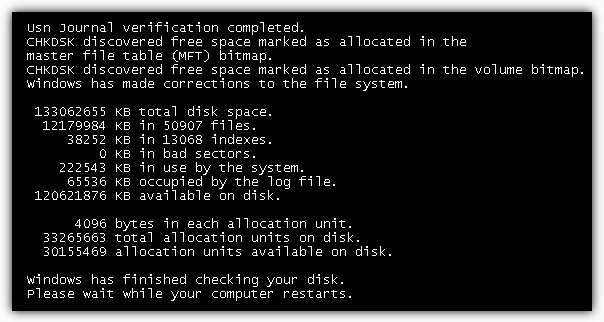
The issue arises when you want to look at the files to see if any personal or important data has been affected because everything recovered by Chkdsk or Scandisk now has a generic filename of File****.CHK placed in a Folder called Folder.*** at the root of your drive! The odd thing is Windows has no utility or built in function to let you find out what these newly renamed files were before it changed them all to CHK files.
Although sometimes a CHK file cannot be recovered successfully because it has been too badly damaged, many of them can be used again, but you need to find out what type of file each one is and the correct extension needs to be applied. If Windows crashed while editing a document, there is only 1 CHK file and your document is missing, then renaming the file to mylostfile.doc could be worth a shot, but in most situations you won’t be so lucky or there’s a lot of files that need checking.
Fortunately there are third party tools around that are able to help you recover CHK files by checking the headers of the files and identifying what the type of file is and what its original extension should be. Here’s a selection of ways to help you out.
1. UnCHK
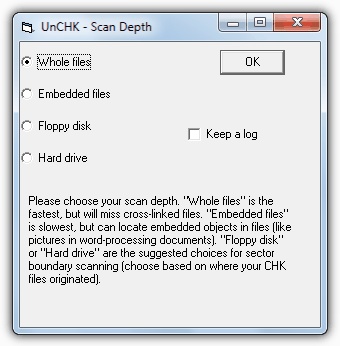
UnCHK is a free CHK file recovery tool that is able to help you restore CHK files for around 25 different file formats to their original extension. It can identify some of the most common types including audio, video, images, archives, executable files and documents. UnCHK also has a valuable feature of allowing you to add your own file type extensions by simply dragging and dropping a known good file onto the program’s icon. It will then be recognized from then onward when scanning CHK files.
Run the tool and it will ask you for the directory where the CHK files are and then a destination directory. The Scan Depth window gives various options about the recovery method; Whole Files will look at each file and check for a recognized signature, Embedded Files can pull objects like images from inside the CHK files and Floppy/Hard drive can check for cross linking in the files. The program was tested and worked fine on Windows 7.
2. FileCHK
FileCHK is about as simple a tool as it gets, and has no options or interface at all. It simply scans your CHK files and renames them with the correct file extension if a recognized file type is detected. Around 30 types of file are supported including the most common multimedia files, images, some common archives, executables and Office/text files. To use the tool all you have to do is place it in the folder where the File****.chk files are, then run it. The process takes no more than a second or two and the files it recognized will have been given the appropriate extension. Because it renames the original files automatically, it’s best to run the tool on a backup of the files in case you wish to try another utility here as well. FileCHK requires the VB5 runtimes installed to work.
3. CHK-Mate
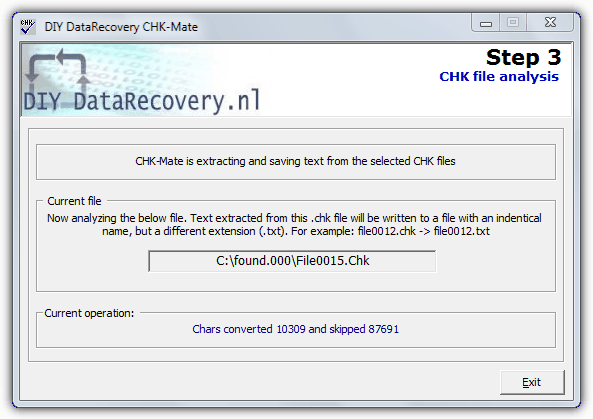
CHK-Mate has a wizard style interface that asks you where the CHK files are located, then asks where you want the renamed files to be saved as it creates a copy of them and doesn’t overwrite the originals. It will then examine the contents of the CHK files and determine whether they are known to the program, and if they are, will create a copy with the appropriate file extension. CHK-Mate only recognizes around 20 types of file by default although you can add custom types yourself.
One thing we noted about CHK-Mate was just how slow it was in trying to recover the files, over 20 minutes to scan 18 CHK files in Windows 7. It did look like it had crashed several times but did eventually finish, and at the end recovered 13, about the same as the other tools here. If the contents of a CHK file can not be identified, you have the option to extract all the readable text from the CHK file. This option is useful to recover information from a CHK file that is perhaps not intact enough to be recovered completely as a known file type.
4. TrIDNet
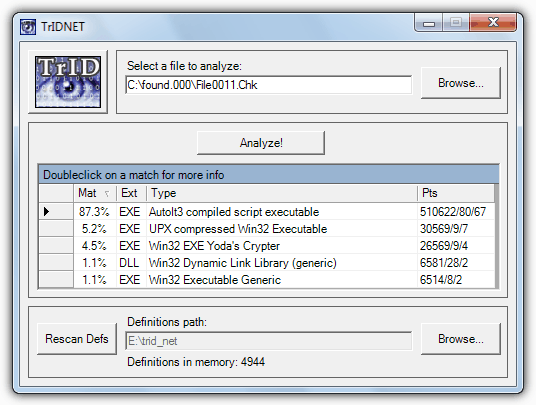
If you have some more obscure types of files on your computer that might not get picked up by one of the CHK file recovery tools, you might like to try to identify them with TrIDNet which has a good chance of helping out. Although it can’t rename the files for you automatically, TrIDNet can perhaps fill in some gaps if your CHK files remain unknown.
The tool itself is quite old dating back to 2004, but the database is still constantly updated meaning even the latest file types are recognized. Download the program and and unzip it, then download the definition files package and unrar the 1000’s of XML files into the TrIDNet main folder. Run the program and click on Rescan Defs to load them all in. Then browse for, or drag and drop a CHK file to identify it. The display will give a percentage of the likelihood a certain file extension matches the file. As an example, the screen shot shows TrIDNet thinks the scanned CHK file is an EXE rather than a DLL, and it is correct. The .NET Framework is required and the defs files and program are downloaded separately.
5. FiletypeID
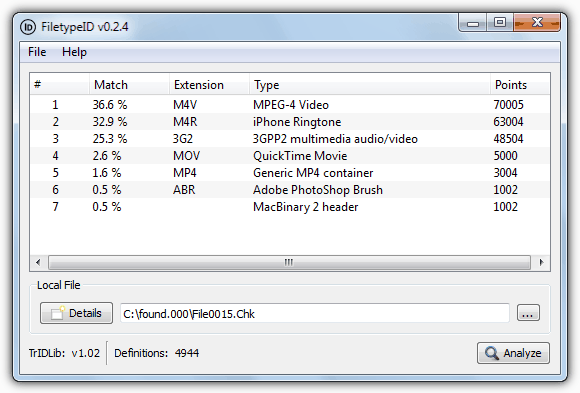
This utility works along the same lines as TrIDNet and uses the same TrID library and definitions to identify files by their type and not the extension, such as CHK files. FiletypeID has a lot more modern graphical interface though with a couple of useful extra functions as well. Although it is relatively up to date, the program comes with the definitions already built in so isn’t fully updated by default. This is easily cured by clicking on Update Definitions from the program’s Help menu.
The program is fully portable and usage is broadly the same as TrIDNet where you browser for or drag and drop a CHK or any other file onto the window. Click the Analyse button and it will give you a list of types and possible extensions with the most likely being the highest percentage entry. A useful button is Details which can give more in depth information about certain types of file such as video and audio encoding/bitrates and archive compression etc. Works on Windows XP and above.
6. Chk-Back
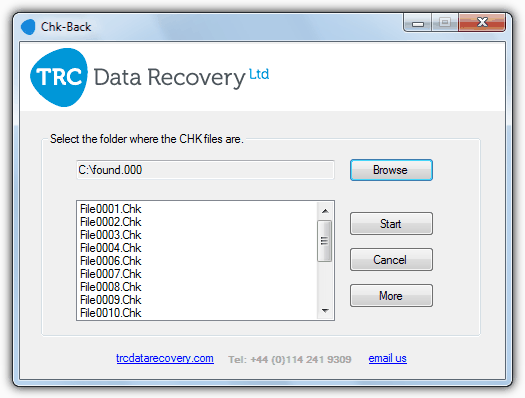
From TRC Data Recovery, Chk-Back is an easy to use utility with a pleasant interface. It has support for some 40 file formats including the most common image, video, audio, executable, document and office files, as well as Windows Address Book, Outlook Store and Outlook Express mail store files.
Although it does require installation, Chk-Back isn’t difficult to operate. Press the button to browse for the CHK files (usually in Folder.*** in the drive’s root) and it will show the files to be checked. Click Start and within a matter of seconds the process will be complete with a highlighted log file ready for you to save to a file if you wish or copy and paste elsewhere. A saved log file and the corrected CHK files will be created in a new folder called “ChkBack Results” in the same folder as the original CHK files. Works on Windows XP and above.
7. The Manual way
Although obviously not the quickest or simplest method, one of the ways you can check and try to identify the CHK file is be by simply opening it with Notepad, Notepad++ or a Hex editor. All file types have a unique header in the first few bytes to tell one file apart from another, and although many will have unrecognizable characters at the beginning of the file, some contain a few characters at or near the start that can be recognized to help you identify what the file is. For example, “Rar!” at the start of a file is a WinRar archive, “ID3” means the file is an MP3 and “JFIF” in the first 10 bytes of the file means it’s a Jpeg image.
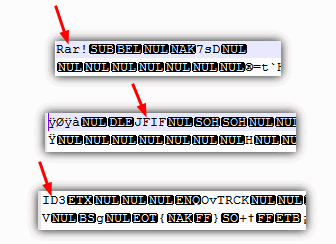
However, there are some more tricky ones to identify such as executable files have “MZ” at the start, but so do DLL files, screensavers, some font files, driver files and a few more. It therefore might not be a simple case of renaming a file with MZ at the start to .exe. A similar problem happens with ZIP archives because although it has a simple “PK” at the start of the file, this could easily be a Word DOCX or Excel XLSX file because they are also simply renamed Zip files. Even game levels can sometimes be archived with Zip.
If you want to try and identify a file that has gibberish characters or something not easily recognizable at the beginning, a useful manual way is:
1. Open the file in a Hex editor such as HxD.
2. Highlight and copy the first 8 bytes or so of hex to the clipboard.
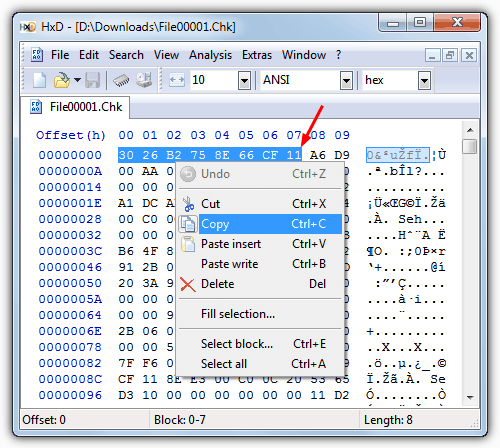
3. Go to a website resource that lists the signatures for hundreds of different files, such as Gary Kessler’s File Signatures Table. Another one is Filesignatures.net. Then use your browser’s search function (Ctrl+F) to look on the page for the hex value. If it’s not found simply delete a byte at a time from the search until it is found.
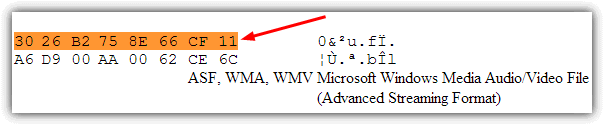
As you can see, the file was identified as a Windows Media file although it didn’t say which type exactly. At least we now know that trying the extensions of .WMA, .WMV or .ASF will most likely get the file to work. This method is quite useful if you want to learn how to quickly identify unknown files by simply looking at the first few bytes of them.



Improve this guide

User forum
0 messages