How to Search for MP3 on Google
The reason why Google being one of the best search engine today is because of their smart robot that is programmed to crawl and index tons of pages together with their excellent algorithm in returning relevant search results to searchers. Googlebot is well known for indexing whatever it finds unless it is specifically blocked using robots.txt or the meta noindex tag on the webpage. Even though Google.com only shows a box where you can type the keywords that you want to search and Google will try its best to determine what are you looking for, you can actually use search operator commands to have more control over the results that will be displayed on your browser.
The search commands are definitely useful especially if you’re trying to check the linkbacks to your website, to have an idea if Google has completely removed a website from their search engine probably due to violation of their guidelines and etc. It can get a little dangerous because a specially crafted search command would reveal a list of websites with live streaming webcam, serial numbers or even password files.
In this article we will show you a few methods on how to easily search for MP3 since the Gnutella network is pretty much dead after LimeWire being shut down and FrostWire became a BitTorrent client.
1. Exploseek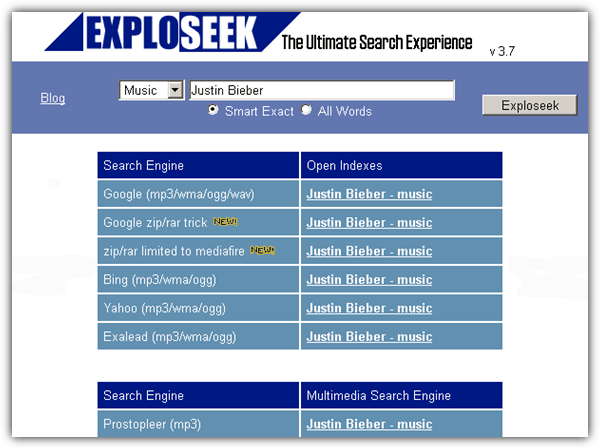
Exploseek is a simple website that offers you to search for music, video, images and PDF files in Google, MediaFire, Bing, Yahoo, Exalead, Google Video, YouTube, Prostopleer and image upload sites such as Flickr. All you need to do is type in the keyword that you want to search, for example the artist Justin Bieber, make sure Music is selected and click the Exploseek button. You will then need to select the search engine that you want to search by clicking on the link that opens a new window with the search results. You can now visit any of the link from the result to download the file.
2. Google Hacks
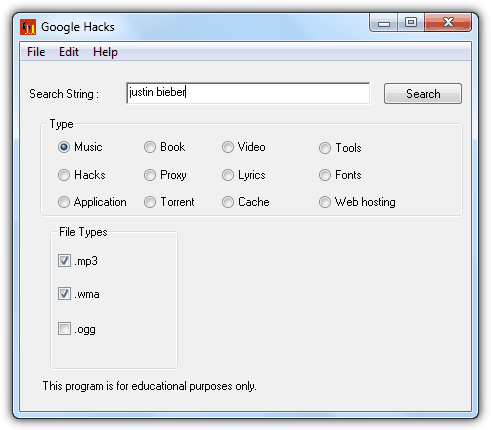
Google Hacks is a free desktop program that allows you to easily search for files from any types by just entering the search string and selecting the file type. Clicking the Search button will run a search command in Google on your default web browser based on what you’ve entered and selected in Google Hacks.
The latest version is 1.6.5 but it is actually the same as the 1.6 which was released 5 years ago except the new version comes with a setup installer bundled with adware. We recommend you to download the 1.6 Zip version instead.
3. Search MP3 Command
If you’re not a fan of using third party services of software and would prefer to do it yourself, here is the simple command to search MP3 in Google.
?intitle:index.of? mp3 ***
Use the command above and replace the *** with the artist or song title that you want to search. A list of results will be displayed which you can access and directly download the MP3. Basically this search string looks for files on unprotected directory.
All 3 methods above should be able to easily help you find the MP3 files that you want to download for free without any hassle. Most of the time the search results are very accurate because if the files are removed or temporarily unavailable, Google is pretty good in detecting it and will not show it in their top results.





Also, for multiple formats at once, separate by bar; i.e.:
mp3|wma|flac
or, for videos:
mp4|avi|wmv|mpg|mpeg
swap flac for mp3, or, as I did, mp4 for mp3 (to get videos)
Heh, how dated some things become. These methods ignore FLAC files which is the only version I’m interested in today, now that flash storage density and cost is so much lower and frankly, some say they can’t hear a difference in 192Kb or higher bitrate MP3, but I sure can. Maybe audio playback hardware got better like everything else.
Just replace “mp3” with “flac” and you’ll be directed to flac only files.
The more you know =*
thanks man.
Oh it works
cool… it works.. i like this page.. because it’s Daily Updated.!