Internet Connection Sharing Software: 10 Best We Tested
There are times when you have a few Internet capable devices such as your laptop and smartphone that needs to connect to the Internet. However some places such as hotels only provides wired Internet connection via Ethernet and only your laptop can get connected but not your smartphone. Unless you have a Wi-Fi base station such as the AirPort Express by Apple which can convert the wired Internet connection to wireless access point, one way to share the Internet connection for free is through the unused wireless adapter found on your laptop. Do take note that a virtual Wireless Access Point is much easier to create and configure compared to creating a public hotspot where you are normally greeted with a webpage on your default web browser either to sign up or agree to the terms to use the hotspot service.
Basically your laptop gets the Internet connection from the wired Ethernet adapter and then the wireless adapter will be configured to act like a wireless router to share the Internet connection. Although it may sound difficult, the setup process is actually quite simple that only involves a few mouse clicks by using any of the 10 free programs listed below. Each program has its own advantages and limitations, so choose the one that is suitable for you.
1. Connectify HotspotConnectify Hotspot is one of the most popular and stable software to share your Internet connection using your wireless adapter. What we really like about Connectify Hotspot is it works on Windows XP right up to the latest Windows 8 while most of the alternatives below does not support Windows XP. The Ad-Hoc mode is available in Windows XP and can be secured with a WEP encryption. Do note that the free version of Connectify Hotspot has some limitation such as sharing Wi-Fi from 3G/4G connection, file transfer, repeater functionality, auto Internet selection, in-built banner ads and fully customizable SSID.
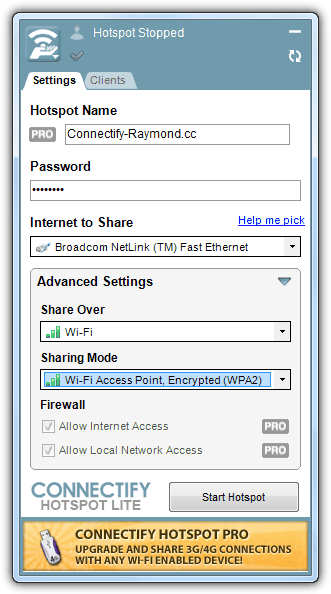
To share your Internet connection using your wireless adapter with Connectify Hotspot, download, install and run the application. Optionally set a name for your Hotspot and set a password. The most important configuration is to select the Internet to share which is your wired connection and then select your wireless adapter for the “Share Over”. It is advisable to use the WPA2 encryption unless you want everyone within the range to be able to connect or perhaps you have an old device that only works with WEP. Finally click the Start Hotspot button. You get to see who is connect to your wireless access point from the Clients tab.
2. MyPublicWiFi
MyPublicWiFi is one of our favorite tool after testing nearly a dozen of such software because it is able to log all the URLs visited by the connected clients and has a simple firewall to block file sharing software that uses P2P protocol. You also get to see the connected clients from the Clients tab. You will need to manually run the program as administrator each time you want to launch it. Unfortunately MyPublicWiFi only supports Windows 7 and 2008 only but not on XP.
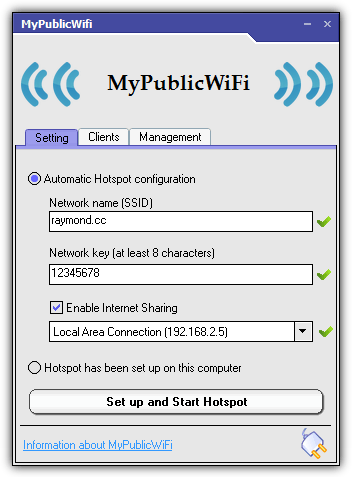
Setting up MyPublicWiFi is easy. Enter the SSID name, password, check Enable Internet Sharing if you would like to share the Internet connection and finally click the Set up and Start Hotspot button.
3. Virtual Router Manager
For some reason Virtual Router Manager remains very popular even though it hasn’t been updated in the last 3 years and never left beta testing stage. It only support Windows 7 and Windows 2008 R2. Some of main advantages in this tool is the simplicity of the program with very little configuration options and it is open source. We wasn’t able to get Virtual Router Manager working on our test machine and kept on receiving the generic error message “Virtual Router Could Not Be Started!” which many others also experience the same problem.
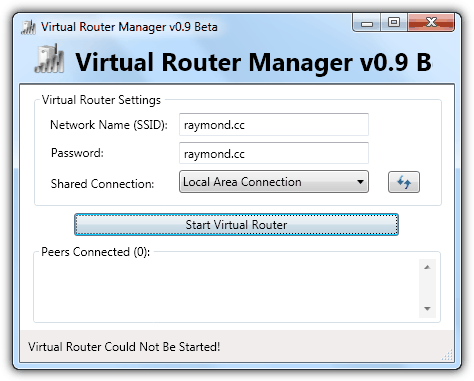
The setup comes in a clean MSI installer without ad-ware. After installing, run it and set a network name (SSID), password, select the network adapter that you want to share if it is not automatically selected and finally click Start Virtual Router button.
Download Virtual Router Manager
4. Virtual Access Point Software for Windows 7
Virtual Access Point Software only works on Windows 7. Unlike the rest of the software, this one doesn’t require downloading and installation of third party software. Simply visit the website using any web browser with Java activated (Java is disabled by default on most popular web browser), enter your preferred SSID and key, and click “Turn On Soft AP” button. To deactivate the access point, simply click the button next to it to turn off.
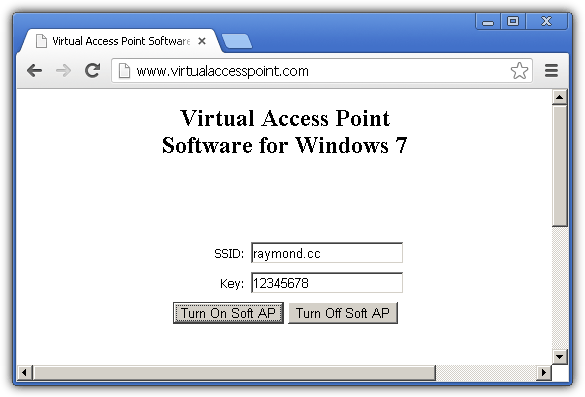
Basically Java made it possible for this to work by dropping a batch file turnonvp.bat in C:\vpcom folder and running it silently when you turn on the soft AP from their website. The batch file contains a command line to create a wireless hosted network in Windows 7.
5. BEETmobile Hotspot
BEETmobile Hotspot is an app available for Windows, Mac OS X and Android to share your Internet connection. The Windows version only works on Windows 7 and 8. A very unique feature found in BEETmobile Hotspot is the ability to set a timer to automatically turn off the Hotspot at the Settings area. The main interface shows the number of connected devices, throughput and volume of bandwidth transfer. There is a built-in hotkey WIN+H to restore the Window from notification area.
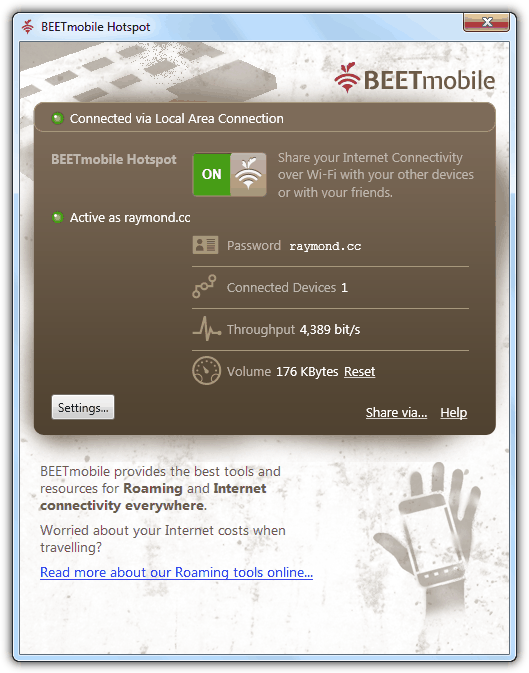
BEETmobile Hotspot is also very easy to use. Set a password, SSID and click the toggle button to turn it ON.
6. SeventhGate
SeventhGate is another free and open source Internet connection sharing tool hosted in CodePlex. If you prefer a tool that can set a limit to the connected clients, SeventhGate allows you to set a client limit from the main interface. It also provides an option for you to select the network connection as the source to share the Internet connection which is more suitable when you have multiple connection sources. Once the hosted network is started, the “Advanced 1” tab will show the wireless network information. The “Advanced 2” tab seems to be an incomplete work in progress on port forwarding and MAC filtering.
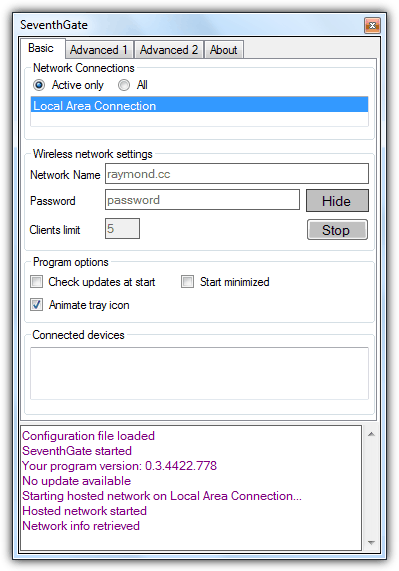
SeventhGate will by default show only the active network connection which will be used to share the Internet connection. Select the “All” radio button if you need to select a different adapter to share. Set a network name, password, optionally the clients limit and click the Start button.
7. MyRouter
The unrestricted free and open source version of MyRouter hosted at CodePlex is actually an older version while the latest version 2.0 has turned into a shareware, while a free version from the 2.0 is also available but with some limitations such as 25MB file transfer, 2 computers limitation, no protection and semi-customizable SSID. Some unique features found in MyRouter is the maximum peers setting, connection and disconnection tray notification and port forwarding.
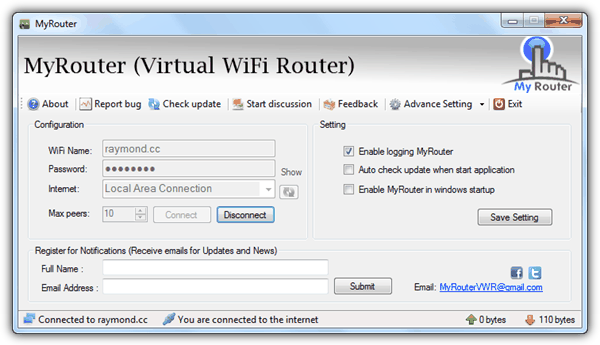
If you plan to use the open source version of MyRouter, make sure the auto update check when start application option is uncheck or else you’ll constantly get a notification saying that there’s an update. Although MyRouter claims to work on Windows XP, we didn’t manage to get it working during testing while it worked flawlessly on Windows 7. MyRouter requires .NET Framework 4 installed to run.
8. Maryfi
Maryfi is a free software that works only in Windows 7 and claims to support sharing 3G connection with manual configuration by sharing it using Internet Connection Sharing (ICS). Some of the disadvantages in Maryfi is it requires Microsoft Research Virtual WiFi installed and it needs to be manually ran as administrator or you’ll get the error “Error while writing network settings to computer” when trying to start the Hotspot.
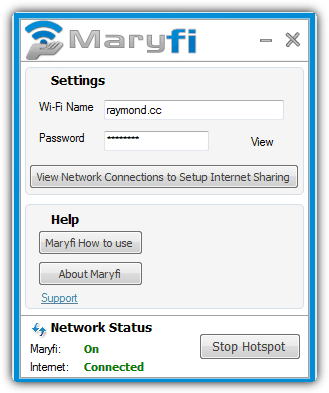
Maryfi is very simply to use. Simply fill up the Wi-Fi name and password box and click the Start Hotspot button. If it doesn’t work, there is a help button which brings you to their official website with online guides in setting up.
9. Winhotspot
Winhotspot is probably the only software that comes without an installer, making it truly portable that can be ran and used instantly after downloading. However, the portable version seems to be only available in Softpedia (which we have linked to) while the official website installer is wrapped with Softonic’s downloader which asks to install adware during setup. Other than sharing your Internet, Winhotspot allows you to view connected clients showing IP address and MAC address. It also comes with a WiFi scanner to find available access points, has a “safe mode” option to attempt starting hotspot if normal method fails and shortcut to run the Windows Network Diagnostics.
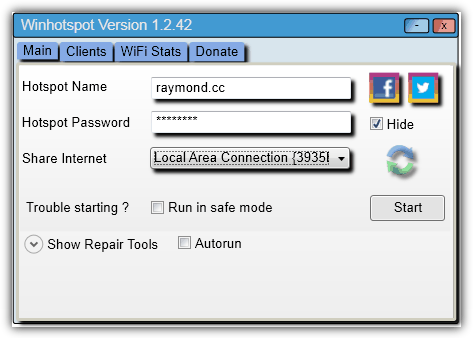
Activating the wireless network is pretty much the same as the rest. Enter your hotspot name, password and select the interface to share and click Start.
10. netsh
The netsh.exe file found in Windows 7 C:\Windows\System32\ folder can actually be used to create a wireless hosted network without using any of the 3rd party tools mentioned in this article. The tools above merely simplifies the whole process through auto detection & configuration and also giving extra features. However if you just need to quickly and temporarily share your Internet connection through your wireless adapter, all you need to do is type the following commands in an elevated (run as administrator) command prompt (cmd).
netsh wlan set hostednetwork mode=allow ssid=YourPreferredNetworkName key=YourPreferredKey
netsh wlan start hostednetwork
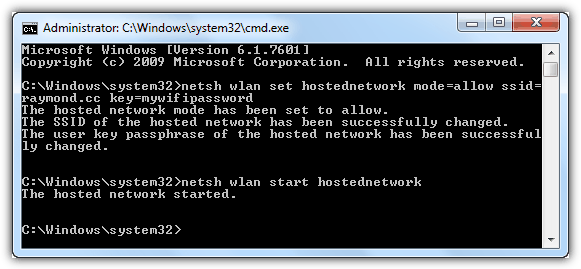
To stop the hosted network, type the following command below:
netsh wlan stop hostednetwork
Additional Notes: We have also tested Virtual WiFi Router, mHotspot (currently ranked #1 for Wireless Networking Software category in CNET’s Download.com), WiFi HotSpot Creator and WifiSpot but they are not added to this list because the installer wraps with a downloader that will install unnecessary ad-ware onto your computer if you’re not careful in opting them out.
You might also like:
 Connect Computers Together using Ad Hoc Wireless for Sharing the Internet and Files
 Network Connection Manager Software: 5 Best We Tested
 4 Ways to Automatically Disable Wireless Network Connection when Local Area Connection is Enabled
 5 Tools To Monitor WiFi Connection Signal Strength [2023]
 How to Use NetCut to cut WiFi or Internet from Users
How I can Create Open Hotspot in PC
wow its so amazing
Any idea if it’s possible to create an OPEN wifi hotspot, but bridge it to a WPA2 protected wifi network? Or must the hotspot created only connect it to a wired network?
I wouldn’t mind using a 2nd wifi adapter (usb), in case the limitation is due to hardware*, but I tried Virtual Router/Plus, mhotspot, Connectify Hotspot, and mypublicwifi, but was unsuccessful.
Thanks!
Ben
*Not sure if my Ralink RT3290 supports mixed mode (client for one SSID and AP for another).. maybe a different chipset is needed – Realtek RTL8188cus / RT5370
Do you kow OSToto Hostopot? I use it ann it can help me create a open free WiFi hotspot! You can have a try!
Sorry to rehash an old post, but I was just wondering, do all of these require admin permissions to function?
I have a situation where I am using an account without admin credentials and was hoping to be able share my computer’s ethernet connection via WiFi to my phone so I don’t use up my data plan.
I have used a couple of these before when I had admin credentials, but most don’t appear to work without admin permissions.
u never mentioned the best 3 alternatives to Connectify Pro. 1st is – OSTOtohotspot (formerly 160 wifi), 2nd is – my wifi router, & 3rd is baidu hotspot. all of them r way better than ur mentioned softwares. particularly the first 2. baidu ain’t bad either.
as title show ….how-to-share-internet-connection-in- “xp” -without-wireless-routeer ?
I want to know how many above mentioned tools work in windows XP ?
Yes, we are using the original url from 2008 which was written with XP in mind. Now though, unfortunately, it’s almost impossible to get XP to work using the listed methods.
I find Virtual WiFi Router to be the most reliable of them all, as for most installers for free software these days quite often if you disconnect from the Internet before you install a program you will not see any crapware that needs to be unchecked pre-install !
Thanks
I have tried connectify and it works fine, I also tried the netsh cmd and that does not work.
I see the new ssid network , it shows up in the ‘currently connected to’ window just like the connectify network does but no device can connect to it..
Mystery
maryfi is the best it’s nice program and very easy to use it and works in a good way without any problems and covered my needs
fantastic
Tested this method today and i worked like a charm, great share thanks :)
You saved my life, buddy! Thank you!
It worked perfectly between my laptop and ipad i couldn’t believe it myself. All this while i always have to download app on itunes with my laptop then sync to my ipad but now i can do it directly with wireless. Thanks allot and i really appreciate you sharing this on here.
thank you very much…it works fine…
thank you very much!!!
thank you very much
Thanks that was really helpful, now I can go online from my iPod while my brother is using the mdsl ^_^
thanks it was very good and easy.
i have one xp and window 7 laptop.
hi thanks for the great post…
Wah nice post. I did it in 3 minutes. Now I can share my internet USB connection with my iPhone.
thanks a lot guy..
Thank you for the guide.
After working on this for two hours, i did it in 5 minutes with the help of your guide.
Works like described
this was too good!! Thanks a lot!!
Thank u, very usefull
Thanks very useful :)
You’re the best Raymond. I’ve actually tried so many methods but this seems to go nice and easy. Thanks
Its a great tip….. Thank you so much for sharing such like information.. Keep do searching for info and sharing.. NKHAN
Raymond,
Thank you very much! I am holidaying in Japan and it was driving me batty that I couldn’t get a wireless connection to go with my netbook and iphone to copy over documents and maps etc. The netbook was connected over ethernet via the hotel.
This solved my problem and was very straightforward.
Domo Arigato!
Ardeet
I follow your instruction and it just works! Great advice. Thanks!
Thanks so much for the great tip.
Hi Raymond
Worked perfectly for me. Thanks a lot bro. Keep up the good work.
Regards
Arvinder
Delhi, India
Great tip Raymond too bad this was only after I setup up a wireless network at my home using a router.
But nevertheless quite worth to bookmark for the future.
Thanks Ray for your all great tips.
Awesome Raymond! Just what I needed. Thanks
Well, thanks i tried this before and it did work but i would recommend getting a wireless router a cheap one would do just fine.
Whoa! I’ve always wondered how you would do that. I have always thought that this process is complicated and hard. Thanks for the great and simple tip Ray!!
thankz ray for the good tip.. (“,)
Great Tip Raymond
I’ve been reading your blogs and have learnt a great deal. Somethings posted I didn’t think were possible. Just wondering though if this would work if the HOST computer was running on Vista