
How To Troubleshoot Windows Startup, LogOff, Login and Shutdown Problems


 6 min. read
  Published on

The fastest time to boot up or shut down your computer is obviously when you first got your computer or after installing a fresh copy of Windows. As time goes by after going through multiple installations and uninstalling third party software, the accumulation of temporary files, the increasing size of the registry, disk fragmentation, accidental infection of malicious software with improper cleanup, all these will eventually lead to causing Windows to take longer than usual to startup or be unable to completely shut down the computer.
No one likes to use a computer that takes 5-10 minutes to boot into the desktop or a Windows that doesn’t do a proper shut down where you are forced to press and hold the power button until it turns off. A forced shut down can cause data corruption when the files are opened or even hard drive failure. Troubleshooting the cause of Windows startup and shutdown problems may not be that easy because a lot of factors can contribute to this problem.
Here we have a few ways that can help you identify the process that is causing problems in Windows startup and shut down.
Troubleshooting Windows Startup Problems
There are a few software that can trace the amount of time taken to startup a program in Windows. It is very useful to determine the process that takes the most time in load.
Process Monitor
Process Monitor is a very powerful tool by Sysinternals that is able to show file and registry activities in real time. If configured properly, you can actually use it to log boot events and analyze those events to determine which process takes a long time to start. Simply follow the steps below:
1. Download Process Monitor, extract and run the Procmon.exe executable file.
2. Click on Options menubar and select Enable Boot Logging.
3. Tick “Generate thread profiling events“, make sure that the every second option is selected and click OK.
4. Restart your computer and run Process Monitor again when you’ve booted in to Windows.
5. Click Yes button when you’re asked to save the collected data and save the process monitor log file. Process Monitor will run after it’s finished converting the boot time event data and applying event filter.
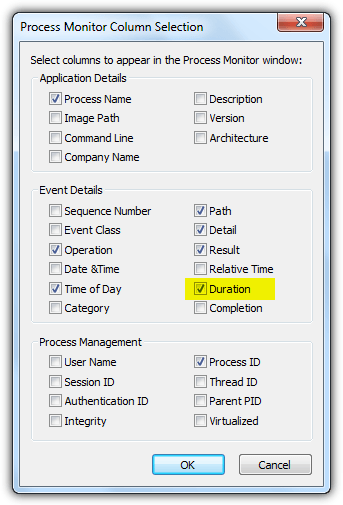
6. Go to the Options menubar and select “Select Columns“.
7. Select “Duration” and click OK.
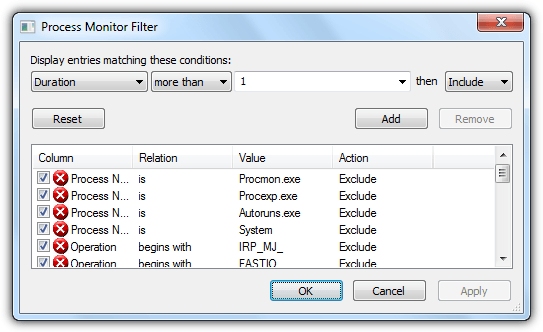
8. Go to Filter menubar and select Filter or alternatively you can press Ctrl + L. Set it up according to the screenshot below. Make sure to click the Add button first followed by OK.
9. You can now check for processes with one of the highest duration and try disabling it from Windows startup.
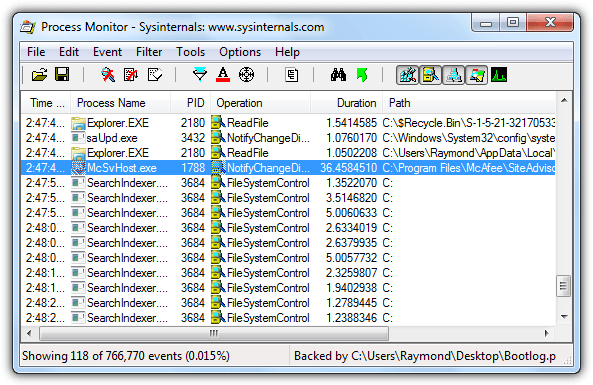
As you can see from the screenshot above, one of McAfee’s process takes 36 seconds to start. You can try disabling the software from startup and if you can’t find it in the program’s options, you can use third party startup manager tools like Autoruns.
Soluto
Soluto started off as a software that analyzes Windows startup programs, then it got a bit bloated because it turned into a web application with extra features such as remote control added to it. Now Soluto is a mobile app to help locate your missing smartphone. If you’re looking for a more user friendly tool to analyze startup programs that takes a lot of time to run, Soluto is your best choice.
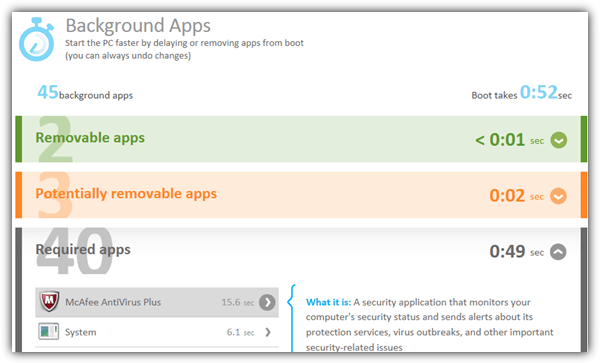
After installing Soluto, you’d need to restart your computer at least once for it to trace the background programs load time. Running the Soluto shortcut in the start Menu will open up your default web browser with your computer listed under My Devices. Click on the computer and go to Background Apps. You can expand the different categories to view the time taken to load during bootup. Do note that you can only delay or remove the app from boot on removable and potentially removable apps category. For required apps, again you can rely on third party tools like Autoruns.
Troubleshooting Windows Shutdown Problems
Troubleshooting Windows shutdown problems is more difficult and most of the time a computer technician would have to go through a series of different tests such as shutting down from safe mode, shutting down using a Live CD and disabling services to narrow down the problem. Fortunately Microsoft has provided Windows Performance Analyzer and Recorder tool from their Software Development Kit (SDK) which can be used to analyze shutdown problems. Simply follow the steps below:
1. Download Windows SDK by clicking the Install and download hyperlink and run sdksetup.exe.
2. Select the option “Install the Windows Software Development Kit for Windows 8.1 to this computer” and click Next.
3. If you’re not comfortable with Microsoft collecting usage data, then select No.
4. Click the Accept button for license agreement.
5. Select only the “Windows Performance Toolkit” checkbox and click Install.
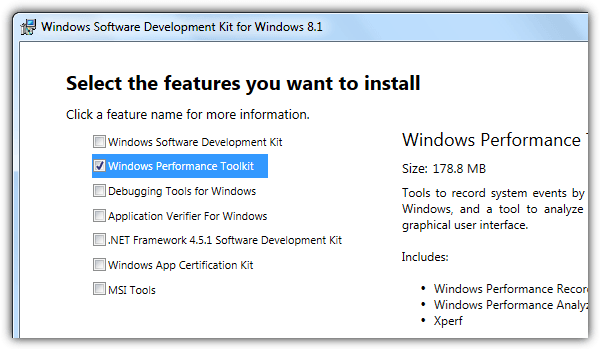
6. After finished installation, run Windows Performance Recorder shortcut from the start menu.
7. Set the options according to the screenshot below and click the Start button.
Performance scenario: Shutdown
Detail level: Verbose
Logging mode: File
Number of iterations: 1
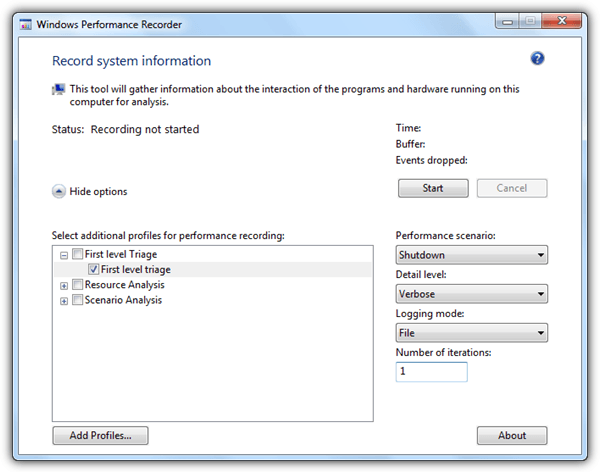
8. It is optional to type in a detailed description of the problem. Click the Save button to continue. Then click OK to shutdown your computer.
9. When Windows is restarted, Windows Performance Recorder will automatically start gathering system shutdown trace information. Once it is done, click the Open in WPA button.
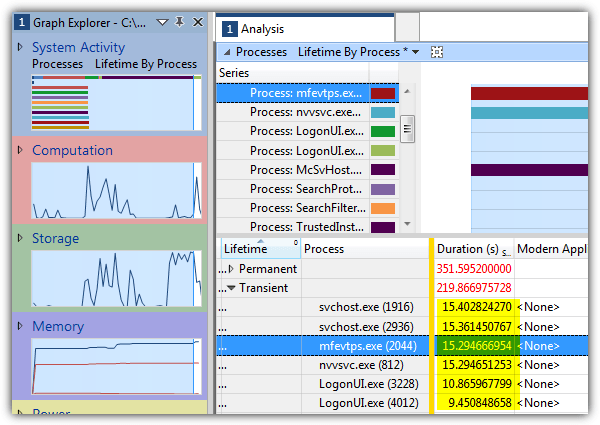
10. Windows Performance Analyzer will now open and automatically load the event trace log file generated by Windows Performance Recorder. Double click on System Activity from the left hand sidebar and a graph will be added to the analysis view.
11. Sort the duration by clicking on the column and look for the process that takes a long time to terminate during shut down.
Since Windows XP, there is a built-in function to enable verbose startup, shutdown, logon, and logoff status messages that can help in troubleshooting startup and shutdown problems. For example, if your computer hangs a long time at “Stopping services” during shutdown, it is most likely a problem with one of the services that is causing the slow shut down.
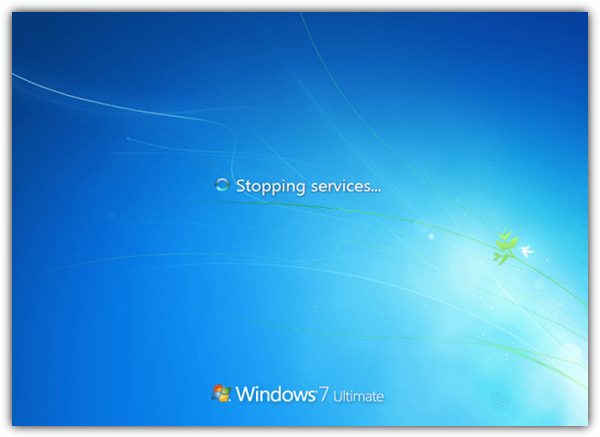
Enabling Verbose Status message requires two new registry entries to be added to:
HKLM\SOFTWARE\Microsoft\Windows\CurrentVersion\Policies\System
Right click, go to New, select DWORD, name it as VerboseStatus and set the value to 1. Create another DWORD with the name DisableStatusMessages and set the value to 0. For your convenience, simply download the registry file below and run it to enable verbose status message.



Improve this guide

User forum
0 messages