
How to Uninstall REFOG Keylogger Without Knowing Master Password


 5 min. read
  Published on

We’ve had a few requests from users in the forum recently asking how to uninstall or remove the REFOG Keylogger from their computer. REFOG Keylogger logs all key presses on your PC and saves any text pasted from the clipboard. It even does periodic screen captures to give an illustrated usage history of the PC. REFOG can also decode chat conversations in many instant messengers, track Web sites and resources visited and log all applications launched. In short, it monitors everything you do on your computer. REFOG isn’t the only tool that can do this and there are many keyloggers that can do a similar or even better job at logging your actions.
Uninstalling a keylogger on your computer is not really that easy because it naturally doesn’t want to be found. It’s totally hidden from task manager and if you try to uninstall it using the official uninstaller, you need to enter the Master Password otherwise it won’t proceed. Most antivirus or antispyware software is able to detect keyloggers but there are times when these security tools won’t be able to fully remove it and ends up making the PC unstable.
Well, the good news is we’ve analyzed how REFOG Keylogger saves the master password and we’ll show you how easy it is to remove it so you can uninstall this keylogger. It even works for other products by REFOG such as Personal Monitor and Employee Monitor. If you have this or any other keylogger on your computer and you didn’t install it, one way to help defeat them in future is by using keystroke encryption software which masks your real keystrokes so the keylogger can’t see what you’re typing.
Section A: Checking if REFOG Keylogger is installed on your computer
On earlier versions of REFOG Keylogger, detecting its presence on your computer was easy by typing runrefog at the Run window or pressing the hotkey Ctrl+Shift+K because it was hard coded into the program. However the current version allows you to change the launch command and hotkeys to prevent easy detection. By default REFOG products are installed in:
C:\Windows\System32\MPK\ – For 32-bit Windows (x86)
C:\Windows\SysWOW64\MPK\ – For 64-bit Windows (x64)
You cannot solely rely on checking this folder though because it can be changed to something else during installation. What we found to be most accurate way to determine if REFOG Keylogger is installed on your computer, is by checking the existence of the program’s logs and settings folder which doesn’t change.
First, bring up the Run window by simultaneously pressing WIN+R key.
For Windows XP users type the following and press enter:
%allusersprofile%\Application Data\MPK
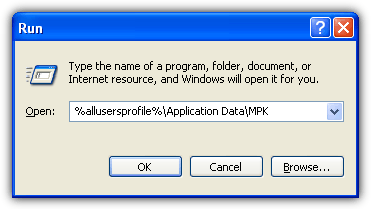
For Windows Vista and Windows 7/8 users type this and press enter:
%allusersprofile%\MPK
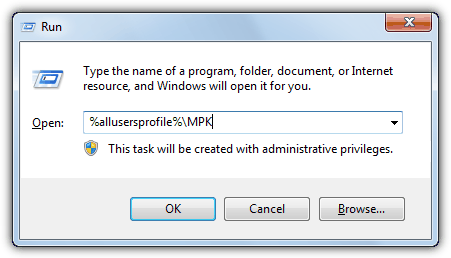
If you get the error message saying that Windows cannot find the folder, then you’re safe from REFOG Keylogger. However if a folder opens and list a few files such as M0000, REFOG Keylogger folder and a shortcut, then it is very likely that your computer is being monitored by someone else.
Normally Refog Keylogger will create a shortcut in the All Users profile (%allusersprofile%) directory for you to run the program but not for Refog Personal Monitor. If you can’t find the shortcut, your next option is to search for MPKView.exe on your computer using the Windows search and run it. If you’re being asked to input a password, leave the Explorer window open and continue reading section B, if not, you can jump straight to section C, both of which are on the next page.
Section B: Reset the REFOG Keylogger password
Most likely that the person who installed the REFOG Keylogger already set a password to protect the software from being modified or uninstalled. Please follow the steps below on how to remove the password.
1. Go to Control Panel, launch Folder Options and then go to the View tab. Uncheck “Hide protected operating system files” (click yes at the warning box) and choose the “Show hidden files, folders, and drives” radio button. Click OK.
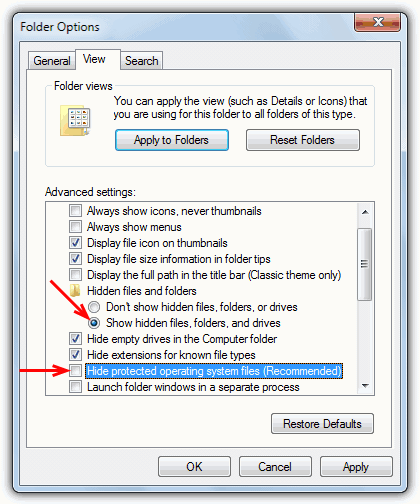
2. In the MPK folder window that you opened earlier in Section A, delete the file S0000. Do note that you WON’T see the S0000 file unless you have changed the folder view settings in step 1.
3. Restart your computer. This is an important step or else the instructions found at the next section to uninstall Refog Keylogger will fail.
Section C: Uninstall REFOG Keylogger from your computer
1. Refer back to Section A on how to run the REFOG Keylogger which is either through the shortcut from the MPK folder or searching for MPKView.exe.
2. The REFOG window will now be displayed and you’ll no longer be asked for the password if you were before. Go to Tools from the menu bar and select Uninstall.
Follow the on-screen instructions to fully remove REFOG Keylogger from your computer. Alternatively, it is also possible to directly launch the REFOG Keylogger uninstaller by typing this into the Run window provided if the program is installed in the default location and the password has been successfully removed.
On 32-bit Windows: %windir%\System32\MPK\unins000.exe
On 64-bit Windows: %windir%\SysWOW64\MPK\unins000.exe
How did we discovered this? It is pretty simple if you have read the article on tracking registry and file changes when installing software in Windows which can reveal all kinds of interesting things about which files and registry entries a program uses.



Improve this guide

User forum
0 messages