
Identify What is Loaded with rundll32.exe in the Windows Task List


 5 min. read
  Published on

One of the problems when you’re trying to diagnose any problems in Windows, is quite a lot of information about what files and programs are loaded in the background is hidden away and not readily visible. One of these Windows programs is the svchost.exe process which just looks like a single process in Task Manager, but in fact can contain several dll loaded services which you won’t know about unless you know how to identify what’s inside the svchost process.
Another process that might be showing in your Windows Task List but you can never know what it is will probably be the rundll32 process. Rundll32.exe is a part of Windows found in \Windows\System32 and used to run program code in a dll file as if it was an actual program. The dll file can’t be executed directly, that’s why the rundll32.exe is required to to run it.
A lot of malicious software can also use this name or similar names to fool you into thinking the virus is actually a legitimate Windows file. Names such as rundII32.exe (actually using 2 uppercase i letters) or rundll.32.exe are not uncommon and you should always study the rundll32 (and svchost) file names in Task Manager if you suspect you have malware on your system. Rundll32 is also commonly used by spyware to launch its own code. As you can see if you open the Task Manager and you have a Rundll32.exe present, you can’t actually see by default what the dll is it’s launching.
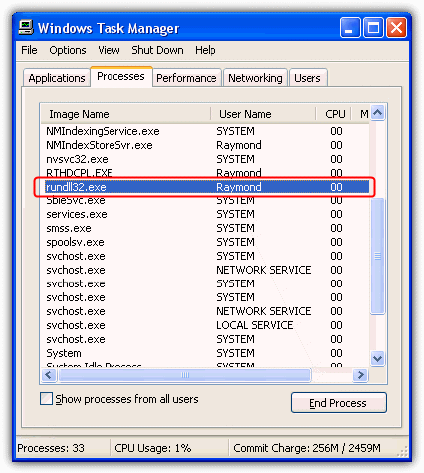
Here’s how to identify what DLL files are being loaded in rundll32.exe on Windows XP, Vista and 7.
Use Task Manager to Identify the Rundll32.exe Command in Use
This function is only available in Vista and above, and what it does is show an extra column in Task Manager which tells you what the command line currently used by the process is. Open Task Manager -> View menu -> Select Columns…, click the Command line box and then OK.
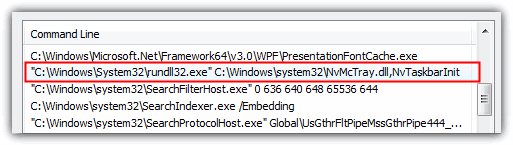
A new column will now be available and you should be able to identify which dll is being executed.
Identify Loaded DLL Files Using Process Explorer
Process Explorer is a great Task Manager replacement made by SysInternals which can display a lot more detailed information about what the Rundll32 process is loading. Simply run the Process Explorer tool and you will be presented with a Task Manager type list of processes.
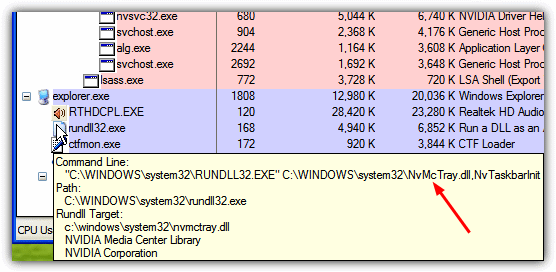
All you have to do is hover your mouse over the Rundll32.exe entry and it will show you in a tool tip what command is being launched and which dll is being executed. As you can see from the image, this rundll32.exe is executing the nVidia tray icon.
Identify Loaded DLL Files through Command Prompt
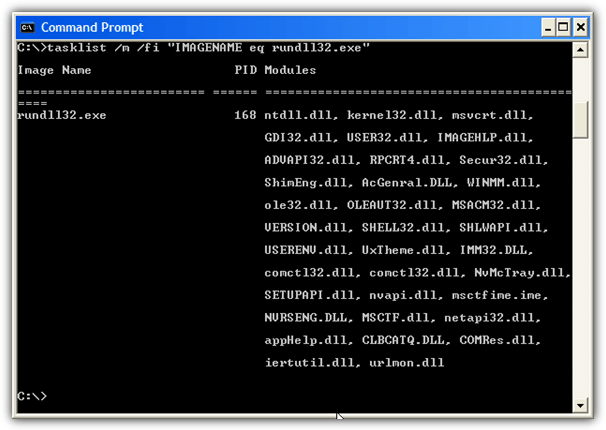
Here is a manual way of identifying DLL files in rundll32.exe. Open a Command Prompt by pressing WinKey+R and type cmd. Then type or paste the command below into the prompt and hit Enter.
tasklist /m /fi "IMAGENAME eq rundll32.exe"
Do take note that by default, Windows XP Home edition does not have the tasklist.exe utility, only Professional. It is built into all versions of Windows Vista and 7. If you want the Tasklist tool for XP Home you can download it from this link:
The dll modules are displayed on the right side of the tasklist result. You’ll probably see a lot of modules being displayed which are the internal Windows dll’s and it takes a little knowledge from an experienced user to identify any dangerous dll on the list. If you’re unsure, you can always do a search in Google on the dll file name.
Fake Rundll32 files
Now you know how to identify loaded DLLs in rundll32.exe, but there are also instances of spyware and viruses replacing the Windows original rundll32.exe with a fake one. When you have a bad or corrupted rundll32.exe, you’ll have problems in opening Control Panel and etc.
To check whether your rundll32.exe has been modified or replaced, you can open it with Notepad, Wordpad or a Hex editor. Once you’ve opened rundll32.exe, look for the word “padding”. If this word is inside the rundll32.exe, it means that you’re using a fake file and it needs to be replaced.
The simplest way to replace the file is using the System File Checker (SFC) from the Command Prompt.
1. Press Win key+R and type cmd into the Run dialog, press Enter.
2. Type the command below into the Command Prompt and press Enter. Windows should now replace the corrupted rundll32.exe and any other system files damaged by a virus or other issues.
sfc /Scannow
If you know only the rundll32.exe file is corrupt and you’re using Vista or 7, you can avoid a full system file check and just run SFC on that 1 file.
sfc /scanfile=c:\windows\system32\rundll32.exe
Windows XP users may need the Windows installation CD to restore an original file. A very useful and time saving tip to avoid needing the CD in future when running SFC is to copy the i386 folder to your hard drive.



Improve this guide

User forum
0 messages