5 Tools to Integrate Multiple Antivirus Rescue Disk into One Single USB Flash Drive
An unstable piece of malware created by someone inexperienced in programming can make a computer slow to a crawl. A carefully created piece of malware can be totally invisible while disabling and preventing any security software such as an antivirus from being installed on the system. An effective solution to remove these viruses is to boot up the computer using an antivirus rescue disk, run a full scan in an offline environment where the malware is inactive and remove any detected threats.
There are a couple of antivirus companies that offer free rescue disks and most of them are in ISO file format which can be burned to a CD. It is best to have every rescue disks at hand because different antivirus have different detection rates. This can be quite troublesome because you would need to have a CD/DVD for every rescue disk and they must be frequently updated to always have the latest version with the latest virus definition just in case the Internet connection on the target computer does not work.

Fortunately there are third party tools that can put multiple antivirus rescue disks into one USB flash drive and make it multi-bootable. So instead of carrying over 10 antivirus rescue CDs/DVDs, you now only need 1 USB flash drive plus the ISO files can be easily and quickly updated. Here we have 6 tools to look at.
1. SARDUSARDU was probably the first tool that can create a multiboot USB flash drive containing multiple antivirus rescue disks. Other than antivirus rescue disks, SARDU can also integrate useful utilities such as Ophcrack & Hiren’s BootCD, Linux Live CDs, Windows PE and Windows installer. SARDU is able to download, burn and check ISO images integrity. It also comes with QEMU virtual machine to test the multiboot USB/ISO.
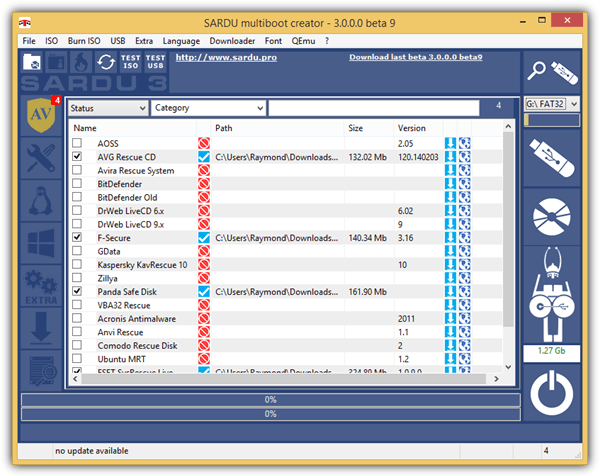
The latest version 3 is still in beta which has been completely rewritten from scratch so you can expect some functions not to work as expected. You can still use the older stable version of SARDU 2.0.6.5 but pay extra attention during setup that prompts to install adware.
2. YUMI
YUMI is a free and open source multiboot USB creator tool that can currently install up to 14 antivirus rescue disks into a USB flash drive. At first glance of YUMI’s graphical user interface, you might have thought that the program doesn’t seem to be able to create a multiboot USB but in fact it is possible by adding the ISOs one by one. Just make sure that the option “Format Drive (Erase Content)” is not enabled when you want to add another ISO to the USB.
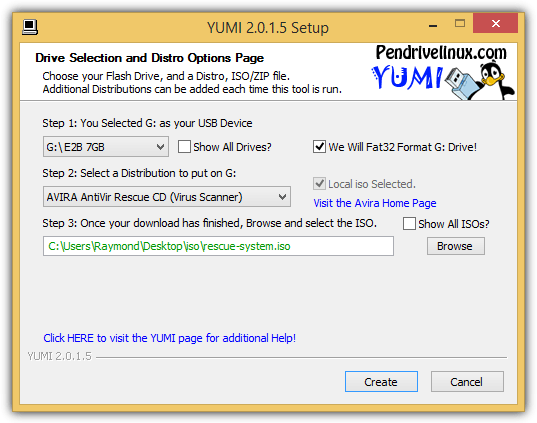
If you have an ISO that is not listed in YUMI, you can still add it in by trying out any of the last 3 options under “Unlisted Bootable ISOs”. You can also remove individual installed ISOs in USB by ticking the “View or Remove Installed Distros” checkbox.
3. MultiBootUSB
MultiBootUSB is yet another free and open source program that can install multiple distros to USB flash drive. Unlike SARDU and YUMI, MultiBootUSB does not come with a downloader or with a database of links to download ISO files but it allows you to add any ISO files from your computer. You cannot select multiple ISO files at a time and you’ll have to add them one at a time.
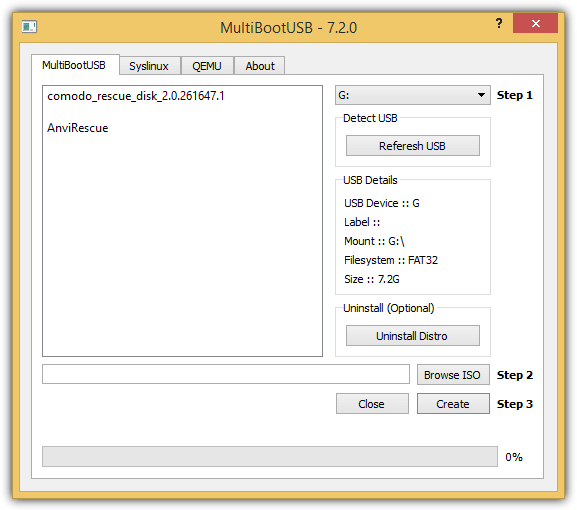
Do take note that Syslinux is automatically installed and configured after adding an ISO to the USB drive. You can test the downloaded ISO or even the multiboot USB that you’ve created from the QEMU tab. Simply select the desired RAM and click the Boot ISO/USB button.
4. WinSetupFromUSB
Although the name of this tool implies that it is used to create a Windows setup from USB, it can also support creating multiboot Linux or other Grub4dos compatible ISO files. WinSetupFromUSB comes with 3 different tools to format your USB flash drive which is FbinstTool, BOOTICE and RMPrepUSB. If you have no idea which one to use, simply tick the “Auto format it with FBinst” checkbox and use the default settings. Next, enable the checkbox for “Linux ISO/Other Grub4dos compatible ISO” and select the ISO that you want to integrated into the multiboot USB.
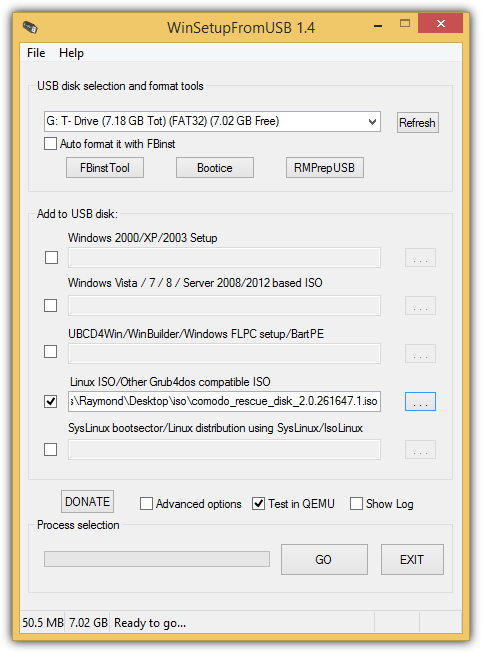
Similarly to MultiBootUSB, the ISO files must be added to the USB one at a time. An option to test the USB in QEMU is also available. The official WinSetupFromUSB website shows that it is able to support up to 17 different antivirus rescue disks.
5. Easy2Boot
Easy2Boot is a new side project by the creators of RMPrepUSB to create a multi USB. It doesn’t come with a nice looking or flashy graphical user interface and it requires some manual steps that involve installation, extracting and copying of files. Fortunately there is no need to edit any boot loaders configuration files. Here are the steps to create a multiboot USB containing multiple antivirus rescue disks.
5a. Download RMPrepUSB and install.
5b. Download Easy2Boot zip file and extract. There are 2 types of Easy2Boot files, one with (DPMS) Driver Pack Mass Storage and the other without it. If you’re unsure, simply download the one with DPMS for completeness.
5c. Insert the USB flash drive that you want to install the antivirus rescue disks on.
5d. Go to the folder where you’ve extracted the Easy2Boot, and go to _ISO/docs/Make_E2B_USB_Drive.
5e. Right click at the Make_E2B_USB_Drive.bat file and select “Run as administrator”.
5f. You will need to type the drive number (NOT the letter) of the detected USB flash drive and press Enter. In our case, it is the number 1.
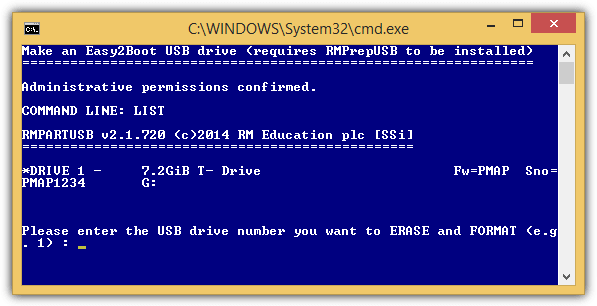
5g. Now the batch file will warn you that it will format the drive that you’ve specified. Press Y and ENTER.
5h. You are now asked if you’d like to format the drive as FAT32 or NTFS. If the ISO files are over 4GB in file size, then choose NTFS, otherwise FAT32. Press F for FAT32 or N for NTFS followed by Enter.
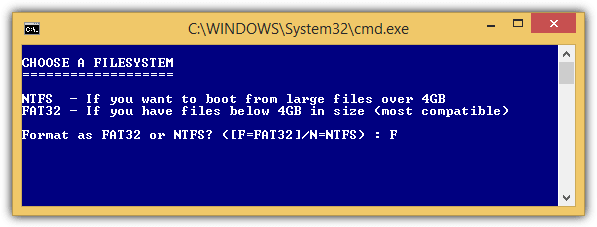
5i. Click the OK button to confirm the format. When the format has completed, the batch file will automatically copy Easy2Boot files to your flash drive and install Grub4dos. When finished, press any key to close the command prompt.
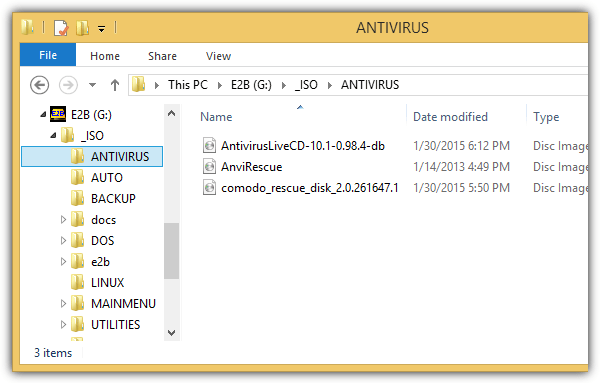
5j. Your final step is to manually copy the antivirus rescue disk ISO files to your multiboot USB flash drive. For antivirus rescue disk, copy them to X:\_ISO\ANTIVIRUS, replacing the X:\ with the drive letter of your USB flash drive.
6. XBoot
XBoot is an older tool to create a multiboot USB and was last updated in 2011. Simply drag and drop ISO files into the program and the recognized ISO will be automatically categorized. For unrecognized ISO files, you will be asked to identify it from the list and if you can’t find a suitable one, simply choose the first option which is “Add using Grub4dos ISO image emulation”.
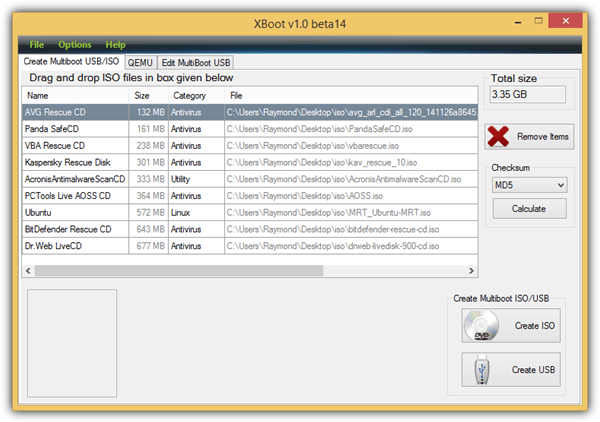
Since XBoot hasn’t been updated in a while, the list of identified ISO is also quite small. The booting of USB using QEMU didn’t work when we tested it on Windows 8.1 but it was able to boot an ISO file. The Edit MultiBoot USB tab allows you to reinstall Syslinux or Grub4dos bootloader.
Additional Notes: Even though some of the tools above can install multiple antivirus rescue disks into a single USB flash drive, it does not necessarily mean that all of them can run without problems. Hence it is important to test every antivirus rescue disk after creating the multiboot USB flash drive.




Link to MultiBootUSB does not work any more…
The link has been fixed, thanks for the report.
Can I use YUMI to boot Kaspersky Rescue CD from hard disk ?
I make a drive 5GB and want to make it for Kaspersky , Acronics
What is your advice ?
YUMI will only write to USB devices, to boot from hard disk you might like to look at putting the entries into the Windows boot menu, have a read of this:
https://www.raymond.cc/blog/boot-an-iso-directly-from-the-windows-boot-manager/
Thank you , I like it !
Great idea and fantastic program. Thanks
absolutely love this tool thank you so much.
Thank you very much for presenting this software.
Thank you very much for your useful tips.I cannot imagine living without this wonderful forum led by Mr RAYMOND.
this is a great tool to have in your IT kit i will definitively burn it on a DVD
Thank you for another great program.
Wooo… So many things in one. This is nice. Thanks.
YOU ARE THE MAN THANKS A LOT MORE POWER DUDE!!!
Hello Raymond,
Thanks to you, Davide and the companies who are allowing their resources to be used!!!!
Mark
thanks for your info Ray..
I’ll try this tool
thanks man
great raymond.. awesome! i work as computer technician and this is what i need.. thanks a lot!
Cheers for the help Raymond, I had put the .exe in with the ISO files, now Ive done as you advised, all is good.
Thankyou for your patience.
looking forward to use it
thanks ray!
It works very well
It’s fantastic
Great article Raymond. Thanks.
A great tool for technicians.
I checked sardu.exe at Jotti’s
The result of all AV (Avira too) is: Found nothing. Sardu.exe is safe.
thanks ray :D
hey, thanks to you raymond as well as Davide Costa for sharing and creating this. you people are simply great….
Raymond,
Thank you very much for your daily posts which I consider very important and I like them a lot! Thanks for your help.
great work
just what I’ve been looking for.. thanks ray
thanks
thanks for this useful info Ray…as the saying goes, “its better late than never” (of not knowing earlier)
Thanks for the tip, Raymond.
Great Info Ray.. Will try it out..
Thanks Raymond, best info/tip for the year
Great stuff as always!
Thanks for the wonderful article.Definitely gonna give it a try!
Thank you Raymond
Wow… Thanks for the share dear Raymond.
Its a wonderful information…
awesome!! thanks for the info.
Thanks Ray, I was waiting for something like this. :)
Wow quite interesting Tools… definitely worth having it.,..
Thanks Raymond.
Thanks for sharing it !
Happy National Day to all Malaysian !
Thanks for sharing these great things ray.
This is a utility to have it with us on the road of pc fixing. Thanks for this info.
Thanks again for a helpful post, really i need this kind of software . Keep up your good work
thnks Ray, this is what i am waiting
Thanks For sharing Raymond.