
5 Solutions for Kaspersky Installation Ended Prematurely Because of an Error


 7 min. read
  Published on

Kaspersky Internet Security and Anti-Virus are highly popular and well respected commercial security products and a recommended choice if you prefer more functions and protection than a free antivirus program offers. We’ve also previously shown you how to get a year’s license for Kaspersky Antivirus 2013 completely free. A major issue with most security software has always been they rarely uninstall themselves cleanly from your computer and can also have issues on installation as well because they need to hook deep into your system.
Kaspersky Antivirus and Internet Security products have commonly suffered with an error during the setup process which prevents install and asks for a reboot to continue. After restarting, the problem remains:
Installation interrupted
Installation ended prematurely because of an error.

Although it isn’t as prevalent as a few years back, people still encounter the error and obviously making sure you succeed in getting your paid protection working is important. Here we show you a selection of solutions we have found to get around this error and allow your Kaspersky product to continue its installation. This applies to all versions of Kaspersky Internet Security and Antivirus, and possibly PURE.
1. A Leftover Registry Key
There is a registry key which can be created when uninstalling an older version of Kaspersky and for some reason this key gets left behind after a reboot. You need to remove a key called avp**_post_uninstall from your registry. The ** corresponds to a version number of Kaspersky which never removed the key. Just follow the simple steps below to remove the key from the registry.
1. Hold Win key+R or go to Start -> Run, type regedit and click OK.
2. Navigate to:
HKEY_LOCAL_MACHINE\SOFTWARE\Microsoft\Windows\CurrentVersion\Run
3. Expand Run and look for a registry key avp**_post_uninstall. For example, you might find one called avp12_post_uninstall.
4. Right click on the avp**_post_uninstall key and select Delete.
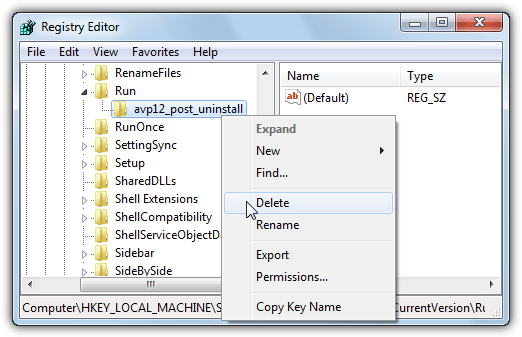
5. Now try to install the Kaspersky product as normal and hopefully the error message has disappeared during install.
This is a quick and simple fix and worth checking, even if you’re sure you haven’t installed Kaspersky previously. Note that this registry key won’t show up in most startup tuning tools such as CCleaner or Glary Utilities and needs to be checked manually.
2. Traces of a Previous Security Package
One of the most common causes for the “Installation ended prematurely because of an error” message is the Kaspersky setup has found traces from another security package that is getting in the way and stopping the installation going any further. Although Kaspersky products have recently been much better at detecting these issues, they can still cause the install process to fail.
If you know what security package(s) you’ve had installed before
It’s quite easy to use a removal tool to clear up any leftovers from a previous antivirus package if you know what’s been installed. Download and run the tool for each brand you’ve had installed on the computer, this also includes previous versions of a Kaspersky product. We have a Comprehensive List of 26 Uninstallers and Removal Tools for Internet Security and Antivirus Software where you can download and run individual removal tools. Kaspersky also have their own antivirus removal tools webpage with similar tools and recommendations.
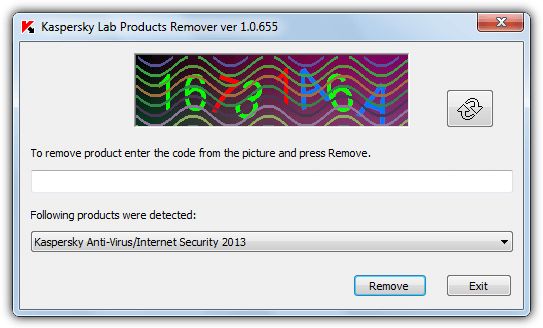
If you don’t know what’s been installed before
If you have no idea what security software has been installed before, you obviously can’t download and run a specific removal tool. Thankfully a program called AppRemover is able to detect and remove leftover data from many security applications including the most popular of Norton, McAfee, Bitdefender, Eset, AVG, Avira, Avast and of course Kaspersky.
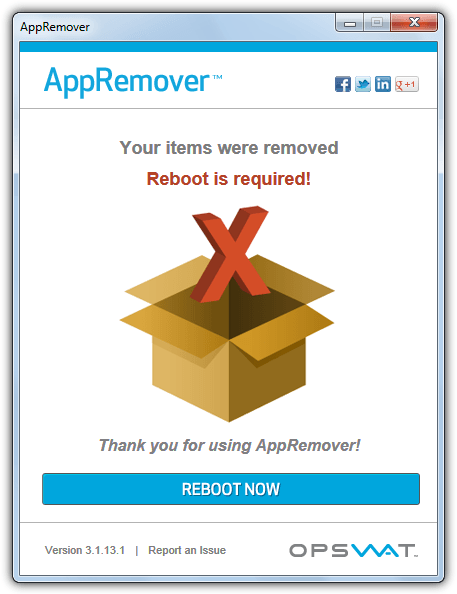
Download and run the AppRemover executable and wait for the results of the system scan. If any security software leftovers are detected you’ll have the opportunity to select them for removal. After a reboot you can try to install your Kaspersky product again.
3. A System Cache File
This solution has been known to work in several cases and is also mentioned in a Kaspersky help page. The problem can be caused by the file INFCACHE.1 which could contain corrupted information. INFCACHE.1 is used to store information about drivers and inf file locations. To remove this file:
For Windows XP
It’s easier to delete the INFCACHE.1 file in XP because it’s not protected by the system. Press Win key+R and type cmd into the run box to open a command prompt, then type:
del C:\Windows\inf\infcache.1
Reboot the system and retry the Kaspersky installation. You can also simply just browse to the file in Explorer although “show all files” needs to be enabled in folder view options to see it.
For Windows Vista and 7
In Windows Vista and 7 INFCACHE.1 is protected by system permissions and can’t simply be deleted, you need to be the owner first. Download Take Ownership which is a right click menu entry to gain ownership of files and folders. Double click the reg file in the archive to import the data into your registry, then navigate to:
C:\Windows\System32\DriverStore
Right click on INFCACHE.1 and select “Take Ownership” from the context menu. Then delete the INFCACHE.1 file.
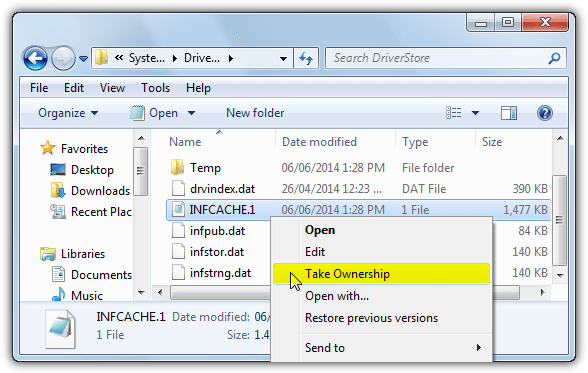
The other file in the zip archive can be used to remove the Take Ownership entry if you have no more use for it. Reboot the system and try the install again. INFCACHE.1 is not present in Windows 8/8.1.
4. Other Security Software Causing a Conflict
While Kaspersky products are now better at detecting currently installed and incompatible software, problems can still arise for lesser known software and cause the installation to fail. It has also been the case that other third party products are also sometimes missed or wrongly detected. Comodo Firewall has been known to cause issues with Kaspersky Antivirus because it can get detected as Comodo Internet Security which includes the antivirus component.

Also other antivirus, firewall, antimalware or antispyware currently installed may be an issue. The best solution is to completely uninstall any other security software you may have on the system and try to reinstall Kaspersky. Optionally use the dedicated removal tool as well from solution #2. Then if all goes well and Kaspersky installs correctly, reinstall the other software again.
5. The HOSTS File and the Registry
Although these last two methods are not known to be a major factor in ridding yourself of the installation error, they are recommendations from the Kaspersky forum so are worth trying if all else fails.
We recommend you simply download Microsoft Fix It 50267 which will automatically reset the HOSTS file on Windows XP, Vista and 7. Windows 8 users will have to do it manually, this Microsoft support page tells you how to reset the HOSTS file for any Windows OS manually back to default.
Which tool is the best for registry cleaning is mostly a matter of personal opinion. For less aggressive cleaning we would recommend CCleaner or Glary Utilities although to remove more obscure registry keys, something more powerful may be needed. PowerTools Lite 2013 is one of the most thorough registry cleaners available and recommended for this task.
1. Download PowerTools Lite 2013, install and launch the program.
2. Click “Registry Cleaner”. If you have no security software currently installed, also click “Additional Safety” and untick “Antivirus and Antimalware software” and “Firewall software”, this tells the program not to ignore security software when scanning.
3. Hit Start and let the scan complete, press Ctrl+A to select all entries in the list and then click Fix. Close the program and try to install Kaspersky after rebooting.
If you encounter any other issues which you suspect may be due to the registry clean, PowerTools saves backups of all the fixes so you can restore the selected keys.



Improve this guide

User forum
0 messages