Keyboard LED as Indicator for Windows Incoming and Outgoing Network Packets

Posted By Raymond In Category: Computer

Nov
12
2009
Donate

I like the network connection icon for XP that is in your notification area compared to Vista or 7 because it’s very clear and visible whenever you have network activity. The connection icon for Vista and 7 has improved with nicer and smoother looks but I personally felt that the “blink” is not bright/visible enough to know if there are incoming/outgoing traffic.

Keyboard LED as network indicator
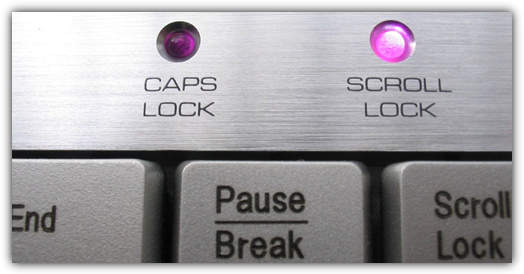
All keyboards has LED so you can easily tell you if you have Numlock, Capslock and ScrollLock enabled/disabled. I found a small tool called Network Lights which really doesn’t do much except giving you a nice little indication on your network traffic by blinking your keyboard LEDs whenever you have outgoing or incoming packets on network interface.


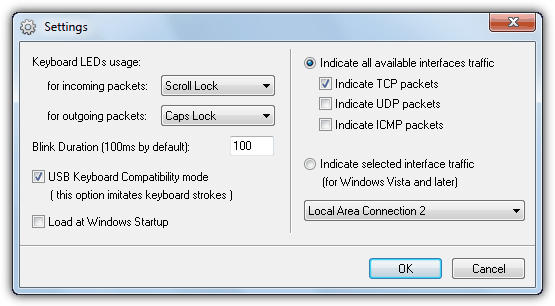
This utility is a standalone executable. Run the program, you’ll see a new system tray icon. Now you can monitor your network traffic using the ScrollLock and NumLock LEDs on your keyboard. You can use the system tray icon (click the mouse) to customize program settings. If you have an older motherboard and your keyboard LED doesn’t blink when there are network traffic, try going to Settings and enable “Force Keyboard Capture” option.

Network Lights settings

Network Lights is only 96KB in size and takes only 1MB of memory when it is running. Lasted updated on June 2006 but I’ve tested it on Windows XP and Windows 7, both seems to work without problems. I am not sure which network connection it will indicate if you have more than 1 network connection. I bet this program will make your keyboard looks cool especially at night when all lights are turned off.

[ Download Network Lights ]


Related posts:
  • Novell Disable Login Feature in Windows With Network Share Monitoring
  • Universal TCP/IP Network Bootdisk for Microsoft Network in Floppy and Boot CD
  • List of Keyboard Shortcuts To Help You Speed Up Your Computing Tasks
  • Network Benchmark – Test Your Network Speed
  • How To Share Keyboard and Mouse On Multiple Computers
    • Gaurav

      great Ray..its working but i think key board light are not for this purpose…they r not modem light
      there is every chance of them getting fuse
      what say
      pl comment Ray! i am afraid

    • Gaurav

      i think blink rate can be increased from 100ms to 999ms
      what say Ray

    • Tommy

      That’s pretty neat. On my laptop, the LEDs are not close enough together to be useful though.

      Is there a way to get the standard blinky icon in windows 7? Right now all I see is the signal strength bars (I’m on wifi).

      Thanks,
      Tommy

    • Raitokun

      I tested it is very beautiful, thanks Ray

    • Tommy
    • SB

      Cooool Share ray
      thanks a lot & keep Blinking :)

    • Poosy

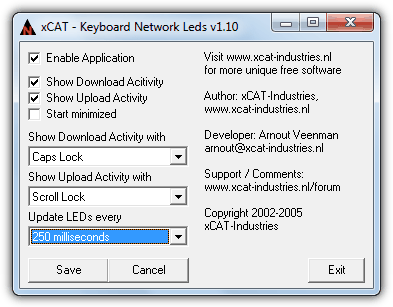
      You can use iTraffic Monitor, as it does the same thing, but sits in the system tray and goes green when theres traffic, and pink when theres none

    • ahmad maher

      lol, i was just thinking about that last night, i found a program called lan light ntf http://www.dalesplace.net/download/lanlight.php but i did not try it yet … now i have 2 ways around that issue :)

      thanks Ray

    • suresh

      hi,
      good one……

    • http://www.digifuntush.blogspot.com Digifuntush

      Nice utility. :)

    • jc onte

      its not working on my usb keyboard, my net is pppoe

    • norman

      That’s cool Ray! Last time, I’m also struggling with the connection of internet and it’s really frustrating because I wanna read some of my emails. Good thing that you introduced this tools. I’ll try for my PC. Thank you very much Ray!

    • shafqat Iqbal

      Great new one

    • Rash

      brilliant share thx!!

    • vhick

      Its cute :) and its works!

      thanks!

    • sean

      didnt work on my laptop(compaq presario v3000)! help anyone!! ray!

    • alex_voyager

      i want the same for monitoring HDD activities!!
      Where??

    • Peter Junir

      This is sooo coool!

      My connection is PPPoE also but my keyboard is ps/2 not usb..

    • jcym

      alex_voyager, there are quite a few keyboard LED HDD indicators, freeware and paid for. Two which I have tried are:

      1. O&O’s Drive LED2 which is available from a number of freeware sites such as;

      http://o-o-driveled.en.softonic.com/

      Note: (the latest, i.e. version 3, is paid for)

      This can either place a small bar on screen (which you can place where you want and also opt to hide when you move the focus away from it or minimise leaving only the tray icon) to show individual disk’s activity or can use the keyboard’s Scroll Lock LED to show HDD activity. This is quite a big package and more complex than the one below but also allows many more options, such as displaying Network Drive activity. This usually needs a reboot to complete the installation and also doesn’t start automatically with Windows from the off. To start it with Windows either Right Click on the bar or on the Tray icon to access settings and Check Automatic Start.

      2. http://forums.laptopvideo2go.com/topic/9538-keyboard-scroll-lock-led-hdd-activity-tool/

      is a much simpler tool and doesn’t need installing, just extract it and run. Right Click on its Tray Icon for access to the only option of Start with Windows.

      And of course, as usual, there’s always google (FYI, in case you haven’t heard about it, Google is this magic web site that allows you to search for just about anything :) ) if you want others to try. There are plenty out there, just search google with something like ;

      keyboard led HDD disk activity

      add +freeware to the end of the search line if you want to limit the results purely to freeware. However, I have found that it misses quite a few freeware offerings if this is added to the search line as not all sites have the term freeware in the right place for Google to catch it when it crawls sites.

    • Mark

      Wow!

      Soo cool!!

      Thanks Ray!!

    • Roger

      Ray, I tried Network Light about a week ago to do the same.

      However on my compuer at least it would sometimes interfere with normal keypresses – sometimes I would press a key and it would not register.

      So I am currently looking for a better solution.

    • http://acarossa.web.id Quro@75

      Hi Ray, already try it and so… cute. But now I have to remove it from my system, my laptop’s keyboard often refuse me to catch the click on it.

    • Proposal

      1. Why can’t we make the Blink Duration less then 100ms? I, for example, have very bright LEDs and it would be better if I set it to 10, 20 or may be 50 ms.

      2. Why not to use reverse indication here (XOR). If, e.g I set on, then NumLk LED should be on all the time, except packets are going (it’s turned off for Blink Duration time). This way it’s possible do not brake the main functionality of LED’s (indicating status of NumLk and ScrollLk, which is pretty static) and to show network activity at the same time.

    • jcym

      Proposal, if you go to the download site you can download the necessary source files in VC++ and modify them yourself if you know how. Just look to the right of the program download link and you will see the link for a .zip of the source files.

      I have had a quick look at the source code and everything appears pretty straightforward from a labelling point of view and shouldn’t be too hard to understand and modify for anyone conversant with Windows and VC++ or just C++.

      Sorry, can’t be bothered to have a go myself as I have no need for the tool and have more important things, to me anyway, to waste my time on :). Of course, you could always send your suggestion directly to the maker via the download site, as that would likely prove more productive than posting your suggestion here. There is even an e-mail address directly underneath the download links in the Feedback section.

    • Proposal

      network-lights-src.zip file offered for download contains just only one CPP file (and its header file). It’s impossible to make a build with it. Lot of other files are missing. :(

    • jcym

      There is even an e-mail address directly underneath the download links in the Feedback section.

    • http://www.e-alkes.com Medical blog

      It’s work,..thank you

    • H@di

      Work’s for me, thanks. It’s very cute program.

    • http://www.studentbrands.co.za Student Brands

      Cool…thanks

    • mamen

      In http://www.howtogeek.com/howto/7230/get-the-classic-style-network-activity-indicator-back-in-windows-7/ there’s a small guide to configure a freeware utility called “Network Activity Indicator” (C++ source code available) to replace the actual network icon with the older, like in windows XP.
      Network Activity Indicator can be downloaded from:
      http://itsamples.com/network-activity-indicator.html
      Ray, it’s from the same author of Network Lights, that you used in your article.

    • Mn3mic (Joc)

      Great find, will check it out ;)

    • Xforexer

      Pardon me. Does anybody realize how to find true Expert Avisor from fraudulent and a clear signal from fake? big thanks

    Copyright © 2005-2012 - Raymond.CC Blog