Make Windows 7, 8, 10 and Vista 32-bit (x86) Support More Than 4GB Memory
As you’ll know, there has been 2 versions of each Windows starting from XP which are 32-bit and 64-bit editions. Sometimes a Windows 32-bit is referred as x86 and 64-bit as x64. We won’t go into details on what are the differences between x86 and x64 are, but one of the major differences is a 64-bit Windows can support more than 4GB of RAM. If your computer has 4GB of RAM and you’re using a 32-bit Windows, you’ll notice that only about 3GB – 3.5GB is being recognized and the remaining memory is gone. Weirdly, Windows 2003 and 2008 can already address more than 4 GB of memory so why can’t we do that with Vista and newer operating systems?
The answer is: Microsoft doesn’t want that and it’s all just a licensing matter. Contrary to popular belief, there is no physical reason why a 32-bit Windows cannot access memory above 4GB, but it’s more a case of Microsoft opting not to allow it. Read the findings of software analyst Geoff Chappell to find out more.
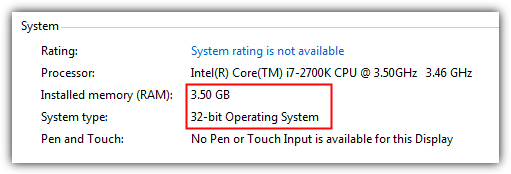
We can of course go for a 64-bit version of Windows, but even today, there is still quite a lot of software which cannot run properly on x64, which can be inconvenient if you’re someone like us who installs and tests a lot of software. Not only that, Windows 64-bit doesn’t accept unsigned drivers unless you disable driver signature enforcement manually every time you boot. Quite frustrating… Well, here is good news for Windows 8, 7 and Vista users because we have some patches here to make your 32-bit Windows support more than 4GB of memory.
There have been a few 4GB patchers available, but unfortunately most of them haven’t been kept up to date. For example, the RamPatch tool over at unawave.de works quite well on Windows 7 RTM, but was never updated to reflect the changes to the kernel files in Service Pack 1. Also the program was removed from the website due to many false positives from antivirus software.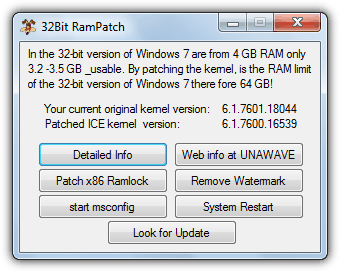
We have tracked down the program and you can download and try it out on Windows 7 if you wish. Although some users have reported no issues running the patched kernel file from SP0 on an SP1 install, we suspect there may be stability or compatibility problems that will arise as a result of this at some point. Consider this program a useful tool to test with and perhaps not something to use permanently.
Luckily, there is a method which has been kept more up to date, and although it’s not quite as easy to implement as the RamPatch tool above, it’s still not that difficult. PatchPae2 is by Wen Jia Liu, also known as “wj32” who is behind the excellent Process Hacker task manager software. This is a small command line tool that will patch the needed system files to enable 4GB and more of memory in Windows Vista SP2, Windows 7 RTM and SP1, and Windows 8 RTM 32-bit. Follow the steps below to enable a patched system, the core system files ARE NOT overwritten meaning you can revert back without too much fuss.
1. Download the PatchPae2 command line tool and extract the zip file to a folder of your choice. For our example, we’re extracting to the root of the C drive.
2. Open a Command prompt with Administrator privileges by pressing the Win key, typing cmd into the search box and then simultaneously pressing Ctrl+Shift+Enter. Then type the following:
cd C:\Windows\system32
3. Now, Windows Vista and 7 users type:
C:\PatchPae2.exe -type kernel -o ntkrnlpx.exe ntkrnlpa.exe
Windows 8 users type:
C:\PatchPae2.exe -type kernel -o ntoskrnx.exe ntoskrnl.exe
This makes a copy of and then patches the Windows kernel file to enable the extra memory of 4GB and above.
4. Type the following to make a copy of and disable signature verification in the Windows loader file:
C:\PatchPae2.exe -type loader -o winloadp.exe winload.exe
5. Enter this to create an entry in the Window boot menu, you can change the text in quotes to what you want:
bcdedit /copy {current} /d “Windows Vista/7/8 (Patched)”
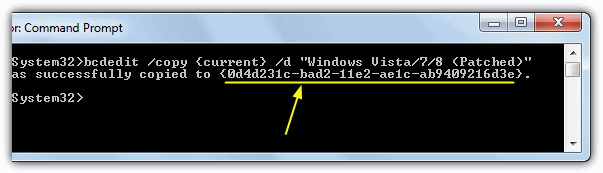
This should give you a “successfully copied to…” message with a number of BCDID characters returned in brackets, make a note of them as you will need to enter them in the following commands.
6. Enter the following commands in turn, pressing enter after each. Replace BCD_ID with the ID you got from step 5:
bcdedit /set {BCD_ID} kernel ntkrnlpx.exe (for Win 8 use ntoskrnx.exe)
bcdedit /set {BCD_ID} path \Windows\system32\winloadp.exe
bcdedit /set {BCD_ID} nointegritychecks 1
Now reboot your computer and you should get a new entry on the Windows Boot Manager to run the patched operating system.
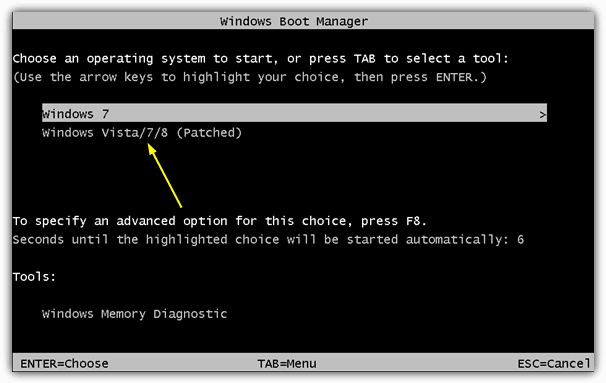
The good thing here is if you have problems, you can simply switch to the unpatched normal system by rebooting because the kernel files were copied and not overwritten. When you boot the patched system, a quick check should show that your amount of memory is now fully utilized. Do note that you still might not get access to all memory if some of it’s shared with the video adapter, e.g. 512MB onboard graphics.
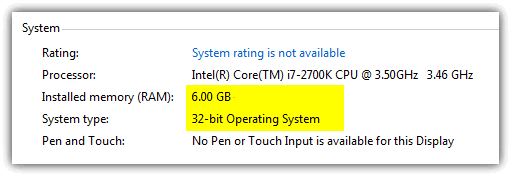
As you can see from the image above, we now have a 32-bit Windows 7 showing there is 6GB of installed RAM available.
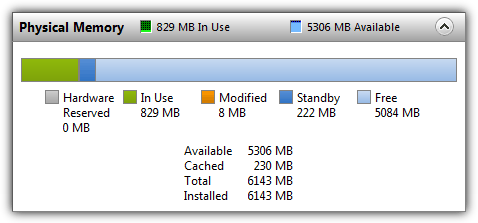
This next image shows that Windows Resource Monitor confirms there is 6GB of memory installed and ready to be used, with over 5GB still available for use.
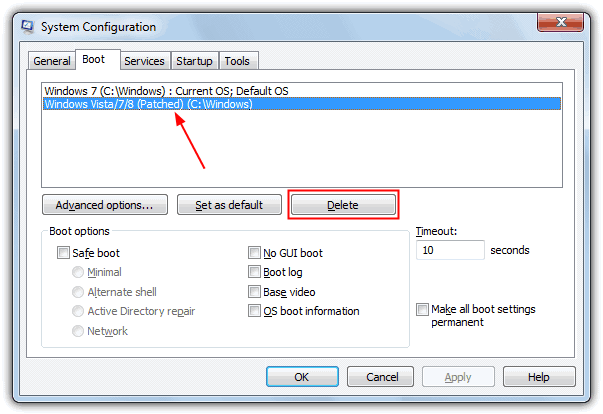
If you want to uninstall this patch again from your system, simply boot into the unpatched Windows, press the Win key, type msconfig and press enter. Then select the boot tab and highlight the patched boot entry, click Delete. This screen can also be used for reducing the timeout and selecting the patched install as the default o/s to boot into if you plan on keeping it permanently.
Also optionally go into C:\Windows\System32 and delete the ntkrnlpx.exe and winloadp.exe files. If after a Windows update you find the patch no longer works, re-run the command from step 3 to patch the kernel file again.
Important Note: Do be aware that PatchPae’s developer offers no support of any kind for this tool and if it works, fine, if it doesn’t, forget about it and move on. It’s also important that you make full backups of your system prior to trying PatchPae. Even though it does not overwrite any system files, that does not stop users from being unable or unwilling to follow the guide correctly, which could stop the system from booting into Windows.




It worked for me, just follow the instructions. In step 4 if you get “Failed” just ignore and proceed with the steps, you can disable signature verification at startup by pressing F8 and selecting the last entry.
Intel Core i5 760 @2.8GHz with 8GB RAM, running Windows 7 Ultimate.
This f***ed up my windows. Now i have to install windows again. Only makes copy? LIE . Does not affect your current windows ? LIE
If you have had so much trouble you likely have not followed the guide properly or you tried to cut corners. Had you followed the guide correctly you would have had a separate boot menu entry for the 4GB patch and your original boot entry that can be used to boot normally without the patch.
The whole point of this tool is it does NOT overwrite any system files and instead makes a copy of a couple and then uses them to boot the system. So I’m afraid they are not lies and you are mistaken. Whether your files were overwritten or not, it would have been entirely possible to get your system back up and running without too much trouble.
The patchpae2.exe file from Wen Jia Liu (wj32.org/wp/2016/02/01/pae-patch-updated-for-windows-10/) does not work with an up to date Windows 7 SP1 installation due to a new loader from Microsoft. However, Jarek has modified the patcher to work correctly with the new loader: jurasz.de/en/jarek/patchpae2.
If you attempt to boot using the steps outlined above with the original patcher from wj32 then Windows 7 will detect a problem and “attempt to fix it” (however, you can just reboot and select the non PAE boot entry to get back into Windows). Which may be what the OP was talking about, albeit poorly explained.
As was mentioned by Zaltko, In step 4 it “Failed”. And as was mentioned by RoboCop, “”attempt to boot using the steps outlined above with the original patcher from wj32 then Windows 7 will detect a problem and “attempt to fix it” “”. Rather than do a hard shut down I let it proceed, eventually it said it could not be fixed. After reboot I was able to boot to the unpached version successfully. I then proceeded to the download @ jurasz.de/en/jarek/patchpae2. It is just the executable .exe. I saved it to disk and copied it to C:\. Rather than removing the previous patch I followed the steps mentioned at the bottom of the above Instructions regarding updates, “” If after a Windows update you find the patch no longer works, re-run the command from step 3 to patch the kernel file again””. I figured being in the system32 directory would still apply so ran step 2, 3 and 4 using the executable from jurasz.de/en/jarek/patchpae2.
I have successfully booted using the patch! Thank you very much for your hard work. And thank you to those of you with positive comments. As mentioned above some of your comments were key to success! Thanks again!
After successful boot, system appears to be much faster, Firefox seems to be loading in about 1/3rd the time it was before and is less laggy, Microsoft Word just pops! No wait! Truly Awesome! Someone mentioned something about instability.. Cannot comment on that at the moment as posting this comment is one of the first things I have done since the successful boot only about 40 minutes runtime since boot but so far looks great
System Config: Sun Ultra 40, 2x Opteron Dual Core 280, 16Gig RAM, AMD ATI Radeon 7870, on Windows7 Ultimate SP1.
It worked for me, but Windows 7 became unstable. My computer rebooted randomly twice before I decided to delete it. Windows isn’t as fast as before, and my hard drive works harder when I open my browser.
Acer Aspire 4720Z Pentium Dual T2310 1.5Ghz ,Vista Home Prem SP2,
with (2) 1 Gb ram =2 Gb
now (2) 2 Gb ram with PAE Patched = 3 Gb ram
Using current setup, until solution for 3Gb to 4Gb is found
Hello, it works for Windows 7 starter? thanks.
It also failed to me in step 4, using Windows 7 Pro and 16GiB of RAM installed.
I patched mine and the signature override failed, but I completed the patch and made it default boot os in msconfig. when i start my comp i press f8 and select the option at the bottom to ignore signature verification. my comp is now using the full 8gb installed and super fast
Hi. I went through the list of commands, at step 4. I get a reply “failed”.. everything else completes fine but when I boot from the patch system windows fails to start and it goes into auto repair process… Any recommendations?? Thanks
Hello! I understand from a comment above that it doesn’t make much sense to try this with systems having got 4 GB RAM… OK, but can anyone tell me why my HP T610 Thin Client running Win7 SP1 shows only 2,5 GB avavilable memory? Both the BIOS and Resource manager recognized the 4GB. Thansk in advance.
when i type bcdedit/set {id} i got message like this “Run “bcdedit /?” for command line assistance. Element not found.” Can you help me ?
Did you type the rest of the command, i.e. bcdedit /set {ID} kernel ntkrnlpx.exe ?
quad core, gigabite p35 motherboard, 8 gb ( 3.5 usable )
Does it work for me?
Most probably YES. Generally, there could be eventually some issue with poorly written drivers (p.e. graphic), you should try itself.
I am using desktop win7 32 bit with 4 GB installed but only 3.25 GB usable. I followed the steps but it failed at Step 4. Could anyone help, please? Thank you in advance.
Why are you trying to run this tool when you only have 4GB of RAM?
The machine in question here is HP dc7100 CMT which runs up to 4GB RAM max. The other machine I have HP dc7600 CMT which can go up to 8GB max. If this tool works with the 7100 model, it stands to reason it will also with the dc7600. At present, I installed the 8GB to the 7600 unit but only 3.5GB is usable. Both machines are 32 bit, and have ATI radeon graphic card, with Pentium 4 for cpu, 3.6GHz and 3.8GHz respectively.
Thank you again for more help.
Logic goes out the window with tools like this so you can’t assume anything will work. For instance, it could crash and burn on the 4GB machine just by the fact it has 4GB. There is no extra RAM to get back because the 0.5GB you are missing is in use by the system.
Just a suggestion, but Win 7 is out of support soon, it might be a good time think about switching to something newer with proper 64-bit and >4GB support.
These 64-bit OS’es eat memory x2 times, dont forget. Of course, nowadays RAM is cheap, but nobody noticed – 64bit so-called modern OS’es eat a lot of ram just by design. So, adding 4+4ram just to install 64bit OS == it eats ram twice, eating all what you added. Okay, we get access to it without hacks, but ..
Also, 32bit software is executed in 64bit enviroment not as native, its emulated. It adds slowdown (somewhen, significant) , so no speed added from ram upgrade \ OS “upgrade”, as a result.
Wait, I have 4 Gb of RAM too. I just followed the process and everything went as expected.
Can I damage my RAM if I keep using this patched kernel??
Should I switch back? How do I do it?
No, you can’t damage your RAM running this patch. All it does is allow the OS to see the extra memory, nothing is done to the memory itself.
Also, I read in this SuperUser thread that unlocking RAM wont do any difference for 32 Bit users. The maximum capacity will be exceeded, but it’s pointless because you still CAN’T use more than 3,8 Gb RAM on 32 Bit.
So, whats the point on even doing this?
Here’s the thread:
superuser.com/questions/394630/can-i-have-8-gb-ram-on-32-bit-win-7
That’s the point of the tool and the article we link to, they say RAM over 4GB is accessible and the limit is an artificial limit, not a hardware limit.
Hi, it does not work with NVIDIA drivers. I have a BSOD of Video Scheduler Internal Error.
How can I overcome this?
Will it work on Win 8.1 x86 the same way as it works on win 8 x86 ?
Thanks.
it worked fine on win7 ultimate
oh well “it worked”, but nvidia driver crashes and restart 3 times (on win7 home pro), and then a BSOD happens… so nvidia driver is not PAE friendly…. SADLY, since i read somewhere that drivers that usuallly have 64bit versions were suppose to work fine on 32bit with PAE
Hi Greg,
You should try 32 bit only driver. It is possible that your 64 driver has a 32 bit driver as well but make sure that it has one.
why does the patchpae2 soesnt work in windows pro with service pack 1?
I’m running Win 7 Pro on 64bit hardware, fully patched as of 8/25/17.
I was able to successfully patch the kernel as per step 3.
When doing step 4 (PatchPae2.exe -type loader -o winloadp.exe winload.exe) I get the response “Failed”. Just in case I finished up the steps and rebooted to the patched OS and it crashed.
I deleted the patched Boot entry in msconfg, and started over rebuilding the patched OS but using the original winload.exe (skipping step 4 and skipping the bcdedit for winloadp.exe in step 6). Still crashes.
Any thoughts or suggestions?
Did you ever get this to work? I get the same error on step 4.
Didn’t work for me.
I am using windows 7 Ultimate 32 bits (my processor supports 64), but it didn’t work. When I reboot, it fails to initialize and starts the “repairing tool” (or whatever it’s called in english). After it “repairs”, it restarts again and try to boot it with the patched windows, which fails agains and does an infinite loop (restarts > fails initialization > repair > restarts…).
It seems to me your article is aimed at people who are running 32 bit windows on 64 bit systems. If however they are using it on a 32 bit system (32 bit processor such as say Pentium IV or so for example), then there is indeed a physical reason why the OS cannot access memory up to and possibly above 4Gb and that has to do with the systems possible inability to actually address that memory at a hardware level, in order to do so the system must support PAE (Physical Address Extensions), but even then, PAE is not supported on all 32 bit systems and is typically only present on some of the most recent 32 bit motherboards (say within the last 10-12 years or so roughly). Of course if they are using a 32 bit version of Windows on a 32 bit system that supports PAE then there is also no real need for software like you mentioned in your article to enable support for PAE in the OS as versions of Windows from Windows XP on up already have support for PAE built in. Though admittedly in the case of Windows XP at least it may not be enabled by default and may need to be enabled through the use of a boot.ini modification. The details of which can be found easily enough using google. Additonally there are boot.ini modifications for XP that can be used to enable support for processors using HyperThreading or similar technology which can also help to improve performance for those using XP on a newer motherboard based system.
As for Windows Vista on up a ‘free for personal use’ program such as EasyBCD may be able to add the necessary boot.ini options, including the option to allow support for unsigned drivers in 64 bit versions of windows.
On another note there are also a few utilities available that can be used to patch 32 bit programs so that they may be able to take advantage of memory above roughly 2Gb making them hence LMA (Large Memory Aware), I myself have used one such program to patch the program Bryce 7.1 Pro from DAZ so that it can utilize additional memory (after all why have that additional memory accessible only by the OS when some Programs may also benefit from its use too). One such utility can be found at ntcore.com/4gb_patch.php persons using this patch however should be aware that not all programs my behave correctly after applying it, which is one of the reasons the patcher makes a backup of the original .exe file before patching it so that it’s easy to revert to using the unpatched executable just by deleting the patched one and renaming the backup one.
While your comment is correct, there are no motherboards built into which more than 4GB of ram can be installed that don’t support either 64bit or PAE. A Pentium IV might have 4 DIMM slots that each take 1GB maxing out at 4GB. To put more than 4GB in you’d need larger than 1GB DIMMs. But you’ll note one of the two situations: 1GB is the largest DIMM ever manufactured for that technology (SD-RAM for example) OR the system will not boot with any of the larger DIMMs (a single 2GB DDR2 stick will prevent the BIOS from posting).
So it pretty much goes without saying that if your motherboard doesn’t support more than 4GB of RAM, you can’t install more than 4GB of ram and get windows to use it, since if you do then the system won’t boot. But if your system boots with 4GB of RAM installed I guarantee it’s either a a 64bit system or supports PAE. So if it boots, you can hack windows to use it.
FWIW, my P4 maxed out at 4 512GB sticks. It couldn’t handle 1GB DIMMs even…
Hi, I tried to use PatchPae to make my laptops see the 4Gig memory I’ve just installed. I tried the 2 modules in one machine, it worked fine, I tried them in my machine and the machine will boot up but will eventually blue screen and I have to revert to the original boot. The 1st machine worked perfectly, seeing all 4Gig of memory. I’ve been more technically harsh on my machine over the years, so could have something conflicting. Where should I look? How do I find out what’s conflicting, or should I just leave it as unsolve-able. I’m a hardware tech, with not much background in software, but am always willing to diagnose. Oh, the laptop is an Acer Aspire 5735.
But, will this modification process open up the computer to malicious exploits? What are the risks?And, how can I mitigate them?
Doesn’t work for Win 7 Ultimate.
All patching is successfully applied but after reboot computer goes to repair mode, peforms some analysis and says that ntkrnlpx.exe is corrupted.
As I can see this problem persists for years but nobody could find a desision…
same problem with me.. some vdd driver didnt load.. restarted
Not the tool in the article but the author has a different version out for Win 10:
wj32.org/wp/2016/02/01/pae-patch-updated-for-windows-10/
Bingo…
Trouble with bcdedit /copy {current} /d “Windows7Patched” ???
A DESCRIPTION FOR THE NEW ENTRY MUST BE SPECIFIED….
Using real double quote in ascii, not some weird variant you got by cutting and pasting from this page.
Copy the lines into notepad, go over the { ” ] quotes with fresh ones try again..
I think some web publishing blog engines try to pretty up the double quote by turning it
into the leading and inverted ones in pairs.
Cheeers… And now lets see how the rest of it works…
That took me 5 minutes… got lucky
Ok Cool.. that seemed to work.
Pavilion DV2412ca 4gb ram installed Windows 7 ultimate N, SP1 clean install.
Many thanks for the walk through and of course Kudoes to the orig dude who made the patch
PatchPae2 by Wen Jia Liu,
Nope. still failed.
I tried. I got the same problem as Tim Edwards. However I have not tried disabling my antivirus yet during the patch of the 2nd command line for creation of winloadp.exe by cloning winload.exe
My view is that failing this important step is causing the “checking” of the installation files. So if this step fails for you. try turning off antivirus and whatever that may protect your computer from probable viral attacks. This also means it may be more advisable to work in a non-networked environment.
I will be trying again by turning off antivirus and unplugging my lan later when i get back home tonight to attempt this again.
Tim, if you read this. and can try it now. do give it a shot and let me know if it helped. 1 month ago is pretty long.
April 2015; after updating Vista I suddenly got a BSOD ()
When trying to re-apply the patch from Raymond, I failed at the 3th step:
“A description for the new entry must be specified. Run bcdedit /? for command line assistance”
I couldn’t figure it out, but after close to 2 hours I finally solved it :)
Go to wj32.org/wp/2013/10/25/pae-patch-updated-for-windows-8-1/ and get the latest patch.
Now the 3th and following steps will work too… Enjoy!
Devvie
worked fine, prompts easy to follow. However on startup my screen displayed some fuzzy lines and when trying to login it blue screened. Slack, just go get a 64bit version.
As I said I would look at Rampatch and report back.
I have ran the program and received a copy of ntkrlICE which is a patched copy of ntkrlpa which is the original kernel.. The program does NOT at least for me write a boot load change and make it available on a reboot.. The fact is, it wants to review and repair the load just as it does for patchpae. I edited the command structure from patchpae to get the boot loader added. I suspect the issue is in the boot loader. I added a copy and rename winloader (winloadICE) to create the second load option using BCDEDIT as per the instructions in patchpae. The author of rampatch says the program will edit the boot load file, if that is the case how and where does this happen? Poor documentation is more the norm than quality writing. I am using Windows 7 build 7601 with service pack 1 and a recent ASUS motherboard.. Nothing works. Some users report mixed results as well as working versions. I find nothing to work for me. I am through with this moon walk and hope someone else will report a DETAILED writing of how they got a working version for either patchpae or rampatch. Best of luck.
C:\WherePatchPaeIs\PatchPae2.exe -type kernel -o ntkrnlpx.exe ntkrnlpa.exe: This line patches properly.
C:\WherePatchPaeIs\PatchPae2.exe -type loader -o winloadp.exe winload.exe: This line displays a FAILED flag upon completion.
Upon several trials it never works.
The pathing to the folder used for the installation does not allow (at least me) to run the file from CMD. I placed the files directly in windows\system32. The operations at least worked until the above failure.
Everything else seems to be in place and will work. Except the program forces windows to scan it’s installation and reboots. In short it fails all the way around. I am an old DOS guy so I am with in my element. The program is not right. I placed the main sub folder with the exe thinking it might be missing some sort of library. The same results. Unless the author refines his exe it is dead in the water. The first version had the same results. I never have gotten it to work. Somethings missing. I really would like to avoid using 64 bit software. I will try the other Rampatch and see what it is missing. If anything.
Thanks, Worked on my Win 7 Home. But when I put more ram in my machine, it only saw 5.5 out of 8 gb. But still more than the 3.5 I was getting before.
Perfect, it worked perfectly!
I tried this and it works. From 2.96 GB I now have 4 GB of RAM. There was also noticeable improvement in system performance. I didn’t encounter any errors in booting Windows or running my programs. I’m using Windows 7 Home Premium 32-bit. Thanks!
The program won’t work anymore, I had to reinstall windows and it just doesn’t even do anything. It says patching kernals, then it patches them and nothing, don’t get a watermark or anything. Then no change to the ram at all, no start up boot option, nothing. I tried to do it manually with PatchPae, twice, but it blue screens me on restart and messes my screen all up. Flickering and stuff. How can I get this to work again?
Will this patch work for Windows server 2003 32bit. please let me know
No, Vista, 7 and 8 only
Windows 10 works to
Works for a bit then then applications start going fuzzy resulting in an unusable experience.
I can start with new new patched version but it still only show 2.94GB usable, any suggestion? Thank you very much
By following the instructions, I get the error message below. Please advise.
C:\Windows\system32>C:\PatchPae2.exe -type kernel -o ntkrnlpx.exe ntkrnlpa.exe
‘C:\PatchPae2.exe’ is not recognized as an internal or external command,
operable program or batch file.
/Can´t make it work.
It says that my kernel is corrupted with a error message: Status 0xc000007b.
One thing that i noticed is that when i try to start the patched version, the loading screen became in English and it was in Portuguese.
It is related?
Ok quick question. I have a sony vaio vgn ar350e laptop running win 7 32bit ultimate. Sony says max ram is 2gb..I have 2 ram slots 1gb sticks in each..will this patch allow me to up the ram to 2 4gb ram sticks or is ram limited to amount by the motherboard itsself or just the os and number of ram slots? Thanks
No, you cannot change the motherboards MAX RAM input. It would only work if your MOBO MAX RAM was 4GB instead of 2GB. If that was the case you might not even need the patch as 32BIT allows you to have close to 4GB of ram
Is there a windows 10 version?
No there isn’t, no telling if there will be one.
im using vista ultimate sp2 it came up with windows failed to start. File: \Windows\system32\ntkrlpx.exe Status: 0xc000000f Info: Windows failed to load because the kernel is missing or corrupt. any help?
Any patch for windows xp sp3?
No, it was never designed to work with XP.
Thanks a lot! It worked!
i have tried to even copy and paste just thinking
will this work on my 64 bit processor quad core running a 32 bit operating system
wont seem to work for me
any thought would be great cheers mate
dennis
Tried this today 29-11-2014 – Windows 7 SP1 all up-to-date with updates.
All I get after choosing the OSW at boot is “your computer was unable to start” then it goes into System Repair. Attempting repairs … ad infinitum. Nada.
Blue screens when trying to load the patched version any fixes for this issue?
I had the same problem as one of the other posters; the patched system went into repair mode and stayed there. My win7 Ultimate is up to date with the latest patches.
Any suggestions?
works great, i’ve been looking for something like this since win7 was launched, great tool just tested on win 8 32 bits with 4g ram. To test it i opened ~40 web pages to fill the memory and everything worked great.
Thanks a lot raymond.cc
At step 4 after entering it comes up with Failed.
successfully done on my win7 32bit :
Modèle GA-880GM-UD2H
Quantité totale de mémoire système Mémoire vive 8,00 Go
Type du système Système d’exploitation 32 bits
Nombre de cœurs de processeur 3
Thanks a lot
I did mine and after restart i went to boot menu to put my full memory on then restarted again now i cant swap back all i get after the little windows 8 sighn then black screen no option to swap back
Seems like it works perfectly on my computer.
Win7 Professional 32 bit and Core 2 Duo. Odd thing about my computer is it sees the 6 gb even without the patch but saying only 2.98 is usuable indirectly saying it was intentionally locking us out from using the other 3 gb.
!!! This patch stop working after installing KB2949927 !!!
I had this problem and had to restore the system.
Hello, first I would like to say that this patch works alright. I have Windows 7 Ultimate 32-bit and when I restart after doing all the procedures and change to the patched version it starts normally, so its fine up to tht point. But when I stut my computer down and the next day I try to start the patched version again it enters the Startup Repair mode but it does not fix anything at all, it simply enters an infinite loop. I know someone has already posted a similar comment above since I have read them all in hope of finding a solution for this but no luck. If anyone has found a way to fix this Startup Repair thing please help. Again, this patch actually works.
When I installed it, everything worked fine until about 5 minutes into using my laptop, the screen flickered in multi-colors and then went blank and would not come on again. I re-started with the non-patched windows 7 and it is fine. It was still showing 70 mb reserved for hardware. Any reason why the screen would not work? I have intel graphics integrated with the ram for my laptop.
This worked great and only took 5 minutes ! Thanks for your great instructions!
-what is the pass for the .rar file because i cant open file, could you help me please?
Password is on the download page…
when i enter the command |”PatchPae2.exe -type kernel -o ntoskrnx.exe ntkrnlpa.exe” it says Unable to copy file: access is denied.why i am using windows 8.1 can u please help me
Go into windows type cmd right click run as admin
I installed the patch everything went ok but when I boot into the patched option it starts to load windows then it gets to a ” shutting down windows ” screen followed by the blue screen of death which shows a memory dump then it reboots. If I go in via safe mode it loads fine and shows my full 12 gig of ram so it seems I’ve patched everything accordingly. If anyone has any suggestions please reply many thanks in advance.
Ringy.
I’m waiting on delivery of windows 7 32 bit meantime can the above patch be used with XP pro SP3 ?
Many thanks in advance,
Ringy.
No, this doesn’t work with XP.
Read the references to XP on this page, Ringy.
I tried entering what the windows 8 users are supposed to enter, then got this message:
‘C:\PatchPae2.exe’ is not recognized as an internal or external command, operable program, or batch file.
I don’t know what to do to fix this, even though I’m sure I did it correctly.
Have you extracted the patchPae2.exe to the C drive or somewhere else? We are using C:\PatchPae2.exe as an example, if you have extracted somewhere else, you will need to adjust this.
Hi,
I tried to patch but when i start the patched version, i get the windows startup repair loop. Any workaround for this?
Thanks
basheer, I’ve done 5 or 6 laptops and all worked until this one, then this one was looping as yours is. In my case all Dell Lat E6410’s with Core i5 CPU’s, 8GB RAM and updated w7-32 SP1. I have been doing these over several months, so they were at different levels of win update. I have always run the mem patch process in an elevated cmd window (start menu|accessories|cmd, rt clcik, run as admin).
I just followed the instructions to remove the patch in msconfig, the ran through the commands again, and it’s working now. I’m dyslexic, so I copied/pasted the commands from this website and also copied/pasted the BCD_ID into notepad to past back into the cmd window.
Another thing I did different between the failed and good attempt, on the failed attempt, I just googled patchpae2 and downloaded from another site. Maybe a bad copy. On the good attempt, I came to this site and downloaded.
If going back through fails to resolve for you, you might try deleting again, then running “sfc /scannow” at an elevated cmd prompt with your win7 disk in the drive.
Guys, i guess the renitent window$ maybe rejects
the change of a write protected file as this ntkrnlpa.exe
If you want sucess, try to run the patch from the
dos shell (or boot cd). Another option would be, run the
patch (one of them, or both, as you like) with wine
from a linux live dvd/cd. Linux doesn’t cares about
write protection of window$ files. ‘stick the middle finger’
Good luck.
I run a legal windows 7 ultimate testing environment beneath linux on a supermicro workstation, whose is capable to adress up to 64GB of ram. The hardware has no
limits, but i installed 7 ages ago as i had a smaller amount of ram.
The patch started and “patch x86 RamSperre” hit shows a nice little progress bar
but nothing more. when i open msconfig under “start” there is nothing to see.
Just no entries. Even the buttons “erweiterte optionen”, “als standard” or “löschen”
does not work.
Glad i have as productivity os linux who installs by standard with 64 bit while the unfinished botch -called winow$ – prevents users from upgrading a good machine
to more memory.
Anyone have a solution?
thanks for tutorial. it worked fine on my win 7 ultimate. but after the update of nvidia driver, i could see shadows (gray areas) instead of images, and sometimes vertical pixelated lines, followed by BSOD after a while. will try again after next nvidia driver update.
Thanks
Stan
Thank you so much it works perfectly in my Desktop. Now I’ve had a fully use of my 4GB RAM. However I’ve had some doubt that it might not work in my 16GB Laptop or it may lead to future system problem. Could anyone pls clarify if this is also works w/o any problem on Laptop’s?
It should work the same on a laptop as it does on a desktop. If you’re unsure just take adequate backups to cover yourself, then try it…
Wow, thanks! Awesome
I followed all the instructions on my Core-i5 machine running Windows 7 Pro 32-bit. It seems to work although, since I’ve only just done it, I can’t vouch for its stability. There is, however, one problem. Every time I boot the patched version I get a window saying “NTVDM.EXE has stopped working”. It is precisely because I need to use 16-bit Dos programs on a very regular basis that I am using 32-bit Windows rather than 64-bit Windows, which can’t run them. Without NTVDM, I can’t run them on 32-bit Windows either. I’ve got 16Gb of RAM and I want a large RAMdisk and lots of memory to run programs in without having them paged to disk all the time. Any suggestions would be very much appreciated.
when i enter the command |”PatchPae2.exe -type kernel -o ntkrnlpx.exe ntkrnlpa.exe” it says Unable to copy file: The system cannot find the file specified.why i am using windows 7 ultimate sp1 can u please help me
For those having this issue, The ntkrnlpa.exe file can be found in the c:\Windows\System32 folder in Windows 7 SP1 32-bit. If you have freshly installed Windows 7 on a system with multiple processors, the file might also be named ntkrnlmp.exe. Just simply rewrite the and adjust the ntkrnlpa.exe lines accordingly.
One more thing to note is that winload.exe might be in the C:\Windows\System32\Boot folder.
The “PatchPae2 command line tool” works on the Win7 Ultimate 32bits? i did all the steps, but when i enter on the “patched” version of windows nothing is changed.
I have 8 gb ram, and the windows see in the patched version also 2.89gb like bifore the patching…what shoud i do?
I tried the winload command and it says it cannot find the file specified. Is this because I’m using an x64 os? I checked the computer and I easily found the winload.exe file. Weird…
I followed the instructions, reboot my computer and it works like champ. Great document. I got win7 32bit with 16GB of memory. Before the patch, it only use 3.5GB out of 16GB and that was sad.
Thank You!
Using the PatchPae2.exe program and your VERY Clear instructions on how to implement it’s use has given me full access to my 8 GB of RAM under Windows 7 32-bit OS. It worked the very first time.
Most Excellent!
It works fine for my Windows 7 Ultimate K 32-bit. Went from 3gb of use out of 4gb to just 4gb of RAM. Thanks Raymond!
I followed the instructions, but after choose the patched option on boot-up Windows goes right into a start up repair. Windows won’t load unless I choose the old boot option.
Any ideas?
Many Thanks!
Rob Nolan
Same here. Vista just goes into a boot loop, continually going to the boot manager and asking me which OS I’d like to boot. If I choose the patched one, it loops back to the same screen and asks me again. I choose either, and get asked if I want to boot normally or go to startup repair, then loops back to the first screen regardless of my choice. WHY?
Worked for me. Win 7 32 bit home edition, on an elderly core2Duo HP machine. 4 Gb may be nopt that much but a gigabyte is not to be sneezed at, and definitely not worth the hassle of obtaining and installing win7 64-bit.
Thanks a million!
I have 32 bit win 8.1 pro…n followed your instruction but it showed unsupported kernel in cmd…what should I do now? plz reply
Try this version, it’s been updated for Windows 8.1:
wj32.org/wp/download/PatchPae2.zip
Hi,
I followed your explanation en it works.
The only problem is that my keyboard and mouse aren’t.
They are USB, maybe that’s why?
Works on my windows 8 Enterprise 32bit , thanks a lot
I see a lot of 64 bit users insult this patch a lot. A few things they say is true a 64 bit operating system will run your memory faster helping in benchmarks. However this patch will definitely improve memory use, memory speed and benchmarks in your 32 bit operating system. Yes the 64bit operating system is faster. But not by much if you have a good video card. If you hate to spend money and need a good video card, The 650ti will give the high end performance of an expensive card at half the price, and better specs. It should play all new game titles for at least the next 2 years. $114 plus $25 rebate and free delivery. I got mine in 6 days. newegg.com/Product/Product.aspx?Item=N82E16814127725
A 650ti in my old i5 750 8gb ripjaw 1600 matches benchmarks of 64bit users with a card around the same specs.
Hope this helps you not to feel so bad when the 64 bitters start to rip on you. However I plan on using 64bit operating system as soon as I can find a replacement modem. Like a lot of you my modem is why I had to use 32bit operating system.
Having issues with this, when I load the patch and reboot, it stops at the “Starting Windows” screen. Anyone else have this issue?
10/8/13 Thanks so much!
Works so far on my Win7 Pro and I can see all 4 GB (woo-hoo ;-). It’s nice not to see IE sucking up all my memory though. My GeForce 8500 GT (woo hoo again ;-) looks like it’s seeing all 4GB too.
I needed to put the PatchPae executable in c:\Windows\system32 and run it from there under safe mode/command line. This doesn’t sound like a problem for anyone else, but I thought I’d suggest it just in case someone needs it.
Thanks alot man ! I have a modem that us robotics refuse to make a 64 bit driver for. I was stuck with my 8 gig restricted to 2.9 because of my video card and having to run 32 bit because of my driver. But now thanks to this I have all 8 gig of mem and my cpu runs much better.
This works great – now I can upgrade RAM and boost the performance!
Unfortunately, it didn’t work on my Win 7 Ultimate system. I am not sure if the new release of Microsoft update (I keeped mine up to date) prevent it from working, but it seems I cannot avoid the forced startup check even I have done the step 5. When I chose to start with the patch, Windows just forced me to come to the startup repair and actually fixed nothing.
Safemode also didn’t work for it. Although I tought if I debug it command by command I might find out why, I really did not have energy to do that.
The original system works as before, anyway. If anyone think out how to solve the problem, please tell me.
yea. the same problem with me. I have Win 7 Ultimate, and the command lines worked, a new patched version appeared in the boot screen, but after that the Startup Repair jumped in and tryied to correct something. I let it do that, and after that it just restarted again, so if I don’t start the default system I keep going in circles with the patched version…
If you have a solution for this, please contact me!
PS: Thanks for the tips! I don’t have IT skills at all but theese steps guided me through and succeeded.
When deleting the two files in system32 form the updates that tried to stop my memory upgrade I was not able to delete them even as adminastrator. So I went into safe mode(f8 after reboot) that gave me authority to do so, darn Microsoft doesn’t want to let go of holding down my memory lol. Anyways if anyone els had issues like this after a update here you go.
I got a problem with this. after your procedure, I uncheck “maximum memory” in msconfig. if I keep it checked, the patch fails.
but after rebooting on maximum memory uncheck, the system freezes while booting in normal mode. this doesn’t happen in safe mode.
but the patch worked. cus on safe mode it shows 4GB ram, but i couldn’t load normal mode.
It worked just great. Thank you you so much! You saved from having to buy an x64 version!
Thank you, recently I read this tutorial. One question: It is not enough to run the PatchPae2 to achieve the goal?
If you mean can you get away without adding entries to the boot loader and just running the PatchPAE2 tool on a standard Windows, then yes you can.
The extra steps are merely to provide a fallback if any software causes crashing or other issues because of the patch which will stop you booting. IF you have adequate backups, then by all means run the patch on the current install.
thanks a lot
Still no problems, been running 6gb ram for about 6 months now.. still not sure if i need 6gb ram, but it’s working.
thanks again Raymond.
just try it with asus n61jq (i7 cpu 4go memory) and I can encode with virtualdub in divx format 2h movie in same time i surf with 15tab open in firefox and all run very well for now
Hi everybody,
I just wanted to testify that this patch is really working !!!! I used to work with Win7 x64 since the the first released betas, just to take advantage of the 4gb installed in my HP Pavilion laptop DV5. Last week I decided to test by myself and installed Win7 32bits which first said ” 4gb and 3gb usable ” and my nvidia declared 1,5gb of total memory (including shared) and after applying the patch the system reports 4Gb of total RAM and the nvidia reports 2Gb of total memory. I Don’t have any issue for now, and all my applications run just fine including all the games I play.
So to say : THANK YOU GUYS, YOU MADE A HAPPY MAN !
still running 6gb RAM, everything is fine. and i sure do notice a difference in computer speed, it’s nice.
Thanks again.
Earlier, none of the patches worked for me on Windows 7 Ultimate. But now, it works well on Windows 7 Professional. I can see all my 4 GB RAM.
My 2 cents:
Does this work? Sure it does.
Does Microsoft want people doing this? Probably not.
Why? Two reasons:
1) Licensing. Yeah, it sucks, but this is one of the reasons.
2) Drivers. I haven’t confirmed this for myself, but I heard that device drivers will go haywire on a system running uncrippled PAE when the driver tries to address space above the 4 GB “ceiling.”
So for those two reasons (the latter good, the former not so good), Microsoft keeps XP/Vista/7 at the 4 GB barrier with hardware mapped within that limit (not above it). Microsoft Server OSes don’t have crippled PAE because server manufacturers usually follow a strict hardware compatibility list (HCL), and the drivers are written to take advantage of PAE.
Also, the actual limit on a 32-bit OS is actually 2^36, or about 64 GB of RAM (not 128 GB like Ady (#83 above) says)…
I have Windows 7 Ultimate 32 bits with 6gb ram, and patch works for me. Thanks
First, Thanks. I have a win 7 32 bit with 4gb installed memory. I tried the patch and it worked.
some people just go on writing loads of stories about cpu architecture and what microsoft says you should do, technology is totally about challenges where trials and errors are pron, remember no venture no success, so thanks a million times for this patch as it has just worked for me, thanks again, here is what to remove the watermark with;
try it for windows 7 , works perfect !! ,
about limitations in 32 bit architecture : stop acting like Microsoft kids , i remember the Z80 back in old days on 8 bits which theoretical can address 64 K and back then where lots of sinclairs with 128K . how was that possible ? how a 32 bit operating system can access 128 GB ( yes i tried this patch with 16 GB and there are not just numbers , the memory it is accessible and usable) …….
think twice before posting , microsoft it’s full of bull with pae and other crappy methods…. paging memory can be done in many other ways…
and of course : THX RAYMOND !!!
… problem solved
It seems to work. You need to enable the memory remapping in BIOS (it’s probably within the north bridge settings). This should remap the 2GB-4GB area to 4GB-6GB, therefore, no interleaving with the videocard or other memory mapped devices.
OMFG THIS WORKS try the last link and download the file. ( i have it ) and just hit the button then hit y and hey presto all 4gb :D im happy
Wow! Great thanks! It’s work!
I’m testing this patch in professional soft and games and see no problems!
Hey thanks a lot… its working on my windows 7
Yay! it works!
This patch really works. I tried both patcher for Vista and Win7.
This Russian version patch worked !!! I now have 4 gb of ram utilization !!! thanks raymond!!!..
Working on Vista Ultimate SP2
Just using this patch and the instructions of Geoff Chappell.
this is great. another reason to still buy 32bit OS’es
I have tried, and it worked in Windows 7 x86 RTM, fully recognized 4GB RAM! Thanks!
this patch really works.
Confirm, working, tested with 2 games running in parallel on my Win7 RTM 7600:D….
Nice… nice one…
Raymond,
Thanks for this one. I have windows 7 RTM. this patch work on x86 windows 7 enabling me to utilize full 4gb ram.
i already test it with windows 7
Thanks Raymond
now i can upgrade my ram without worry about x32 and x64
two thumbs up to you and who develop this nice program!