Manually Update AVP Tool Kaspersky Virus Removal Tool Signature Databases
Kaspersky is well known for their antivirus and internet security software which effectively protects the computer from cyber threats such as malware in real time. It is not unusual for Kaspersky to be rated as one of the best if not the best by independent antivirus testing groups such as AV-TEST, Dennis Technology Labs and Virus Bulletin’s VB100. As good as it is, unfortunately Kaspersky does not offer a free version of their antivirus software unlike AVG, Avast and Avira for personal and non-commercial use.
They do however offer a free on-demand scanner called Kaspersky Virus Removal Tool, also known as AVPTool that can scan system memory, hidden startup objects, disk boot sectors, email, and hard drives for malware. Since it is an on-demand scanner, it does not automatically protect your computer in real time but you can use it to run a full scan whenever you want without fearing that it will conflict with a different antivirus software that is installed in Windows.
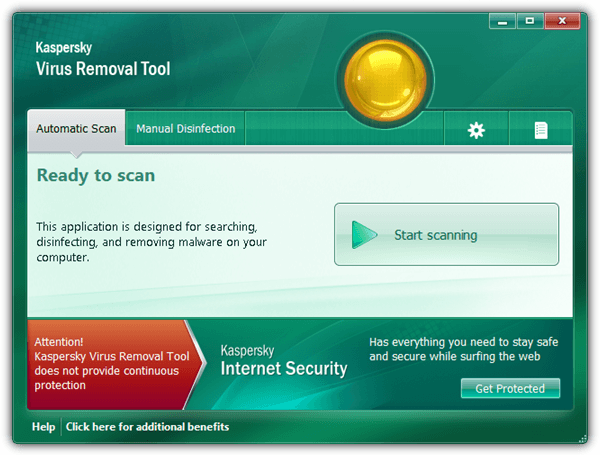
The only annoyance that we find in Kaspersky Virus Removal Tool is it does not come with an auto updater to download the latest virus definitions which means you are advised to download the new installer at 137MB in size whenever you want to run a scan with the latest signature database. An updated installer with the latest virus definitions is created every 2 hours.
In this article we’ll show you how to manually perform an incremental update for the Kaspersky Virus Removal Tool virus definitions to prevent redownloading the huge installer, saving both time and bandwidth.
First of all, you need to download Kaspersky Virus Removal Tool from the official website. It would be best to download the latest version 11 instead of the previous version 10. Select the language and click the Download button.Copying Kaspersky Virus Removal Tool To Another Location
When you run the downloaded Kaspersky Virus Removal Tool setup file, it will extract the program to a new directory that is randomly named with 7 digits in the Temp folder. Closing the program will automatically uninstall and completely remove any trace of Kaspersky Virus Removal Tool from your computer. To keep an extracted copy of Kaspersky Virus Removal Tool in your computer or an external USB flash drive, you will need to copy the folder from the Temp directory before it is being erased.
1. Run the Kaspersky Virus Removal setup file (setup_11.0.3.7.x01_2014_07_19_07_57.exe) and wait until the program runs.
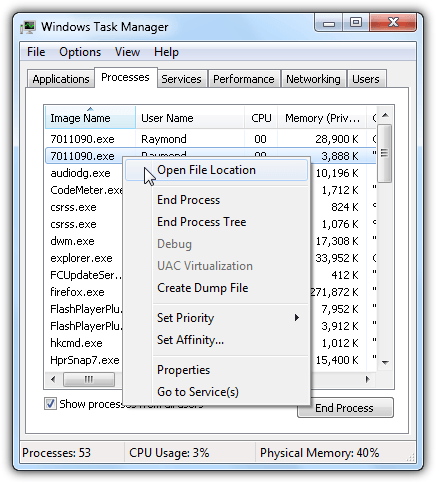
2. Press Ctrl+Shift+Esc to run Windows Task Manager and go to Processes tab. Look for two identical file name process with 7 digits, right click on the first one and select “Open File Location“. You are looking for the directory with 7 digits and not the one as RarSFX0 in Temp folder. You need to copy the folder of the 7 digits to another location such as your Desktop. You can now close the running Kaspersky Virus Removal Tool program after finished copying.
Disable Kaspersky Virus Removal Tool Self-Defense
Now that you have the extracted “portable” Kaspersky Virus Removal Tool on your Desktop, you will need to disable the program’s self-defense before you can update any of the files such as the virus definitions in the protected folder.
1. Go to Desktop and open the 7 digit folder that you’ve copied. Look for a 7 digit executable file with a Kaspersky icon and run it. That should launch the Kaspersky Virus Removal Tool program.
2. Accept the license agreement and click the Start button on the program.
3. Click on the Settings icon located at the top right of the program, go to Security Level and uncheck “Enable Self-Defense”
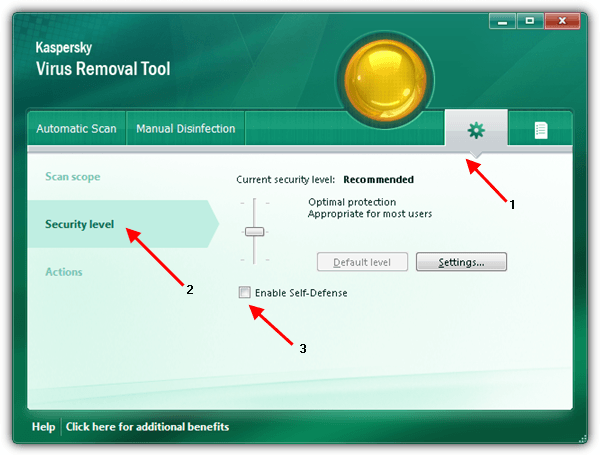
4. Close Kaspersky Virus Removal Tool. Note that you only need to do this once. When the self-defense is disabled, it will remain disabled until you manually turn it back on.
Update Kaspersky Virus Removal Tool Antivirus Database
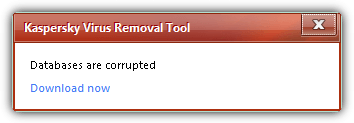
The Kaspersky Virus Removal Tool antivirus database is stored in the “bases” folder and Kaspersky’s latest official database can be found at their public FTP which is ftp://downloads1.kaspersky-labs.com/bases/av/kdb/i386/. You can simply download the changed files from FTP to the bases folder to keep the antivirus database up to date but there are over 1,700 files to keep track off and if the files don’t tally, you will easily get the error message “Databases are corrupted“.
An easy way to sync the latest antivirus database from Kaspersky FTP to the local bases folder is by using WinSCP, a free SFTP and FTP client for Windows which has the capability to synchronize between remote and local directories.
1. Download WinSCP from the official website, a portable version is available as well.
2. Run WinSCP, at the login window, enter the following information below and click Login.
File protocol: FTP
Encryption: No Encryption
Host name: downloads1.kaspersky-labs.com
Port number: 21
Anonymous login checkbox: Checked (This will automatically fill up the user name and password box)
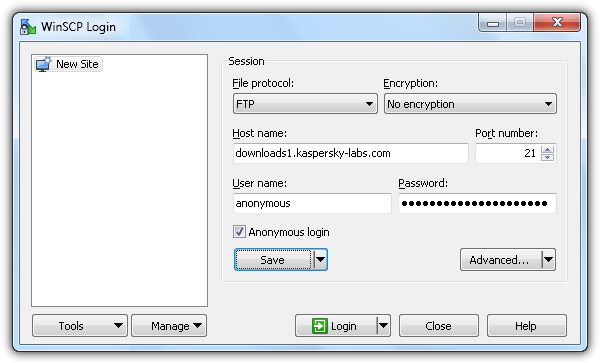
You can optionally click on the Save button to save the login information so that you can easily login in future without filling up the information.
3. Once you’re logged in to Kaspersky FTP using WinSCP, press Ctrl+S to launch the Synchronize function.
4. Click the Browse button and select the bases folder located in the Kaspersky Virus Removal Tool directory.
5. For remote directory, enter /bases/av/kdb/i386
6. Select “Local” for Direction/Target directory.
7. Select “Synchronize files” for Mode.
8. Select “File size” for Comparison criteria.
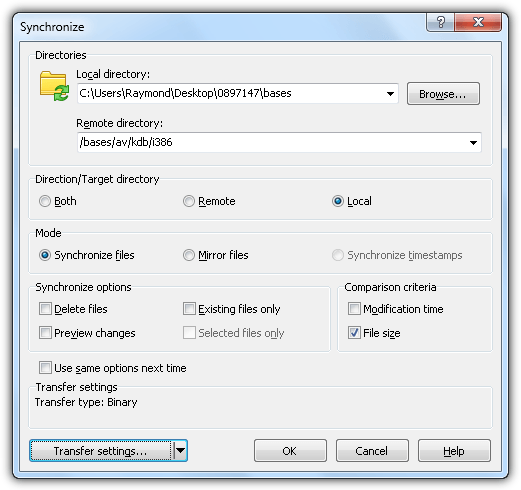
9. Click the OK button and WinSCP will start to compare the local and remote directory.
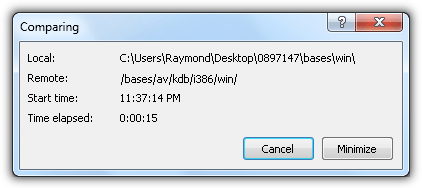
10. Once finished comparing, WinSCP will automatically start downloading the necessary updated files. The first download may take a longer time to complete and much faster with only a few minutes the next time.
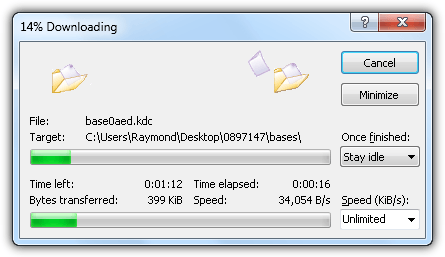
WinSCP remembers the information that you entered in the Synchronize window, making it so much easier to update the Kaspersky Virus Removal Tool antivirus signature database with only a few mouse clicks.
The screenshot below is a simple test to prove that the method of updating the Kaspersky Virus Removal Tool antivirus signature shared above is working.
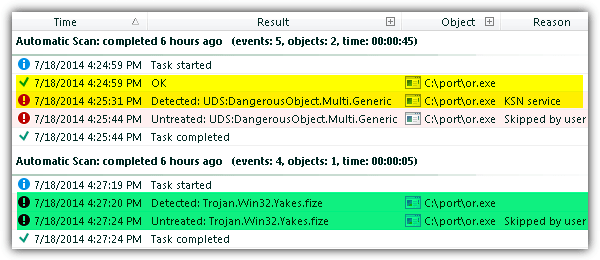
The first automated scan result which is highlighted in yellow shows that the malware file (or.exe) is detected as OK by the antivirus signature but the second line shows detected as UDS:DangerousObject.Multi.Generic by KSN service. KSN is actually Kaspersky’s cloud scanner called Kaspersky Security Network. After the first scan, we updated the antivirus signature using the method above, ran a scan again and this time Kaspersky Virus Removal Tool instantly detected the same malware (or.exe) as Trojan.Win32.Yakes.fize.





Before I jump thru all these hoops (BTW – Great job Raymond) will this still work as of today? March 10,2016
I’ve found a way to use this again.
You can download the older client here: devbuilds.kaspersky-labs.com/devbuilds/AVPTool/avptool11/setup_11.0.3.8.x01_2015_02_26_12_07.exe
(most recent 11x version. The 15 is the new one, and works differently. My limited skills didn’t allow me to get that up and running, it would need quite a bit of reverse engineering, as the signatures are in a single file).
You can get the signatures from dnl-test.kaspersky-labs.com/test/pbs/bases/av/kdb/i386/
I used wget (for windows) to download them all.
The command I used:
“wget -m -e robots=off -nd –no-parent dnl-test.kaspersky-labs.com/test/pbs/bases/av/kdb/i386/”
The “-m” for mirror also keeps track of the timestamp, so it shouldn’t download old files again.
“-nd” downloads everything in the current folder, it won’t recreate the whole directory structure of the site.
From what I can tell, the FTP sites have been removed and replaced with easily accessible active web HTTP directories. The old version of KVRT can no longer be updated, however; there is a newer and more simlified version available now.
kaspersky.com/antivirus-removal-tool?form=1
*GREAT tuturial on updating the old beast, by the way!! *
Very nice trick!
I noticed something strange though, even though I updated my Kaspersky via the method stated above it still says I have not updated in a while, is it because the program itself doesn’t know that it has new definitions or is it because I didn’t update properly?
I try to update the tool as often as I can with Winscp and usually there are some files that are new. So I’m not sure where the problem is.
FTP mirror isn’t worked for me. I have fined worked it : 80.239.174.38
Best Regards!
This isn’t working for me. My database is still 7+ days old.
hey raymond good to see another article from you
please do find time to write more articles like this
welcome back
Cool… Welcome back Raymond. Long time no hear – hope all’s well and looking forward to many more excellent articles like this one. Keep up the great work…
Raymond. Every time I come to your website to check your Tips, It feels like the holidays have come early again. You always have new gifts to offer. Thank You so much for all your hard work .
Hi, great article.
I dont use antivirus, but a scan once in a while dont hurt anybody. Is nice to have a good a PORTABLE scanner to do that.
One question: Why synchronize based in file size and not Modification time?. Bigger is not always newer…
Hello Raymond!
Good to see You Back Again.
Hope all is well with You and Family.
TheRube
Hi,
I’ve used “setup_11.0.3.7.x01_2014_07_21_09_57.exe” (last version I suppose) on win 8.1 and there was only 1 process in the task manager…..anyway, I could find the second folder with 7 digits in Temp.
On the other side, there is no mention “Enable Self-Defense“ at all in the Settings menu – Security Level.
What to do now ? Thanks !
Hi JJ, the self-defense option is not available in Windows 8.1 so you can skip this step and directly configure WinSCP to synchronize the antivirus database.
backside Brilliant article, due to huge size of download it is difficult fo slower connections to download but this information will help a lot thanks.
This is a tool recommended to clean the system before installation of new antvirus. this is the best way to protect my computer i think.
Dude, this files is clear, and works fine for me.
Thanks, Raymond.
Great help. Thanks a lot Ray.
Thank you very much :)
thanks for the tip ray very helpful as always
Great tip indeed !
Many many thanks Mr.Raymond.
thanks a lot RAY!
Thank you Rymond for this tool
THANK YOU VERY MUCH..