
Maximize New Internet Explorer Windows


 4 min. read
  Published on

Microsoft Internet Explorer has always been a rather curious program in the way it works, not least because of the small fix I’m going to talk about here. It may not seem like such a big deal, but a lot of users prefer to have Internet Explorer when it opens, display in a full screen, or maximized window.
This doesn’t sound too difficult to achieve on the face of it, simply click on the Internet Explorer icon in your Start Menu, Quick launch or on the Desktop. Then click the maximize button and close your browser. When it’s started up again, the window will be maximized. Or so you would think…
In actual fact, this issue has been around for years and across multiple version of Internet Explorer too. The odd thing is, the program often behaves like it has two different settings to control the size of the browser window. One if you launch Internet Explorer from the Start Menu, Quick Launch, Desktop or a pinned icon on the task bar. And if you click on something like an Internet shortcut on your desktop or access your favorites from somewhere like the the Start Menu, you might get a browser window of a completely different size!
After browsing some sites, sometimes I want to open a NEW Internet Explorer window from a link. This can be done by either right clicking on the link -> Open in new window, or shift clicking on the link which opens it in a new window. Even if the window I’m clicking from is a fully maximized window, I get the same problem as above, and it will open the new window as the small default size. You would think opening a new window from a maximized window would make that new one maximized as well, but this isn’t always the case…
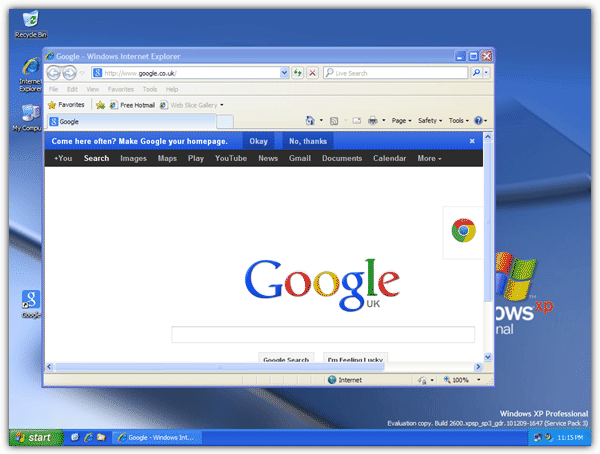
This has become a bit frustrating as that window then always needs sizing manually. Unfortunately, there doesn’t seem to be a universal easy fix for this, and what works for one person doesn’t always seem to work for another. Here is known workaround fix that might help you get round this annoying issue. While this doesn’t really maximize the window in its truest sense, it does at least resize the window to fill the screen every time.
1. Start Internet Explorer, right click any link on a web page and select Open in a New Window, or shift click on the link. Alternatively, open a web page through an internet shortcut icon.
2. Go back to the original Internet Explorer window you opened and close it.
3. Making sure you have no other windows open on the desktop apart from the second browser window, right click on the task bar and select “Tile Windows Horizontally” for XP or “Show Windows Side by Side” for Windows 7.
This will fill the browser window to fill the screen. Don’t use the maximize button on the window as it doesn’t work and won’t retain the window size.
4. Close the browser window and try to open the a new window the same way you did from step 1.
If you’re still having trouble maximizing your Internet Explorer windows properly, here are a couple of useful tools which might help.
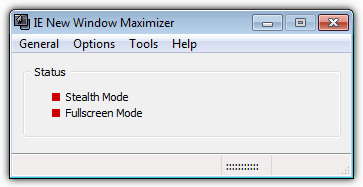
This little tool is able to automatically maximize all Internet Explorer and Outlook Express windows in the foreground or into the background using the Ctrl key. It’s also able to hide or close all IE windows via a hotkey, and allow windows to be opened in full screen mode which is the same as pressing F11. As an add bonus, IE New Window Maximizer can also be setup to close browser popup windows.
It’s been tested and works fine on XP IE8 and Windows 7 IE9 32-bit.
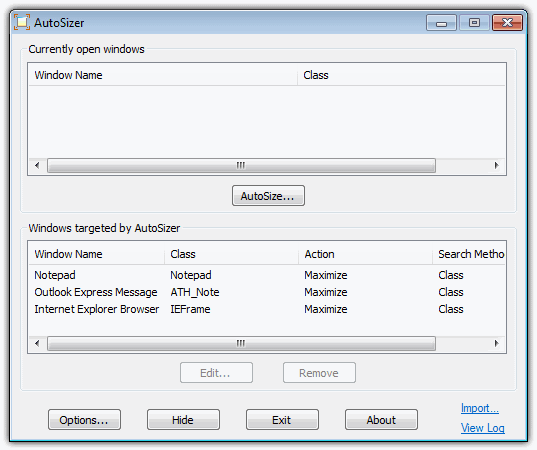
Autosizer is a bit more versatile than IE New Window Maximizer because it works on just about any program that has a window which can be maximized, minimized, resized etc. The good thing is you can also manually set the window’s size and position, and also place it on top of other windows. Something of great use to multi monitor users is Autosizer can be told to maximize windows to specific monitors.
Compatible with Windows 98 to Windows 7. Tested and works fine on XP IE8 and Windows 7 IE9 32-bit.



Improve this guide

User forum
0 messages