
Menu Uninstaller is a Quick Context Menu Uninstall Tool


 4 min. read
  Published on

When you’re uninstalling software these days, a lot of it is a bit like when Antivirus and security software is being removed from a machine; there always seems to be at least a few leftover registry entries and/or files that have remained on the system that the programs own uninstaller fails to remove. This is why third party utilities like Revo Uninstaller, IObit Uninstaller, Advanced Uninstaller Pro and even the newer kid on the block, Geek Uninstaller have become highly useful tools these days to help get rid of all the extra junk that gets left behind.
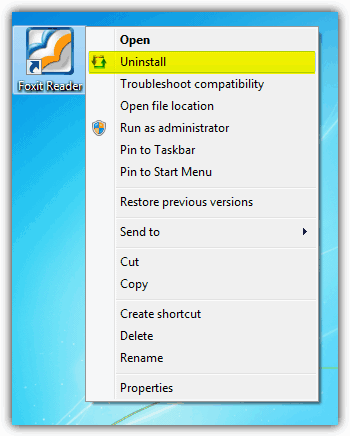
Software developer LeizerSoft seems to have gone in another direction to the uninstall tools I have mentioned above. While they focus more on being thorough and removing leftover data, Menu Uninstaller has gone for making removal of software as quick and easy as possible. This is achieved in a large part by using an Uninstall option on the standard context menu, allowing you to simply right click on a program’s shortcut icon on the desktop or in the Start Menu, and selecting it for removal. Definitely one of the fastest and most hassle free ways you could uninstall a program.
Menu Uninstaller actually comes in three different flavors; the Lite version has the context menu function and a couple of easy to read confirmation windows, the Ultra version claims to be the worlds fastest uninstaller and has only a confirmation ‘do you want to uninstall xxxxx ?’ window. Menu Uninstaller Pro is slightly different in that it sports a full blown uninstall interface where a number of extra option are available such as batch uninstalls, password locking the program and tracking all your uninstall activity within a log file.
As Menu Uninstaller’s main function is removing software via the context menu, it does need to be installed. During install all versions ask for a name and email address but this can be anything you like. I have seen this software also listed as ad supported by offering things like the Babylon toolbar on various sites, but thankfully this appears to have been removed as there was no trace of any third party products either offered or downloaded in the background in the installers I tested with. Administrator rights are needed for the software to function properly and if you get a crash, visit the program support page for steps on how to permanently run the program as admin.
Using the program is simplicity itself, right click on a shortcut to a piece of software you want to remove and click ‘Uninstall’. You can select more than one shortcut icon at once which will run the uninstallers one after the other in a batch mode.
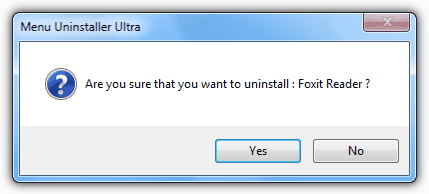
Depending on which version you are using, what happens next will differ. On the Ultra version there will be a simple window asking if you are sure if you want to remove the software. The program to be removed will then display its normal uninstall dialog.
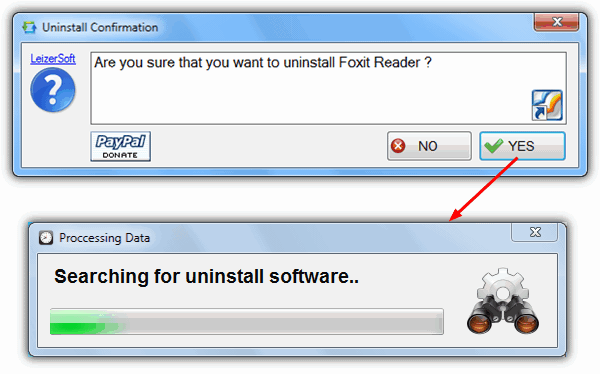
The Lite version will pop up a couple of windows in a similar way, apart from an extra window which searches for the correct uninstaller to call. If it finds more than one possible option, you will be asked to pick the correct one.
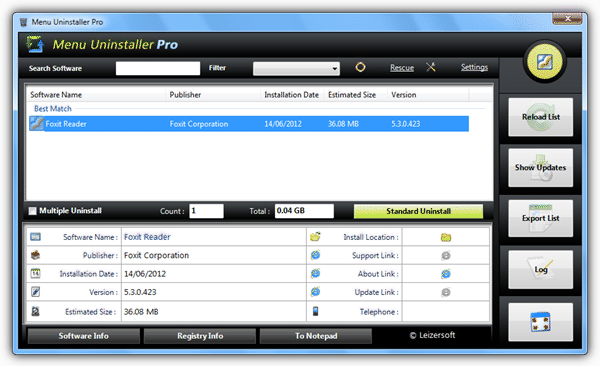
The Pro version has the GUI which can be called from the context menu option and will show the entry selected, or by using the Menu Uninstaller icon which will show all installed software. Icons can also be dragged and dropped to start the uninstall process.
All three versions of Menu Installer seemed to work quite well at quickly removing software although there is the odd occasion it failed to pick up the uninstaller, but on the whole, did what its supposed to do. These utilities are perhaps best suited to getting small or simple programs off the system quickly that you know are very unlikely to leave anything behind. Think of Menu Uninstaller more as a faster and more easily accessible version of the standard Windows Add/Remove function as opposed to a real alternative to tools like Revo Uninstaller which are much more powerful.
The lack of a post removal scan to pick up any leftovers is a real negative point as it is something most users expect to be included in this type of programs these days. If LeizerSoft could introduce this in future versions, even in just the Pro version, Menu Uninstaller could be a really viable option. Compatible with Windows XP, Vista and 7. The Ultra version requires .NET Framework 4.



Improve this guide

User forum
0 messages