
3 Tools to Minimize Open Application Windows to the Desktop as Thumbnails


 5 min. read
  Published on

With each subsequent version of windows, the task bar gets tweaked and enhanced a little bit more. When you minimize a running program or application it should usually go down to the task bar as an icon alongside your Start menu and quick launch or pinned icons. If you hover your mouse over a minimized window, in XP you get a text tool tip, in Vista you get a static thumbnail and in windows 7 and 8 you get a nice live preview thumbnail.
There are plenty of tweaking tools around that can do all manner of things to enhance the system task bar and tray. Some can even minimize the open windows into the tray to keep the task bar uncluttered as some users like to keep the task bar clean and efficient and others prefer to pin most of their used programs to it. An alternative tweak you can perform if you have plenty of space on your desktop is to minimize the open applications not to your task bar or tray, but instead straight onto the desktop. Not only does this give you quick access and a thumbnail view of the windows, it can also free up the limited amount of space in the task bar and tray. Here’s 3 free tools to have a look at.
1. miniMIZE
miniMIZE is a small desktop enhancing application that catches windows that you minimize and puts a thumbnail of the main application window onto your desktop. You can set the direction for which way across the desktop the icons go to suit the best layout for your desktop. For easy identification the icons from each program are displayed on the thumbnails
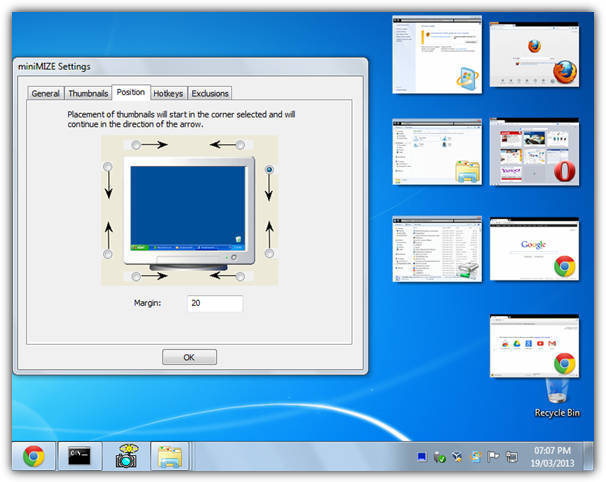
miniMIZE has some useful features such as support for exclusions to ignore specific windows or complete applications that you don’t want to minimize to desktop as a thumbnail. It also has a few hotkeys available to cycle thumbnail levels, minimize all windows and show/hide thumbnails. Sizes and the sizing mode for the thumbnails can be customized and there’s also an option to set a transparency level to blend everything in a bit more.
miniMIZE is no longer developed and the website has all but gone. It does seem to work pretty well on Vista/Windows 7 32-bit, Windows 8 and 64-bit versions do work up to a point although most of the built in Windows components like (Internet) Explorer, Notepad, Paint etc don’t minimize.
2. ThumbWin
Although it isn’t compatible with 64-bit operating systems, Thumbwin is a more reliable tool than miniMIZE for minimizing and restoring application windows to thumbnails on 32-bit versions of Windows XP, Vista, 7 and also 8. ThumbWin’s feature set is very much like what miniMIZE has to offer.

The thumbnail arrangements can be either top to bottom or left to right with options to auto arrange or display them on a secondary monitor. Also 6 hotkeys can be configured and thumbnail or icon sizes can be reduced or enlarged up to 300px with transparency. The Exclusions window is slightly less useful than that in miniMIZE because it only allows a window or class name to be excluded and not a whole application.
If you right click on the tray icon there are some options to hide, arrange, minimize or restore all open windows. Despite the options and functions on offer, Thumbwin is very low on memory usage and used only around 600K even with several open windows minimized to thumbnails. Unfortunately the program’s official website is in the Japanese language.
3. Microsoft Scalable Fabric
This tool comes from Microsoft Research and is a prototype software which presumably was a concept they looked at for integrating into Windows at some point. Scalable Fabric works on the idea of a boundary on the desktop, and dragging a window out of this area will minimize it to a thumbnail in an animated way similar to Windows 7’s “Animate windows when minimizing and maximizing” option. You can also click on the window minimize button and restore it again by clicking on the thumbnail.
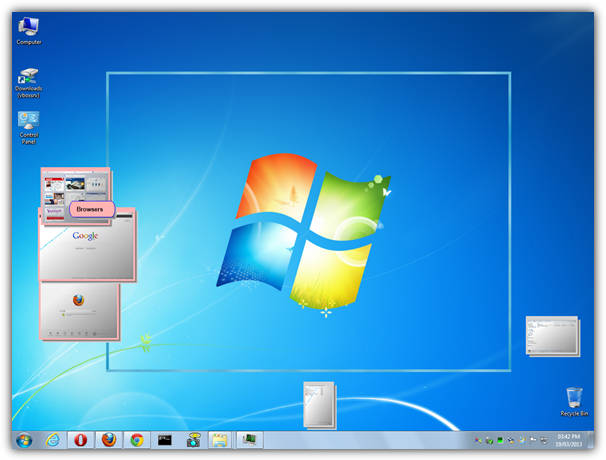
The boundary itself can be scaled and moved around the desktop so you can have the thumbnails on different sides or all around if you wish, right click on the tray icon and select Show/Hide Boundaries to edit. Windows can be dragged and moved around in the thumbnail area, and you can also create tasks by dropping one thumbnail onto another. This has the effect of grouping the windows together and they can all be restored or minimized at once by clicking on the task header.
It’s worth noting that Scalable Fabric dates back to 2005 and was just a development release, the side effects being that it’s still quite buggy in how it deals with the windows and memory usage can fluctuate quite a bit. That being said, the program seemed to work in Windows 7 32-bit without major issues (64-bit was patchy) although the .NET Framework 1.1 is required.



Improve this guide

User forum
0 messages